
Wayback Machinekoobas.hobune.stream
May JUN Jul
Previous capture 12 Next capture
2021 2022 2023
1 capture
12 Jun 22 - 12 Jun 22
sparklines
Close Help
  • Products
  • Solutions
  • Made with Unity
  • Learning
  • Support & Services
  • Community
  • Asset Store
  • Get Unity

UNITY ACCOUNT

You need a Unity Account to shop in the Online and Asset Stores, participate in the Unity Community and manage your license portfolio. Login Create account
  • Blog
  • Forums
  • Answers
  • Evangelists
  • User Groups
  • Beta Program
  • Advisory Panel

Navigation

  • Home
  • Products
  • Solutions
  • Made with Unity
  • Learning
  • Support & Services
  • Community
    • Blog
    • Forums
    • Answers
    • Evangelists
    • User Groups
    • Beta Program
    • Advisory Panel

Unity account

You need a Unity Account to shop in the Online and Asset Stores, participate in the Unity Community and manage your license portfolio. Login Create account

Language

  • Chinese
  • Spanish
  • Japanese
  • Korean
  • Portuguese
  • Ask a question
  • Spaces
    • Default
    • Help Room
    • META
    • Moderators
    • Topics
    • Questions
    • Users
    • Badges
  • Home /
avatar image
0
Question by ParyPro · Jun 03, 2019 at 06:21 AM · buglevel

Level Select screen Messed Up

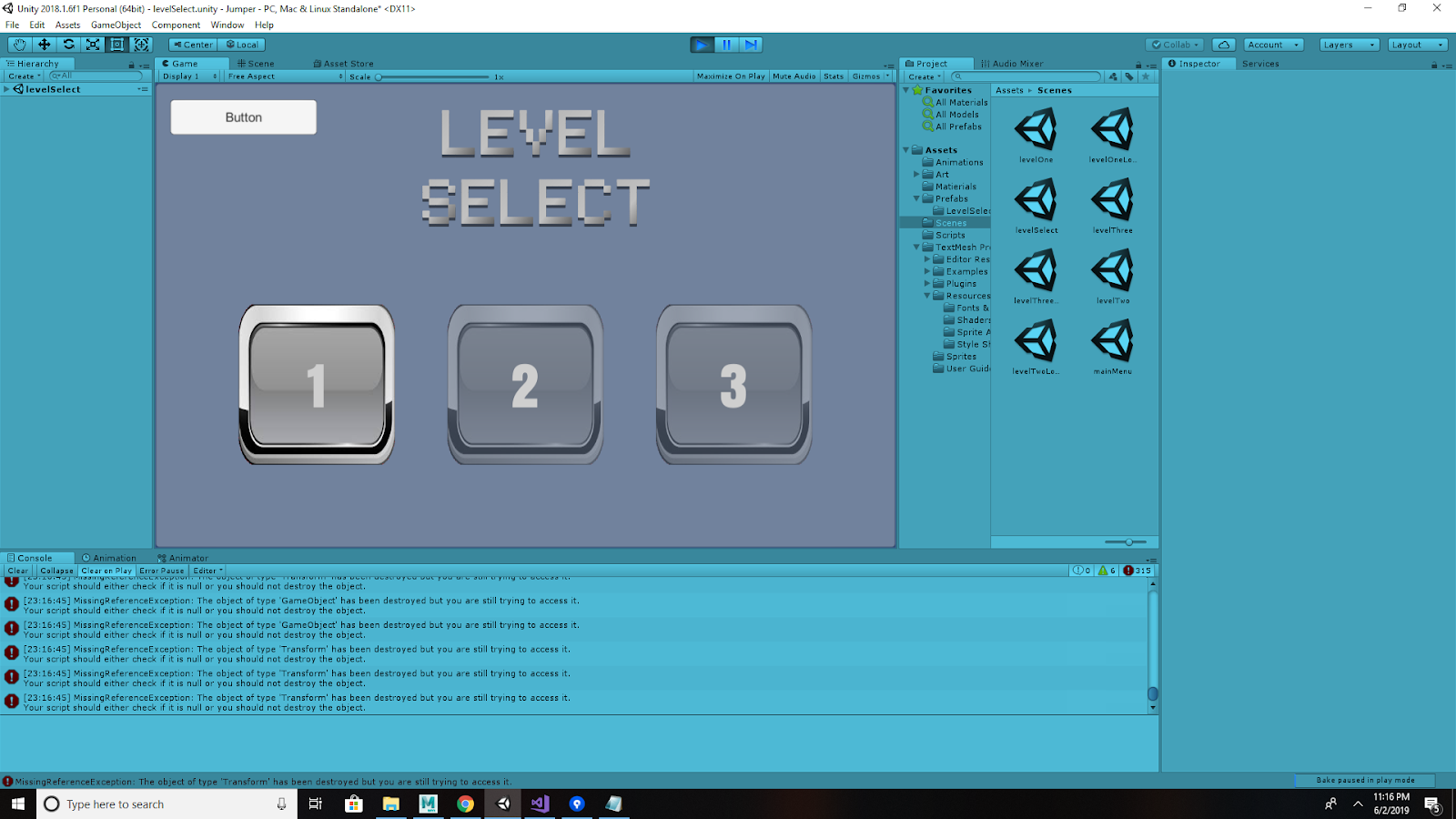
I have followed a Youtube video on this & tried to apply it to my own game. Upon dying in level 2, I am sent back to the Level Select menu (image attached) but the level 2 start button is still grayed out and locked despite the button On click settings being set up to how they should be. Attached is the script that should be handling that, and then the level control script. If anyone can find any suggestions or solutions to this problem they would be very much appreciated! Thanks!
alt text

 public class LevelSelectController : MonoBehaviour {
 
     public Button level02Button, level03Button;
     int levelPassed;
 
     void Start()
     {
         levelPassed = PlayerPrefs.GetInt("LevelPassed");
         level02Button.interactable = false;
         level03Button.interactable = false;
 
         switch (levelPassed) {
         case 1:
             level02Button.interactable = true;
             break;
         case 2:
                 level02Button.interactable = true;
                 level03Button.interactable = true;
                 break;
         }
     }
 
     public void levelToLoad (int level)
     {
         SceneManager.LoadScene (level);
     }
 
     public void resetPlayerPrefs()
     {
         level02Button.interactable = false;
         level03Button.interactable = false;
         PlayerPrefs.DeleteAll ();
     }
 }


public class LevelControlScript : MonoBehaviour {

     public static LevelControlScript instance = null;
     GameObject levelSign, gameOverText, youWinText;
     int sceneIndex, levelPassed;
 
     void Start()
     {
 
         if (instance == null)
             instance = this;
         else if (instance != this)
             Destroy(gameObject);
 
         levelSign = GameObject.Find("LevelNumber");
 
         sceneIndex = SceneManager.GetActiveScene().buildIndex;
         levelPassed = PlayerPrefs.GetInt("LevelPassed");
     }
 
     public void youWin()
     {
         if (levelPassed < sceneIndex)
         {
             PlayerPrefs.SetInt("LevelPassed", sceneIndex);
         }
     }
 
     public void youLose()
     {
         levelSign.gameObject.SetActive(false);
         Invoke("loadMainMenu", 1f);
     }
 
     void loadMainMenu()
     {
         SceneManager.LoadScene("levelSelect");
         
     }
 }


pasted-image-0-1.png (349.3 kB)
Comment
Add comment · Show 1
10 |3000 characters needed characters left characters exceeded
▼
  • Viewable by all users
  • Viewable by moderators
  • Viewable by moderators and the original poster
  • Advanced visibility
Viewable by all users
avatar image unity_21erushbrook · Jun 03, 2019 at 07:30 AM 0
Share

Please add a check to see if the object you are trying to destroy is still existent. You can do this if you add a if (YOUROBJECT != null) Destroy(YOUROBJECT);

Ins$$anonymous$$d of: Destroy(YOUROBJECT);

1 Reply

· Add your reply
  • Sort: 
avatar image
1

Answer by unity_21erushbrook · Jun 03, 2019 at 07:26 AM

Between line 10 and line 15 of the LevelSelectController.cs script, your case 1 dictates that only if level 2 is PASSED is it clickable. You need to change the levelbutton02.interactable to true when level 1 is completed, not level 2. Tell me if you need help doing this.

Comment
Add comment · Show 2 · Share
10 |3000 characters needed characters left characters exceeded
▼
  • Viewable by all users
  • Viewable by moderators
  • Viewable by moderators and the original poster
  • Advanced visibility
Viewable by all users
avatar image unity_21erushbrook · Jun 03, 2019 at 07:27 AM 0
Share

Also just a heads up, in C#, the na$$anonymous$$g convention is to have capitals on your methods and classes, and lower case on your variables. i.e. youLose() should be YouLose(). Doesn't really matter, its just good practice.

avatar image ParyPro · Jun 03, 2019 at 07:58 AM 0
Share

@unity_21erushbrook Hey, really appreciate the reply! I'm sorry I'm still extremely new to all of this and am unsure how to do that. Would I need to create a new variable & a new switch method?

Your answer

Hint: You can notify a user about this post by typing @username

Up to 2 attachments (including images) can be used with a maximum of 524.3 kB each and 1.0 MB total.

Follow this Question

Answers Answers and Comments

121 People are following this question.

avatar image avatar image avatar image avatar image avatar image avatar image avatar image avatar image avatar image avatar image avatar image avatar image avatar image avatar image avatar image avatar image avatar image avatar image avatar image avatar image avatar image avatar image avatar image avatar image avatar image avatar image avatar image avatar image avatar image avatar image avatar image avatar image avatar image avatar image avatar image avatar image avatar image avatar image avatar image avatar image avatar image avatar image avatar image avatar image avatar image avatar image avatar image avatar image avatar image avatar image avatar image avatar image avatar image avatar image avatar image avatar image avatar image avatar image avatar image avatar image avatar image avatar image avatar image avatar image avatar image avatar image avatar image avatar image avatar image avatar image avatar image avatar image avatar image avatar image avatar image avatar image avatar image avatar image avatar image avatar image avatar image avatar image avatar image avatar image avatar image avatar image avatar image avatar image avatar image avatar image avatar image avatar image avatar image avatar image avatar image avatar image avatar image avatar image avatar image avatar image avatar image avatar image avatar image avatar image avatar image avatar image avatar image avatar image avatar image avatar image avatar image avatar image avatar image avatar image avatar image avatar image avatar image avatar image avatar image avatar image avatar image

Related Questions

Point of light bug 0 Answers

Level corrupted on build 0 Answers

Why is the level not properly working when I load it? 0 Answers

Clipping Errors with LineRenderer? 0 Answers

2D Platformer Bug 0 Answers


Enterprise
Social Q&A

Social
Subscribe on YouTube social-youtube Follow on LinkedIn social-linkedin Follow on Twitter social-twitter Follow on Facebook social-facebook Follow on Instagram social-instagram

Footer

  • Purchase
    • Products
    • Subscription
    • Asset Store
    • Unity Gear
    • Resellers
  • Education
    • Students
    • Educators
    • Certification
    • Learn
    • Center of Excellence
  • Download
    • Unity
    • Beta Program
  • Unity Labs
    • Labs
    • Publications
  • Resources
    • Learn platform
    • Community
    • Documentation
    • Unity QA
    • FAQ
    • Services Status
    • Connect
  • About Unity
    • About Us
    • Blog
    • Events
    • Careers
    • Contact
    • Press
    • Partners
    • Affiliates
    • Security
Copyright © 2020 Unity Technologies
  • Legal
  • Privacy Policy
  • Cookies
  • Do Not Sell My Personal Information
  • Cookies Settings
"Unity", Unity logos, and other Unity trademarks are trademarks or registered trademarks of Unity Technologies or its affiliates in the U.S. and elsewhere (more info here). Other names or brands are trademarks of their respective owners.
  • Anonymous
  • Sign in
  • Create
  • Ask a question
  • Spaces
  • Default
  • Help Room
  • META
  • Moderators
  • Explore
  • Topics
  • Questions
  • Users
  • Badges
