
Wayback Machinekoobas.hobune.stream
May JUN Jul
Previous capture 13 Next capture
2021 2022 2023
1 capture
13 Jun 22 - 13 Jun 22
sparklines
Close Help
  • Products
  • Solutions
  • Made with Unity
  • Learning
  • Support & Services
  • Community
  • Asset Store
  • Get Unity

UNITY ACCOUNT

You need a Unity Account to shop in the Online and Asset Stores, participate in the Unity Community and manage your license portfolio. Login Create account
  • Blog
  • Forums
  • Answers
  • Evangelists
  • User Groups
  • Beta Program
  • Advisory Panel

Navigation

  • Home
  • Products
  • Solutions
  • Made with Unity
  • Learning
  • Support & Services
  • Community
    • Blog
    • Forums
    • Answers
    • Evangelists
    • User Groups
    • Beta Program
    • Advisory Panel

Unity account

You need a Unity Account to shop in the Online and Asset Stores, participate in the Unity Community and manage your license portfolio. Login Create account

Language

  • Chinese
  • Spanish
  • Japanese
  • Korean
  • Portuguese
  • Ask a question
  • Spaces
    • Default
    • Help Room
    • META
    • Moderators
    • Topics
    • Questions
    • Users
    • Badges
  • Home /
avatar image
0
Question by SamFZGames · Mar 02, 2014 at 10:51 PM · 2drigidbody2dplatformboxcollider2dlinecast

My RigidBody2D+BoxCollider2D is getting stuck on corners

Hello!

I'm loving using Unity, just getting started, but I've run into a really strange problem. I am using a RigidBody2D + Box Collider for a 2D platform movement. I'm using a Box Collider so the player doesn't 'slip' off of the corners of platforms.

So I do what you'd expect, set horizontal velocity based on input, and add vertical force when the player hits the jump button.

To prevent jumping, I use a horizontal linecast along the bottom of the collider to detect the ground and set an isGrounded boolean, like so:

     // Get the extents (edges) of the player
     extents = GetComponent<BoxCollider2D> ().size * 0.5f;
 
     // Use a linecast to check if player is on the ground
     if (Physics2D.Linecast (new Vector2 (transform.position.x - extents.x, transform.position.y - extents.y - 0.02f),new Vector2 (transform.position.x + extents.x, transform.position.y - extents.y - 0.02f), 1 << LayerMask.NameToLayer ("Obstacle")))
         isGrounded = true;
     else
         isGrounded = false;

I don't allow the player to jump if isGrounded is false, it's near perfect. The problem is, if the player walks right to the very, very corner of a platform, the player can't jump. I've made isGrounded public, and I see the checkbox uncheck in the inspector, so the linecast, although it goes from one edge to the other, is obviously no longer colliding, and yet the physics engine seems to think it still is.

I tried to deal with it by altering this part:

         isGrounded = true;
     else if (rigidbody2D.velocity.y != 0)
        isGrounded = false;

My reasoning there is that it wouldn't set isGrounded to false again until the physics engine has decided it's time to fall off, or the player jumps. The problem here is that if you stand on that very corner, and then perform a single jump, then the rigidbody will 'land' but the linecast won't collide, so isGrounded will remain false and then the player can't jump a second time if they don't move.

The other thing I thought to try was to enlarge the raycast slightly so it goes slightly beyond the edges, but then jumping whilst touching a wall will still count as grounded, and then I thought to do that and check for the y velocity to be 0, but I believe that still leaves a possibility (albeit a small one) of the player performing a double jump when touching a wall.

I've attached a screenshot of what's happening in the scene view if I zoom in on the corner, with a red Debug.Drawline to show where the linecast is:
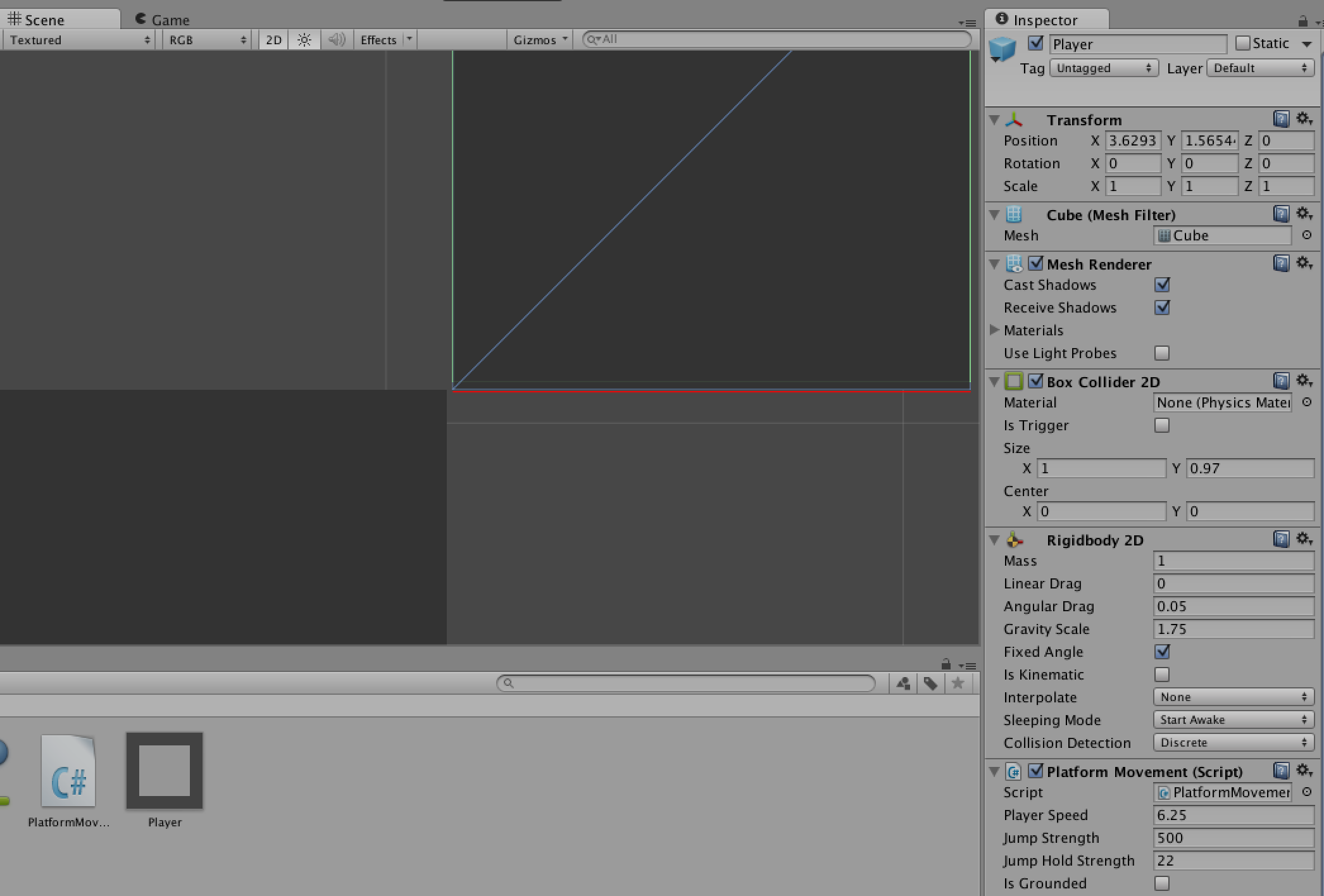
alt text

Does anybody have any idea what's going on here?

P.S. The GetComponent I mentioned above is called in the Start() function to save it happening every frame, I just included it above to make it clear what extents is.

screenshot 2014-03-02 21.55.58.png (82.9 kB)
Comment
Add comment · Show 1
10 |3000 characters needed characters left characters exceeded
▼
  • Viewable by all users
  • Viewable by moderators
  • Viewable by moderators and the original poster
  • Advanced visibility
Viewable by all users
avatar image Calos1591 · Dec 22, 2015 at 09:13 AM 0
Share

same problem here

0 Replies

· Add your reply
  • Sort: 

Your answer

Hint: You can notify a user about this post by typing @username

Up to 2 attachments (including images) can be used with a maximum of 524.3 kB each and 1.0 MB total.

Follow this Question

Answers Answers and Comments

21 People are following this question.

avatar image avatar image avatar image avatar image avatar image avatar image avatar image avatar image avatar image avatar image avatar image avatar image avatar image avatar image avatar image avatar image avatar image avatar image avatar image avatar image avatar image

Related Questions

Rigidbody2D is kind of flying instead of falling when the child box is colliding 1 Answer

Problem with 2 Rigidbodies having respective colliders (2d) 1 Answer

Rigidbody2d getting stuck when moving horizontally at random points! Can't figure it out :( 1 Answer

2D Pong Ball Not Reflecting Off Walls "Exactly" 1 Answer

Ball bounces at different heights when it shouldn't 0 Answers


Enterprise
Social Q&A

Social
Subscribe on YouTube social-youtube Follow on LinkedIn social-linkedin Follow on Twitter social-twitter Follow on Facebook social-facebook Follow on Instagram social-instagram

Footer

  • Purchase
    • Products
    • Subscription
    • Asset Store
    • Unity Gear
    • Resellers
  • Education
    • Students
    • Educators
    • Certification
    • Learn
    • Center of Excellence
  • Download
    • Unity
    • Beta Program
  • Unity Labs
    • Labs
    • Publications
  • Resources
    • Learn platform
    • Community
    • Documentation
    • Unity QA
    • FAQ
    • Services Status
    • Connect
  • About Unity
    • About Us
    • Blog
    • Events
    • Careers
    • Contact
    • Press
    • Partners
    • Affiliates
    • Security
Copyright © 2020 Unity Technologies
  • Legal
  • Privacy Policy
  • Cookies
  • Do Not Sell My Personal Information
  • Cookies Settings
"Unity", Unity logos, and other Unity trademarks are trademarks or registered trademarks of Unity Technologies or its affiliates in the U.S. and elsewhere (more info here). Other names or brands are trademarks of their respective owners.
  • Anonymous
  • Sign in
  • Create
  • Ask a question
  • Spaces
  • Default
  • Help Room
  • META
  • Moderators
  • Explore
  • Topics
  • Questions
  • Users
  • Badges
