
Wayback Machinekoobas.hobune.stream
May JUN Jul
Previous capture 12 Next capture
2021 2022 2023
2 captures
12 Jun 22 - 14 Jun 22
sparklines
Close Help
  • Products
  • Solutions
  • Made with Unity
  • Learning
  • Support & Services
  • Community
  • Asset Store
  • Get Unity

UNITY ACCOUNT

You need a Unity Account to shop in the Online and Asset Stores, participate in the Unity Community and manage your license portfolio. Login Create account
  • Blog
  • Forums
  • Answers
  • Evangelists
  • User Groups
  • Beta Program
  • Advisory Panel

Navigation

  • Home
  • Products
  • Solutions
  • Made with Unity
  • Learning
  • Support & Services
  • Community
    • Blog
    • Forums
    • Answers
    • Evangelists
    • User Groups
    • Beta Program
    • Advisory Panel

Unity account

You need a Unity Account to shop in the Online and Asset Stores, participate in the Unity Community and manage your license portfolio. Login Create account

Language

  • Chinese
  • Spanish
  • Japanese
  • Korean
  • Portuguese
  • Ask a question
  • Spaces
    • Default
    • Help Room
    • META
    • Moderators
    • Topics
    • Questions
    • Users
    • Badges
  • Home /
  • Help Room /
avatar image
0
Question by legoblaster1234 · May 15, 2019 at 05:14 AM · renderingbakingnormalmapbakedlighting

[LWRP] Normal maps in baked lighting not working
alt text

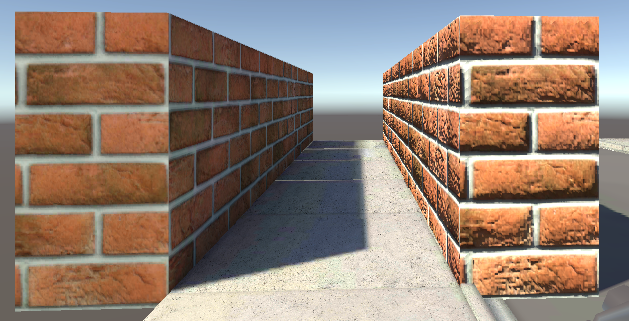
The brick wall on the left is using baked lighting and the one on the right is using real-time lighting. They both have the same material using a normal map but baking the lighting causes the normal map to stop being used. I'm using Directional Mode in the lightmapper settings and still get this. Is it possible to bake normal maps?

I'm using Unity 2019.2.0a14 and LWRP 5.2 and my lightmapper is Progressive GPU (preview). Any help would be nice.

Edit: I've found that the normal map is working on the baked bricks. It's just very, very weak. You can barely even tell. It's more noticeable from the top. alt text
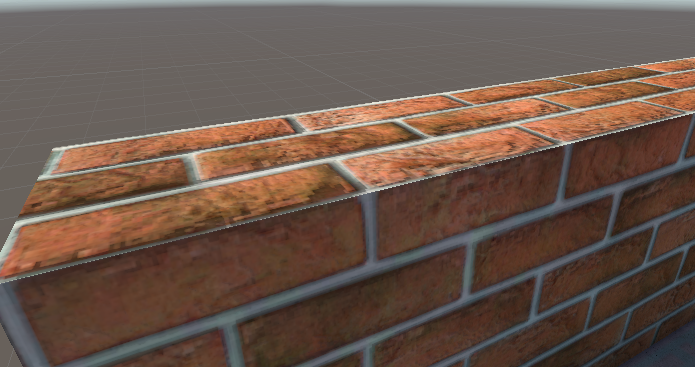
Does anyone know why it's so weak? you can barely tell it's there.

unitynormalmaps.png (458.1 kB)
unitynormalmaps2.png (482.9 kB)
Comment
Add comment · Show 2
10 |3000 characters needed characters left characters exceeded
▼
  • Viewable by all users
  • Viewable by moderators
  • Viewable by moderators and the original poster
  • Advanced visibility
Viewable by all users
avatar image legoblaster1234 · May 19, 2019 at 09:10 PM 0
Share

There's no way no one else is having this problem. Can anyone else help? (this post is a bump)

avatar image legoblaster1234 · May 19, 2019 at 09:39 PM 0
Share

![alt text][1] ![alt text][2]

with normal map on backed object: [1]: /storage/temp/138480-unitynormalmaps2.png without normal map on baked object: [2]: /storage/temp/138481-unitynormalmaps3.png

unitynormalmaps2.png (482.9 kB)
unitynormalmaps3.png (454.9 kB)

2 Replies

· Add your reply
  • Sort: 
avatar image
1

Answer by Cyborn · May 22, 2019 at 08:05 AM

bump, have the same problem with 2019.1.1f1 LWRP-highquality ... how is this even an issue. can't post screenshots due to confidential content, but it looks exactly the same, like my normal maps are just reduced by 80%-90% when baked. All my objects are set to static. Directionel is set to baked (also tried mixed) Lightamapper tried Enlighten as wel as Progressive cpu Also tried bumping up lightmap size In the mixed lighting tab, lighting mode is set to subtractive which is the only option available alt text

Comment
Add comment · Share
10 |3000 characters needed characters left characters exceeded
▼
  • Viewable by all users
  • Viewable by moderators
  • Viewable by moderators and the original poster
  • Advanced visibility
Viewable by all users
avatar image
0

Answer by ajeziak · Mar 14, 2020 at 03:47 AM

Hitting this as well.. is this a limitation for baking with normal maps? Or is there a workflow trick?

Comment
Add comment · Share
10 |3000 characters needed characters left characters exceeded
▼
  • Viewable by all users
  • Viewable by moderators
  • Viewable by moderators and the original poster
  • Advanced visibility
Viewable by all users

Your answer

Hint: You can notify a user about this post by typing @username

Up to 2 attachments (including images) can be used with a maximum of 524.3 kB each and 1.0 MB total.

Follow this Question

Answers Answers and Comments

193 People are following this question.

avatar image avatar image avatar image avatar image avatar image avatar image avatar image avatar image avatar image avatar image avatar image avatar image avatar image avatar image avatar image avatar image avatar image avatar image avatar image avatar image avatar image avatar image avatar image avatar image avatar image avatar image avatar image avatar image avatar image avatar image avatar image avatar image avatar image avatar image avatar image avatar image avatar image avatar image avatar image avatar image avatar image avatar image avatar image avatar image avatar image avatar image avatar image avatar image avatar image avatar image avatar image avatar image avatar image avatar image avatar image avatar image avatar image avatar image avatar image avatar image avatar image avatar image avatar image avatar image avatar image avatar image avatar image avatar image avatar image avatar image avatar image avatar image avatar image avatar image avatar image avatar image avatar image avatar image avatar image avatar image avatar image avatar image avatar image avatar image avatar image avatar image avatar image avatar image avatar image avatar image avatar image avatar image avatar image avatar image avatar image avatar image avatar image avatar image avatar image avatar image avatar image avatar image avatar image avatar image avatar image avatar image avatar image avatar image avatar image avatar image avatar image avatar image avatar image avatar image avatar image avatar image avatar image avatar image avatar image avatar image avatar image avatar image avatar image avatar image avatar image avatar image avatar image avatar image avatar image avatar image avatar image avatar image avatar image avatar image avatar image avatar image avatar image avatar image avatar image avatar image avatar image avatar image avatar image avatar image avatar image avatar image avatar image avatar image avatar image avatar image avatar image avatar image avatar image avatar image avatar image avatar image avatar image avatar image avatar image avatar image avatar image avatar image avatar image avatar image avatar image avatar image avatar image avatar image avatar image avatar image avatar image avatar image avatar image avatar image avatar image avatar image avatar image avatar image avatar image avatar image avatar image avatar image avatar image avatar image avatar image avatar image avatar image avatar image avatar image avatar image avatar image avatar image avatar image

Related Questions

Light baking causes artifacts 0 Answers

Baking Error: Albedo and Emissive’ job filed with error code: 2 (‘Failed to bake albedo & emissive map.’).,Constantly get this error: Albedo and Emissive’ job filed with error code: 2(‘Failed to bake albedo & emissive map.’). 0 Answers

Invalid texels with Progressive GPU (Preview) but not with CPU Progressive 1 Answer

Is it possible to render only specific texture (albedo for instance) 0 Answers

Unity lighting turning off when baked, Unity lighting clarification 1 Answer


Enterprise
Social Q&A

Social
Subscribe on YouTube social-youtube Follow on LinkedIn social-linkedin Follow on Twitter social-twitter Follow on Facebook social-facebook Follow on Instagram social-instagram

Footer

  • Purchase
    • Products
    • Subscription
    • Asset Store
    • Unity Gear
    • Resellers
  • Education
    • Students
    • Educators
    • Certification
    • Learn
    • Center of Excellence
  • Download
    • Unity
    • Beta Program
  • Unity Labs
    • Labs
    • Publications
  • Resources
    • Learn platform
    • Community
    • Documentation
    • Unity QA
    • FAQ
    • Services Status
    • Connect
  • About Unity
    • About Us
    • Blog
    • Events
    • Careers
    • Contact
    • Press
    • Partners
    • Affiliates
    • Security
Copyright © 2020 Unity Technologies
  • Legal
  • Privacy Policy
  • Cookies
  • Do Not Sell My Personal Information
  • Cookies Settings
"Unity", Unity logos, and other Unity trademarks are trademarks or registered trademarks of Unity Technologies or its affiliates in the U.S. and elsewhere (more info here). Other names or brands are trademarks of their respective owners.
  • Anonymous
  • Sign in
  • Create
  • Ask a question
  • Spaces
  • Default
  • Help Room
  • META
  • Moderators
  • Explore
  • Topics
  • Questions
  • Users
  • Badges
