
Wayback Machinekoobas.hobune.stream
May JUN Jul
Previous capture 13 Next capture
2021 2022 2023
1 capture
13 Jun 22 - 13 Jun 22
sparklines
Close Help
  • Products
  • Solutions
  • Made with Unity
  • Learning
  • Support & Services
  • Community
  • Asset Store
  • Get Unity

UNITY ACCOUNT

You need a Unity Account to shop in the Online and Asset Stores, participate in the Unity Community and manage your license portfolio. Login Create account
  • Blog
  • Forums
  • Answers
  • Evangelists
  • User Groups
  • Beta Program
  • Advisory Panel

Navigation

  • Home
  • Products
  • Solutions
  • Made with Unity
  • Learning
  • Support & Services
  • Community
    • Blog
    • Forums
    • Answers
    • Evangelists
    • User Groups
    • Beta Program
    • Advisory Panel

Unity account

You need a Unity Account to shop in the Online and Asset Stores, participate in the Unity Community and manage your license portfolio. Login Create account

Language

  • Chinese
  • Spanish
  • Japanese
  • Korean
  • Portuguese
  • Ask a question
  • Spaces
    • Default
    • Help Room
    • META
    • Moderators
    • Topics
    • Questions
    • Users
    • Badges
  • Home /
avatar image
1
Question by sspross · Nov 11, 2013 at 08:51 AM · 2d-physicscolliding

Need advice for 2d physic decision

Hi all

I'm new to unity and just worked some 2d tutorials through. now I'm trying to start my own 2d game and don't know which way of "physic implementation" i should chose. As I see there are two obvious ways:

  1. use unitys physic with gravity, colliders, character controller, rigibodies and so on.

  2. implement it by my self, even "colliders" with raycasting almost everything.

As I can see in other answers, there is no obvious right way. But each has his advantages and disadvantages. E.g. first way is a lot easier to start with and you need to script less. But at some point I'm struggling with strange 2d behaviour like screenshot 1.
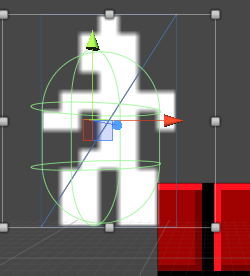
hanging character controller

now before i'm starting chosing way 2 and implementing everything by my self I ask you for advice :)

thank you very much!

screen shot 2013-11-11 at 08.52.22.png (28.5 kB)
Comment
Add comment · Show 8
10 |3000 characters needed characters left characters exceeded
▼
  • Viewable by all users
  • Viewable by moderators
  • Viewable by moderators and the original poster
  • Advanced visibility
Viewable by all users
avatar image mattssonon · Nov 11, 2013 at 08:52 AM 0
Share

If you character is rectangle and you want it to collide with objects, but a box collider on it ins$$anonymous$$d of a capsule.

avatar image sspross · Nov 11, 2013 at 10:48 AM 0
Share

yeah right, but the box collider replaces my character controller, so i'm losing all his features and "good" parts :(

avatar image TpkQ91 · Nov 11, 2013 at 11:37 AM 0
Share

when you refer to strange 2d behavior you mean that your character overlaps the collider?

avatar image sspross · Nov 11, 2013 at 12:42 PM 0
Share

not the overlapping. he is "hanging" there, because the character controller collider isn't a rectangle :/ and as far as I know I have to replace it with a box collider to get a rectangle.

avatar image TpkQ91 · Nov 11, 2013 at 01:10 PM 0
Share

Yes I agree with what was said before (to use a box collider) although you would have to write your own character controller which is the best way to go, but as you said you don't have any of the pre defined stuff. There is no way either to just replace the capsule collider with a box collider without rewriting at least half the thing, the scripts calculate many values based on a capsule shape.

But a workaround that comes to my $$anonymous$$d is to change the "Radius", "Height" and "Center" of the Capsule to suit your needs more accurately. You could have these values code driven. Do a pre check of where your character is going and where the closest collider of your environment is, find out where he should collide and shift your capsule via code.

Let me know if I made it clear :)

Show more comments

1 Reply

· Add your reply
  • Sort: 
avatar image
0
Best Answer

Answer by sspross · Nov 12, 2013 at 03:18 PM

thanks to the discussion in the comments above, I decided to chose the second way and get rid of the character controller and implement it by my self. thanks to all the commenters! I will mark this question as answered to keep unity answers clean if nobody else disagree :)

Comment
Add comment · Share
10 |3000 characters needed characters left characters exceeded
▼
  • Viewable by all users
  • Viewable by moderators
  • Viewable by moderators and the original poster
  • Advanced visibility
Viewable by all users

Your answer

Hint: You can notify a user about this post by typing @username

Up to 2 attachments (including images) can be used with a maximum of 524.3 kB each and 1.0 MB total.

Follow this Question

Answers Answers and Comments

18 People are following this question.

avatar image avatar image avatar image avatar image avatar image avatar image avatar image avatar image avatar image avatar image avatar image avatar image avatar image avatar image avatar image avatar image avatar image avatar image

Related Questions

I am having a problem with detecting certain collision? 1 Answer

differentiate between box collider of two different Game Objects in UNITY 1 Answer

Rotate 2D hero based on small collisions. Is it possible? 2 Answers

How to do time reversal with Unity2D / Physics2D? 1 Answer

2D Colliders are colliding but not touching 1 Answer


Enterprise
Social Q&A

Social
Subscribe on YouTube social-youtube Follow on LinkedIn social-linkedin Follow on Twitter social-twitter Follow on Facebook social-facebook Follow on Instagram social-instagram

Footer

  • Purchase
    • Products
    • Subscription
    • Asset Store
    • Unity Gear
    • Resellers
  • Education
    • Students
    • Educators
    • Certification
    • Learn
    • Center of Excellence
  • Download
    • Unity
    • Beta Program
  • Unity Labs
    • Labs
    • Publications
  • Resources
    • Learn platform
    • Community
    • Documentation
    • Unity QA
    • FAQ
    • Services Status
    • Connect
  • About Unity
    • About Us
    • Blog
    • Events
    • Careers
    • Contact
    • Press
    • Partners
    • Affiliates
    • Security
Copyright © 2020 Unity Technologies
  • Legal
  • Privacy Policy
  • Cookies
  • Do Not Sell My Personal Information
  • Cookies Settings
"Unity", Unity logos, and other Unity trademarks are trademarks or registered trademarks of Unity Technologies or its affiliates in the U.S. and elsewhere (more info here). Other names or brands are trademarks of their respective owners.
  • Anonymous
  • Sign in
  • Create
  • Ask a question
  • Spaces
  • Default
  • Help Room
  • META
  • Moderators
  • Explore
  • Topics
  • Questions
  • Users
  • Badges
