 koobas.hobune.stream


Playdead's Inside AO decal
Hello all ! I don't know if you're familiar with this document : http://www.gdcvault.com/play/1023002/Low-Complexity-High-Fidelity-INSIDE
It is about the tech side of Playdead's recently released INSIDE.
On p70, they are discussing how they implement AO decals by transforming a simple point light to make it multiplicative instead of additive.
I'm trying to do the same thing, but I have no idea how this if possible with vanilla unity. They say in the intro they are using a modded version, but nothing more.
Anyone has the slightest clue on how to achieve this effect ?

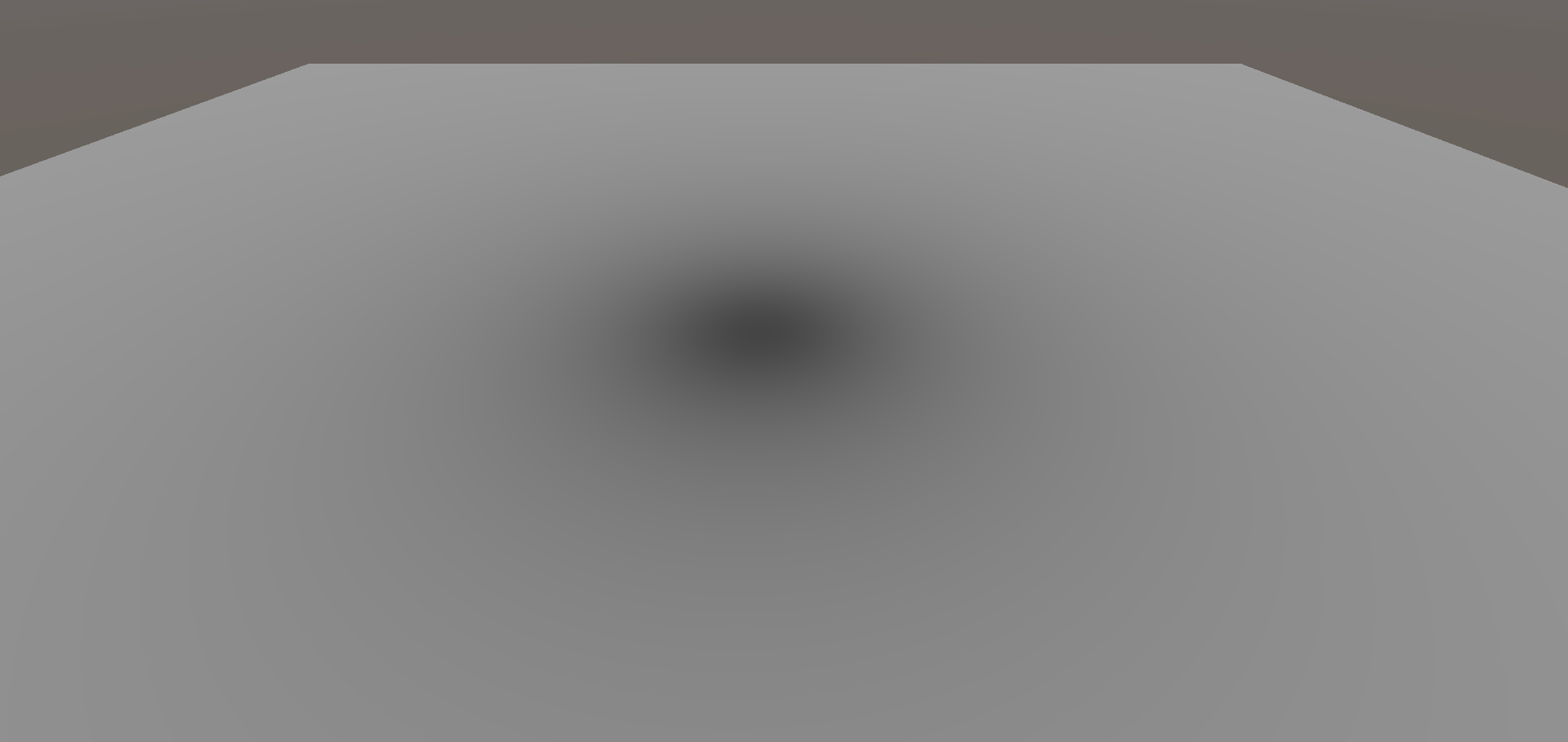 Something like that maybe. I'm not entirely sure if you can directly control blending of lights in the base version of Unity, this is just done by using an extra One$$anonymous$$inus diffuse lighting pass with ReverseSubtractive blending.
Although, re-reading it this does appear to be how they do it. You would just need some way of distinguishing between normal point lights and AO lights.
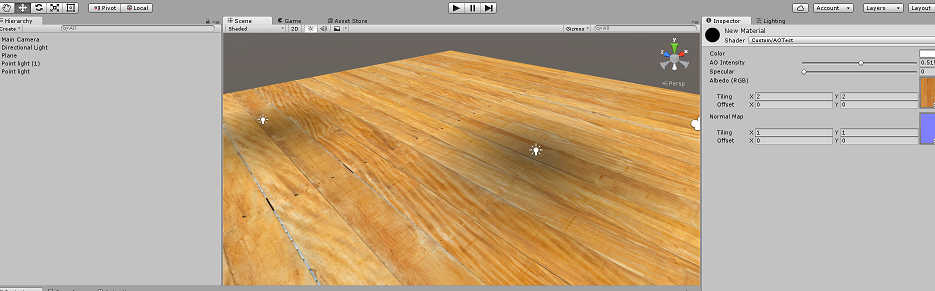 Rewrote it using the methods they did. This uses the positioning of point lights though, you would need to set up AO objects through a CGINCLUDE perhaps.

Very nice ! I was trying to fiddle around unity to find out. When you say adding another light pass, you mean using the command buffer and an homemade shader ? That's what I did, and it's working. I'm curious at how you did it though, do you $$anonymous$$d uploading the sources ?
I'm trying now to be able to deform the light source, as they mention, and $$anonymous$$atrix mult are killing me :p

 Shader "Custom/AOTest" {
     Properties {
         _Color ("Color", Color) = (1,1,1,1)
         _AO ("AO Intensity", Range(0,1)) = 0.5
         _Spec ("Specular", Range(0,1)) = 0.5
         _MainTex ("Albedo (RGB)", 2D) = "white" {}
         _BumpMap ("Normal Map", 2D) = "bump" {}
     }
     SubShader {
         Tags { "RenderType"="Opaque" }
         LOD 200

         Pass
         {
             Tags {"LightMode"="ForwardBase"}
             CGPROGRAM
             #pragma vertex vert
             #pragma fragment frag
             #include "UnityCG.cginc"
             #include "Lighting.cginc"

             // compile shader into multiple variants, with and without shadows
             #pragma multi_compile_fwdbase
             // shadow helper functions and macros
             #include "AutoLight.cginc"

             struct v2f
             {
                 float2 uv : TEXCOORD0;
                 SHADOW_COORDS(1) // put shadows data into TEXCOORD1
                 float4 pos : SV_POSITION;
                 half3 viewDir : TEXCOORD2;
                 half3 worldPos : TEXCOORD3;
                 half3 tspace0 : TEXCOORD4; // tangent.x, bitangent.x, normal.x
                 half3 tspace1 : TEXCOORD5; // tangent.y, bitangent.y, normal.y
                 half3 tspace2 : TEXCOORD6; // tangent.z, bitangent.z, normal.z
                 float2 uv2 : TEXCOORD7;
             };

             sampler2D _MainTex;
             float4 _MainTex_ST;
             sampler2D _BumpMap;
             float4 _BumpMap_ST;

             v2f vert (appdata_tan v)
             {
                 v2f o;
                 o.pos = mul (UNITY_MATRIX_MVP, v.vertex);
                 o.uv = TRANSFORM_TEX (v.texcoord, _MainTex);
                 o.uv2 = TRANSFORM_TEX (v.texcoord, _BumpMap);
                 o.viewDir = WorldSpaceViewDir (v.vertex);
                 o.worldPos = mul (_Object2World, v.vertex);

                 half3 wNormal = UnityObjectToWorldNormal (v.normal);
                 half3 wTangent = UnityObjectToWorldDir (v.tangent.xyz);
                 // compute bitangent from cross product of normal and tangent
                 half tangentSign = v.tangent.w * unity_WorldTransformParams.w;
                 half3 wBitangent = cross (wNormal, wTangent) * tangentSign;
                 // output the tangent space matrix
                 o.tspace0 = half3 (wTangent.x, wBitangent.x, wNormal.x);
                 o.tspace1 = half3 (wTangent.y, wBitangent.y, wNormal.y);
                 o.tspace2 = half3 (wTangent.z, wBitangent.z, wNormal.z);
                 // compute shadows data
                 TRANSFER_SHADOW(o)
                 return o;
             }

             half _Spec;
             fixed4 _Color;

             half4 frag (v2f i) : SV_Target
             {
                 half3 tnormal = UnpackNormal (tex2D (_BumpMap, i.uv2));
                 // transform normal from tangent to world space
                 half3 worldNormal;
                 worldNormal.x = dot (i.tspace0, tnormal);
                 worldNormal.y = dot (i.tspace1, tnormal);
                 worldNormal.z = dot (i.tspace2, tnormal);

                 worldNormal = normalize (worldNormal);

                 half4 col = tex2D (_MainTex, i.uv) * _Color;
                 half3 lightDir;
                 half atten;
                 if (_WorldSpaceLightPos0.w == 0.0) {
                     atten = 1.0;
                     lightDir = normalize (_WorldSpaceLightPos0.xyz);
                 } else {
                     half3 lightPos = _WorldSpaceLightPos0.xyz - i.worldPos.xyz;
                     lightDir = normalize (lightPos);
                     atten = saturate (1.0 / (length (lightPos) * 2));
                 }
                 // compute shadow attenuation (1.0 = fully lit, 0.0 = fully shadowed)
                 fixed shadow = SHADOW_ATTENUATION (i);
                 half nl = max (0, dot (worldNormal, lightDir)) * shadow;
                 half diff = nl * _LightColor0.rgb;
                 // darken light's illumination with shadow, keep ambient intact
                 half3 ambient = ShadeSH9 (half4 (worldNormal, 1));

                 half3 h = normalize (lightDir + i.viewDir);
                 half nh = max (0, dot (worldNormal, h));
                 half spec = pow (nh, (pow (_Spec, 2) + 0.1) * 512) * _Spec * _LightColor0 * shadow;

                 half3 lighting = (diff + spec) * atten + ambient;
                 col.rgb *= lighting;
                 return col;
             }
             ENDCG
         }

         /*Pass
         {
             Tags {"LightMode"="ForwardAdd"}

             Blend One One

             CGPROGRAM
             #pragma vertex vert
             #pragma fragment frag
             #include "UnityCG.cginc"
             #include "Lighting.cginc"

             // compile shader into multiple variants, with and without shadows
             #pragma multicompile_fwdadd_fullshadows
             // shadow helper functions and macros
             #include "AutoLight.cginc"

             struct v2f
             {
                 float2 uv : TEXCOORD0;
                 SHADOW_COORDS(1) // put shadows data into TEXCOORD1
                 float4 pos : SV_POSITION;
                 half3 viewDir : TEXCOORD2;
                 half3 worldPos : TEXCOORD3;
                 half3 tspace0 : TEXCOORD4; // tangent.x, bitangent.x, normal.x
                 half3 tspace1 : TEXCOORD5; // tangent.y, bitangent.y, normal.y
                 half3 tspace2 : TEXCOORD6; // tangent.z, bitangent.z, normal.z
                 float2 uv2 : TEXCOORD7;
             };

             sampler2D _MainTex;
             float4 _MainTex_ST;
             sampler2D _BumpMap;
             float4 _BumpMap_ST;

             v2f vert (appdata_tan v)
             {
                 v2f o;
                 o.pos = mul (UNITY_MATRIX_MVP, v.vertex);
                 o.uv = TRANSFORM_TEX (v.texcoord, _MainTex);
                 o.uv2 = TRANSFORM_TEX (v.texcoord, _BumpMap);
                 o.viewDir = WorldSpaceViewDir (v.vertex);
                 o.worldPos = mul (_Object2World, v.vertex);

                 half3 wNormal = UnityObjectToWorldNormal (v.normal);
                 half3 wTangent = UnityObjectToWorldDir (v.tangent.xyz);
                 // compute bitangent from cross product of normal and tangent
                 half tangentSign = v.tangent.w * unity_WorldTransformParams.w;
                 half3 wBitangent = cross (wNormal, wTangent) * tangentSign;
                 // output the tangent space matrix
                 o.tspace0 = half3 (wTangent.x, wBitangent.x, wNormal.x);
                 o.tspace1 = half3 (wTangent.y, wBitangent.y, wNormal.y);
                 o.tspace2 = half3 (wTangent.z, wBitangent.z, wNormal.z);
                 // compute shadows data
                 TRANSFER_SHADOW(o)
                 return o;
             }

             half _Spec;
             fixed4 _Color;

             half4 frag (v2f i) : SV_Target
             {
                 half3 tnormal = UnpackNormal (tex2D (_BumpMap, i.uv2));
                 // transform normal from tangent to world space
                 half3 worldNormal;
                 worldNormal.x = dot (i.tspace0, tnormal);
                 worldNormal.y = dot (i.tspace1, tnormal);
                 worldNormal.z = dot (i.tspace2, tnormal);

                 worldNormal = normalize (worldNormal);
                 half4 col = tex2D (_MainTex, i.uv) * _Color;
                 half3 lightDir;
                 half atten;
                 if (_WorldSpaceLightPos0.w == 0.0) {
                     atten = 1.0;
                     lightDir = normalize (_WorldSpaceLightPos0.xyz);
                 } else {
                     half3 lightPos = _WorldSpaceLightPos0.xyz - i.worldPos.xyz;
                     lightDir = normalize (lightPos);
                     atten = saturate (1.0 / (length (lightPos) * 2));
                 }
                 // compute shadow attenuation (1.0 = fully lit, 0.0 = fully shadowed)
                 fixed shadow = SHADOW_ATTENUATION (i);
                 half nl = max (0, dot (worldNormal, lightDir)) * shadow;
                 half diff = nl * _LightColor0.rgb;

                 half3 h = normalize (lightDir + i.viewDir);
                 half nh = max (0, dot (worldNormal, h));
                 half spec = pow (nh, (pow (_Spec, 2) + 0.1) * 512) * _Spec * _LightColor0 * shadow;

                 half3 lighting = (diff + spec) * atten;
                 col.rgb *= lighting;
                 return col;
             }
             ENDCG
         }*/

         Pass
         {
             Tags {"LightMode"="ForwardAdd"}

             Blend Zero SrcColor

             CGPROGRAM
             #pragma vertex vert
             #pragma fragment frag
             #include "UnityCG.cginc"
             #include "Lighting.cginc"

             // compile shader into multiple variants, with and without shadows
             #pragma multi_compile_fwdadd
             // shadow helper functions and macros
             #include "AutoLight.cginc"

             struct v2f
             {
                 float4 pos : SV_POSITION;
                 half3 worldPos : TEXCOORD0;
                 half3 worldNormal : TEXCOORD1;
             };

             v2f vert (appdata_tan v)
             {
                 v2f o;
                 o.pos = mul (UNITY_MATRIX_MVP, v.vertex);
                 o.worldPos = mul (_Object2World, v.vertex);
                 o.worldNormal = UnityObjectToWorldNormal (v.normal);
                 return o;
             }

             half _AO;

             half4 frag (v2f i) : SV_Target
             {
                 i.worldNormal = normalize (i.worldNormal);

                 half3 lightDir;
                 half atten;
                 if (_WorldSpaceLightPos0.w == 0.0) {
                     atten = 0;
                 } else {
                     half3 lightPos = _WorldSpaceLightPos0.xyz - i.worldPos.xyz;
                     lightDir = normalize (lightPos);
                     atten = length (lightPos) * 2;
                 }
                 half nl = dot (i.worldNormal, lightDir) * 0.5 + 0.5;

                 half3 lighting = saturate (sqrt (atten) * nl);
                 return half4 (lighting + (0.5-_AO), 1);
             }
             ENDCG
         }
     }
     FallBack "Diffuse"
 }
(Had to post as answer, too big for comment) By 'adding another light pass' I mean I used the forward additive pass in the actual object shader, and converted it to their AO pass. You can still have this and the base fwdadd pass, but because they both just use point lights rather than separate objects, having both passes enabled looks a bit strange. The third pass here is what you would want to look at.
They used pre-pass rendering, so you may be able to use this shader to draw to a command buffer, then re-add as AO to allow for other lights. That makes more sense.




