
Wayback Machinekoobas.hobune.stream
May JUN Jul
Previous capture 12 Next capture
2021 2022 2023
1 capture
12 Jun 22 - 12 Jun 22
sparklines
Close Help
  • Products
  • Solutions
  • Made with Unity
  • Learning
  • Support & Services
  • Community
  • Asset Store
  • Get Unity

UNITY ACCOUNT

You need a Unity Account to shop in the Online and Asset Stores, participate in the Unity Community and manage your license portfolio. Login Create account
  • Blog
  • Forums
  • Answers
  • Evangelists
  • User Groups
  • Beta Program
  • Advisory Panel

Navigation

  • Home
  • Products
  • Solutions
  • Made with Unity
  • Learning
  • Support & Services
  • Community
    • Blog
    • Forums
    • Answers
    • Evangelists
    • User Groups
    • Beta Program
    • Advisory Panel

Unity account

You need a Unity Account to shop in the Online and Asset Stores, participate in the Unity Community and manage your license portfolio. Login Create account

Language

  • Chinese
  • Spanish
  • Japanese
  • Korean
  • Portuguese
  • Ask a question
  • Spaces
    • Default
    • Help Room
    • META
    • Moderators
    • Topics
    • Questions
    • Users
    • Badges
  • Home /
avatar image
0
Question by mike29willems · Mar 26, 2019 at 04:07 PM · rotationrigidbodyquaternions

How to wall-walk?

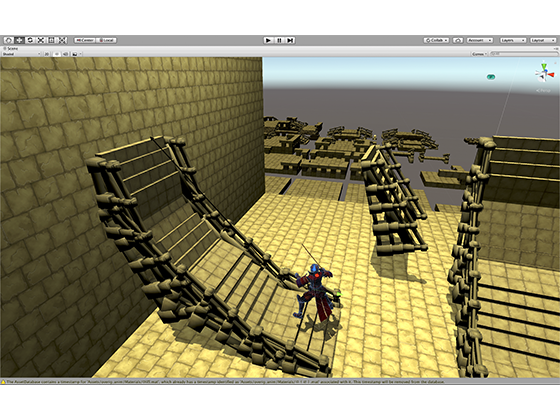
I have tried to ask several times but I still didn't mange to make it work. So I want to make my player walk on walls just like it would on the ground. Therefore I need to change the gravity and rotate the camera, that worked fine. But then I also need the player to rotate based on the hit.normal of the ground and move him based on the input from the joystick and make that align with the surface (or perpendicular to the hit.normal) see image. This is where I can stuck every time. I would really appreciate it if u could correct my code so that it would work. I will give 20 points away if it worked :).
1.I'am using a Rigidbody
2. I'am using a joystick that returns a vector form -1 to 1 like (3, 0f, -8). alt text
  private void Update()
     {
         h = Joystick.Horizontal;
         v = Joystick.Vertical;
         movement = (transform.forward * v) + (transform.right * h);
 //or movement.Set(h, 0f, v)
         Debug.Log(movement);
 }
 private void FixedUpdate()
     {
 Physics.Raycast(transform.position, -(transform.up), out hit, RayLengh)
   transform.up = hit.normal;
  transform.rotation = Quaternion.LookRotation(movement, transform.up);
 playerRig.MovePosition(transform.position + movement);
 }


unityansw.png (252.4 kB)
myscene.png (361.9 kB)
Comment
Add comment · Show 2
10 |3000 characters needed characters left characters exceeded
▼
  • Viewable by all users
  • Viewable by moderators
  • Viewable by moderators and the original poster
  • Advanced visibility
Viewable by all users
avatar image highpockets · Mar 26, 2019 at 11:47 PM 1
Share

Hmm, have you thought about rotating the world ins$$anonymous$$d?? Then you don’t have to change gravity and movement is the exact same. You could make an empty object a parent of the world objects, including the lights to keep them consistent with the shadows, and just rotate that empty.. There might be reasons why this wouldn’t work though, like other characters or objects that are affected by rigidbodies, etc.

avatar image mike29willems highpockets · Mar 27, 2019 at 10:54 AM 0
Share

Yeah I have thought about that I was only worried that it would cost a lot of performance is that true?

2 Replies

· Add your reply
  • Sort: 
avatar image
1

Answer by laurG · Mar 27, 2019 at 06:02 AM

Afaik, is not a good idea to ever set the Up of a transform.

I wrote this code just now, but did not test. Add me on Discord: Laur#6047 . I will get it done in the afternoon and help you.

         public Vector3 normal = Vector3.up;
 
         private void FixedUpdate()
         {
             if (Physics.Raycast(transform.position, -(transform.up), out hit, 100))
             {
                 transform.position = hit.point;
                 normal = hit.normal;
             }
         }
 
         private void Update()
         {
             transform.rotation = Quaternion.LookRotation(movement.normalized, normal); 
         }
Comment
Add comment · Show 2 · Share
10 |3000 characters needed characters left characters exceeded
▼
  • Viewable by all users
  • Viewable by moderators
  • Viewable by moderators and the original poster
  • Advanced visibility
Viewable by all users
avatar image mike29willems · Mar 27, 2019 at 11:03 AM 0
Share

Thanks man really appreciate it!

avatar image mike29willems mike29willems · Mar 27, 2019 at 12:38 PM 0
Share

This code did unfortunately not work for me as it would make my player spin or move 'glitchy'. @laurG

avatar image
1

Answer by Patico · Mar 27, 2019 at 09:22 AM

You can use Custom Gravitations Kit for that, and walk everywhere, even on ceiling =) https://assetstore.unity.com/packages/tools/physics/custom-gravitations-kit-17789

Comment
Add comment · Show 1 · Share
10 |3000 characters needed characters left characters exceeded
▼
  • Viewable by all users
  • Viewable by moderators
  • Viewable by moderators and the original poster
  • Advanced visibility
Viewable by all users
avatar image mike29willems · Mar 27, 2019 at 10:58 AM 0
Share

Thank you, but I will first try to understand the physics behind it myself.

Your answer

Hint: You can notify a user about this post by typing @username

Up to 2 attachments (including images) can be used with a maximum of 524.3 kB each and 1.0 MB total.

Follow this Question

Answers Answers and Comments

165 People are following this question.

avatar image avatar image avatar image avatar image avatar image avatar image avatar image avatar image avatar image avatar image avatar image avatar image avatar image avatar image avatar image avatar image avatar image avatar image avatar image avatar image avatar image avatar image avatar image avatar image avatar image avatar image avatar image avatar image avatar image avatar image avatar image avatar image avatar image avatar image avatar image avatar image avatar image avatar image avatar image avatar image avatar image avatar image avatar image avatar image avatar image avatar image avatar image avatar image avatar image avatar image avatar image avatar image avatar image avatar image avatar image avatar image avatar image avatar image avatar image avatar image avatar image avatar image avatar image avatar image avatar image avatar image avatar image avatar image avatar image avatar image avatar image avatar image avatar image avatar image avatar image avatar image avatar image avatar image avatar image avatar image avatar image avatar image avatar image avatar image avatar image avatar image avatar image avatar image avatar image avatar image avatar image avatar image avatar image avatar image avatar image avatar image avatar image avatar image avatar image avatar image avatar image avatar image avatar image avatar image avatar image avatar image avatar image avatar image avatar image avatar image avatar image avatar image avatar image avatar image avatar image avatar image avatar image avatar image avatar image avatar image avatar image avatar image avatar image avatar image avatar image avatar image avatar image avatar image avatar image avatar image avatar image avatar image avatar image avatar image avatar image avatar image avatar image avatar image avatar image avatar image avatar image avatar image avatar image avatar image avatar image avatar image avatar image avatar image avatar image avatar image avatar image avatar image avatar image avatar image avatar image avatar image avatar image avatar image avatar image avatar image avatar image avatar image avatar image avatar image avatar image

Related Questions

smoothly rotate my rigidbody with CapsuleCollider to facing the fall direction 0 Answers

Rigidbody along with up-vector 2 Answers

Rigidbody spins out of control when colliding into corner 0 Answers

Object slope rotation issue 0 Answers

Is there any way to keep increasing an object's angular velocity? 1 Answer


Enterprise
Social Q&A

Social
Subscribe on YouTube social-youtube Follow on LinkedIn social-linkedin Follow on Twitter social-twitter Follow on Facebook social-facebook Follow on Instagram social-instagram

Footer

  • Purchase
    • Products
    • Subscription
    • Asset Store
    • Unity Gear
    • Resellers
  • Education
    • Students
    • Educators
    • Certification
    • Learn
    • Center of Excellence
  • Download
    • Unity
    • Beta Program
  • Unity Labs
    • Labs
    • Publications
  • Resources
    • Learn platform
    • Community
    • Documentation
    • Unity QA
    • FAQ
    • Services Status
    • Connect
  • About Unity
    • About Us
    • Blog
    • Events
    • Careers
    • Contact
    • Press
    • Partners
    • Affiliates
    • Security
Copyright © 2020 Unity Technologies
  • Legal
  • Privacy Policy
  • Cookies
  • Do Not Sell My Personal Information
  • Cookies Settings
"Unity", Unity logos, and other Unity trademarks are trademarks or registered trademarks of Unity Technologies or its affiliates in the U.S. and elsewhere (more info here). Other names or brands are trademarks of their respective owners.
  • Anonymous
  • Sign in
  • Create
  • Ask a question
  • Spaces
  • Default
  • Help Room
  • META
  • Moderators
  • Explore
  • Topics
  • Questions
  • Users
  • Badges
