
Wayback Machinekoobas.hobune.stream
May JUN Jul
Previous capture 12 Next capture
2021 2022 2023
1 capture
12 Jun 22 - 12 Jun 22
sparklines
Close Help
  • Products
  • Solutions
  • Made with Unity
  • Learning
  • Support & Services
  • Community
  • Asset Store
  • Get Unity

UNITY ACCOUNT

You need a Unity Account to shop in the Online and Asset Stores, participate in the Unity Community and manage your license portfolio. Login Create account
  • Blog
  • Forums
  • Answers
  • Evangelists
  • User Groups
  • Beta Program
  • Advisory Panel

Navigation

  • Home
  • Products
  • Solutions
  • Made with Unity
  • Learning
  • Support & Services
  • Community
    • Blog
    • Forums
    • Answers
    • Evangelists
    • User Groups
    • Beta Program
    • Advisory Panel

Unity account

You need a Unity Account to shop in the Online and Asset Stores, participate in the Unity Community and manage your license portfolio. Login Create account

Language

  • Chinese
  • Spanish
  • Japanese
  • Korean
  • Portuguese
  • Ask a question
  • Spaces
    • Default
    • Help Room
    • META
    • Moderators
    • Topics
    • Questions
    • Users
    • Badges
  • Home /
  • Help Room /
avatar image
0
Question by Wraththewraith · Jan 07, 2017 at 01:31 AM · c#texturescale

Scale a plane without scaling or movintg it's texture

Problem:

 I've got a plane set up in place of a terrain to scale up and down in size using the distant between the player and the center of the plane. Once i put a grid texture onto the plane, i noticed that the texture would scale with the object. So, I then scripted the plane's texture to scale inverse to the plane so that the texture would always be the same size, but even after that  the texture would still move. I've tried the same method with the position of the texture, but it still moves.

I have no idea what else to try, could someone tell me what i might be missing?

Code:

 public GameObject growTarg;
 public GameObject growCatalyst;
 // Use this for initialization
 void Start () {
     growTarg = gameObject;
 }
 
 // Update is called once per frame
 void Update () {
     float distance = Vector3.Distance(growTarg.transform.position, growCatalyst.transform.position);
     growTarg.transform.localScale = (new Vector3(distance + 1, distance + 1, distance + 1));
     gameObject.GetComponent<Renderer>().material.mainTextureScale = new Vector3(transform.localScale.x * 30, transform.localScale.y * 30, transform.localScale.z * 30);
     
 }

Comment
Add comment
10 |3000 characters needed characters left characters exceeded
▼
  • Viewable by all users
  • Viewable by moderators
  • Viewable by moderators and the original poster
  • Advanced visibility
Viewable by all users

3 Replies

· Add your reply
  • Sort: 
avatar image
0
Best Answer

Answer by Daloots · Jan 07, 2017 at 08:25 PM

Hey Wrath,

Since your plane expands in all directions, you need to offset the texture by half the scale it so that the center point stays in place:

 void Update()
     {
         float distance = Vector3.Distance(growTarg.transform.position, growCatalyst.transform.position);
         growTarg.transform.localScale = (new Vector3(distance + 1, distance + 1, distance + 1));
         gameObject.GetComponent<Renderer>().material.mainTextureScale = new Vector2(transform.localScale.x * 2, transform.localScale.y * 2);
         gameObject.GetComponent<Renderer>().material.mainTextureOffset = -0.5f * gameObject.GetComponent<Renderer>().material.mainTextureScale;
     }

Hope this helps!

Comment
Add comment · Show 2 · Share
10 |3000 characters needed characters left characters exceeded
▼
  • Viewable by all users
  • Viewable by moderators
  • Viewable by moderators and the original poster
  • Advanced visibility
Viewable by all users
avatar image Wraththewraith · Jan 08, 2017 at 08:33 AM 0
Share

That's awesome. I can't believe i missed it, thanks!

avatar image Daloots Wraththewraith · Jan 08, 2017 at 10:32 AM 0
Share

Cool. If the idea was to have an infinite environment, you could also move the plane along with your player and move the texture offset relative to the player position. So something like this (not tested): gameObject.transform.position = growTarg.transform.position; gameObject.GetComponent<Renderer>().material.mainTextureOffset = new Vector3(-gameObject.transform.position.x, -gameObject.transform.position.z);

avatar image
0

Answer by Benji771 · Jan 07, 2017 at 08:23 PM

That's an unusual way of creating terrain and you will probably run into more problems later. I recommend setting the plane's scale to a large amount in the editor before the scene loads. If you need the terrain to be infinite, create a system of terrain tiles that spawn as needed.

Comment
Add comment · Show 1 · Share
10 |3000 characters needed characters left characters exceeded
▼
  • Viewable by all users
  • Viewable by moderators
  • Viewable by moderators and the original poster
  • Advanced visibility
Viewable by all users
avatar image Wraththewraith · Jan 08, 2017 at 08:29 AM 0
Share

Ironically, this was the placeholder for that very system until i work out the kinks in my logic. I was hoping this would be the easier path.

avatar image
0

Answer by Harardin · Jan 07, 2017 at 11:30 AM

There is one way but I'am not sure it's is the best one.

Firs you need to make UVmapping like in example img. or maybe even smaller depends on plane scale size that you want to achieve. alt text
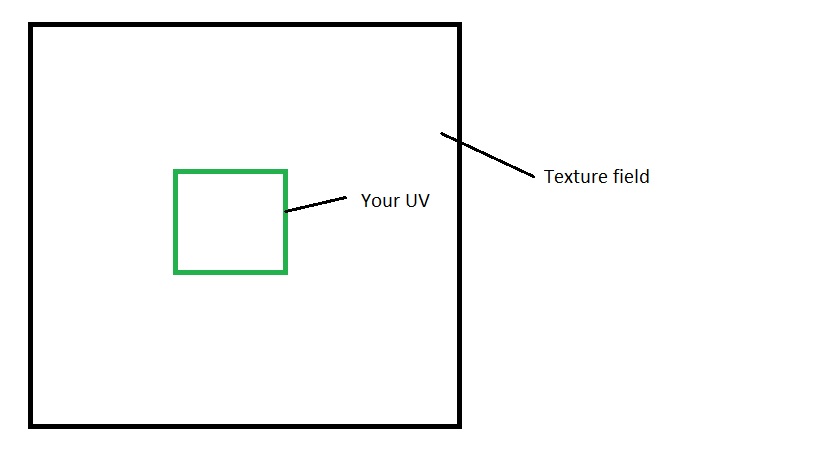
After you finish with UVs you need to create a script and calculate a proper values.

You need to modify three values it is Scale of the plane, Tiling of texture in material and the last one is Offset of the texture in material options.

To modify Scale you can use transform.localScale you can read about it here: Transform.localScale

Ok now to the texture you need to modify it by this scheme for example if Tiling = 2 then Offset need to be -0.5 And you also need to synchronize it with your scale transform.

How to modify texture Offset ant Tiling you can find here: Material.SetTextureOffset Material.SetTextureScale

And again I'am not sure this is the best way of doing it. Hope it helps.


uv-excample.jpg (21.0 kB)
Comment
Add comment · Share
10 |3000 characters needed characters left characters exceeded
▼
  • Viewable by all users
  • Viewable by moderators
  • Viewable by moderators and the original poster
  • Advanced visibility
Viewable by all users

Your answer

Hint: You can notify a user about this post by typing @username

Up to 2 attachments (including images) can be used with a maximum of 524.3 kB each and 1.0 MB total.

Follow this Question

Answers Answers and Comments

275 People are following this question.

avatar image avatar image avatar image avatar image avatar image avatar image avatar image avatar image avatar image avatar image avatar image avatar image avatar image avatar image avatar image avatar image avatar image avatar image avatar image avatar image avatar image avatar image avatar image avatar image avatar image avatar image avatar image avatar image avatar image avatar image avatar image avatar image avatar image avatar image avatar image avatar image avatar image avatar image avatar image avatar image avatar image avatar image avatar image avatar image avatar image avatar image avatar image avatar image avatar image avatar image avatar image avatar image avatar image avatar image avatar image avatar image avatar image avatar image avatar image avatar image avatar image avatar image avatar image avatar image avatar image avatar image avatar image avatar image avatar image avatar image avatar image avatar image avatar image avatar image avatar image avatar image avatar image avatar image avatar image avatar image avatar image avatar image avatar image avatar image avatar image avatar image avatar image avatar image avatar image avatar image avatar image avatar image avatar image avatar image avatar image avatar image avatar image avatar image avatar image avatar image avatar image avatar image avatar image avatar image avatar image avatar image avatar image avatar image avatar image avatar image avatar image avatar image avatar image avatar image avatar image avatar image avatar image avatar image avatar image avatar image avatar image avatar image avatar image avatar image avatar image avatar image avatar image avatar image avatar image avatar image avatar image avatar image avatar image avatar image avatar image avatar image avatar image avatar image avatar image avatar image avatar image avatar image avatar image avatar image avatar image avatar image avatar image avatar image avatar image avatar image avatar image avatar image avatar image avatar image avatar image avatar image avatar image avatar image avatar image avatar image avatar image avatar image avatar image avatar image avatar image avatar image avatar image avatar image avatar image avatar image avatar image avatar image avatar image avatar image avatar image avatar image avatar image avatar image avatar image avatar image avatar image avatar image avatar image avatar image avatar image avatar image avatar image avatar image avatar image avatar image avatar image avatar image avatar image avatar image avatar image avatar image avatar image avatar image avatar image avatar image avatar image avatar image avatar image avatar image avatar image avatar image avatar image avatar image avatar image avatar image avatar image avatar image avatar image avatar image avatar image avatar image avatar image avatar image avatar image avatar image avatar image avatar image avatar image avatar image avatar image avatar image avatar image avatar image avatar image avatar image avatar image avatar image avatar image avatar image avatar image avatar image avatar image avatar image avatar image avatar image avatar image avatar image avatar image avatar image avatar image avatar image avatar image avatar image avatar image avatar image avatar image avatar image avatar image avatar image avatar image avatar image avatar image avatar image avatar image avatar image avatar image avatar image avatar image avatar image avatar image avatar image avatar image avatar image avatar image avatar image avatar image avatar image avatar image avatar image avatar image

Related Questions

How can I set an Image (PNG) from a URL to be the material of a sphere ?? 0 Answers

My GameObject disappears when running this script. 0 Answers

Easy demand but unsolvable?? Set a permanent size (width and height) of a Texture even on different sized objects (c#) 0 Answers

Raw Image changing texture in inspector but not in game. 1 Answer

struggling with Playing card game in unity 2 Answers


Enterprise
Social Q&A

Social
Subscribe on YouTube social-youtube Follow on LinkedIn social-linkedin Follow on Twitter social-twitter Follow on Facebook social-facebook Follow on Instagram social-instagram

Footer

  • Purchase
    • Products
    • Subscription
    • Asset Store
    • Unity Gear
    • Resellers
  • Education
    • Students
    • Educators
    • Certification
    • Learn
    • Center of Excellence
  • Download
    • Unity
    • Beta Program
  • Unity Labs
    • Labs
    • Publications
  • Resources
    • Learn platform
    • Community
    • Documentation
    • Unity QA
    • FAQ
    • Services Status
    • Connect
  • About Unity
    • About Us
    • Blog
    • Events
    • Careers
    • Contact
    • Press
    • Partners
    • Affiliates
    • Security
Copyright © 2020 Unity Technologies
  • Legal
  • Privacy Policy
  • Cookies
  • Do Not Sell My Personal Information
  • Cookies Settings
"Unity", Unity logos, and other Unity trademarks are trademarks or registered trademarks of Unity Technologies or its affiliates in the U.S. and elsewhere (more info here). Other names or brands are trademarks of their respective owners.
  • Anonymous
  • Sign in
  • Create
  • Ask a question
  • Spaces
  • Default
  • Help Room
  • META
  • Moderators
  • Explore
  • Topics
  • Questions
  • Users
  • Badges
