Wayback Machinekoobas.hobune.stream
May JUN Jul
Previous capture 12 Next capture
2021 2022 2023
1 capture
12 Jun 22 - 12 Jun 22
sparklines
Close Help
  • Products
  • Solutions
  • Made with Unity
  • Learning
  • Support & Services
  • Community
  • Asset Store
  • Get Unity

UNITY ACCOUNT

You need a Unity Account to shop in the Online and Asset Stores, participate in the Unity Community and manage your license portfolio. Login Create account
  • Blog
  • Forums
  • Answers
  • Evangelists
  • User Groups
  • Beta Program
  • Advisory Panel

Navigation

  • Home
  • Products
  • Solutions
  • Made with Unity
  • Learning
  • Support & Services
  • Community
    • Blog
    • Forums
    • Answers
    • Evangelists
    • User Groups
    • Beta Program
    • Advisory Panel

Unity account

You need a Unity Account to shop in the Online and Asset Stores, participate in the Unity Community and manage your license portfolio. Login Create account

Language

  • Chinese
  • Spanish
  • Japanese
  • Korean
  • Portuguese
  • Ask a question
  • Spaces
    • Default
    • Help Room
    • META
    • Moderators
    • Topics
    • Questions
    • Users
    • Badges
  • Home /
avatar image
0
Question by Marshal_Alessi · Feb 21, 2016 at 01:59 AM · wheelcollidercar physicscars

Car Colliders fall off car

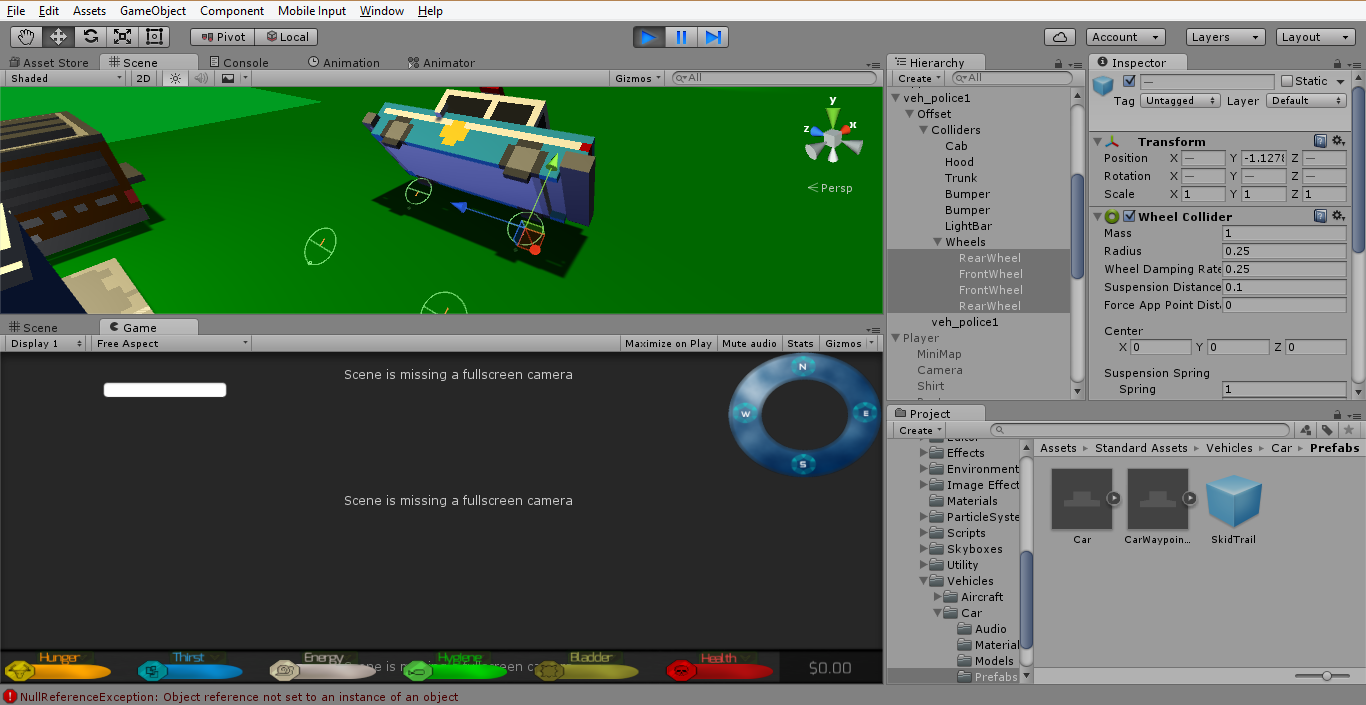
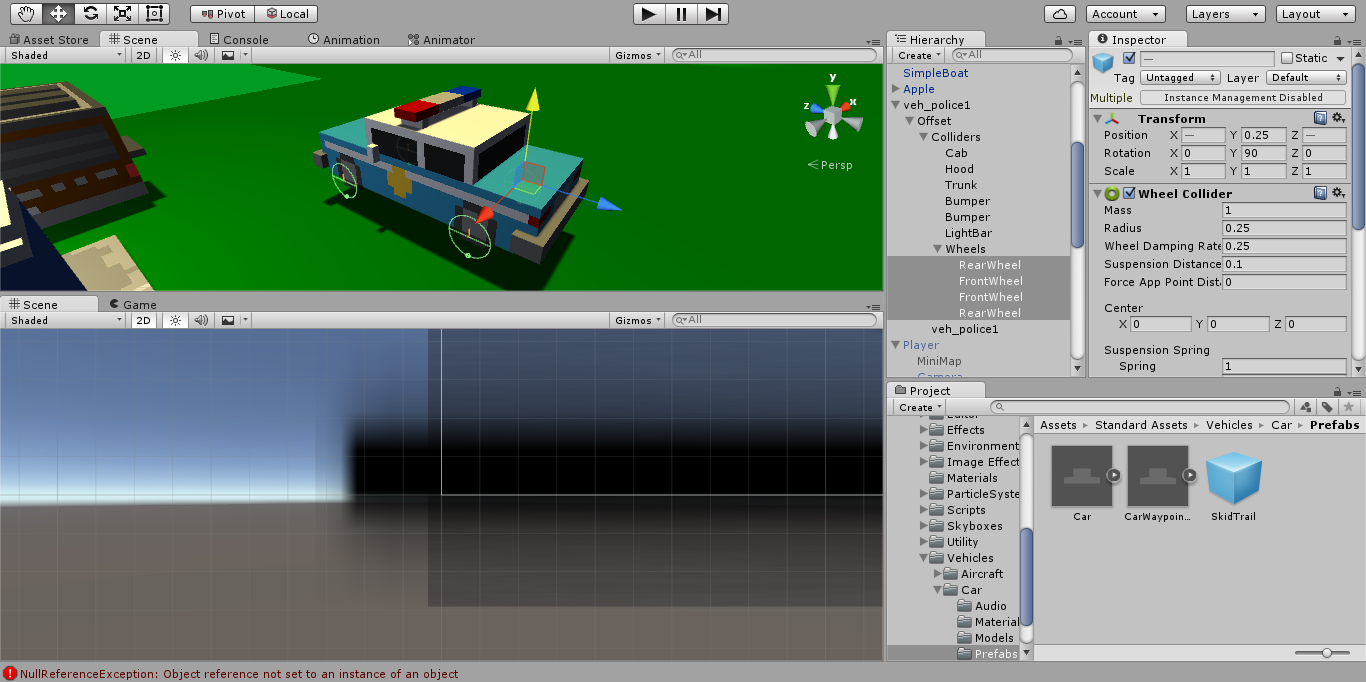
So simply, I tried to move over the car physics scripts from the standard assets onto my car, and it wasn't working. While having the WheelColliders selected in the inspector during play, I noticed that the brief few seconds that the car moves properly, the wheels are attached, but in seconds the body of the car starts to float off while the wheels just seem to run away...See attached pictures below.

Before Play
Before Play

During Play During

before-car.png (210.4 kB)
after-2.png (192.7 kB)
Comment
Add comment · Show 3
10 |3000 characters needed characters left characters exceeded
▼
  • Viewable by all users
  • Viewable by moderators
  • Viewable by moderators and the original poster
  • Advanced visibility
Viewable by all users
avatar image nickostan · Feb 21, 2016 at 04:08 AM 0
Share

Do the gameObjects have rigidbodies attached with Use Gravity unchecked?

avatar image Marshal_Alessi nickostan · Feb 21, 2016 at 05:14 AM 0
Share

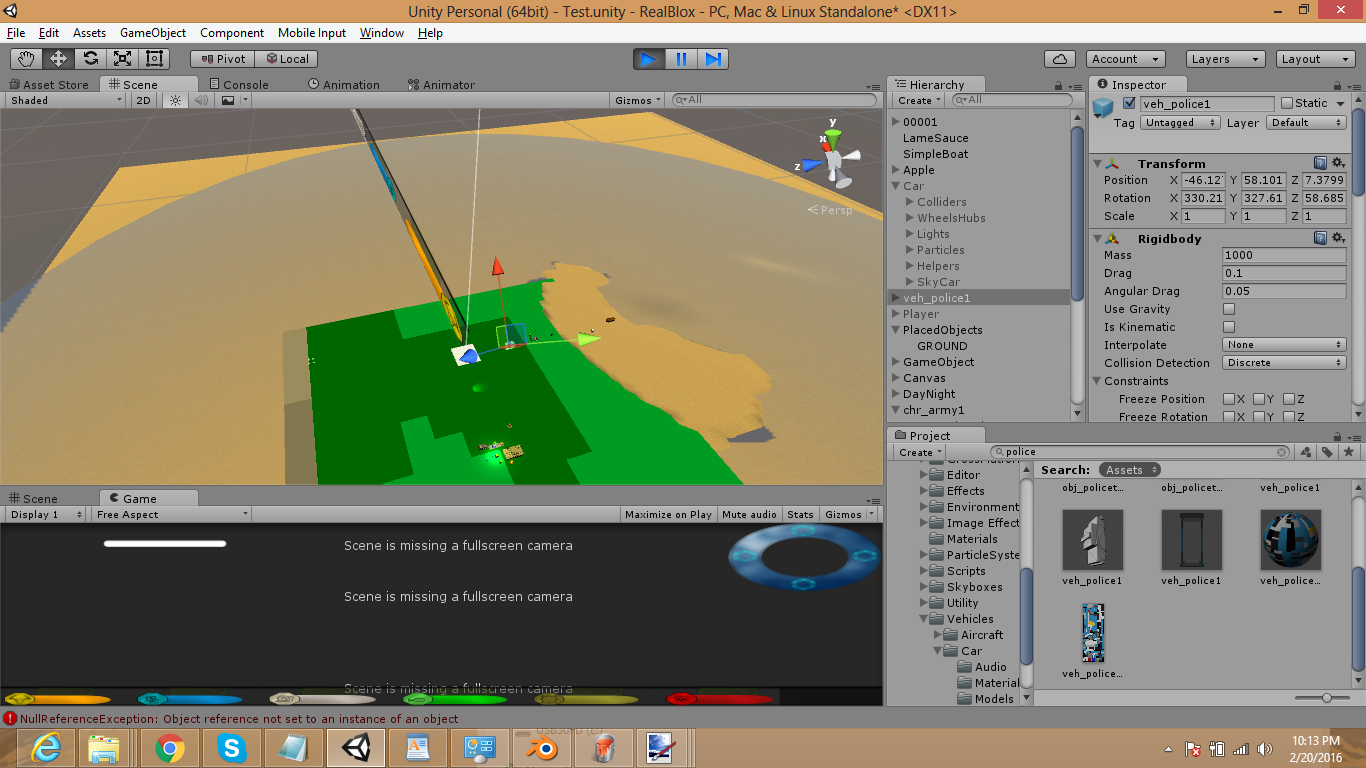
It does have a rigidbody...I unchecked gravity and it flew everywhere, wheels still came unhooked.
alt text

worse.png (520.4 kB)
avatar image L_Remp · Mar 17, 2016 at 06:00 PM 0
Share

Did you create box collider to the car? If you didn't create box collider for car will happen like what, because you didn't show car mass position.

2 Replies

· Add your reply
  • Sort: 
avatar image
0

Answer by GameMaker102 · Sep 06, 2017 at 08:22 PM

@Marshal_Alessi I have the same problem. I don't know why it's doing this. It looks like it's somehow giving the wheels their own rigidbodies and not detecting collision (most likely because of the wheel colliders). What do you think?

Comment
Add comment · Share
10 |3000 characters needed characters left characters exceeded
▼
  • Viewable by all users
  • Viewable by moderators
  • Viewable by moderators and the original poster
  • Advanced visibility
Viewable by all users
avatar image
0

Answer by Honorsoft · Mar 17, 2018 at 09:16 PM

Yeah, I'm starting to see the same types of issues too. One problem is that we don't know how Unity's car controller system works. Unity's standard car setup (SkyCar) has specific measurements and values, and the wheel and body colliders are aligned and positioned for that specific car. It is not just a car object with a script attached, it's a bunch of objects with a bunch of scripts and colliders attached everywhere, so it can be more difficult to figure out how they set it all up than it would be to build your own car controller from scratch. I know that Unity recommends using their "CarPrefabEmpty" to set up your own car. (Read the text file in the Standard Assets' Car folder, CarGuidelines.txt)

Comment
Add comment · Share
10 |3000 characters needed characters left characters exceeded
▼
  • Viewable by all users
  • Viewable by moderators
  • Viewable by moderators and the original poster
  • Advanced visibility
Viewable by all users

Your answer

Hint: You can notify a user about this post by typing @username

Up to 2 attachments (including images) can be used with a maximum of 524.3 kB each and 1.0 MB total.

Follow this Question

Answers Answers and Comments

38 People are following this question.

avatar image avatar image avatar image avatar image avatar image avatar image avatar image avatar image avatar image avatar image avatar image avatar image avatar image avatar image avatar image avatar image avatar image avatar image avatar image avatar image avatar image avatar image avatar image avatar image avatar image avatar image avatar image avatar image avatar image avatar image avatar image avatar image avatar image avatar image avatar image avatar image avatar image avatar image

Related Questions

Multiple Cars not working 1 Answer

Question! Why does the 'WheelCollider' Component act funny? 1 Answer

Does anyone know good free wheel collider alterantives? 0 Answers

Car Model wheels problem 0 Answers

change wheel collider with script? 0 Answers


Enterprise
Social Q&A

Social
Subscribe on YouTube social-youtube Follow on LinkedIn social-linkedin Follow on Twitter social-twitter Follow on Facebook social-facebook Follow on Instagram social-instagram

Footer

  • Purchase
    • Products
    • Subscription
    • Asset Store
    • Unity Gear
    • Resellers
  • Education
    • Students
    • Educators
    • Certification
    • Learn
    • Center of Excellence
  • Download
    • Unity
    • Beta Program
  • Unity Labs
    • Labs
    • Publications
  • Resources
    • Learn platform
    • Community
    • Documentation
    • Unity QA
    • FAQ
    • Services Status
    • Connect
  • About Unity
    • About Us
    • Blog
    • Events
    • Careers
    • Contact
    • Press
    • Partners
    • Affiliates
    • Security
Copyright © 2020 Unity Technologies
  • Legal
  • Privacy Policy
  • Cookies
  • Do Not Sell My Personal Information
  • Cookies Settings
"Unity", Unity logos, and other Unity trademarks are trademarks or registered trademarks of Unity Technologies or its affiliates in the U.S. and elsewhere (more info here). Other names or brands are trademarks of their respective owners.
  • Anonymous
  • Sign in
  • Create
  • Ask a question
  • Spaces
  • Default
  • Help Room
  • META
  • Moderators
  • Explore
  • Topics
  • Questions
  • Users
  • Badges