
Wayback Machinekoobas.hobune.stream
May JUN Jul
Previous capture 12 Next capture
2021 2022 2023
1 capture
12 Jun 22 - 12 Jun 22
sparklines
Close Help
  • Products
  • Solutions
  • Made with Unity
  • Learning
  • Support & Services
  • Community
  • Asset Store
  • Get Unity

UNITY ACCOUNT

You need a Unity Account to shop in the Online and Asset Stores, participate in the Unity Community and manage your license portfolio. Login Create account
  • Blog
  • Forums
  • Answers
  • Evangelists
  • User Groups
  • Beta Program
  • Advisory Panel

Navigation

  • Home
  • Products
  • Solutions
  • Made with Unity
  • Learning
  • Support & Services
  • Community
    • Blog
    • Forums
    • Answers
    • Evangelists
    • User Groups
    • Beta Program
    • Advisory Panel

Unity account

You need a Unity Account to shop in the Online and Asset Stores, participate in the Unity Community and manage your license portfolio. Login Create account

Language

  • Chinese
  • Spanish
  • Japanese
  • Korean
  • Portuguese
  • Ask a question
  • Spaces
    • Default
    • Help Room
    • META
    • Moderators
    • Topics
    • Questions
    • Users
    • Badges
  • Home /
avatar image
6
Question by algaib · Feb 25, 2017 at 06:14 PM · lightingbaking

Endless Baking even though all GI is turned off: 10/16 Bake Runtime | 1 jobs

I have turned off all the GI lighting stuff in the Lighting settings, the only lights in the scene are dynamic (Bake: Realtime) Spot lights, and there are no 'Static' objects. The issue is that I have a persistent notification in the information at the bottom right of the screen which says "10/16 Bake Runtime | 1 jobs"

Does anyone know what might be causing this and how I can stop it happening?

Thanks everyone!
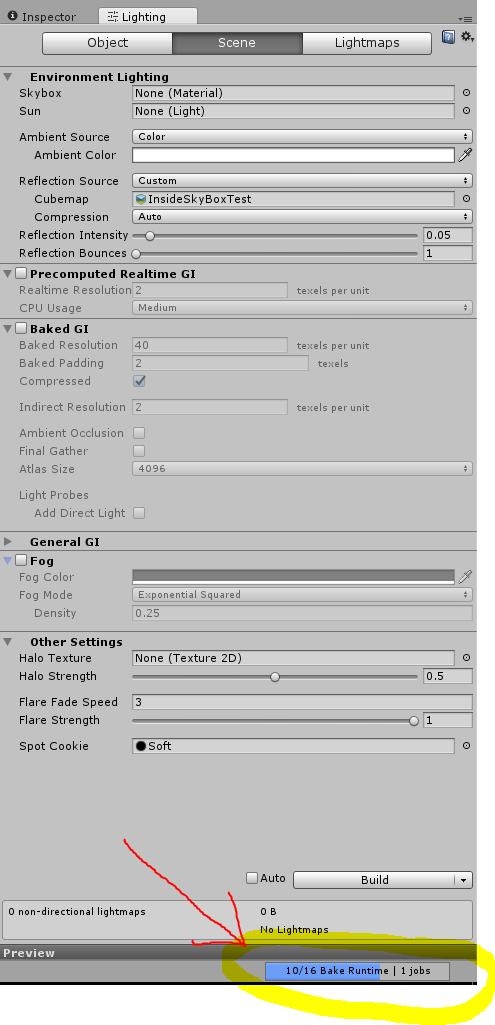
alt text

bakingissue.png (56.9 kB)
Comment
Add comment · Show 3
10 |3000 characters needed characters left characters exceeded
▼
  • Viewable by all users
  • Viewable by moderators
  • Viewable by moderators and the original poster
  • Advanced visibility
Viewable by all users
avatar image tosiabunio · Feb 28, 2017 at 12:10 AM 1
Share

The same situation in my project on both machines - desktop and laptop. Baked GI is turned off, never used it anyway and suddenly the Unity starts baking and gets stuck.

avatar image Janju · Apr 07, 2017 at 11:34 PM 0
Share

I have the same issue in a 2D scene without lights

avatar image MD_Reptile Janju · Apr 07, 2017 at 11:35 PM 0
Share

I converted this answer to a comment. In the future, be sure to use the comment button (its kind of hidden under questions and answers) ins$$anonymous$$d of the big white box (which seems like the right thing to use, haha)

2 Replies

· Add your reply
  • Sort: 
avatar image
2

Answer by Supreme_Taco · Mar 15, 2017 at 09:07 PM

EDIT: It seems that the issue was that I did not have any "Static" objects in the scene. Select at least one object in the scene and check "static" next to it's name in the Inspector and then it works.

I'm having the same issue even in a totally new scene with just a simple plane and sphere to test. I just have this one light...
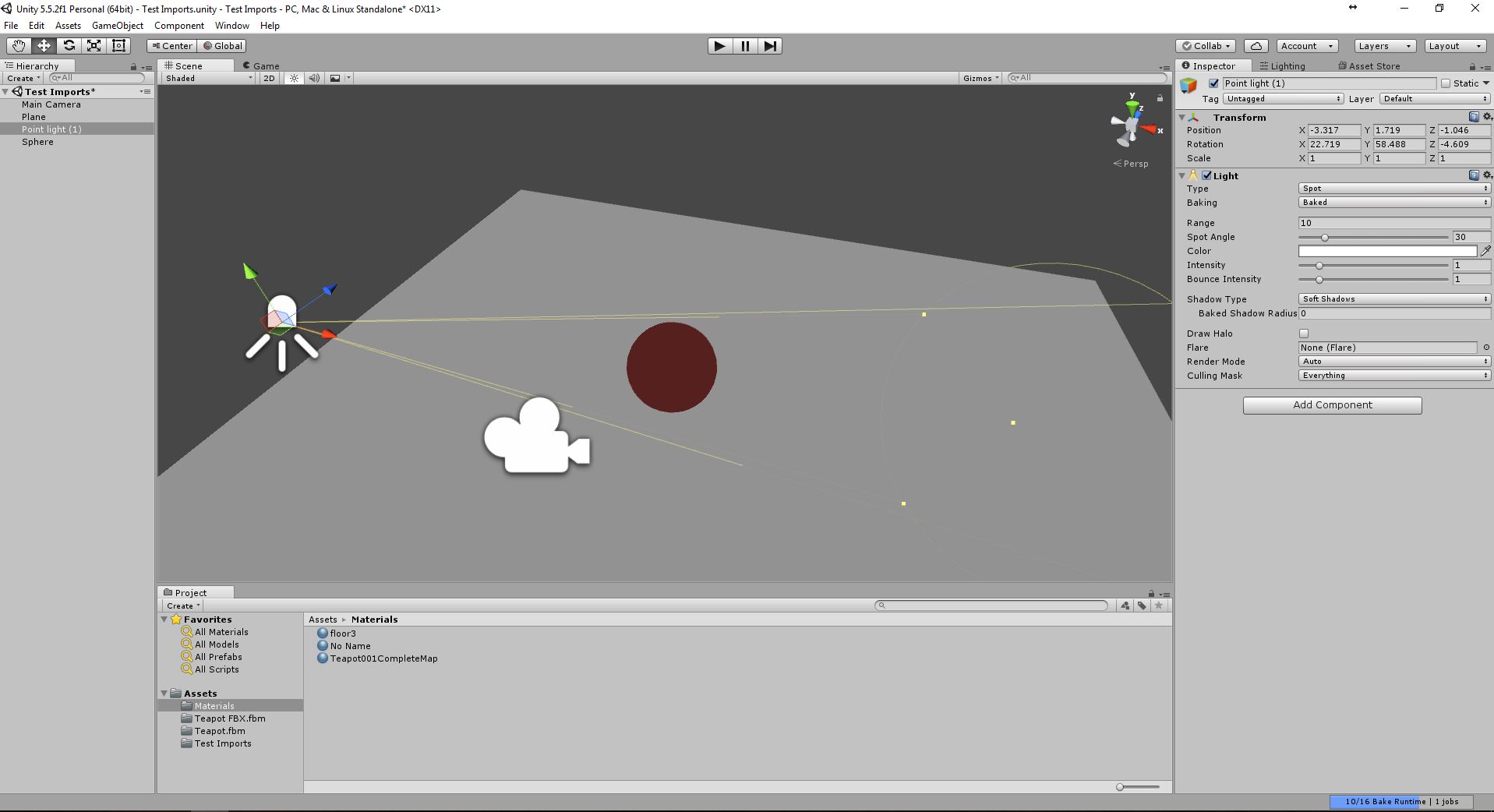
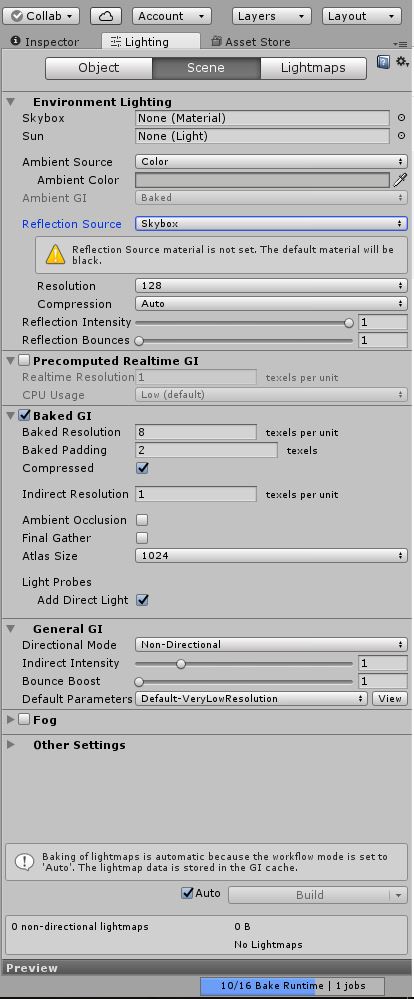
scene screenshot

Scene Settings


baked-lighting-2.jpg (87.5 kB)
baked-lighting.jpg (151.7 kB)
Comment
Add comment · Show 2 · Share
10 |3000 characters needed characters left characters exceeded
▼
  • Viewable by all users
  • Viewable by moderators
  • Viewable by moderators and the original poster
  • Advanced visibility
Viewable by all users
avatar image scottpantall · Mar 28, 2017 at 09:11 PM 0
Share

I had the same issue and this solution worked. Thanks!

Can anyone explain why this solution works?

avatar image yeyun_unity · Jul 12, 2018 at 04:52 AM 0
Share

I have the same issues. However, my scene already have many "Static" objects, but this "Bake time 10/16" problem is still there. I waited it to build for a whole night, but nothing happened. So sad that your solution didn't work for me.

avatar image
0

Answer by Raikir-i-sh · Nov 05, 2018 at 11:21 AM

I had the same problem. The way it worked me is Changing the 'Compression' from Auto to Uncompressed. And Don't Forget to Click the 'Generate Lighting' at the end . I hope this works for anyone else having this same problem !!

Comment
Add comment · Share
10 |3000 characters needed characters left characters exceeded
▼
  • Viewable by all users
  • Viewable by moderators
  • Viewable by moderators and the original poster
  • Advanced visibility
Viewable by all users

Your answer

Hint: You can notify a user about this post by typing @username

Up to 2 attachments (including images) can be used with a maximum of 524.3 kB each and 1.0 MB total.

Follow this Question

Answers Answers and Comments

12 People are following this question.

avatar image avatar image avatar image avatar image avatar image avatar image avatar image avatar image avatar image avatar image avatar image avatar image

Related Questions

Ambient lighting/reflection switching off when camera gets close. 0 Answers

Why is this error occuring and how to resolve it ? please help !! 1 Answer

Shadows pass through meshes after baking 0 Answers

Problem with scene lighting/bake 2 Answers

Artifacting when baking with Precomputed Realtime GI 0 Answers


Enterprise
Social Q&A

Social
Subscribe on YouTube social-youtube Follow on LinkedIn social-linkedin Follow on Twitter social-twitter Follow on Facebook social-facebook Follow on Instagram social-instagram

Footer

  • Purchase
    • Products
    • Subscription
    • Asset Store
    • Unity Gear
    • Resellers
  • Education
    • Students
    • Educators
    • Certification
    • Learn
    • Center of Excellence
  • Download
    • Unity
    • Beta Program
  • Unity Labs
    • Labs
    • Publications
  • Resources
    • Learn platform
    • Community
    • Documentation
    • Unity QA
    • FAQ
    • Services Status
    • Connect
  • About Unity
    • About Us
    • Blog
    • Events
    • Careers
    • Contact
    • Press
    • Partners
    • Affiliates
    • Security
Copyright © 2020 Unity Technologies
  • Legal
  • Privacy Policy
  • Cookies
  • Do Not Sell My Personal Information
  • Cookies Settings
"Unity", Unity logos, and other Unity trademarks are trademarks or registered trademarks of Unity Technologies or its affiliates in the U.S. and elsewhere (more info here). Other names or brands are trademarks of their respective owners.
  • Anonymous
  • Sign in
  • Create
  • Ask a question
  • Spaces
  • Default
  • Help Room
  • META
  • Moderators
  • Explore
  • Topics
  • Questions
  • Users
  • Badges