 koobas.hobune.stream


LookAt doesn't work properly with OVRCameraRig
Hello,
I have a function which should rotate the CameraRig of the Oculus towards different GameObjects (POIs). But what it does is only rotating the y-Axis towards something but not the POI.
Here is my code:
 GameObject tempObject = currentActivePOI;
 Vector3 tempVector;
 tempVector = new Vector3 (tempObject.transform.position.x, tempObject.transform.position.y, tempObject.transform.position.z);
 cameraRig.transform.LookAt (tempVector);
This is how it looks like before the rotation: 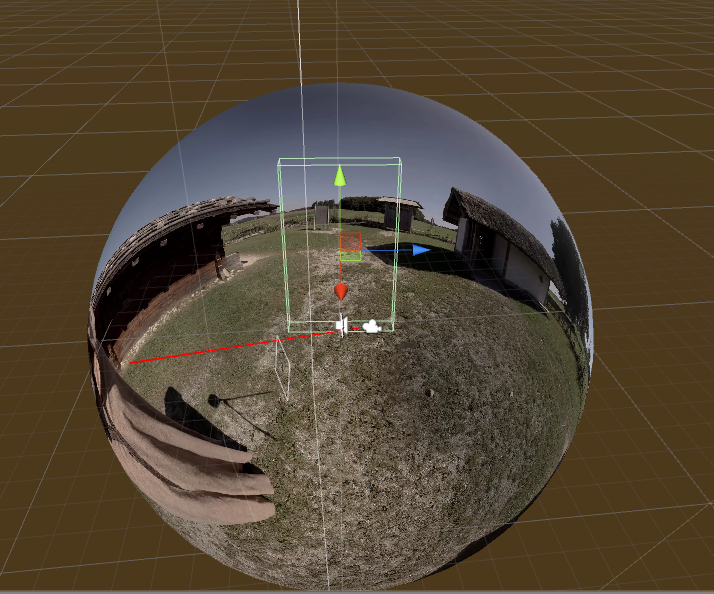
And this is how it looks afterwards: 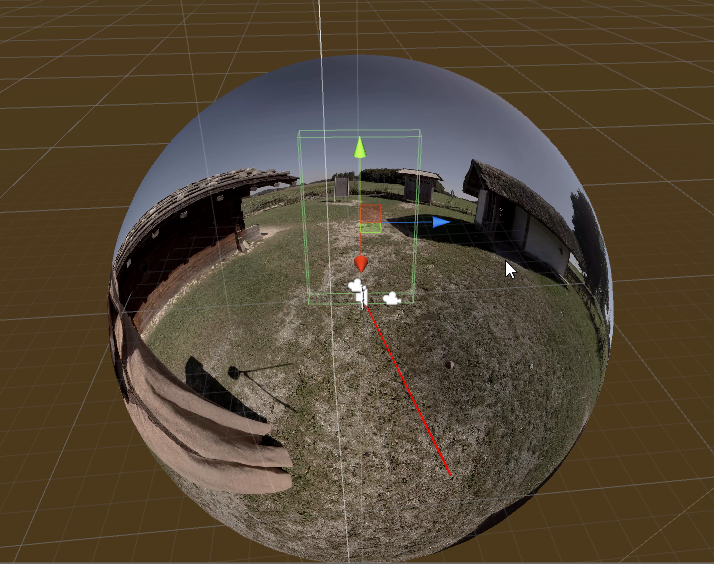
The position of the BoxCollider is my POI. At first I thought it might be looking towards the opposite direction but that was not the case.
Can anyone help me here?

hi;
i out of ideas ;
try to instantiate a simple cube on "tempVector" position like below to see where is he actually trying to look and then u may find the problem;
Instantiate(GameObject.CreatePrimitive(PrimitiveType.Cube), tempVector, Quaternion.identity);

hi,
I did what you said, and it actually spawned 2 cubes at the same time. One right at the camera at postion 0/0/0 and one at the postion of tempVector. 
But I dont understand why it instantiates the cube twice even tho the method is only called once.

I actually solved that problem now. But another problem appeared: how can I rotate the CenterEyeAnchor of the OVR CameraRig? $$anonymous$$y problem is that if I rotate the TrackingSpace of the CameraRig towards the POI it does that perfectly for the TrackingSpace object, but not for the Oculus CameraView itself, because the TrackingSpace object doesn't follow the rotation of the CenterEyeAnchor. Ins$$anonymous$$d it has a static position and rotates the whole view, with the EyeAnchors in their rotation where they used to be before.
In other words, if the CenterEyeAnchor rotation is off from the TrackingSpace's static rotation, then it also will be off, after rotating the TrackingSpace towards the POI.
I tried setting the rotation of the TrackingSpace = CenterEyeAnchor rotation before rotating it towards the POI, but that didn't work for me.
I've added my script in an extra comment.
Here you have my script:
 using System.Collections;
 using System.Collections.Generic;
 using UnityEngine;
 using UnityEditor;
 using UnityEngine.VR;

 public class FadeController : MonoBehaviour {

     public Transform popupSpawnPosition;
     public GameObject popupObject;
     public OVRCameraRig cameraRig;
     public Camera centerCam;
     public GameObject player;
     public GameObject cube;

     private BoxCollider currentBoxCollider;
     private GameObject currentActivePOI;

     private Transform currentSpawnPosition;
     private GameObject currentPopup;
     private GameObject screenFadeObject;
     private Transform mainCamera;
     GameObject cam;
     private int poiCounter = 0;

     bool spawned = false;

     private RaycastHit vision;
     public float rayLength = 10.0f;
     private bool isHit;
     private Rigidbody hitObject;


     // Use this for initialization
     void Start () {
         mainCamera = Camera.main.transform;
         cam = GameObject.FindGameObjectWithTag ("MainCamera");

         screenFadeObject = GameObject.Find("ScreenFadeCube");
         FadeToClear ();
     }

     // Update is called once per frame
     void Update () {

         Debug.DrawRay (Camera.main.transform.position, Camera.main.transform.forward * rayLength, Color.red, 0.5f);


         currentActivePOI = getCurrentActivePOI ();


         //Hitting colider
         if (Physics.Raycast (Camera.main.transform.position, Camera.main.transform.forward, out vision, rayLength)) {

             //Check the object Tag
             if (vision.collider.tag == "Interactive") {
                 //Debug.Log (vision.collider.name);

                 hitObject = vision.rigidbody;

                 //hide preview window
                 if (currentPopup != null) {
                     Destroy (currentPopup);
                     currentActivePOI = null;
                 }
             }
         }

         if (currentActivePOI != null) {

             //cameraRig.transform.LookAt (currentActivePOI.transform, Vector3.up);

             if (currentPopup == null && !spawned) {
                 SpawnPopup ();
             }
         } else {
             Destroy (currentPopup);

         }


         //Testzwecke
         if (Input.GetMouseButton (0)) {
             if (currentPopup == null) {
                 Debug.Log ("Spawn PopUpWindow.");

                 SpawnPopup ();
             }
         }
         if (Input.GetMouseButton (1)) {
             if (currentPopup != null) {
                 Debug.Log ("Destroy PopUpWindow.");
                 Destroy (currentPopup);
             }
         }

         //Checken, ob Nutzer nach unten schaut.
         if (currentPopup != null) {
             if (InputTracking.GetLocalRotation (VRNode.CenterEye).eulerAngles.x > 50 && InputTracking.GetLocalRotation (VRNode.CenterEye).eulerAngles.x < 60) {

                 Debug.Log ("START COROUTINE");
                 cameraRig.trackerAnchor.rotation = cameraRig.centerEyeAnchor.rotation;
                 StartCoroutine(rotateImage ());
                 //rotateImage ();
                 //test ();
                 Destroy (currentPopup);
             }

         }


         //Debug.Log("x:" + InputTracking.GetLocalRotation (VRNode.CenterEye).eulerAngles.x);
         //Debug.Log("y:" + InputTracking.GetLocalRotation (VRNode.CenterEye).eulerAngles.y);
     }

     void SpawnPopup() {

         spawned = true;

         Debug.Log ("Instantiiate");
         //Instantiiert das Preview Fenster

         Debug.Log (mainCamera.position.x);


         currentPopup = (GameObject)Instantiate(popupObject, popupSpawnPosition.position, mainCamera.rotation);

         //Animiert spawnen
         currentPopup.transform.GetChild(0).localScale = Vector3.zero;
         iTween.ScaleTo(currentPopup.transform.GetChild(0).gameObject, Vector3.one, 1f);

         //currentPopup.gameObject.SetActive (true);
     }


     void FadeToClear() {
         iTween.ColorTo(screenFadeObject, Color.clear, 1f);
     }
     void FadeToBlack() {
         iTween.ColorTo(screenFadeObject, Color.black, 1f);
     }

     IEnumerator rotateImage() {
         FadeToBlack ();

         yield return new WaitForSeconds (1f);
         GameObject tempObject = currentActivePOI;
         Vector3 tempVector;

         tempVector = new Vector3 (tempObject.transform.position.x, tempObject.transform.position.y, tempObject.transform.position.z);


         //Instantiate(GameObject.CreatePrimitive(PrimitiveType.Cube), tempObject.transform.position, Quaternion.identity);

         //cameraRig.trackingSpace.rotation = cam.transform.rotation;

         Debug.Log (cameraRig.trackingSpace.rotation);

         cameraRig.trackingSpace.transform.LookAt (tempVector);

         Debug.Log ("Camera Rotated!");
         yield return new WaitForSeconds (1f);
         FadeToClear ();
         //StopCoroutine ("rotateImage");
     }

     GameObject getCurrentActivePOI() {
         BoxCollider tempCollider = null;
         GameObject tempObject = null;
         for (int i = 1; i < 4; i++) {
             tempObject = GameObject.Find ("POI" + i);
             tempCollider = tempObject.GetComponent <BoxCollider>() ;

             if (tempCollider.enabled) {
                 //Debug.Log (tempObject);
                 poiCounter = i;
                 return tempObject;
             }
         }
         Destroy (currentPopup);
         spawned = false;
         return null;
     }
 }




