
Wayback Machinekoobas.hobune.stream
May JUN Jul
Previous capture 12 Next capture
2021 2022 2023
1 capture
12 Jun 22 - 12 Jun 22
sparklines
Close Help
  • Products
  • Solutions
  • Made with Unity
  • Learning
  • Support & Services
  • Community
  • Asset Store
  • Get Unity

UNITY ACCOUNT

You need a Unity Account to shop in the Online and Asset Stores, participate in the Unity Community and manage your license portfolio. Login Create account
  • Blog
  • Forums
  • Answers
  • Evangelists
  • User Groups
  • Beta Program
  • Advisory Panel

Navigation

  • Home
  • Products
  • Solutions
  • Made with Unity
  • Learning
  • Support & Services
  • Community
    • Blog
    • Forums
    • Answers
    • Evangelists
    • User Groups
    • Beta Program
    • Advisory Panel

Unity account

You need a Unity Account to shop in the Online and Asset Stores, participate in the Unity Community and manage your license portfolio. Login Create account

Language

  • Chinese
  • Spanish
  • Japanese
  • Korean
  • Portuguese
  • Ask a question
  • Spaces
    • Default
    • Help Room
    • META
    • Moderators
    • Topics
    • Questions
    • Users
    • Badges
  • Home /
  • Help Room /
avatar image
0
Question by abeering · Dec 21, 2015 at 08:35 PM · 2d gamelinerenderertrailrendererorthographic camera

2D Orthographic Cameras and Line/Trail Renderers Not Working (with detailed example)

So there are tons of questions out there about orthographic cameras + LineRenderer or TrailRenderer not working together or working strangely together, and I think I've read a hundred of them. Still - I can't get them to work together.

I've laid out an extremely simple example using TrailRenderer instead of LineRenderer for simplicity, but they share the same problem. The basic issue is that although I can see my Lines/Trails in the Scene view, they don't show in the Game view.
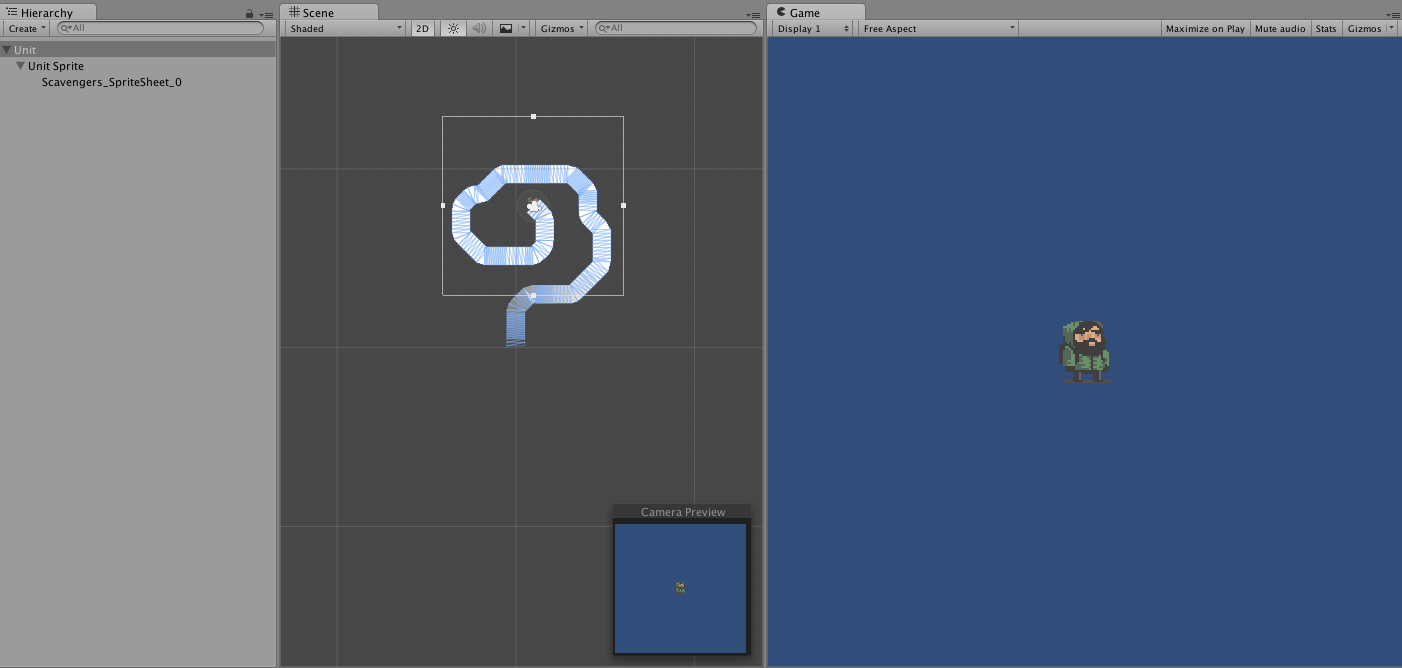
game and secen views

The Example:

  • Created an empty GameObject called Unit

  • Added a Sprite object called UnitSprite as a child of Unit (Holding the Unit Sprite) http://i.imgur.com/0zczDhj.png

  • Added a Camera Component on Unit and made it Orthographic http://i.imgur.com/86t7xuN.png

  • Added a TrailRenderer Component on Unit http://i.imgur.com/InSAtME.png

  • Added a simple movement script to Unit. (included below)

Simple Movement Script:

 public class SimpleMovement : MonoBehaviour {
 
     // Use this for initialization
     void Start () {
     
     }
     
     // Update is called once per frame
     void Update () {
         int horizontal = 0;
         int vertical = 0;
         horizontal = (int)(Input.GetAxisRaw ("Horizontal"));
         vertical = (int)(Input.GetAxisRaw ("Vertical"));
 
         Vector2 start = transform.position;
         Vector2 end = start + new Vector2 (horizontal, vertical);
         Vector2 newPosition = Vector2.MoveTowards (start, end, .1f);
         transform.position = newPosition;
     }
 }
 

Things I've tried:

  • Playing with every permutation of Sorting Layer and Z-values

  • Camera.transparencySortMode and Camera.opaqueSortMode

  • Using a different Orthographic camera than one attached to Unit

  • Madly changed every value I could find in every possible way all the while laughing hysterically

I'm hoping that if I can solve this problem with the TrailRenderer I'll be able to fix my real problems with LineRenderers + TrailRenderers in my actual game. Any help is super appreciated, so thanks in advance.

Happy Holidays.

screen-shot-2015-12-21-at-93632-am.png (79.2 kB)
Comment
Add comment
10 |3000 characters needed characters left characters exceeded
▼
  • Viewable by all users
  • Viewable by moderators
  • Viewable by moderators and the original poster
  • Advanced visibility
Viewable by all users

1 Reply

· Add your reply
  • Sort: 
avatar image
0

Answer by abeering · Dec 22, 2015 at 12:40 AM

Okay so the answer was in SortingLayers. The most important bit I noticed is that no matter what the parent GameObject is set to, I still needed to set the SortingOrderName for the TrailRenderer component in the script, otherwise it would just always render behind every other sprite regardless of Sorting Layer or Z value.

Comment
Add comment · Share
10 |3000 characters needed characters left characters exceeded
▼
  • Viewable by all users
  • Viewable by moderators
  • Viewable by moderators and the original poster
  • Advanced visibility
Viewable by all users

Your answer

Hint: You can notify a user about this post by typing @username

Up to 2 attachments (including images) can be used with a maximum of 524.3 kB each and 1.0 MB total.

Follow this Question

Answers Answers and Comments

33 People are following this question.

avatar image avatar image avatar image avatar image avatar image avatar image avatar image avatar image avatar image avatar image avatar image avatar image avatar image avatar image avatar image avatar image avatar image avatar image avatar image avatar image avatar image avatar image avatar image avatar image avatar image avatar image avatar image avatar image avatar image avatar image avatar image avatar image avatar image

Related Questions

Can't get a smooth following line 1 Answer

y line render getting norrow at the end 1 Answer

Moving dotted guide line 0 Answers

Unity Trail Renderer Shows in Unity Editor but not in-game. 0 Answers

How to make game like Line 1 Answer


Enterprise
Social Q&A

Social
Subscribe on YouTube social-youtube Follow on LinkedIn social-linkedin Follow on Twitter social-twitter Follow on Facebook social-facebook Follow on Instagram social-instagram

Footer

  • Purchase
    • Products
    • Subscription
    • Asset Store
    • Unity Gear
    • Resellers
  • Education
    • Students
    • Educators
    • Certification
    • Learn
    • Center of Excellence
  • Download
    • Unity
    • Beta Program
  • Unity Labs
    • Labs
    • Publications
  • Resources
    • Learn platform
    • Community
    • Documentation
    • Unity QA
    • FAQ
    • Services Status
    • Connect
  • About Unity
    • About Us
    • Blog
    • Events
    • Careers
    • Contact
    • Press
    • Partners
    • Affiliates
    • Security
Copyright © 2020 Unity Technologies
  • Legal
  • Privacy Policy
  • Cookies
  • Do Not Sell My Personal Information
  • Cookies Settings
"Unity", Unity logos, and other Unity trademarks are trademarks or registered trademarks of Unity Technologies or its affiliates in the U.S. and elsewhere (more info here). Other names or brands are trademarks of their respective owners.
  • Anonymous
  • Sign in
  • Create
  • Ask a question
  • Spaces
  • Default
  • Help Room
  • META
  • Moderators
  • Explore
  • Topics
  • Questions
  • Users
  • Badges
