
Wayback Machinekoobas.hobune.stream
May JUN Jul
Previous capture 12 Next capture
2021 2022 2023
1 capture
12 Jun 22 - 12 Jun 22
sparklines
Close Help
  • Products
  • Solutions
  • Made with Unity
  • Learning
  • Support & Services
  • Community
  • Asset Store
  • Get Unity

UNITY ACCOUNT

You need a Unity Account to shop in the Online and Asset Stores, participate in the Unity Community and manage your license portfolio. Login Create account
  • Blog
  • Forums
  • Answers
  • Evangelists
  • User Groups
  • Beta Program
  • Advisory Panel

Navigation

  • Home
  • Products
  • Solutions
  • Made with Unity
  • Learning
  • Support & Services
  • Community
    • Blog
    • Forums
    • Answers
    • Evangelists
    • User Groups
    • Beta Program
    • Advisory Panel

Unity account

You need a Unity Account to shop in the Online and Asset Stores, participate in the Unity Community and manage your license portfolio. Login Create account

Language

  • Chinese
  • Spanish
  • Japanese
  • Korean
  • Portuguese
  • Ask a question
  • Spaces
    • Default
    • Help Room
    • META
    • Moderators
    • Topics
    • Questions
    • Users
    • Badges
  • Home /
avatar image
0
Question by Charris4 · Mar 20, 2017 at 10:31 PM · bugassetsimporting assetsmovie texturequicktime

Video assets won't import...mostly.

I'm putting in some pre-rendered cutscenes for my game, and for a few weeks I've been using a placeholder cutscene. Back (a Unity version or two ago) when I imported the placeholder, everything worked as expected. Now that I'm ready to put in the actual cutscenes, they will not import correctly. They show up in the project asset browser, and there's a Unity metadata file, but it's like it doesn't recognize that it's a video, and has no import settings and won't make a movie texture out of it. I've attached a picture so that you can see what I'm talking about. Solutions I've tried:

  • Reinstall Quicktime

  • Render video in various formats (including .avi, .mov, .m4a, etc)

  • Run Unity as Administrator

Picture: My project assets browser with the "Cutscene Placeholder" imported correctly (from a while ago) and one of the final cutscenes called "SVVM_EndingCutscene1_v2" which does not show up as a movie texture. alt text
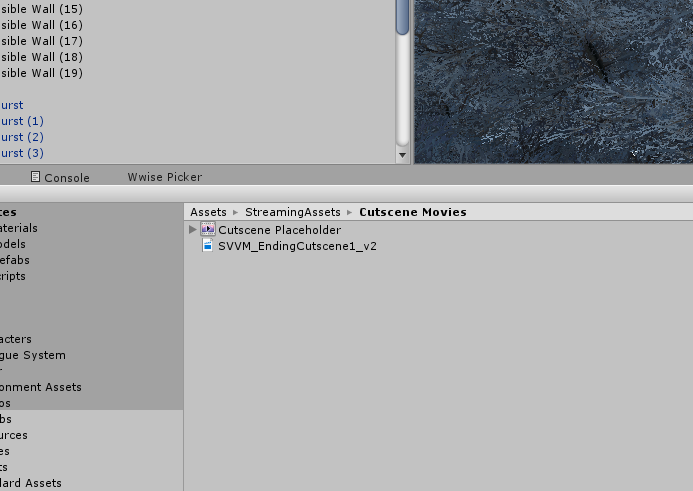
unity-movie-problem.png (141.3 kB)
Comment
Add comment · Show 4
10 |3000 characters needed characters left characters exceeded
▼
  • Viewable by all users
  • Viewable by moderators
  • Viewable by moderators and the original poster
  • Advanced visibility
Viewable by all users
avatar image IvovdMarel · Mar 20, 2017 at 03:03 AM 0
Share

Do you have the option to export it to an ogv ? That's what Unity does with video files, so if you do it yourself it might solve the issue.

avatar image Charris4 IvovdMarel · Mar 20, 2017 at 04:47 PM 0
Share

Just tried converting to that, but same result. Unity still is not happy with it. But even if that had worked, it still doesn't explain the root problem. Thanks for the suggestion, though!

avatar image IvovdMarel Charris4 · Mar 20, 2017 at 04:57 PM 1
Share

Yea it might be difficult to find the actual cause. I would try:

Create a new Unity project, import a video into there. Does it work? $$anonymous$$ove your project over (potentially part by part, to see what might have caused the issue).

Re-install Unity.

Neither of these options actually explains anything, but definitely worth a try.

Show more comments

1 Reply

· Add your reply
  • Sort: 
avatar image
0

Answer by JC_SummitTech · Mar 23, 2017 at 03:09 PM

Assets put in the streaming assets folder won't be converted to ogv. I would guess your placeholders were in a different folder and were getting converted to ogv by unity.

You'll want to convert them externally if you want to place them in streaming assets.

Comment
Add comment · Show 2 · Share
10 |3000 characters needed characters left characters exceeded
▼
  • Viewable by all users
  • Viewable by moderators
  • Viewable by moderators and the original poster
  • Advanced visibility
Viewable by all users
avatar image cdunne1 · Aug 08, 2017 at 03:14 PM 0
Share

I thought Unity and the Easy $$anonymous$$ovie Texture plug in can cope with any format video file - it must be ogv files then?

avatar image cdunne1 · Aug 08, 2017 at 03:14 PM 0
Share

Thought Unity and Easy $$anonymous$$ovie Texture could handle any format... so any Strea$$anonymous$$gAssets folder files must be ogv then yes?

Your answer

Hint: You can notify a user about this post by typing @username

Up to 2 attachments (including images) can be used with a maximum of 524.3 kB each and 1.0 MB total.

Follow this Question

Answers Answers and Comments

6 People are following this question.

avatar image avatar image avatar image avatar image avatar image avatar image

Related Questions

Selected Mesh in inspector is missing name, the link to mesh in assets is also missing 1 Answer

Unable to Drag and Drop Folder/Assets into "Project" editor window. 2 Answers

How do I import custom weapon skins on steam 1 Answer

Replace a sprite by another in every game object using it 1 Answer

Assets Blinking on Game Play 0 Answers


Enterprise
Social Q&A

Social
Subscribe on YouTube social-youtube Follow on LinkedIn social-linkedin Follow on Twitter social-twitter Follow on Facebook social-facebook Follow on Instagram social-instagram

Footer

  • Purchase
    • Products
    • Subscription
    • Asset Store
    • Unity Gear
    • Resellers
  • Education
    • Students
    • Educators
    • Certification
    • Learn
    • Center of Excellence
  • Download
    • Unity
    • Beta Program
  • Unity Labs
    • Labs
    • Publications
  • Resources
    • Learn platform
    • Community
    • Documentation
    • Unity QA
    • FAQ
    • Services Status
    • Connect
  • About Unity
    • About Us
    • Blog
    • Events
    • Careers
    • Contact
    • Press
    • Partners
    • Affiliates
    • Security
Copyright © 2020 Unity Technologies
  • Legal
  • Privacy Policy
  • Cookies
  • Do Not Sell My Personal Information
  • Cookies Settings
"Unity", Unity logos, and other Unity trademarks are trademarks or registered trademarks of Unity Technologies or its affiliates in the U.S. and elsewhere (more info here). Other names or brands are trademarks of their respective owners.
  • Anonymous
  • Sign in
  • Create
  • Ask a question
  • Spaces
  • Default
  • Help Room
  • META
  • Moderators
  • Explore
  • Topics
  • Questions
  • Users
  • Badges
