
Wayback Machinekoobas.hobune.stream
May JUN Jul
Previous capture 12 Next capture
2021 2022 2023
1 capture
12 Jun 22 - 12 Jun 22
sparklines
Close Help
  • Products
  • Solutions
  • Made with Unity
  • Learning
  • Support & Services
  • Community
  • Asset Store
  • Get Unity

UNITY ACCOUNT

You need a Unity Account to shop in the Online and Asset Stores, participate in the Unity Community and manage your license portfolio. Login Create account
  • Blog
  • Forums
  • Answers
  • Evangelists
  • User Groups
  • Beta Program
  • Advisory Panel

Navigation

  • Home
  • Products
  • Solutions
  • Made with Unity
  • Learning
  • Support & Services
  • Community
    • Blog
    • Forums
    • Answers
    • Evangelists
    • User Groups
    • Beta Program
    • Advisory Panel

Unity account

You need a Unity Account to shop in the Online and Asset Stores, participate in the Unity Community and manage your license portfolio. Login Create account

Language

  • Chinese
  • Spanish
  • Japanese
  • Korean
  • Portuguese
  • Ask a question
  • Spaces
    • Default
    • Help Room
    • META
    • Moderators
    • Topics
    • Questions
    • Users
    • Badges
  • Home /
avatar image
0
Question by tonycsharks · Nov 19, 2016 at 06:39 PM · buttonsdetectionswipedetecttap

Detect touches on the top right corner of the screen

For my game, I have in the top right area of the screen there are 3 ui buttons, sound, Exit, pause buttons. These buttons are shown here:
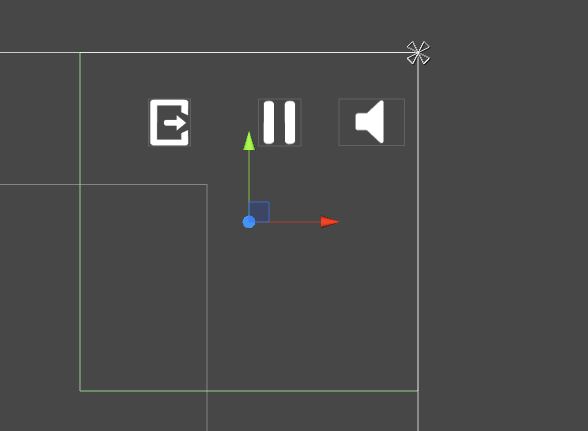
alt text

I have created an empty UI game object and has given box collider2d component to it. and its area is shown in the green colour. I'm using Single Tap, Swipe Up and Swipe Down for the player controls and its done using the code in the Update function:

 for (var i = 0; i < Input.touchCount; ++i)
             {
                 if (Input.GetTouch(i).phase == TouchPhase.Began)
                 {
                     fp = Input.GetTouch(i).position;
                     lp = Input.GetTouch(i).position;
                 }
                 if (Input.GetTouch(i).phase == TouchPhase.Moved)
                 {
                     lp = Input.GetTouch(i).position;
                     swipeDistanceX = Mathf.Abs((lp.x - fp.x));
                     swipeDistanceY = Mathf.Abs((lp.y - fp.y));
                 }
                 if (Input.GetTouch(i).phase == TouchPhase.Ended)
                 {
                     angle = Mathf.Atan2((lp.x - fp.x), (lp.y - fp.y)) * 57.2957795f;
                     Debug.Log("Swipe Distance: " + swipeDistanceY);
                     Debug.Log("Tap count: " + Input.GetTouch(i).tapCount);
                     if (swipeDistanceY < 20)
                     {
                         if (Input.GetTouch(0).tapCount == 1)
                         {
                             PlayerScript.OnTap();
                             Debug.Log("Single tap..");
                         }
                     }
                     else if ((angle > 150 || angle < -150) && !GameScript.isCollectibleDragging)
                     {
                         Debug.Log("Down Swipe detected..");
                         PlayerScript.SwipeDown();
                         swipeDistanceY = 0;
                     }
                     else if((angle > -30 && angle < 30) && !GameScript.isCollectibleDragging)
                     {
                         Debug.Log("Up Swipe detected..");
                         PlayerScript.SwipeUp();
                         swipeDistanceY = 0;
                     }
                 }
             }


Now the problem is when ever I tap on the buttons, the code for the single tap is being executed mostly. I need to block the player taps within the selected empty game object, so that when the player taps on the buttons, the buttons will work properly. Now the buttons are not detecting the presses, sometimes and the users are giving me negative feedback for that. How can I fix this issue? Any help would be appreciated very much.

error1.jpg (18.0 kB)
Comment
Add comment
10 |3000 characters needed characters left characters exceeded
▼
  • Viewable by all users
  • Viewable by moderators
  • Viewable by moderators and the original poster
  • Advanced visibility
Viewable by all users

1 Reply

· Add your reply
  • Sort: 
avatar image
0

Answer by Spartiate0033 · Nov 19, 2016 at 07:46 PM

You are definitely going to want to use Unity's UI for this.

https://unity3d.com/learn/tutorials/topics/user-interface-ui/ui-button

These work wonders. Take an hour or two and watch all the UI videos and use these instead. They will save you a bunch of time and open up new options for you and your game (in some cases, literally opening new options ;) )

As a side note, you are using touch, so I'm assuming your game will be on mobile. Yes, buttons do work on mobile and they work very well (I used them for a little medical app I made for a doctor).

Cheers!

Comment
Add comment · Share
10 |3000 characters needed characters left characters exceeded
▼
  • Viewable by all users
  • Viewable by moderators
  • Viewable by moderators and the original poster
  • Advanced visibility
Viewable by all users

Your answer

Hint: You can notify a user about this post by typing @username

Up to 2 attachments (including images) can be used with a maximum of 524.3 kB each and 1.0 MB total.

Follow this Question

Answers Answers and Comments

57 People are following this question.

avatar image avatar image avatar image avatar image avatar image avatar image avatar image avatar image avatar image avatar image avatar image avatar image avatar image avatar image avatar image avatar image avatar image avatar image avatar image avatar image avatar image avatar image avatar image avatar image avatar image avatar image avatar image avatar image avatar image avatar image avatar image avatar image avatar image avatar image avatar image avatar image avatar image avatar image avatar image avatar image avatar image avatar image avatar image avatar image avatar image avatar image avatar image avatar image avatar image avatar image avatar image avatar image avatar image avatar image avatar image avatar image avatar image

Related Questions

Differentiating between a tap from a swipe on Android 2 Answers

Problem with touch 1 Answer

Detect if player wants to pause or to jump 3 Answers

detect 360 spin on mobile device 1 Answer

How to do different actions when hovering mouse at each button on GUILayout 1 Answer


Enterprise
Social Q&A

Social
Subscribe on YouTube social-youtube Follow on LinkedIn social-linkedin Follow on Twitter social-twitter Follow on Facebook social-facebook Follow on Instagram social-instagram

Footer

  • Purchase
    • Products
    • Subscription
    • Asset Store
    • Unity Gear
    • Resellers
  • Education
    • Students
    • Educators
    • Certification
    • Learn
    • Center of Excellence
  • Download
    • Unity
    • Beta Program
  • Unity Labs
    • Labs
    • Publications
  • Resources
    • Learn platform
    • Community
    • Documentation
    • Unity QA
    • FAQ
    • Services Status
    • Connect
  • About Unity
    • About Us
    • Blog
    • Events
    • Careers
    • Contact
    • Press
    • Partners
    • Affiliates
    • Security
Copyright © 2020 Unity Technologies
  • Legal
  • Privacy Policy
  • Cookies
  • Do Not Sell My Personal Information
  • Cookies Settings
"Unity", Unity logos, and other Unity trademarks are trademarks or registered trademarks of Unity Technologies or its affiliates in the U.S. and elsewhere (more info here). Other names or brands are trademarks of their respective owners.
  • Anonymous
  • Sign in
  • Create
  • Ask a question
  • Spaces
  • Default
  • Help Room
  • META
  • Moderators
  • Explore
  • Topics
  • Questions
  • Users
  • Badges
