
Wayback Machinekoobas.hobune.stream
May JUN Jul
Previous capture 12 Next capture
2021 2022 2023
1 capture
12 Jun 22 - 12 Jun 22
sparklines
Close Help
  • Products
  • Solutions
  • Made with Unity
  • Learning
  • Support & Services
  • Community
  • Asset Store
  • Get Unity

UNITY ACCOUNT

You need a Unity Account to shop in the Online and Asset Stores, participate in the Unity Community and manage your license portfolio. Login Create account
  • Blog
  • Forums
  • Answers
  • Evangelists
  • User Groups
  • Beta Program
  • Advisory Panel

Navigation

  • Home
  • Products
  • Solutions
  • Made with Unity
  • Learning
  • Support & Services
  • Community
    • Blog
    • Forums
    • Answers
    • Evangelists
    • User Groups
    • Beta Program
    • Advisory Panel

Unity account

You need a Unity Account to shop in the Online and Asset Stores, participate in the Unity Community and manage your license portfolio. Login Create account

Language

  • Chinese
  • Spanish
  • Japanese
  • Korean
  • Portuguese
  • Ask a question
  • Spaces
    • Default
    • Help Room
    • META
    • Moderators
    • Topics
    • Questions
    • Users
    • Badges
  • Home /
avatar image
0
Question by antonioperez · Dec 17, 2015 at 05:19 PM · sprite2d gametexture2dweight

Image weight 2d - problems weight Game - (texture) (Sprite 2d and UI) ?

I have a problem where my game 2d 're all ready mechanical and now I cling to put the elements on the screen, the official , final arts and everything, but right at the beginning when I put the first " Quad " with a background that was Unity has the weight of 110KB Once in mind it comes as Unity " Texture " magically having 341.4KB,
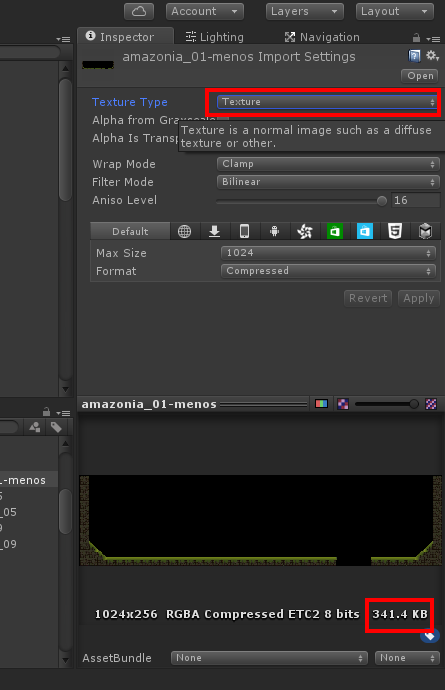
alt text

and we convert it to " Sprite (2D and UI) " iS WITH 1.5MB wEIGHT .
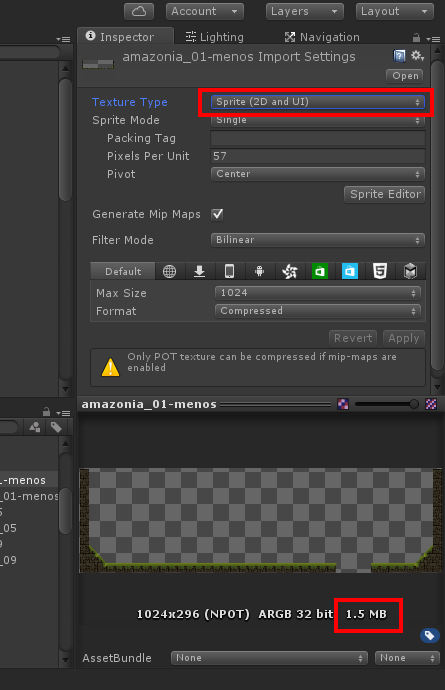
alt text

  • I do not know if I'm putting incorrectly or WHAT should I do so that the weight of my backgrouns not come to such a size up because I thought it would be a UNREAL value , but I exported my game ( android ) and yet these images weigh much and this exponentially rising size of my game and be 2D get very supreso .

Thank you very much in advance

print1.png (46.5 kB)
print2.png (51.9 kB)
Comment
Add comment
10 |3000 characters needed characters left characters exceeded
▼
  • Viewable by all users
  • Viewable by moderators
  • Viewable by moderators and the original poster
  • Advanced visibility
Viewable by all users

2 Replies

· Add your reply
  • Sort: 
avatar image
0

Answer by fffMalzbier · Dec 17, 2015 at 05:24 PM

The bigger size comes from unity no longer compressing the image.

The problem is that if you set your texture to be a sprite, unity set it to NPOT(NotPowerOfTwo) resolution so it has the correct size for working with the sprite tools..

But if you are at NPOT there are some limitations, like the warning you are getting in your second image. Unity can only compress NPOT textures if they do not have mip-map enabled (which you have).

That is why it's suddenly ARGB 32 bit (uncompressed) and 1.5mb in size.

Comment
Add comment · Share
10 |3000 characters needed characters left characters exceeded
▼
  • Viewable by all users
  • Viewable by moderators
  • Viewable by moderators and the original poster
  • Advanced visibility
Viewable by all users
avatar image
0

Answer by arky25 · Nov 01, 2016 at 01:47 PM

Try turning off "Generate Mip Maps". It Reduced the file size from 1.5mb to 8kb for me.

Comment
Add comment · Share
10 |3000 characters needed characters left characters exceeded
▼
  • Viewable by all users
  • Viewable by moderators
  • Viewable by moderators and the original poster
  • Advanced visibility
Viewable by all users

Your answer

Hint: You can notify a user about this post by typing @username

Up to 2 attachments (including images) can be used with a maximum of 524.3 kB each and 1.0 MB total.

Follow this Question

Answers Answers and Comments

4 People are following this question.

avatar image avatar image avatar image avatar image

Related Questions

Unity UpdateExternalTexture from MovieTexture windows crash 0 Answers

Resize a sprite by giving it more transparent pixels 0 Answers

My sprite from sprite.create looks pixelated. 1 Answer

How do you crop a Texture2d 1 Answer

Creating Sprites in code for use Dynamically. 1 Answer


Enterprise
Social Q&A

Social
Subscribe on YouTube social-youtube Follow on LinkedIn social-linkedin Follow on Twitter social-twitter Follow on Facebook social-facebook Follow on Instagram social-instagram

Footer

  • Purchase
    • Products
    • Subscription
    • Asset Store
    • Unity Gear
    • Resellers
  • Education
    • Students
    • Educators
    • Certification
    • Learn
    • Center of Excellence
  • Download
    • Unity
    • Beta Program
  • Unity Labs
    • Labs
    • Publications
  • Resources
    • Learn platform
    • Community
    • Documentation
    • Unity QA
    • FAQ
    • Services Status
    • Connect
  • About Unity
    • About Us
    • Blog
    • Events
    • Careers
    • Contact
    • Press
    • Partners
    • Affiliates
    • Security
Copyright © 2020 Unity Technologies
  • Legal
  • Privacy Policy
  • Cookies
  • Do Not Sell My Personal Information
  • Cookies Settings
"Unity", Unity logos, and other Unity trademarks are trademarks or registered trademarks of Unity Technologies or its affiliates in the U.S. and elsewhere (more info here). Other names or brands are trademarks of their respective owners.
  • Anonymous
  • Sign in
  • Create
  • Ask a question
  • Spaces
  • Default
  • Help Room
  • META
  • Moderators
  • Explore
  • Topics
  • Questions
  • Users
  • Badges
