
Wayback Machinekoobas.hobune.stream
May JUN Jul
Previous capture 13 Next capture
2021 2022 2023
1 capture
13 Jun 22 - 13 Jun 22
sparklines
Close Help
  • Products
  • Solutions
  • Made with Unity
  • Learning
  • Support & Services
  • Community
  • Asset Store
  • Get Unity

UNITY ACCOUNT

You need a Unity Account to shop in the Online and Asset Stores, participate in the Unity Community and manage your license portfolio. Login Create account
  • Blog
  • Forums
  • Answers
  • Evangelists
  • User Groups
  • Beta Program
  • Advisory Panel

Navigation

  • Home
  • Products
  • Solutions
  • Made with Unity
  • Learning
  • Support & Services
  • Community
    • Blog
    • Forums
    • Answers
    • Evangelists
    • User Groups
    • Beta Program
    • Advisory Panel

Unity account

You need a Unity Account to shop in the Online and Asset Stores, participate in the Unity Community and manage your license portfolio. Login Create account

Language

  • Chinese
  • Spanish
  • Japanese
  • Korean
  • Portuguese
  • Ask a question
  • Spaces
    • Default
    • Help Room
    • META
    • Moderators
    • Topics
    • Questions
    • Users
    • Badges
  • Home /
avatar image
0
Question by Meltdown · Jun 25, 2015 at 03:39 AM · planeuv mappingperspective

Generate a plane and change it's UV's to give perspective

I’m using the CreatePlane script from the Unity Wiki.

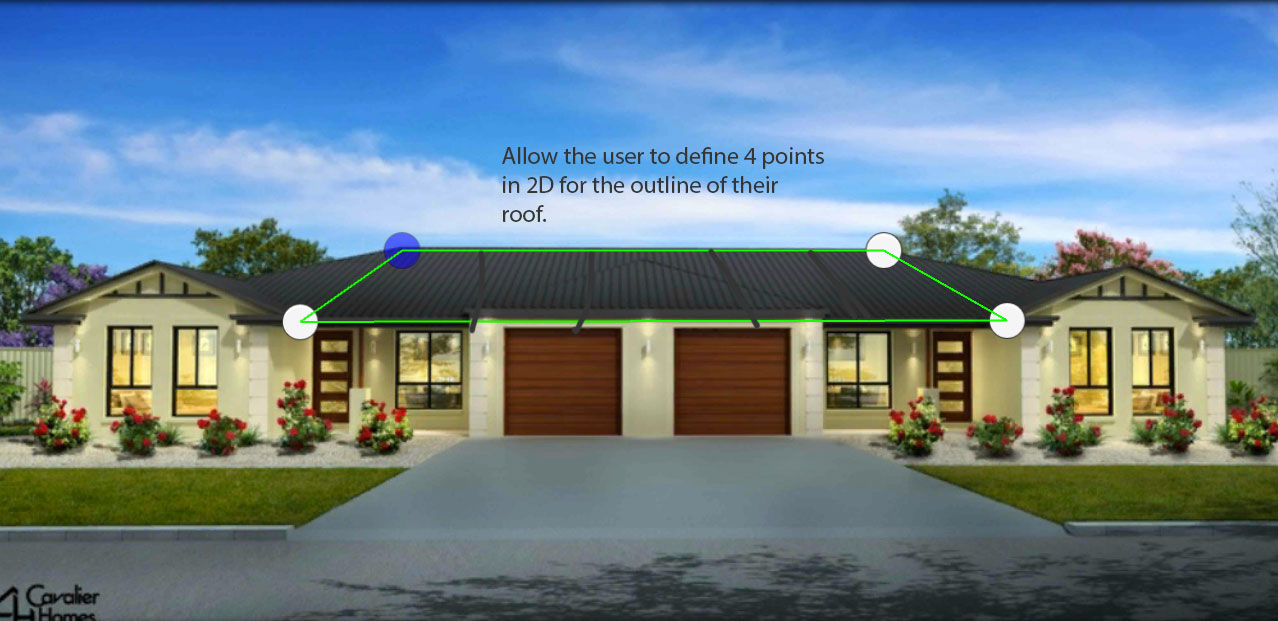
I'm building a roof visualiser app, that allows a user to see what a new roof product will look like on their existing home's roof.

So what I’m doing is allow the user to define 4 points on a screen in 2D, and what I want to do is generate the plane to match those points, all good.
alt text

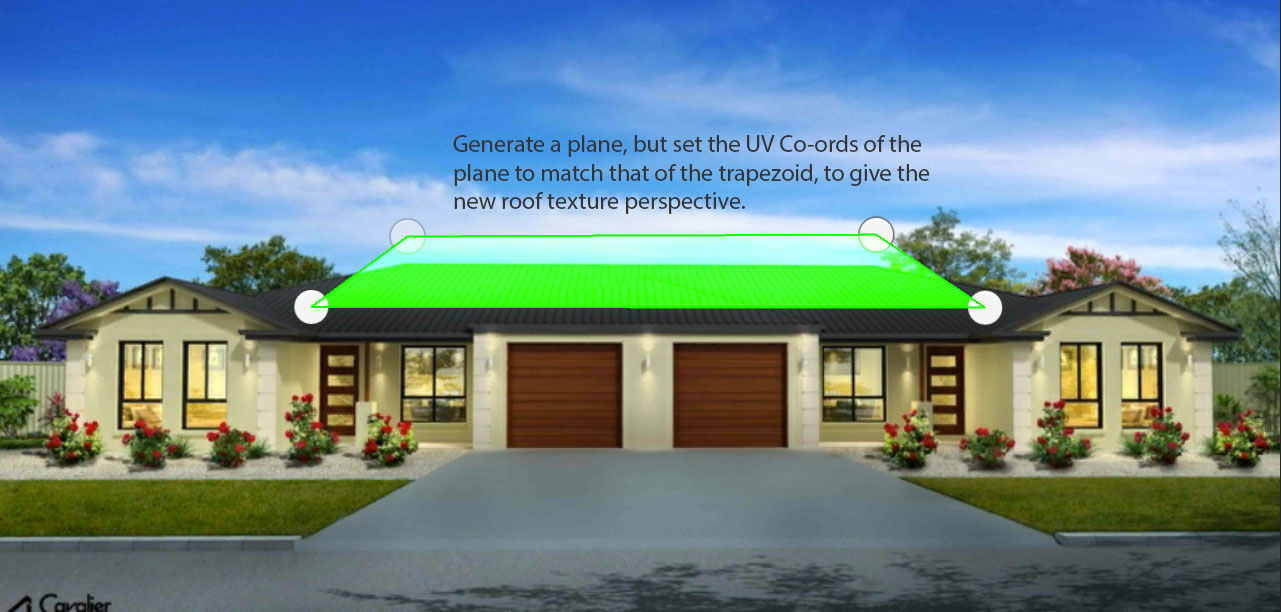
But now the problem comes, where if the plane is a trapezoid, I.e the top 2 points are closer together than the bottom 2, I want the UV’s of the texture to converge along with this angle.
alt text

Any tips or advice on how to do this?

Or am I better rotating the plane in 3D space and somehow mapping it to the 2D points? If so, what would be the easiest way to do this while keeping the correct perspective.

roof-step2.jpg (137.7 kB)
roof-step1.jpg (134.3 kB)
Comment
Add comment · Show 5
10 |3000 characters needed characters left characters exceeded
▼
  • Viewable by all users
  • Viewable by moderators
  • Viewable by moderators and the original poster
  • Advanced visibility
Viewable by all users
avatar image Eric5h5 · Jun 25, 2015 at 04:54 AM 1
Share

Probably I'm missing something, but wouldn't the UVs just be (0, 0) for the bottom left, (1, 0) for the bottom right, (0, 1) for the top left, and (1, 1) for the top right? (Assu$$anonymous$$g a square texture.) It doesn't matter that the top two points are closer together; that doesn't change the UV mapping.

avatar image hexagonius · Jun 25, 2015 at 10:44 AM 0
Share

I go with Eric5h5 here. If you never touch the UVs it should get perspectively distorted all by itself.

avatar image Arshia001 · Jun 25, 2015 at 12:34 PM 0
Share

It wouldn't create a 'perfect' distortion as the texture needs to be distorted along the Y axis as well, but yeah, it should kinda work.

avatar image hexagonius · Jun 25, 2015 at 12:39 PM 0
Share

I see what you mean. You could project the handles into the 3D space and tilt the quad accordingly, or use the angle between top and bottom points for the tilt angle

avatar image Meltdown · Jun 26, 2015 at 12:12 AM 0
Share

@Eric5h5 You were correct, I was doing something wrong in my trapezoid Vertex/UV generation that was causing some issues, the texture does slant correctly :)

0 Replies

· Add your reply
  • Sort: 

Your answer

Hint: You can notify a user about this post by typing @username

Up to 2 attachments (including images) can be used with a maximum of 524.3 kB each and 1.0 MB total.

Follow this Question

Answers Answers and Comments

23 People are following this question.

avatar image avatar image avatar image avatar image avatar image avatar image avatar image avatar image avatar image avatar image avatar image avatar image avatar image avatar image avatar image avatar image avatar image avatar image avatar image avatar image avatar image avatar image avatar image

Related Questions

Transfer lighting and other information from 3D sphere to 2D plane 0 Answers

Object follow cursor using plane due to perspective cam? 2 Answers

What is Vector3.Exclude for? 2 Answers

i've messed something up 1 Answer

hot to use raycast 2 Answers


Enterprise
Social Q&A

Social
Subscribe on YouTube social-youtube Follow on LinkedIn social-linkedin Follow on Twitter social-twitter Follow on Facebook social-facebook Follow on Instagram social-instagram

Footer

  • Purchase
    • Products
    • Subscription
    • Asset Store
    • Unity Gear
    • Resellers
  • Education
    • Students
    • Educators
    • Certification
    • Learn
    • Center of Excellence
  • Download
    • Unity
    • Beta Program
  • Unity Labs
    • Labs
    • Publications
  • Resources
    • Learn platform
    • Community
    • Documentation
    • Unity QA
    • FAQ
    • Services Status
    • Connect
  • About Unity
    • About Us
    • Blog
    • Events
    • Careers
    • Contact
    • Press
    • Partners
    • Affiliates
    • Security
Copyright © 2020 Unity Technologies
  • Legal
  • Privacy Policy
  • Cookies
  • Do Not Sell My Personal Information
  • Cookies Settings
"Unity", Unity logos, and other Unity trademarks are trademarks or registered trademarks of Unity Technologies or its affiliates in the U.S. and elsewhere (more info here). Other names or brands are trademarks of their respective owners.
  • Anonymous
  • Sign in
  • Create
  • Ask a question
  • Spaces
  • Default
  • Help Room
  • META
  • Moderators
  • Explore
  • Topics
  • Questions
  • Users
  • Badges
