
Wayback Machinekoobas.hobune.stream
May JUN Jul
Previous capture 13 Next capture
2021 2022 2023
1 capture
13 Jun 22 - 13 Jun 22
sparklines
Close Help
  • Products
  • Solutions
  • Made with Unity
  • Learning
  • Support & Services
  • Community
  • Asset Store
  • Get Unity

UNITY ACCOUNT

You need a Unity Account to shop in the Online and Asset Stores, participate in the Unity Community and manage your license portfolio. Login Create account
  • Blog
  • Forums
  • Answers
  • Evangelists
  • User Groups
  • Beta Program
  • Advisory Panel

Navigation

  • Home
  • Products
  • Solutions
  • Made with Unity
  • Learning
  • Support & Services
  • Community
    • Blog
    • Forums
    • Answers
    • Evangelists
    • User Groups
    • Beta Program
    • Advisory Panel

Unity account

You need a Unity Account to shop in the Online and Asset Stores, participate in the Unity Community and manage your license portfolio. Login Create account

Language

  • Chinese
  • Spanish
  • Japanese
  • Korean
  • Portuguese
  • Ask a question
  • Spaces
    • Default
    • Help Room
    • META
    • Moderators
    • Topics
    • Questions
    • Users
    • Badges
  • Home /
  • Help Room /
avatar image
0
Question by Joglpr · Apr 20, 2021 at 03:14 PM · 2d-platformerrigidbody2djumping

Weird Jump After Walking Into Wall and Releasing

Thanks for reading this. I've been working on a prototype for a metroidvania, and I got the basic walk, run, and jump down, but for some reason, after walking against a wall and releasing the walk button, the player springs into the air at a height around 1.5x the max jump height is set. I've tried to lock the y position when not jumping and not moving, but because of how I detect input, I can't find a way to make that work, so I tried to assign a physics material with a very small amount of friction, which does remove the jump bug, but then prevents my character from jumping when in a corner sometimes. At some point, I may use a physics material for a wall jump drag, so if possible, I would like to keep the friction 0 for as long as possible until I do this. Thanks for helping me out.

using System.Collections; using System.Collections.Generic; using UnityEngine.InputSystem; using UnityEngine.SceneManagement; using UnityEngine; public class PlayerMovement : MonoBehaviour { Material material; float lastSpawnSet; public LayerMask dangerLayer; public bool inDanger; public float dangerCheckRadius; public float xMovement; float yMovement; public float gravityScale; public float direction; public Transform playerTransform; Rigidbody2D rb; PlayerInput playerControls; InputAction movement; InputAction jump; InputAction run; public float speed; public float walkingSpeed; public float runningSpeed; public float jumpSpeed; public bool grounded; public LayerMask groundLayer; public Transform groundCheck; public float groundCheckRadius; public bool frozen; public float coolDown; public float nextMoveTime; public Vector2 spawn; public Vector2 playerFallBack; public bool runHeld; void Awake() { GameManager.playerManager = gameObject.GetComponent<PlayerManager>(); DontDestroyOnLoad(gameObject); frozen = false; playerControls = new PlayerInput(); movement = playerControls.Player.Move; jump = playerControls.Player.Jump; run = playerControls.Player.Run; material = gameObject.GetComponent<Material>(); } void Start() { rb = this.GetComponent<Rigidbody2D>(); playerTransform = gameObject.transform; speed = walkingSpeed; } void OnEnable() { playerControls.Enable(); } void OnCollisionEnter2D (Collision2D targetObj) { if (targetObj.gameObject.tag == "Void" || targetObj.gameObject.tag == "Trap") { GameManager.playerManager.Death(); } } void FixedUpdate() { if (frozen) rb.gravityScale = 0; else rb.gravityScale = gravityScale; if (Time.time > nextMoveTime) frozen = false; grounded = Physics2D.OverlapCircle (groundCheck.position, groundCheckRadius, groundLayer); if (!frozen) xMovement = movement.ReadValue<Vector2>().x; if (!frozen) { rb.velocity = new Vector2(xMovement * speed, rb.velocity.y); } if (xMovement > 0) { rb.constraints |= RigidbodyConstraints2D.FreezeRotation; direction = 1; } if (xMovement < 0) { rb.constraints |= RigidbodyConstraints2D.FreezeRotation; direction = -1; } jump.performed += ctx => { if (ctx.ReadValue<float>() > 0.5f) { if (grounded && !frozen) { rb.velocity = new Vector2(rb.velocity.x, jumpSpeed); } } }; run.performed += ctx => { if (ctx.ReadValue<float>() > 0.5f) { if (grounded && !frozen) { runHeld = true; } } }; run.canceled += ctx => { if (ctx.ReadValue<float>() <= 0.5f) { runHeld = false; } }; if (runHeld && xMovement != 0) { float t = 0; t += (Time.deltaTime/1); speed = Mathf.Lerp(speed, runningSpeed, t); } else if (!runHeld && xMovement != 0) { float t = 0; t += (Time.deltaTime/1); speed = Mathf.Lerp(speed, walkingSpeed, t); } else { speed = walkingSpeed; } if (direction == 1) transform.localScale = new Vector2 (1, 1); if (direction == -1) transform.localScale = new Vector2 (-1, 1); if (grounded && xMovement == 0) { rb.constraints |= RigidbodyConstraints2D.FreezePositionX | RigidbodyConstraints2D.FreezeRotation; } else { rb.constraints &= ~RigidbodyConstraints2D.FreezePositionX; } grounded = Physics2D.OverlapCircle(groundCheck.position, groundCheckRadius, groundLayer); inDanger = Physics2D.OverlapCircle(groundCheck.position, dangerCheckRadius, dangerLayer); if (grounded) { if (!inDanger) { if (Time.realtimeSinceStartup >= lastSpawnSet + 2) { if (Physics2D.OverlapCircle(groundCheck.position, groundCheckRadius, dangerLayer) == false) { lastSpawnSet = Time.realtimeSinceStartup; playerFallBack = new Vector2(playerTransform.position.x, playerTransform.position.y); } } } } } }

Edit: Quick update. I decided to use a physics material 2d, as well as a platform effector to prevent the player from sticking to walls. The original problem still persists.
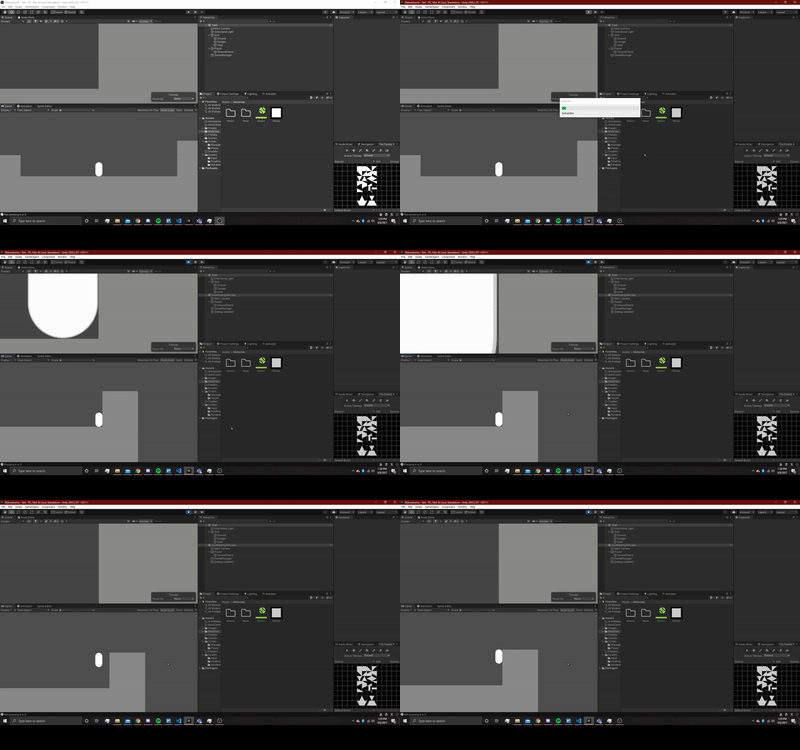
alt text

ezgifcom-gif-maker.gif (321.2 kB)
Comment
Add comment · Show 2
10 |3000 characters needed characters left characters exceeded
▼
  • Viewable by all users
  • Viewable by moderators
  • Viewable by moderators and the original poster
  • Advanced visibility
Viewable by all users
avatar image Joglpr · Apr 08, 2021 at 08:29 PM 0
Share

Sorry for the first part of the code getting messed up.

avatar image SpaceManDan Joglpr · Apr 20, 2021 at 05:52 PM 0
Share

Sorry my friend but that code is really tough to read. FYI to post code on the forum here a line needs to be indented four spaces. For example

public float myfloat;

Now put 4 spaces before the word public

 public float myfloat;

So go through your post by editing the lines with the correct indentation so we can read what you got there.

0 Replies

· Add your reply
  • Sort: 

Your answer

Hint: You can notify a user about this post by typing @username

Up to 2 attachments (including images) can be used with a maximum of 524.3 kB each and 1.0 MB total.

Follow this Question

Answers Answers and Comments

174 People are following this question.

avatar image avatar image avatar image avatar image avatar image avatar image avatar image avatar image avatar image avatar image avatar image avatar image avatar image avatar image avatar image avatar image avatar image avatar image avatar image avatar image avatar image avatar image avatar image avatar image avatar image avatar image avatar image avatar image avatar image avatar image avatar image avatar image avatar image avatar image avatar image avatar image avatar image avatar image avatar image avatar image avatar image avatar image avatar image avatar image avatar image avatar image avatar image avatar image avatar image avatar image avatar image avatar image avatar image avatar image avatar image avatar image avatar image avatar image avatar image avatar image avatar image avatar image avatar image avatar image avatar image avatar image avatar image avatar image avatar image avatar image avatar image avatar image avatar image avatar image avatar image avatar image avatar image avatar image avatar image avatar image avatar image avatar image avatar image avatar image avatar image avatar image avatar image avatar image avatar image avatar image avatar image avatar image avatar image avatar image avatar image avatar image avatar image avatar image avatar image avatar image avatar image avatar image avatar image avatar image avatar image avatar image avatar image avatar image avatar image avatar image avatar image avatar image avatar image avatar image avatar image avatar image avatar image avatar image avatar image avatar image avatar image avatar image avatar image avatar image avatar image avatar image avatar image avatar image avatar image avatar image avatar image avatar image avatar image avatar image avatar image avatar image avatar image avatar image avatar image avatar image avatar image avatar image avatar image avatar image avatar image avatar image avatar image avatar image avatar image avatar image avatar image avatar image avatar image avatar image avatar image avatar image avatar image avatar image avatar image avatar image avatar image avatar image avatar image avatar image avatar image avatar image avatar image avatar image avatar image avatar image avatar image avatar image avatar image avatar image

Related Questions

How can I move a Kinematic Rigidbody2d along the x-axis? 1 Answer

Jumping on enemies help 0 Answers

Help with Player Jumping Script In 2D Platformer (C#) 1 Answer

Inconsistent jump height and double jumping issues with rigidbody2D on a sprite 0 Answers

Broken Jump Physics 0 Answers


Enterprise
Social Q&A

Social
Subscribe on YouTube social-youtube Follow on LinkedIn social-linkedin Follow on Twitter social-twitter Follow on Facebook social-facebook Follow on Instagram social-instagram

Footer

  • Purchase
    • Products
    • Subscription
    • Asset Store
    • Unity Gear
    • Resellers
  • Education
    • Students
    • Educators
    • Certification
    • Learn
    • Center of Excellence
  • Download
    • Unity
    • Beta Program
  • Unity Labs
    • Labs
    • Publications
  • Resources
    • Learn platform
    • Community
    • Documentation
    • Unity QA
    • FAQ
    • Services Status
    • Connect
  • About Unity
    • About Us
    • Blog
    • Events
    • Careers
    • Contact
    • Press
    • Partners
    • Affiliates
    • Security
Copyright © 2020 Unity Technologies
  • Legal
  • Privacy Policy
  • Cookies
  • Do Not Sell My Personal Information
  • Cookies Settings
"Unity", Unity logos, and other Unity trademarks are trademarks or registered trademarks of Unity Technologies or its affiliates in the U.S. and elsewhere (more info here). Other names or brands are trademarks of their respective owners.
  • Anonymous
  • Sign in
  • Create
  • Ask a question
  • Spaces
  • Default
  • Help Room
  • META
  • Moderators
  • Explore
  • Topics
  • Questions
  • Users
  • Badges
