
Wayback Machinekoobas.hobune.stream
May JUN Jul
Previous capture 12 Next capture
2021 2022 2023
1 capture
12 Jun 22 - 12 Jun 22
sparklines
Close Help
  • Products
  • Solutions
  • Made with Unity
  • Learning
  • Support & Services
  • Community
  • Asset Store
  • Get Unity

UNITY ACCOUNT

You need a Unity Account to shop in the Online and Asset Stores, participate in the Unity Community and manage your license portfolio. Login Create account
  • Blog
  • Forums
  • Answers
  • Evangelists
  • User Groups
  • Beta Program
  • Advisory Panel

Navigation

  • Home
  • Products
  • Solutions
  • Made with Unity
  • Learning
  • Support & Services
  • Community
    • Blog
    • Forums
    • Answers
    • Evangelists
    • User Groups
    • Beta Program
    • Advisory Panel

Unity account

You need a Unity Account to shop in the Online and Asset Stores, participate in the Unity Community and manage your license portfolio. Login Create account

Language

  • Chinese
  • Spanish
  • Japanese
  • Korean
  • Portuguese
  • Ask a question
  • Spaces
    • Default
    • Help Room
    • META
    • Moderators
    • Topics
    • Questions
    • Users
    • Badges
  • Home /
avatar image
0
Question by adamlofting · Jul 23, 2019 at 08:15 PM · android buildgoogle playkeystoresigning

How to export Android "Encrypted App Signing Private Key" from Unity Keystore?

Hi all,

I'm looking for some help getting an old Google Play project live again after making some updates. The app was last updated 2017, but since then Google Play have introduced the App Signing feature, and I'm stuck.

This is an existing application, so Google have not generated an app signing key for me (if I setup a brand new Google Play Application they do generate the app signing key, and I can work with Unity keystore as my upload key).

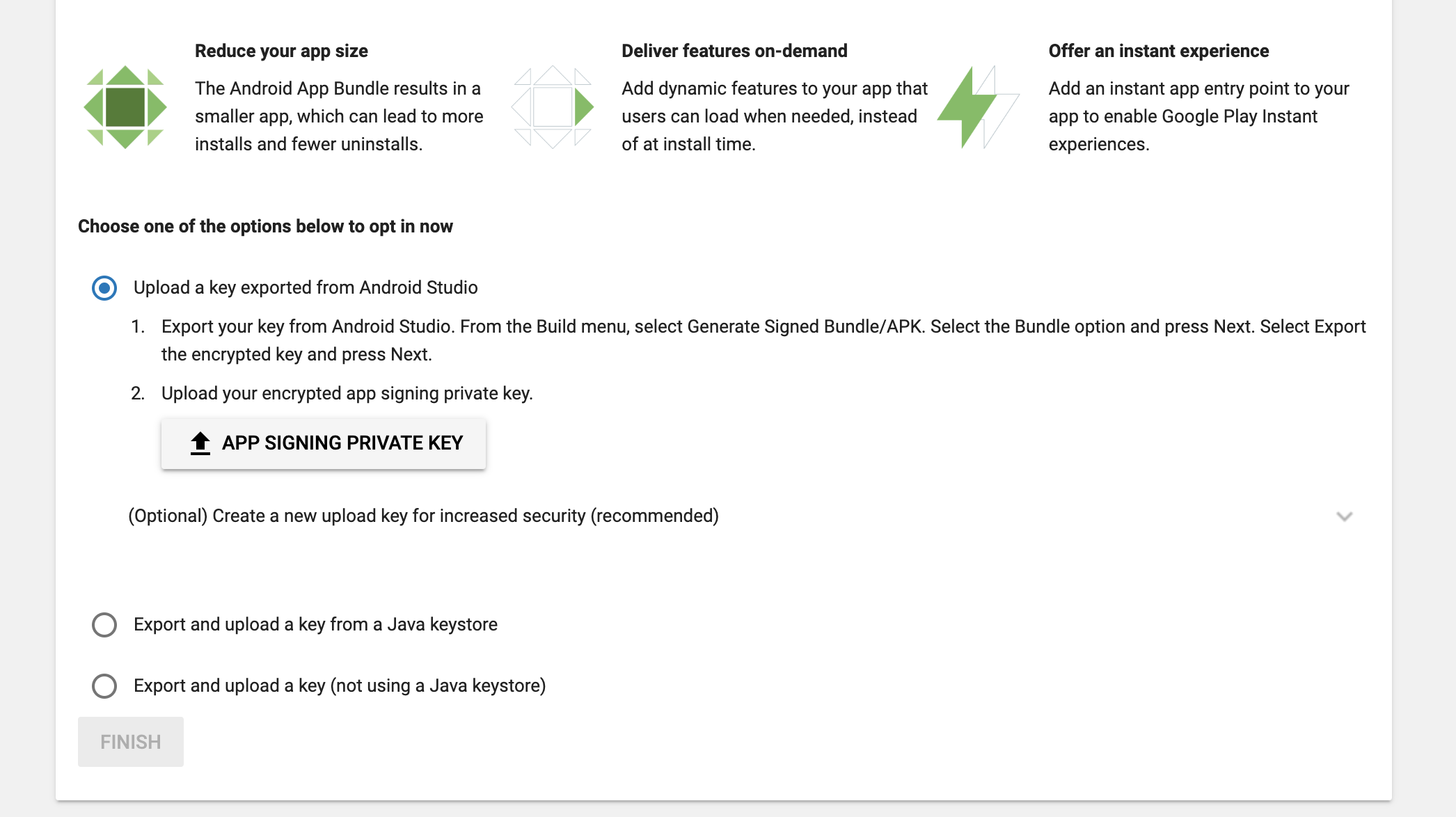
Please see attached screenshot for the options I have in Google Play:
alt text

My question:

How to export Android "Encrypted App Signing Private Key" requested by Google Play? (I believe this needs to be in a .pepk format)

  1. Am I missing some obvious way to get this from the existing Unity Keystore?

    This comment from @Yury-Habets suggests it is possible, but I'm not sure how: https://forum.unity.com/threads/android-app-signing-by-google.471539/#post-4618906

    Possible useful background?

  • I'm running Unity 2018.4, and building directly in Unity (ie not exporting to Android Studio)

  • I'm using the Unity keystore to sign the app, and have access to the original keystore/creds


I've reviewed a few related threads on here which didn't get me a working solution.

- https://forum.unity.com/threads/android-app-signing-by-google.471539/ - https://forum.unity.com/threads/new-android-signing-method.482136/


Thanks in advance! :)

screenshot-2019-07-23-at-205555.png (241.4 kB)
Comment
Add comment
10 |3000 characters needed characters left characters exceeded
▼
  • Viewable by all users
  • Viewable by moderators
  • Viewable by moderators and the original poster
  • Advanced visibility
Viewable by all users

2 Replies

· Add your reply
  • Sort: 
avatar image
0
Best Answer

Answer by Bunny83 · Jul 24, 2019 at 03:49 AM

Duplicate of :

https://answers.unity.com/questions/1622568/exporting-a-pem-file-from-unity-keystore.html

and

https://answers.unity.com/questions/1650800/keystore-to-pem-file.html

The whole keystore thing is not a Unity thing at all. The KeyTool.exe that comes with the JDK is shipped with Unity but any version should work. You can find it somewhere inside the Unity installation folder. For example when using the Unity hub and version 2019.1.10f1 it would be here on windows:

 C:\Program Files\Unity\Hub\Editor\2019.1.10f1\Editor\Data\PlaybackEngines\AndroidPlayer\Tools\OpenJDK\Windows\bin\KeyTool.exe


Though the easiest solution would probably be the software mentioned in the answer by Marcio Jasinski: portecle

Comment
Add comment · Share
10 |3000 characters needed characters left characters exceeded
▼
  • Viewable by all users
  • Viewable by moderators
  • Viewable by moderators and the original poster
  • Advanced visibility
Viewable by all users
avatar image
0

Answer by adamlofting · Jul 24, 2019 at 06:57 PM

Thanks @Bunny83 ! Knowing that the Keystore is not unique to Unity is the key bit of info I missed in my searching. I should be fine from here.

Comment
Add comment · Share
10 |3000 characters needed characters left characters exceeded
▼
  • Viewable by all users
  • Viewable by moderators
  • Viewable by moderators and the original poster
  • Advanced visibility
Viewable by all users

Your answer

Hint: You can notify a user about this post by typing @username

Up to 2 attachments (including images) can be used with a maximum of 524.3 kB each and 1.0 MB total.

Follow this Question

Answers Answers and Comments

113 People are following this question.

avatar image avatar image avatar image avatar image avatar image avatar image avatar image avatar image avatar image avatar image avatar image avatar image avatar image avatar image avatar image avatar image avatar image avatar image avatar image avatar image avatar image avatar image avatar image avatar image avatar image avatar image avatar image avatar image avatar image avatar image avatar image avatar image avatar image avatar image avatar image avatar image avatar image avatar image avatar image avatar image avatar image avatar image avatar image avatar image avatar image avatar image avatar image avatar image avatar image avatar image avatar image avatar image avatar image avatar image avatar image avatar image avatar image avatar image avatar image avatar image avatar image avatar image avatar image avatar image avatar image avatar image avatar image avatar image avatar image avatar image avatar image avatar image avatar image avatar image avatar image avatar image avatar image avatar image avatar image avatar image avatar image avatar image avatar image avatar image avatar image avatar image avatar image avatar image avatar image avatar image avatar image avatar image avatar image avatar image avatar image avatar image avatar image avatar image avatar image avatar image avatar image avatar image avatar image avatar image avatar image avatar image avatar image avatar image avatar image avatar image avatar image avatar image avatar image

Related Questions

How do I use Google Upload Key cert in my keystore 0 Answers

CommandInvokationFailure: Failed to sign APK Package 1 Answer

google protect 0 Answers

Issue Updating Unity application on google play store 0 Answers

Failed to sign Android package (Unity 2019) 1 Answer


Enterprise
Social Q&A

Social
Subscribe on YouTube social-youtube Follow on LinkedIn social-linkedin Follow on Twitter social-twitter Follow on Facebook social-facebook Follow on Instagram social-instagram

Footer

  • Purchase
    • Products
    • Subscription
    • Asset Store
    • Unity Gear
    • Resellers
  • Education
    • Students
    • Educators
    • Certification
    • Learn
    • Center of Excellence
  • Download
    • Unity
    • Beta Program
  • Unity Labs
    • Labs
    • Publications
  • Resources
    • Learn platform
    • Community
    • Documentation
    • Unity QA
    • FAQ
    • Services Status
    • Connect
  • About Unity
    • About Us
    • Blog
    • Events
    • Careers
    • Contact
    • Press
    • Partners
    • Affiliates
    • Security
Copyright © 2020 Unity Technologies
  • Legal
  • Privacy Policy
  • Cookies
  • Do Not Sell My Personal Information
  • Cookies Settings
"Unity", Unity logos, and other Unity trademarks are trademarks or registered trademarks of Unity Technologies or its affiliates in the U.S. and elsewhere (more info here). Other names or brands are trademarks of their respective owners.
  • Anonymous
  • Sign in
  • Create
  • Ask a question
  • Spaces
  • Default
  • Help Room
  • META
  • Moderators
  • Explore
  • Topics
  • Questions
  • Users
  • Badges
