
Wayback Machinekoobas.hobune.stream
May JUN Jul
Previous capture 13 Next capture
2021 2022 2023
1 capture
13 Jun 22 - 13 Jun 22
sparklines
Close Help
  • Products
  • Solutions
  • Made with Unity
  • Learning
  • Support & Services
  • Community
  • Asset Store
  • Get Unity

UNITY ACCOUNT

You need a Unity Account to shop in the Online and Asset Stores, participate in the Unity Community and manage your license portfolio. Login Create account
  • Blog
  • Forums
  • Answers
  • Evangelists
  • User Groups
  • Beta Program
  • Advisory Panel

Navigation

  • Home
  • Products
  • Solutions
  • Made with Unity
  • Learning
  • Support & Services
  • Community
    • Blog
    • Forums
    • Answers
    • Evangelists
    • User Groups
    • Beta Program
    • Advisory Panel

Unity account

You need a Unity Account to shop in the Online and Asset Stores, participate in the Unity Community and manage your license portfolio. Login Create account

Language

  • Chinese
  • Spanish
  • Japanese
  • Korean
  • Portuguese
  • Ask a question
  • Spaces
    • Default
    • Help Room
    • META
    • Moderators
    • Topics
    • Questions
    • Users
    • Badges
  • Home /
avatar image
1
Question by fusecore · Mar 25, 2015 at 01:50 PM · lightingpixel

How to do per texel lighting?

I'm currently working on a 3D game that has low resolution textures. (32x32) Lighting needs to be real time, but I only want the lighting to change per texel instead of having a light gradient running over every pixel in the texture.

Can anyone point me in the light direction?
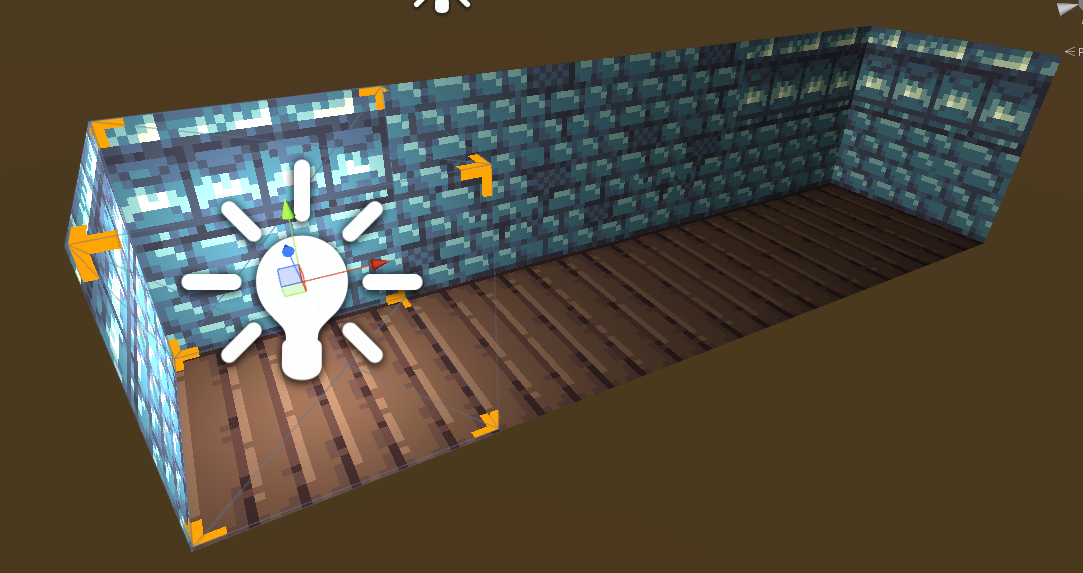
alt text

pertexel.png (238.1 kB)
Comment
Add comment · Show 6
10 |3000 characters needed characters left characters exceeded
▼
  • Viewable by all users
  • Viewable by moderators
  • Viewable by moderators and the original poster
  • Advanced visibility
Viewable by all users
avatar image screenname_taken · Mar 25, 2015 at 02:11 PM 0
Share

the only thing i can think of is to actually render the game with a really low res like 320*240 and then upscale it. Or perhaps with a screen space effect from the asset store.

avatar image fusecore · Mar 25, 2015 at 02:15 PM 0
Share

That is a possibility, but it would impact the shape of my meshes. A very different, but cool, effect. I am going to experiment with render texture and post shaders, but first I wanted to see what this would give.

avatar image Nymisu · Mar 25, 2015 at 02:19 PM 0
Share

Personally i don't think it looks bad at all now. You could of course try adding normalmapping to the materials, which would give the impression of the lighting being low resolution.

avatar image fusecore · Mar 25, 2015 at 02:20 PM 0
Share

Thanks for the tip, that would definitely be interesting. The reason I want to try this is because I want to find a unique look for my game.

avatar image hexagonius · Mar 25, 2015 at 04:56 PM 0
Share

$$anonymous$$aybe you can write your own shader that, during lighting, snaps to the same light intensity value for each pixel, like rasterising the light.

Or you check out this

Show more comments

1 Reply

· Add your reply
  • Sort: 
avatar image
0

Answer by Pangamini · Mar 26, 2015 at 09:45 AM

Write a custom lighting model for your shaders that rounds up the interpolated data (used in lighting calculation) from your vertex shader. I won't give you an exact complete solution, but this is definitely the direction you want to go.

Comment
Add comment · Share
10 |3000 characters needed characters left characters exceeded
▼
  • Viewable by all users
  • Viewable by moderators
  • Viewable by moderators and the original poster
  • Advanced visibility
Viewable by all users

Your answer

Hint: You can notify a user about this post by typing @username

Up to 2 attachments (including images) can be used with a maximum of 524.3 kB each and 1.0 MB total.

Follow this Question

Answers Answers and Comments

24 People are following this question.

avatar image avatar image avatar image avatar image avatar image avatar image avatar image avatar image avatar image avatar image avatar image avatar image avatar image avatar image avatar image avatar image avatar image avatar image avatar image avatar image avatar image avatar image avatar image avatar image

Related Questions

Trying to create 2D pixel art lighting 1 Answer

Per Pixel Lighting on iOS 3 Answers

Lighting disparity using spotlights between editor and iDevices 0 Answers

Pixels per Unit / Pixel Perfect Shadows, possible? 1 Answer

How to make shadows in Top Down 2D game 1 Answer


Enterprise
Social Q&A

Social
Subscribe on YouTube social-youtube Follow on LinkedIn social-linkedin Follow on Twitter social-twitter Follow on Facebook social-facebook Follow on Instagram social-instagram

Footer

  • Purchase
    • Products
    • Subscription
    • Asset Store
    • Unity Gear
    • Resellers
  • Education
    • Students
    • Educators
    • Certification
    • Learn
    • Center of Excellence
  • Download
    • Unity
    • Beta Program
  • Unity Labs
    • Labs
    • Publications
  • Resources
    • Learn platform
    • Community
    • Documentation
    • Unity QA
    • FAQ
    • Services Status
    • Connect
  • About Unity
    • About Us
    • Blog
    • Events
    • Careers
    • Contact
    • Press
    • Partners
    • Affiliates
    • Security
Copyright © 2020 Unity Technologies
  • Legal
  • Privacy Policy
  • Cookies
  • Do Not Sell My Personal Information
  • Cookies Settings
"Unity", Unity logos, and other Unity trademarks are trademarks or registered trademarks of Unity Technologies or its affiliates in the U.S. and elsewhere (more info here). Other names or brands are trademarks of their respective owners.
  • Anonymous
  • Sign in
  • Create
  • Ask a question
  • Spaces
  • Default
  • Help Room
  • META
  • Moderators
  • Explore
  • Topics
  • Questions
  • Users
  • Badges
