
Wayback Machinekoobas.hobune.stream
May JUN Jul
Previous capture 12 Next capture
2021 2022 2023
1 capture
12 Jun 22 - 12 Jun 22
sparklines
Close Help
  • Products
  • Solutions
  • Made with Unity
  • Learning
  • Support & Services
  • Community
  • Asset Store
  • Get Unity

UNITY ACCOUNT

You need a Unity Account to shop in the Online and Asset Stores, participate in the Unity Community and manage your license portfolio. Login Create account
  • Blog
  • Forums
  • Answers
  • Evangelists
  • User Groups
  • Beta Program
  • Advisory Panel

Navigation

  • Home
  • Products
  • Solutions
  • Made with Unity
  • Learning
  • Support & Services
  • Community
    • Blog
    • Forums
    • Answers
    • Evangelists
    • User Groups
    • Beta Program
    • Advisory Panel

Unity account

You need a Unity Account to shop in the Online and Asset Stores, participate in the Unity Community and manage your license portfolio. Login Create account

Language

  • Chinese
  • Spanish
  • Japanese
  • Korean
  • Portuguese
  • Ask a question
  • Spaces
    • Default
    • Help Room
    • META
    • Moderators
    • Topics
    • Questions
    • Users
    • Badges
  • Home /
  • Help Room /
avatar image
0
Question by pingu2k4 · Mar 19, 2017 at 01:37 AM · collisioncolliderrigidbody2dcollider2d

Circle Collider 2d is slipping off box colider2d when it shouldnt

I have a crude rectangle sprite with a box colider 2d, and a circle sprite with rigidbody 2d and circle collider 2d, as seen in the image below. When I click on the red rectangle, it moves up fairly quickly a little more than the diameter of the circle.
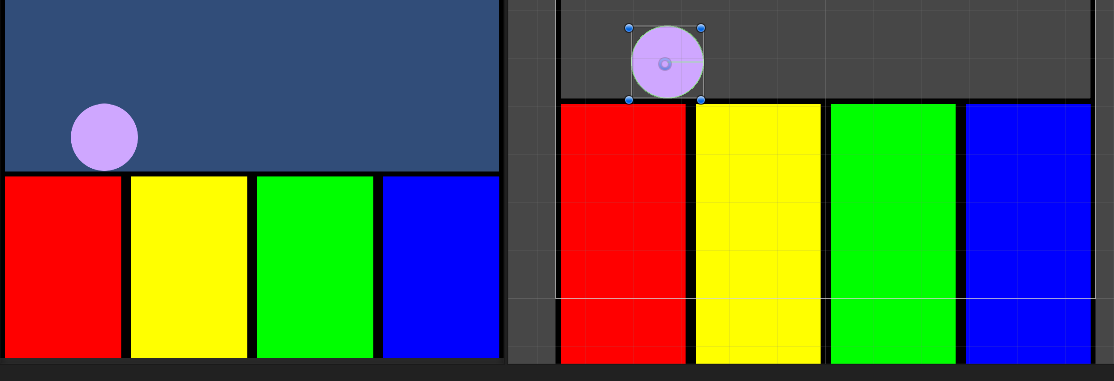
game image

If this occurs from the position show, or with the circle any further right than it currently is, the circle appears to fall down onto the yellow box almost instantly, hugging the side of the red rectangle. If I let the circle go a little more onto the red rectangle then it is pushed up correctly. Why is the circle falling off the red rectangle from this position, and how can I prevent it from acting like this?

3.png (15.2 kB)
Comment
Add comment
10 |3000 characters needed characters left characters exceeded
▼
  • Viewable by all users
  • Viewable by moderators
  • Viewable by moderators and the original poster
  • Advanced visibility
Viewable by all users

1 Reply

· Add your reply
  • Sort: 
avatar image
0

Answer by MelvMay · Mar 19, 2017 at 01:15 PM

You should try to step back and think more about what you're asking the physics system to do. It sounds like you're simply repositioning stuff via the Transform. This means you instantly move a collider from one position to another. In the case above, instantly moving the "red rectangle" which I presume has a collider on it means you cause it to overlap the "circle". You have forced an overlap which the physics system has solve. The solver works by moving the "circle" away from the "red rectangle" using the shortest exit which is probably to the right.

If you are moving colliders then you should always attach a Rigidbody2D otherwise the collider is static (non moving). If you don't want forces applied to your collider then use a Rigidbody2D set to be Kinematic else use Dynamic.

In the case above, it sounds like your "red rectangle" should have a Kinematic Rigidbody2D. After you've added this, instead of modifying the Transform which you should never do, use Rigidbody2D.MovePosition which moves the body from its existing position to the specified one during the next physics update. It's also compatible with Rigidbody2D interpolation meaning you'll get smooth movement during the frame update. More importantly, it means the "circle" will contact the top of the "red rectangle" during its move upwards and so should get forces applied to it which should move it upwards as well asssuming the "circle" has a Dynamic Rigidbody2D attached.

Comment
Add comment · Share
10 |3000 characters needed characters left characters exceeded
▼
  • Viewable by all users
  • Viewable by moderators
  • Viewable by moderators and the original poster
  • Advanced visibility
Viewable by all users

Your answer

Hint: You can notify a user about this post by typing @username

Up to 2 attachments (including images) can be used with a maximum of 524.3 kB each and 1.0 MB total.

Follow this Question

Answers Answers and Comments

135 People are following this question.

avatar image avatar image avatar image avatar image avatar image avatar image avatar image avatar image avatar image avatar image avatar image avatar image avatar image avatar image avatar image avatar image avatar image avatar image avatar image avatar image avatar image avatar image avatar image avatar image avatar image avatar image avatar image avatar image avatar image avatar image avatar image avatar image avatar image avatar image avatar image avatar image avatar image avatar image avatar image avatar image avatar image avatar image avatar image avatar image avatar image avatar image avatar image avatar image avatar image avatar image avatar image avatar image avatar image avatar image avatar image avatar image avatar image avatar image avatar image avatar image avatar image avatar image avatar image avatar image avatar image avatar image avatar image avatar image avatar image avatar image avatar image avatar image avatar image avatar image avatar image avatar image avatar image avatar image avatar image avatar image avatar image avatar image avatar image avatar image avatar image avatar image avatar image avatar image avatar image avatar image avatar image avatar image avatar image avatar image avatar image avatar image avatar image avatar image avatar image avatar image avatar image avatar image avatar image avatar image avatar image avatar image avatar image avatar image avatar image avatar image avatar image avatar image avatar image avatar image avatar image avatar image avatar image avatar image avatar image avatar image avatar image avatar image avatar image avatar image avatar image avatar image avatar image avatar image avatar image avatar image avatar image avatar image avatar image avatar image avatar image

Related Questions

Why Object2D jump out collision? 1 Answer

Collision is not working with some Collider2d 1 Answer

Unable to stop animation upon collision (2d, animation, rigidbody) 0 Answers

¿Why wont child move with parent? 0 Answers

2D Collisions Not Working,2d Collision not working? 0 Answers


Enterprise
Social Q&A

Social
Subscribe on YouTube social-youtube Follow on LinkedIn social-linkedin Follow on Twitter social-twitter Follow on Facebook social-facebook Follow on Instagram social-instagram

Footer

  • Purchase
    • Products
    • Subscription
    • Asset Store
    • Unity Gear
    • Resellers
  • Education
    • Students
    • Educators
    • Certification
    • Learn
    • Center of Excellence
  • Download
    • Unity
    • Beta Program
  • Unity Labs
    • Labs
    • Publications
  • Resources
    • Learn platform
    • Community
    • Documentation
    • Unity QA
    • FAQ
    • Services Status
    • Connect
  • About Unity
    • About Us
    • Blog
    • Events
    • Careers
    • Contact
    • Press
    • Partners
    • Affiliates
    • Security
Copyright © 2020 Unity Technologies
  • Legal
  • Privacy Policy
  • Cookies
  • Do Not Sell My Personal Information
  • Cookies Settings
"Unity", Unity logos, and other Unity trademarks are trademarks or registered trademarks of Unity Technologies or its affiliates in the U.S. and elsewhere (more info here). Other names or brands are trademarks of their respective owners.
  • Anonymous
  • Sign in
  • Create
  • Ask a question
  • Spaces
  • Default
  • Help Room
  • META
  • Moderators
  • Explore
  • Topics
  • Questions
  • Users
  • Badges
