
Wayback Machinekoobas.hobune.stream
May JUN Jul
Previous capture 13 Next capture
2021 2022 2023
1 capture
13 Jun 22 - 13 Jun 22
sparklines
Close Help
  • Products
  • Solutions
  • Made with Unity
  • Learning
  • Support & Services
  • Community
  • Asset Store
  • Get Unity

UNITY ACCOUNT

You need a Unity Account to shop in the Online and Asset Stores, participate in the Unity Community and manage your license portfolio. Login Create account
  • Blog
  • Forums
  • Answers
  • Evangelists
  • User Groups
  • Beta Program
  • Advisory Panel

Navigation

  • Home
  • Products
  • Solutions
  • Made with Unity
  • Learning
  • Support & Services
  • Community
    • Blog
    • Forums
    • Answers
    • Evangelists
    • User Groups
    • Beta Program
    • Advisory Panel

Unity account

You need a Unity Account to shop in the Online and Asset Stores, participate in the Unity Community and manage your license portfolio. Login Create account

Language

  • Chinese
  • Spanish
  • Japanese
  • Korean
  • Portuguese
  • Ask a question
  • Spaces
    • Default
    • Help Room
    • META
    • Moderators
    • Topics
    • Questions
    • Users
    • Badges
  • Home /
avatar image
0
Question by saldavonschwartz · Dec 01, 2014 at 06:39 AM · rigidbodykinematicspring

translate kinematic rigid body while affecting velocity of child attached with spring joint

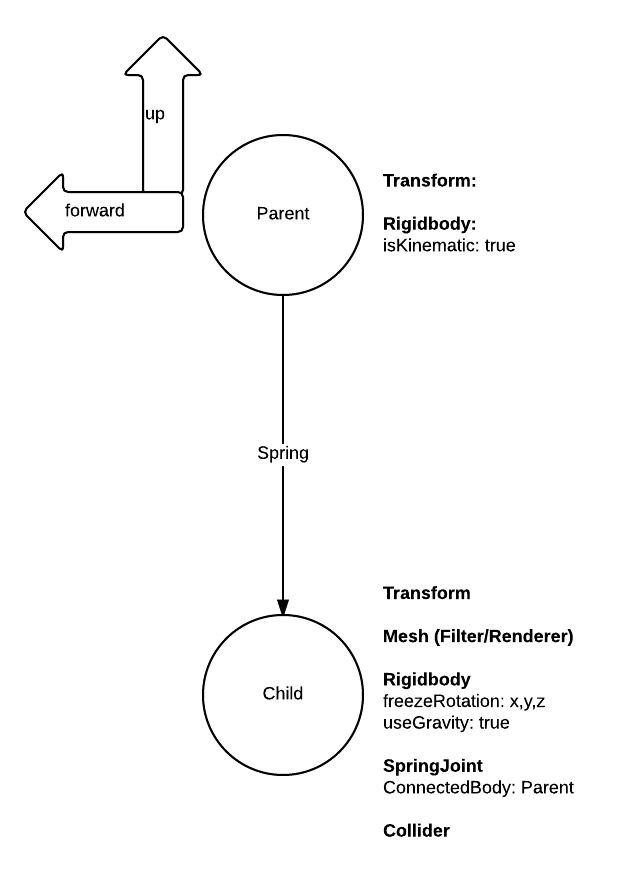
I have the following setup:

  1. kinematic rigid body with a child rigid body attached thru a spring joint. That is, in the child, the connected rigid body is its parent, the kinematic one.

  2. I translate this kinematic rigidbody by setting its transform in response to user input (Y Input axis = speed up / down).

Basically, this:
alt text

Note that the parent doesn't have a collider nor a mesh. This is because it's really only the child that will be visible in game and that I care about colliding with other stuff.

What I'm trying to achieve is that, if I'm 'accelerating' the kinematic body forward and all of a suden I break, have the child keep moving forward for a bit, before going back into place as a result of the spring. That is, I need momentum if you will. But what happens is that, while if I add a force to the child it will oscillate as expected cause of the spring, the parent's translation obviously does nothing in terms of imparting an acceleration in the child as it moves forward. I'm wondering if there is a way to do this with my setup (i.e.: dynamic body attached to a kinematic parent via a spring).

I tried rigidbody.MovePosition but it doesn't seem to affect the kinematic body, though I might just be using it wrong.

Just in case, the reason why I make the parent kinematic and translate it via it's transform instead of having it be dynamic and add forces to it is cause I'm having it follow a bezier path and otherwise I'd need to calculate several forces to keep it moving on the path. Instead, I'm calculating acceleration, speed (not velocity) and position myself and keeping the body always on track by evaluating the bezier function and assigning the right values to transform.position and transform.forward.

rigidbody.png (24.1 kB)
Comment
Add comment
10 |3000 characters needed characters left characters exceeded
▼
  • Viewable by all users
  • Viewable by moderators
  • Viewable by moderators and the original poster
  • Advanced visibility
Viewable by all users

1 Reply

· Add your reply
  • Sort: 
avatar image
1

Answer by saldavonschwartz · Dec 04, 2014 at 08:58 AM

One way I found around it is by making the parent non-kinematic instead (like it was pointed out, this is not necessary), and translating it via rigid body.MovePosition() instead of transform.position.

Comment
Add comment · Show 2 · Share
10 |3000 characters needed characters left characters exceeded
▼
  • Viewable by all users
  • Viewable by moderators
  • Viewable by moderators and the original poster
  • Advanced visibility
Viewable by all users
avatar image khan-amil · Dec 04, 2014 at 09:14 AM 0
Share

You can move it with rigidbody.$$anonymous$$ovePosition() even if it's marked as kinematic. And it should update the joint as well.

avatar image saldavonschwartz · Dec 04, 2014 at 10:40 AM 0
Share

true, I just tried it out. I think before I thought I couldn't move it if it was kinematic, but obviously I had something else wrong.

Your answer

Hint: You can notify a user about this post by typing @username

Up to 2 attachments (including images) can be used with a maximum of 524.3 kB each and 1.0 MB total.

Follow this Question

Answers Answers and Comments

26 People are following this question.

avatar image avatar image avatar image avatar image avatar image avatar image avatar image avatar image avatar image avatar image avatar image avatar image avatar image avatar image avatar image avatar image avatar image avatar image avatar image avatar image avatar image avatar image avatar image avatar image avatar image avatar image

Related Questions

Kinematic Rigidbody collision detection 1 Answer

Collision Detection for Kinematic Rigidbodies 0 Answers

Kinematics: Trying to get an object to land at a known point 1 Answer

Rigidbody hinged to moving kinematic rigidbody is NOT constrained 0 Answers

Moving a player on a rigidbody platform that can collide 2 Answers


Enterprise
Social Q&A

Social
Subscribe on YouTube social-youtube Follow on LinkedIn social-linkedin Follow on Twitter social-twitter Follow on Facebook social-facebook Follow on Instagram social-instagram

Footer

  • Purchase
    • Products
    • Subscription
    • Asset Store
    • Unity Gear
    • Resellers
  • Education
    • Students
    • Educators
    • Certification
    • Learn
    • Center of Excellence
  • Download
    • Unity
    • Beta Program
  • Unity Labs
    • Labs
    • Publications
  • Resources
    • Learn platform
    • Community
    • Documentation
    • Unity QA
    • FAQ
    • Services Status
    • Connect
  • About Unity
    • About Us
    • Blog
    • Events
    • Careers
    • Contact
    • Press
    • Partners
    • Affiliates
    • Security
Copyright © 2020 Unity Technologies
  • Legal
  • Privacy Policy
  • Cookies
  • Do Not Sell My Personal Information
  • Cookies Settings
"Unity", Unity logos, and other Unity trademarks are trademarks or registered trademarks of Unity Technologies or its affiliates in the U.S. and elsewhere (more info here). Other names or brands are trademarks of their respective owners.
  • Anonymous
  • Sign in
  • Create
  • Ask a question
  • Spaces
  • Default
  • Help Room
  • META
  • Moderators
  • Explore
  • Topics
  • Questions
  • Users
  • Badges
