 koobas.hobune.stream


Unity UNET Multiplayer Networking. Problem with Host and Client not being able to control their respective characters.
Hi everyone. I'm James and this is my first question I've ever asked so apologies if I do anything incorrectly.
I have a simple 2 player Multiplayer level using UNET and the Network Lobby asset from the asset store.
The problem I have is when the players spawn in the host is able to control it's player but the client can only control the host players player. What I want is for the players to only be able to control their respective player.
Movement is accomplished through 2 scripts TP_Controller and TP_Motor. These call on the Character controller component of the player prefab.
 //This is the code for TP_Controller

 using System.Collections;
 using System.Collections.Generic;
 using UnityEngine;

 public class TP_Controller : MonoBehaviour {

     public static CharacterController CharacterController;    //reference to the Iroks character controller
     public static TP_Controller Instance;    //refenence to the Tp_Controller

     void Awake () {

         CharacterController = GetComponent ("CharacterController") as CharacterController;    //cast the return value of getComponent to type CharacterController
         Instance = this;    //point to this instance of TP_Controller

         TP_Camera.UseExistingOrCreateNewMainCamera ();
     }


     void Update () {

         if (Camera.main == null)
             return;


         GetLocomotionInput ();
         HandleActionInput ();

         TP_Motor.Instance.UpdateMotor ();
     }

     //handle press key for jump
     void HandleActionInput(){

         if (Input.GetButton ("Jump"))
             Jump ();
     }

     void Jump(){
         TP_Motor.Instance.Jump ();
     }

     void GetLocomotionInput(){

         var deadZone = 0.1f;
         //acceleration
         TP_Motor.Instance.verticalVelocity = TP_Motor.Instance.moveVector.y;

         TP_Motor.Instance.moveVector = Vector3.zero;    //stops motion adding on each other
                                                         //zero the moveVector value as it is re calculated each frame

         //move forward/backwards only takes place on the z axis
         //Vertical checks for the w and s keys
         if ((Input.GetAxis ("Vertical") > deadZone) || (Input.GetAxis ("Vertical") < -deadZone)) {
             TP_Motor.Instance.moveVector += new Vector3 (0, 0, Input.GetAxis ("Vertical"));
         }

         //move left/right only takes place on the x axis
         //Horizontal checks for the w and s keys
         if ((Input.GetAxis ("Horizontal") > deadZone) || (Input.GetAxis ("Horizontal") < -deadZone)) {
             TP_Motor.Instance.moveVector += new Vector3 (Input.GetAxis ("Horizontal"),0, 0 );
         }
     }
 }


 //This is the code for TP_Motor


 using System.Collections;
 using System.Collections.Generic;
 using UnityEngine;

 public class TP_Motor : MonoBehaviour {

     public static TP_Motor Instance;
     public float moveSpeed = 10f;

     public float gravity = 21f;
     public float terminalVelocity = 20f;
     public float jumpSpeed = 6f;

     public Vector3 moveVector { get; set; }
     public float verticalVelocity { get; set;}


     void Awake () {
         Instance = this;
     }

     void ApplyGravity(){
         //check terminal velocity
         if (moveVector.y > -terminalVelocity) {
             //apply gravity on y axis (downward vector)
             moveVector = new Vector3(moveVector.x, moveVector.y - gravity * Time.deltaTime, moveVector.z);
         }
         if (TP_Controller.CharacterController.isGrounded && moveVector.y < -1)
             moveVector = new Vector3(moveVector.x, -1, moveVector.z);

     }

     public void Jump(){
         if (TP_Controller.CharacterController.isGrounded)
             verticalVelocity = jumpSpeed;
     }

     //public so TP_Controller can access this method
     public void UpdateMotor () {
         ProcessMotion ();
         SnapAllignCharacterWithCamera ();
     }


     void ProcessMotion(){

         //Transform MoveVector to WorldSpace
         moveVector = transform.TransformDirection(moveVector);

         //Normalize MoveVector if Magnitude > 1
         if(moveVector.magnitude > 1){
             moveVector = Vector3.Normalize (moveVector);    //assign moveVector the value of the normalized moveVecotr
         }

         //Multiply MoveVector by MoveSpeed
         moveVector *= moveSpeed;

         //Multiply MoveVector by Delta Time

         //reapply vertical velocity to the y of moveVector
         moveVector = new Vector3(moveVector.x, verticalVelocity, moveVector.z);

         ApplyGravity ();

         //Move the Irok in World Space
         TP_Controller.CharacterController.Move(moveVector * Time.deltaTime);

     }

     void SnapAllignCharacterWithCamera(){

         //only snap camera to player if moving

         if (moveVector.x != 0 || moveVector.z != 0) {
             transform.rotation = Quaternion.Euler (transform.eulerAngles.x,
                 Camera.main.transform.eulerAngles.y, transform.eulerAngles.z);
         }
     }
 }
I have a script SetLocalPlayer which checks for the local version of the player and enables components which should allow movement. This is where I think the problem lies. I don't think what is inside the isLocalPlayer loop is doing what it's meant to.
 //Code for SetLocalPlayer


 using UnityEngine;
 using System.Collections;
 using UnityEngine.Networking;

 public class SetLocalPlayer : NetworkBehaviour {

     [SyncVar]
     public string pname = "player";

     [SyncVar]
     public Color playerColor;

     [SyncVar]
     public Quaternion rotation;


     //[SyncVar]
     //public Vector3 mirrorRotate;        //

     bool collided = false;

     [SyncVar]
     public GameObject otherObj;


     // Use this for initialization
     void Start()
     {

         if (isLocalPlayer) {

             //enable local player script with new movement
             GetComponent<TP_Controller> ().enabled = true;

             if (GetComponent<TP_Controller> ().enabled == true)
                 Debug.Log ("TP_Controller is enabled");
             else
                 Debug.Log ("TP_Controller is disabled");


             GetComponent<TP_Motor> ().enabled = true;

             if (GetComponent<TP_Motor> ().enabled == true)
                 Debug.Log ("TP_Motor is enabled");
             else
                 Debug.Log ("TP_Motor is disabled");

             this.GetComponent<CharacterController>().enabled = true;


             //this works Camera moves to correct target
             //TP_Camera script used to select the player for the camera to target. targetLookAt is a child of the player prehab.
             //Camera script looks for and targets this object.
             Camera.main.GetComponent <TP_Camera> ().TargetLookAt = this.transform.GetChild (0).transform;


         }

         //need botth players color to update regardless of localPlayer
         //this works Player colour updated correctly

             Renderer rend = GetComponent<Renderer> ();
             rend.material.shader = Shader.Find ("MK/Glow/Selective/Transparent/Diffuse");
             Debug.Log ("Found shader");
             rend.material.SetColor ("_MKGlowColor", playerColor);
     }
 }
Lastly here is a screenshot of my player prefab with the necessary components attached. 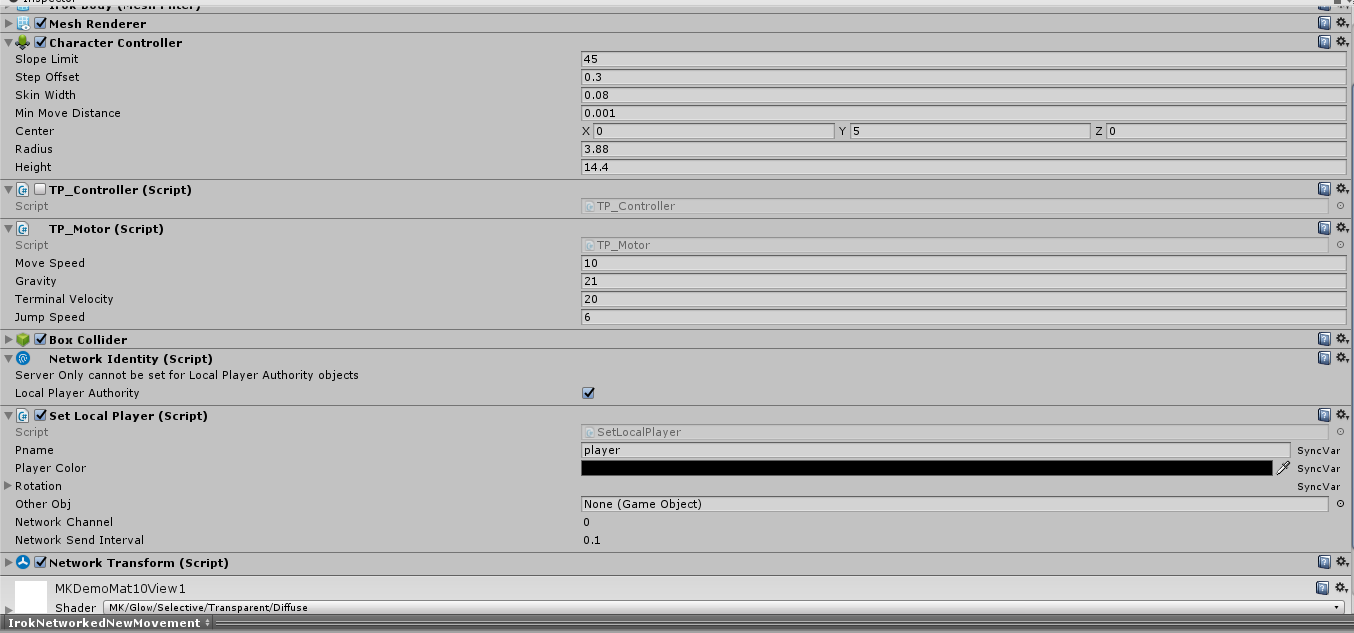
Any help is greatly appreciated. Thank you all in advance.



