 koobas.hobune.stream


i need a script to put an albedo into a material
Hi guys ! Please help me, i follow the first tutorial and i write this script
using UnityEngine; using System.Collections;
public class ExampleBehaviourScript : MonoBehaviour { void Update() { if (Input.GetKeyDown(KeyCode.R)) { GetComponent ().material.color = Color.red; } if (Input.GetKeyDown(KeyCode.G)) { GetComponent().material.color = Color.green; } if (Input.GetKeyDown(KeyCode.B)) { GetComponent().material.color = Color.blue; } } }
It steel work ok, but i need to change the albedo texture, not just the color, I need to put my texture into the material via script, it is possible ?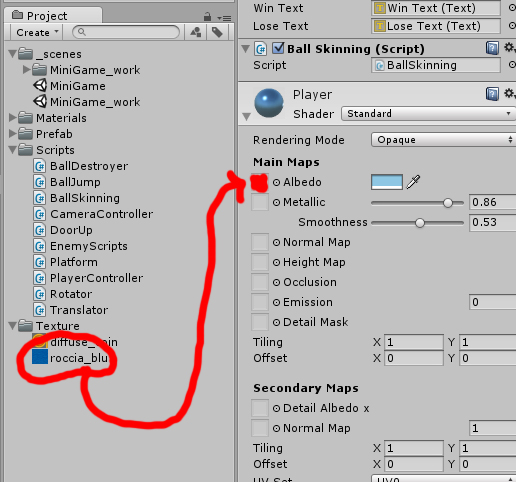

Yes it is possible. Lets say you have two variables (I will make them public so they can be set through the inspector) like this
 public Sprite sprite;
 public Material material;
You can then set the Albedo image using the following code
 if ((sprite != null) && (material != null))
 {
     material.SetTexture("_MainTex", sprite);
 }


@$$anonymous$$avina uff it soesen't work :( i have this errors: 1-Assets/Scripts/BallSkin.cs(19,34): error CS1503: Argument #2' cannot convert UnityEngine.Sprite' expression to type UnityEngine.Texture' 2-Assets/Scripts/BallSkin.cs(19,34): error CS1502: The best overloaded method match for UnityEngine.$$anonymous$$aterial.SetTexture(string, UnityEngine.Texture)' has some invalid arguments
and this is the script: using UnityEngine; using System.Collections;
public class BallSkin : $$anonymous$$onoBehaviour {
 public Sprite sprite;
 public $$anonymous$$aterial material;

 // Use this for initialization
 void Start () {

 }

 // Update is called once per frame
 void Update () {

     if ((sprite != null) && (material != null))
     {
         material.SetTexture("_$$anonymous$$ainTex", sprite);
     }


 }
}
@Cervelx Sorry I did not have time to test my script. This
material.SetTexture("_$$anonymous$$ainTex", sprite);
should have been this
material.SetTexture("_$$anonymous$$ainTex", sprite.texture);
Thank you Thank you Thank you Thank you Thank you !!! Tonight i will test it :D



