
Wayback Machinekoobas.hobune.stream
May JUN Jul
Previous capture 12 Next capture
2021 2022 2023
1 capture
12 Jun 22 - 12 Jun 22
sparklines
Close Help
  • Products
  • Solutions
  • Made with Unity
  • Learning
  • Support & Services
  • Community
  • Asset Store
  • Get Unity

UNITY ACCOUNT

You need a Unity Account to shop in the Online and Asset Stores, participate in the Unity Community and manage your license portfolio. Login Create account
  • Blog
  • Forums
  • Answers
  • Evangelists
  • User Groups
  • Beta Program
  • Advisory Panel

Navigation

  • Home
  • Products
  • Solutions
  • Made with Unity
  • Learning
  • Support & Services
  • Community
    • Blog
    • Forums
    • Answers
    • Evangelists
    • User Groups
    • Beta Program
    • Advisory Panel

Unity account

You need a Unity Account to shop in the Online and Asset Stores, participate in the Unity Community and manage your license portfolio. Login Create account

Language

  • Chinese
  • Spanish
  • Japanese
  • Korean
  • Portuguese
  • Ask a question
  • Spaces
    • Default
    • Help Room
    • META
    • Moderators
    • Topics
    • Questions
    • Users
    • Badges
  • Home /
avatar image
0
Question by jaguilar0047 · May 16, 2018 at 03:48 PM · buttontriggerscene

How to get button to switch scenes

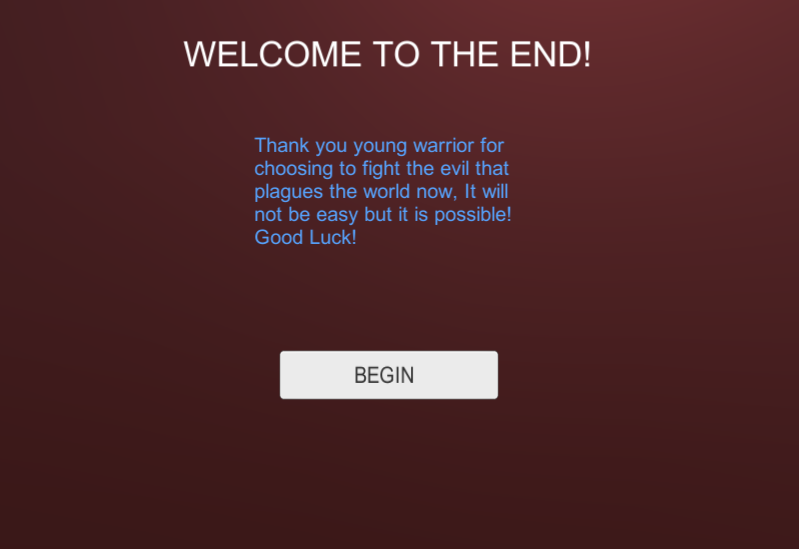
Hello i keep trying to get my button to switch scenes when i click it but nothing happens when i Build and run the game. I put all my scenes in the Build Settings and they are in order but it does nothing if someone could help me thatd be really awesome below is the script i used but doesn't do anything:/ using UnityEngine; using UnityEngine.SceneManagement;

public class Menu : MonoBehaviour {

 public void StartGame ()
 {
        SceneManager.LoadScene(SceneManager.GetActiveScene().buildIndex + 1);
        SceneManager.LoadScene("ToonTown");
 }
     
 }
alt text

screenshot-21.png (79.9 kB)
Comment
Add comment · Show 1
10 |3000 characters needed characters left characters exceeded
▼
  • Viewable by all users
  • Viewable by moderators
  • Viewable by moderators and the original poster
  • Advanced visibility
Viewable by all users
avatar image Hellium · May 16, 2018 at 04:33 PM 0
Share

Have you tried to enable "Development build " in your Build settings and checking the logs of the built application?

C:\Users\username\AppData\LocalLow\CompanyName\ProductName\output_log.txt

2 Replies

· Add your reply
  • Sort: 
avatar image
3
Best Answer

Answer by bolkay · May 16, 2018 at 04:16 PM

Hi friend! First, this is something really easy to do. Second, you need to understand that it is necessary to have your scenes logically and sequentially arranged in build settings. For instance, scene (0) is the first scene that Unity loads upon pressing "play". The rest depends on you! With that in mind, in your StartGame() function. Use something like SceneManager.LoadScene(1); Of course, the above simple code assumes you want to load scene 1. Remember, Scene(0) is always the first one that Unity loads for you. The next simple thing to do is to attach the script that contains the function to an active GameObject in the hierarchy. In this case, just drag your script and attach it to Canvas. Now, head over to "Play" button, in the inspector, look for OnClick(). I would have supported you with pictures but I'm not with my laptop right now. Sorry. You will notice a little space where you can select something, drag your Canvas into that little area. Select "Editor and Runtime" Now, a kind of "drop down" would likely appear, you will select the StartGame() function therefrom.

Comment
Add comment · Show 3 · Share
10 |3000 characters needed characters left characters exceeded
▼
  • Viewable by all users
  • Viewable by moderators
  • Viewable by moderators and the original poster
  • Advanced visibility
Viewable by all users
avatar image SoshJam · May 17, 2018 at 11:45 AM 0
Share

I was typing this when my wifi died lol.

avatar image jaguilar0047 · May 17, 2018 at 04:29 PM 0
Share

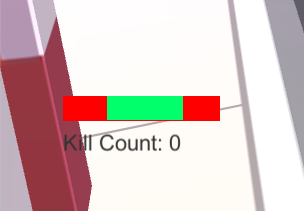
Thank you i got it to work! Btw would you happen to know how to fix a UI health bar? $$anonymous$$ine closes in on its self ins$$anonymous$$d of going left to right, also i can't find a good tutorial for a "kill count" if you don't know how to do either of these thats fine:) Sorry if im asking too much alt text
screenshot-22.png (18.3 kB)
avatar image bolkay · May 18, 2018 at 01:00 AM 0
Share

I found a good tutorial for you! https://www.mvcode.com/lessons/using-sliders-in-unity-aaron It's a very simple tutorial. Get you slider fixed!

avatar image
0

Answer by KjipGamer · May 16, 2018 at 04:15 PM

As SoshJam pointed out, you need to remove the first SceneManager.LoadScenefrom your code, as what you're doing currently is loading the same scene twice. Next, make sure that the button is hooked to the class, otherwise the button press will obviously not work.

Comment
Add comment · Share
10 |3000 characters needed characters left characters exceeded
▼
  • Viewable by all users
  • Viewable by moderators
  • Viewable by moderators and the original poster
  • Advanced visibility
Viewable by all users

Your answer

Hint: You can notify a user about this post by typing @username

Up to 2 attachments (including images) can be used with a maximum of 524.3 kB each and 1.0 MB total.

Follow this Question

Answers Answers and Comments

131 People are following this question.

avatar image avatar image avatar image avatar image avatar image avatar image avatar image avatar image avatar image avatar image avatar image avatar image avatar image avatar image avatar image avatar image avatar image avatar image avatar image avatar image avatar image avatar image avatar image avatar image avatar image avatar image avatar image avatar image avatar image avatar image avatar image avatar image avatar image avatar image avatar image avatar image avatar image avatar image avatar image avatar image avatar image avatar image avatar image avatar image avatar image avatar image avatar image avatar image avatar image avatar image avatar image avatar image avatar image avatar image avatar image avatar image avatar image avatar image avatar image avatar image avatar image avatar image avatar image avatar image avatar image avatar image avatar image avatar image avatar image avatar image avatar image avatar image avatar image avatar image avatar image avatar image avatar image avatar image avatar image avatar image avatar image avatar image avatar image avatar image avatar image avatar image avatar image avatar image avatar image avatar image avatar image avatar image avatar image avatar image avatar image avatar image avatar image avatar image avatar image avatar image avatar image avatar image avatar image avatar image avatar image avatar image avatar image avatar image avatar image avatar image avatar image avatar image avatar image avatar image avatar image avatar image avatar image avatar image avatar image avatar image avatar image avatar image avatar image avatar image avatar image avatar image avatar image avatar image avatar image avatar image avatar image

Related Questions

When enter deathscene cursor disappear 0 Answers

How can I intercept "Play scene" event at code? 1 Answer

Move camera upon button press 0 Answers

I can't click to an UI button. 3 Answers

Door Between Scenes 3 Answers


Enterprise
Social Q&A

Social
Subscribe on YouTube social-youtube Follow on LinkedIn social-linkedin Follow on Twitter social-twitter Follow on Facebook social-facebook Follow on Instagram social-instagram

Footer

  • Purchase
    • Products
    • Subscription
    • Asset Store
    • Unity Gear
    • Resellers
  • Education
    • Students
    • Educators
    • Certification
    • Learn
    • Center of Excellence
  • Download
    • Unity
    • Beta Program
  • Unity Labs
    • Labs
    • Publications
  • Resources
    • Learn platform
    • Community
    • Documentation
    • Unity QA
    • FAQ
    • Services Status
    • Connect
  • About Unity
    • About Us
    • Blog
    • Events
    • Careers
    • Contact
    • Press
    • Partners
    • Affiliates
    • Security
Copyright © 2020 Unity Technologies
  • Legal
  • Privacy Policy
  • Cookies
  • Do Not Sell My Personal Information
  • Cookies Settings
"Unity", Unity logos, and other Unity trademarks are trademarks or registered trademarks of Unity Technologies or its affiliates in the U.S. and elsewhere (more info here). Other names or brands are trademarks of their respective owners.
  • Anonymous
  • Sign in
  • Create
  • Ask a question
  • Spaces
  • Default
  • Help Room
  • META
  • Moderators
  • Explore
  • Topics
  • Questions
  • Users
  • Badges
