
Wayback Machinekoobas.hobune.stream
May JUN Jul
Previous capture 11 Next capture
2021 2022 2023
1 capture
11 Jun 22 - 11 Jun 22
sparklines
Close Help
  • Products
  • Solutions
  • Made with Unity
  • Learning
  • Support & Services
  • Community
  • Asset Store
  • Get Unity

UNITY ACCOUNT

You need a Unity Account to shop in the Online and Asset Stores, participate in the Unity Community and manage your license portfolio. Login Create account
  • Blog
  • Forums
  • Answers
  • Evangelists
  • User Groups
  • Beta Program
  • Advisory Panel

Navigation

  • Home
  • Products
  • Solutions
  • Made with Unity
  • Learning
  • Support & Services
  • Community
    • Blog
    • Forums
    • Answers
    • Evangelists
    • User Groups
    • Beta Program
    • Advisory Panel

Unity account

You need a Unity Account to shop in the Online and Asset Stores, participate in the Unity Community and manage your license portfolio. Login Create account

Language

  • Chinese
  • Spanish
  • Japanese
  • Korean
  • Portuguese
  • Ask a question
  • Spaces
    • Default
    • Help Room
    • META
    • Moderators
    • Topics
    • Questions
    • Users
    • Badges
  • Home /
avatar image
0
Question by General_Hz · Aug 05, 2015 at 03:48 PM · collisionphysics2dcolider

Coliders Don't work

I have a Rigidbody2D object with a box colider that has a child sprite object attched to it, but unity engine doesn't detect collisions with this object anymore. Is there any specific code I need to implement or was there something I did wrong? My project can be found here: https://drive.google.com/file/d/0B4RdkwinGvTfcU1DUVB2bjdVLXc/view?usp=sharing

Comment
Add comment
10 |3000 characters needed characters left characters exceeded
▼
  • Viewable by all users
  • Viewable by moderators
  • Viewable by moderators and the original poster
  • Advanced visibility
Viewable by all users

1 Reply

· Add your reply
  • Sort: 
avatar image
0

Answer by Major0 · Aug 05, 2015 at 06:42 PM

1- On your Player GameObject, do the following in the inspector to the Rigidbody2D component:

  • Set IsKinematic to false (untick the checkbox).

  • Freeze Rotation on Z axis (tick the checkbox).

2- In the scene:

  • Create a Down Border as in the screen-shot below, and add a Box Collider 2D component to it just like the Left Border and Right Border. This Down Border acts as a floor to your player. alt text
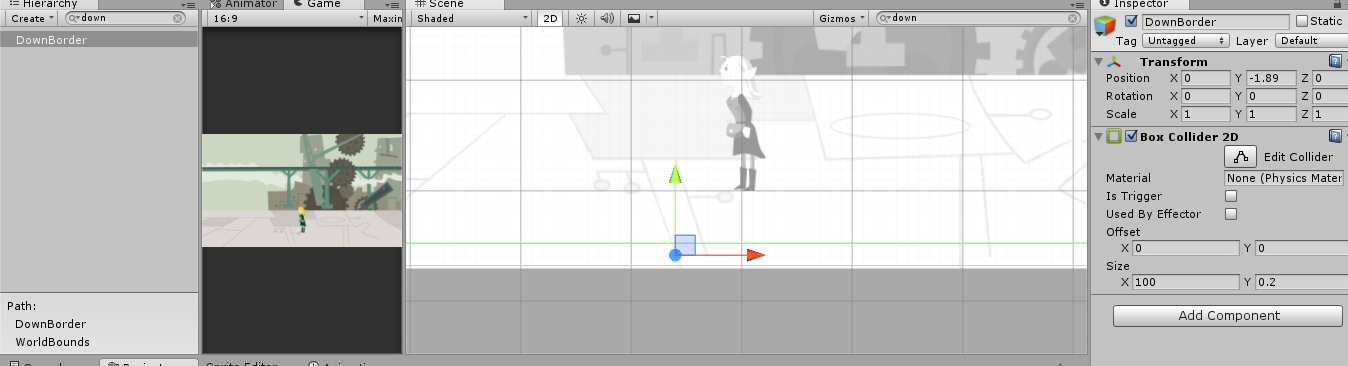
BTW the character is really cute, merely going left and right was fun :P Keep up the good work even though if this wasn't entirely your work and never give up on solving problems and creating your own work :) Your imagination is your limit.


unity2dcolliders.png (105.1 kB)
Comment
Add comment · Share
10 |3000 characters needed characters left characters exceeded
▼
  • Viewable by all users
  • Viewable by moderators
  • Viewable by moderators and the original poster
  • Advanced visibility
Viewable by all users

Your answer

Hint: You can notify a user about this post by typing @username

Up to 2 attachments (including images) can be used with a maximum of 524.3 kB each and 1.0 MB total.

Follow this Question

Answers Answers and Comments

3 People are following this question.

avatar image avatar image avatar image

Related Questions

Box Colider not working properly 1 Answer

Slow down object about to collide 1 Answer

character bumps when going between overlapping or side by side colliders 0 Answers

Physics2D.IgnoreCollision not working! 0 Answers

Recalculating collisions after Physics2D.IgnoreLayerCollision()? 1 Answer


Enterprise
Social Q&A

Social
Subscribe on YouTube social-youtube Follow on LinkedIn social-linkedin Follow on Twitter social-twitter Follow on Facebook social-facebook Follow on Instagram social-instagram

Footer

  • Purchase
    • Products
    • Subscription
    • Asset Store
    • Unity Gear
    • Resellers
  • Education
    • Students
    • Educators
    • Certification
    • Learn
    • Center of Excellence
  • Download
    • Unity
    • Beta Program
  • Unity Labs
    • Labs
    • Publications
  • Resources
    • Learn platform
    • Community
    • Documentation
    • Unity QA
    • FAQ
    • Services Status
    • Connect
  • About Unity
    • About Us
    • Blog
    • Events
    • Careers
    • Contact
    • Press
    • Partners
    • Affiliates
    • Security
Copyright © 2020 Unity Technologies
  • Legal
  • Privacy Policy
  • Cookies
  • Do Not Sell My Personal Information
  • Cookies Settings
"Unity", Unity logos, and other Unity trademarks are trademarks or registered trademarks of Unity Technologies or its affiliates in the U.S. and elsewhere (more info here). Other names or brands are trademarks of their respective owners.
  • Anonymous
  • Sign in
  • Create
  • Ask a question
  • Spaces
  • Default
  • Help Room
  • META
  • Moderators
  • Explore
  • Topics
  • Questions
  • Users
  • Badges
