 koobas.hobune.stream


Enemy AI movement problem
I have been trying to understand this for a long while now, and still haven't come to a conclusion. I have an enemy AI working with two colliders (aggroRange and attackRange) that set two bools which indicate if the player is in either of the ranges. The two colliders are placed in two separate gameObjects which are both children of the enemy gameObject (where the enemy AI script is placed). The bools _playerIsInAggroRange and _playerIsInAttackRange are set to true on OnTriggerEnter and to false on OnTriggerExit by two separate scripts placed in each collider.
Here is a code map showing the connection between the bools and the functions:
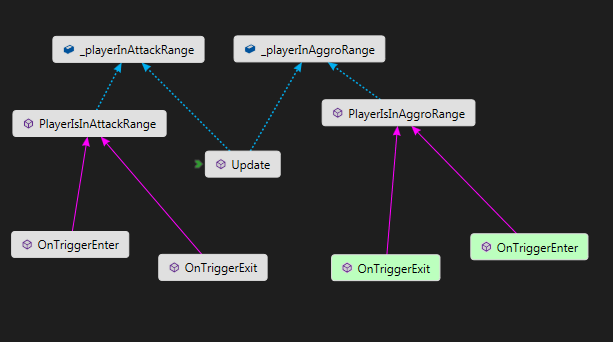
The AI is pretty straight forward:
         //If player is within aggro range, but not attack range
         if (_playerInAggroRange)
         {
             if (_playerInAttackRange)
             {
                 if (_moving) stopMoveAnimation();
                 if (_attackFrequency <= 0 && !_moving)
                 {
                     startAttackAnimation();                //Attack
                     _attackFrequency = AttackRechargeTime; //Reset Timer
                 }
             }
             else
             {
                 moveTowardsPlayer();
             }
         }
         else
         {
             moveToSpawn();
         }
 /*This is inside the Update() method of the AI script, which controls everything about the enemy (movement, combat etc.)*/
An example of what the OnTriggerEnter/Exit functions do:
 void OnTriggerEnter(Collider other)
     {
         if (other.CompareTag("Player"))
         {
             Debug.Log("Player got inside attack");
             EnemyScript.PlayerIsInAttackRange(true);
         }
     }
For some reasons, the last else (that leads to moveToSpawn()) is called every frame, even if the first condition (_playerIsInAggroRange) is true. In fact, when I tried to debug the bool variables, they appeared to be true and false in the same frame. The only functions that write the bools are called by the OnTriggerExit/Enter functions in the aggroRange and attackRange collider gameObjects, and they are called properly (tested with debug.log), so I don't see how this is happening!
Please tell me if you need any other info to help me fix this problem, any help would be greatly appreciated!

Where/how do you declare "EnemyScript"? And can you describe the hierarchy of gameobjects in more detail? (Particularly, which elements have rigidbodies?)

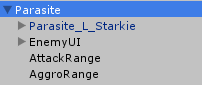
This is the hierarchy. The Enemy AI script is in the "Parasite" object, the other two scripts are in AttackRange object and AggroRange object respectively. There are no rigidbodies involved anywhere, only CharacterControllers used as colliders (movement is done through animation)

"the last else (that leads to moveToSpawn()) is called every frame, even if the first condition (_playerIsInAggroRange) is true" -
No. The IF/ELSE construct is not a weak test, so if the first condition is true ELSE is not called that frame. Given your description, look for other places in your code where you reference/change this stuff.
$$anonymous$$onobehavior find references might help.
I've been printing a debug log from that condition tree, and it prints both whats under the IF and whats under ELS$$anonymous$$ So logic says, there is either some change in the variable before the ELSE is called, or the Debugo.Log message came from two separate frame (consecutive probably, as the number of messages was growing constantly). But, unfortunately, there are no other references to those variables (I've even shown evidence of that on the Code $$anonymous$$ap at the top of the post), so I have no idea why this happens

Do you have multiple parasites cause if so the
getting true and false could just be because one is calling move to spawn and the other isn't.
the other possibility is your move towards player script is wonky and moving the parasite in the opposite direction and so the moment it "enters" it goes ok im in aggro range, ok i'm not in attack yet, ok move to player, mvoes the oppostie direction on accident. Ok i'm out of aggro range move to spawn.
"Do you have multiple parasites cause if so the
getting true and false could just be because one is calling move to spawn and the other isn't.
the other possibility is your move towards player script is wonky and moving the parasite in the opposite direction and so the moment it "enters" it goes ok im in aggro range, ok i'm not in attack yet, ok move to player, mvoes the oppostie direction on accident. Ok i'm out of aggro range move to spawn." By sparkzbarca
You nailed it! The ranges scripts where referencing the same script because I was using a stupid public variable -.-', I've changed it to a private and retrieve it at start using GetComponentInParent, so each script will get a proper reference to its enemy script. Thank you, I was getting crazy and the game was getting laggy!




