
Wayback Machinekoobas.hobune.stream
May JUN Jul
Previous capture 13 Next capture
2021 2022 2023
1 capture
13 Jun 22 - 13 Jun 22
sparklines
Close Help
  • Products
  • Solutions
  • Made with Unity
  • Learning
  • Support & Services
  • Community
  • Asset Store
  • Get Unity

UNITY ACCOUNT

You need a Unity Account to shop in the Online and Asset Stores, participate in the Unity Community and manage your license portfolio. Login Create account
  • Blog
  • Forums
  • Answers
  • Evangelists
  • User Groups
  • Beta Program
  • Advisory Panel

Navigation

  • Home
  • Products
  • Solutions
  • Made with Unity
  • Learning
  • Support & Services
  • Community
    • Blog
    • Forums
    • Answers
    • Evangelists
    • User Groups
    • Beta Program
    • Advisory Panel

Unity account

You need a Unity Account to shop in the Online and Asset Stores, participate in the Unity Community and manage your license portfolio. Login Create account

Language

  • Chinese
  • Spanish
  • Japanese
  • Korean
  • Portuguese
  • Ask a question
  • Spaces
    • Default
    • Help Room
    • META
    • Moderators
    • Topics
    • Questions
    • Users
    • Badges
  • Home /
avatar image
0
Question by LaurynasLubys · Aug 03, 2014 at 07:33 PM · optimizationtexturingfile size

Texturing - one big one or many small ones?

Hello, I am developing game, and in unity I always get stuck with optimization. Games became lagy and not playable.

I wonder which is better, to use many small sized textures or put everything inside bigger ones.

Now I have street with 10 buildings, I use in total 10 textures as well. All textures are compressed to maximum and doesn't take more than 1mb in size, but game is still very lagy. Meshes are also optimized well, no necessary polygons etc.

When I read online, everyone advises to use bigger textures - to put as much as possible in one texture file. Today I opened some big games like GTA IV and noticed that they use very small textures and many. Everything is separated,in them, especially with environment mapping.

1 Can someone advice me, on which picture file type to use. I use Jpg for diffuse bump map, if I need transparency I use tiff which is way bigger file type.. ?

2 Should I use big picture files like 4096x4096 ~ 1 mb or I should go to like GTA IV uses ~256x256 ~80kb ?
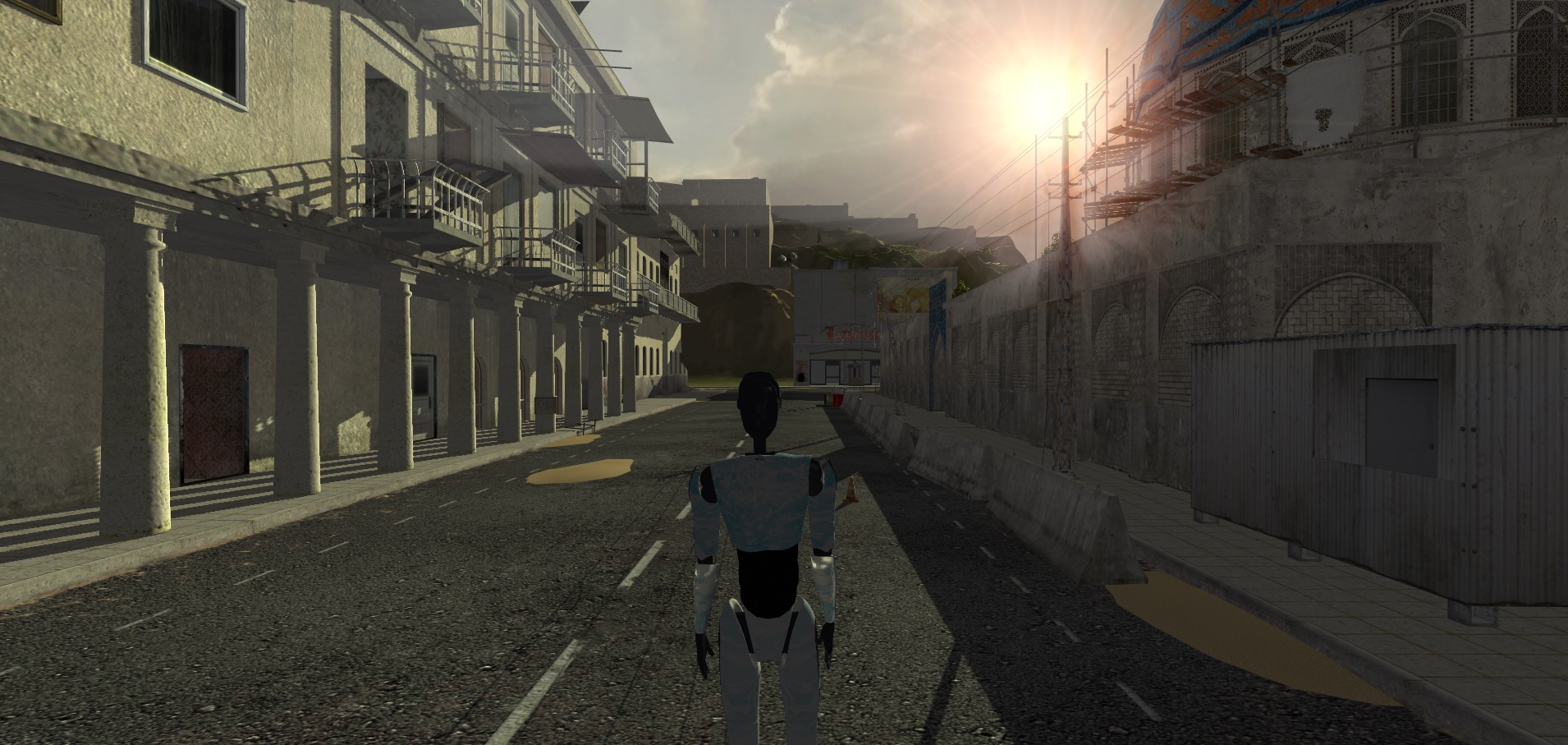
alt text

game_14.jpg (499.3 kB)
Comment
Add comment · Show 1
10 |3000 characters needed characters left characters exceeded
▼
  • Viewable by all users
  • Viewable by moderators
  • Viewable by moderators and the original poster
  • Advanced visibility
Viewable by all users
avatar image meat5000 ♦ · Aug 03, 2014 at 09:48 PM 0
Share

Texture Atlas will allow you to share materials and save performance through batching. Some GPUs will find 4k textures hard to deal with though.

0 Replies

· Add your reply
  • Sort: 

Your answer

Hint: You can notify a user about this post by typing @username

Up to 2 attachments (including images) can be used with a maximum of 524.3 kB each and 1.0 MB total.

Follow this Question

Answers Answers and Comments

23 People are following this question.

avatar image avatar image avatar image avatar image avatar image avatar image avatar image avatar image avatar image avatar image avatar image avatar image avatar image avatar image avatar image avatar image avatar image avatar image avatar image avatar image avatar image avatar image avatar image

Related Questions

Android Build Optimization for Unity - Textures 3 Answers

Huge prefab file sizes 0 Answers

Despite following Unity best practices, my iOS game bloat from 20MB to 60MB. Why? 1 Answer

PNG on iOS? 3 Answers

What's the best way to optimize draw calls with 100,000+ bjects? 1 Answer


Enterprise
Social Q&A

Social
Subscribe on YouTube social-youtube Follow on LinkedIn social-linkedin Follow on Twitter social-twitter Follow on Facebook social-facebook Follow on Instagram social-instagram

Footer

  • Purchase
    • Products
    • Subscription
    • Asset Store
    • Unity Gear
    • Resellers
  • Education
    • Students
    • Educators
    • Certification
    • Learn
    • Center of Excellence
  • Download
    • Unity
    • Beta Program
  • Unity Labs
    • Labs
    • Publications
  • Resources
    • Learn platform
    • Community
    • Documentation
    • Unity QA
    • FAQ
    • Services Status
    • Connect
  • About Unity
    • About Us
    • Blog
    • Events
    • Careers
    • Contact
    • Press
    • Partners
    • Affiliates
    • Security
Copyright © 2020 Unity Technologies
  • Legal
  • Privacy Policy
  • Cookies
  • Do Not Sell My Personal Information
  • Cookies Settings
"Unity", Unity logos, and other Unity trademarks are trademarks or registered trademarks of Unity Technologies or its affiliates in the U.S. and elsewhere (more info here). Other names or brands are trademarks of their respective owners.
  • Anonymous
  • Sign in
  • Create
  • Ask a question
  • Spaces
  • Default
  • Help Room
  • META
  • Moderators
  • Explore
  • Topics
  • Questions
  • Users
  • Badges
