
Wayback Machinekoobas.hobune.stream
May JUN Jul
Previous capture 13 Next capture
2021 2022 2023
1 capture
13 Jun 22 - 13 Jun 22
sparklines
Close Help
  • Products
  • Solutions
  • Made with Unity
  • Learning
  • Support & Services
  • Community
  • Asset Store
  • Get Unity

UNITY ACCOUNT

You need a Unity Account to shop in the Online and Asset Stores, participate in the Unity Community and manage your license portfolio. Login Create account
  • Blog
  • Forums
  • Answers
  • Evangelists
  • User Groups
  • Beta Program
  • Advisory Panel

Navigation

  • Home
  • Products
  • Solutions
  • Made with Unity
  • Learning
  • Support & Services
  • Community
    • Blog
    • Forums
    • Answers
    • Evangelists
    • User Groups
    • Beta Program
    • Advisory Panel

Unity account

You need a Unity Account to shop in the Online and Asset Stores, participate in the Unity Community and manage your license portfolio. Login Create account

Language

  • Chinese
  • Spanish
  • Japanese
  • Korean
  • Portuguese
  • Ask a question
  • Spaces
    • Default
    • Help Room
    • META
    • Moderators
    • Topics
    • Questions
    • Users
    • Badges
  • Home /
avatar image
1
Question by aress · Jul 27, 2014 at 03:57 PM · spritetransparencybackground

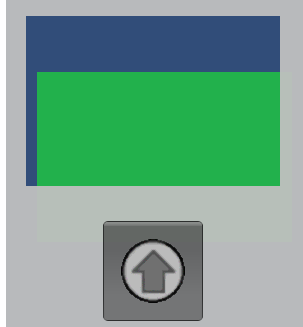
Why sprite are semi transparent

Hi today I notice that my background sprites are semi transparent. I open my sprite with Photoshop and the texture was fine with 100% opacity. How to make it to transparent only the parts that must be and the other color parts not trasparent.alt text
tansparent.png (5.9 kB)
Comment
Add comment · Show 2
10 |3000 characters needed characters left characters exceeded
▼
  • Viewable by all users
  • Viewable by moderators
  • Viewable by moderators and the original poster
  • Advanced visibility
Viewable by all users
avatar image incorrect · Jul 28, 2014 at 12:44 PM 0
Share

You can make png-sprite with different transparency in different places. It works fine 'cause png has alpha channel.

avatar image Sherlock-jr · Mar 19, 2015 at 12:00 AM 0
Share

Thanks Aress, changing Compressed to TrueColor worked for me, but i would like to know if using truecolor will affect the performance on a cellphone, 'cause every sprite will have to have truecolor.

Somebody know? Will afect the performance or not?

4 Replies

· Add your reply
  • Sort: 
avatar image
6
Best Answer

Answer by aress · Jul 28, 2014 at 02:21 PM

I found how to remove the transparency. In the inspector view I change the format of the sprite to truecolor and the transparency goes off, don't know why but works :) now the only the transparent area is transparent.

Comment
Add comment · Show 1 · Share
10 |3000 characters needed characters left characters exceeded
▼
  • Viewable by all users
  • Viewable by moderators
  • Viewable by moderators and the original poster
  • Advanced visibility
Viewable by all users
avatar image Houp · Nov 01, 2014 at 06:47 PM 0
Share

Thanks a lot for this solution. Unfortunatelly I can't upvote you.

avatar image
1

Answer by Sherlock-jr · Mar 19, 2015 at 10:16 AM

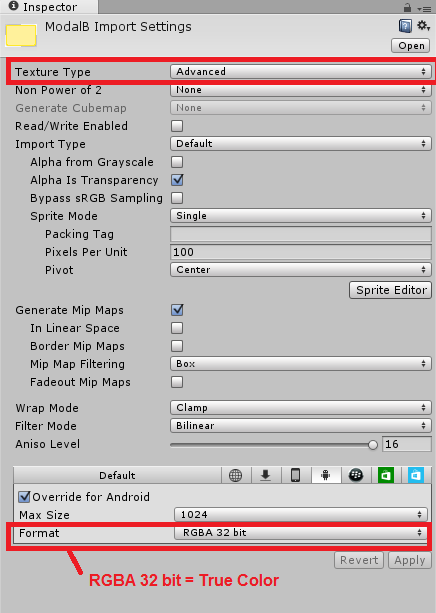
True color must be use only if it's the only type of Format that allows your image to render correctly, because true color is the heavier format, for more control you have to select "Texture Type = Advanced" and then you have to find what type of format functions better for your sprite.

Here you can see the configuration that i used for an specific image, in this case only trueColor worked.
alt text


inspectorunity.png (34.1 kB)
Comment
Add comment · Share
10 |3000 characters needed characters left characters exceeded
▼
  • Viewable by all users
  • Viewable by moderators
  • Viewable by moderators and the original poster
  • Advanced visibility
Viewable by all users
avatar image
0

Answer by Kaz_Yamof · Jul 28, 2014 at 12:25 PM

Check opacity of the color on Unity. If not 100%, you will get transparency. I think you will need multiples sprites over each other, alternating the transparency of each to make only some areas transparent.

Comment
Add comment · Show 2 · Share
10 |3000 characters needed characters left characters exceeded
▼
  • Viewable by all users
  • Viewable by moderators
  • Viewable by moderators and the original poster
  • Advanced visibility
Viewable by all users
avatar image meat5000 ♦ · Jul 28, 2014 at 12:44 PM 0
Share

Click the texture and in the Inspector, observe the Transparency checkboxes.

avatar image aress · Jul 28, 2014 at 01:20 PM 0
Share

Where I can see the opacity? If you mean in Sprite Renderer >> Color >> Alpha all is O$$anonymous$$.

avatar image
0

Answer by guavaman · May 04, 2015 at 04:10 AM

This is still a problem in Unity 4.6.5. It only seems to happen with 16-bit sprites with alpha (RGBA 16), which happens to be the default compression format when you choose "Compressed" in the inspector on some platforms. So it looks to me like it's a bug in Unity's 16-bit color conversion algorithm. The only solution seems to be to either use Truecolor (big waste of space) or force another texture compression format such as DTX5 on most platforms or PVRTC if on iOS. To get the option to set your compression format, you must change the sprite to type "Advanced" in the inspector first.

Sloppy...

Comment
Add comment · Share
10 |3000 characters needed characters left characters exceeded
▼
  • Viewable by all users
  • Viewable by moderators
  • Viewable by moderators and the original poster
  • Advanced visibility
Viewable by all users

Your answer

Hint: You can notify a user about this post by typing @username

Up to 2 attachments (including images) can be used with a maximum of 524.3 kB each and 1.0 MB total.

Follow this Question

Answers Answers and Comments

27 People are following this question.

avatar image avatar image avatar image avatar image avatar image avatar image avatar image avatar image avatar image avatar image avatar image avatar image avatar image avatar image avatar image avatar image avatar image avatar image avatar image avatar image avatar image avatar image avatar image avatar image avatar image avatar image avatar image

Related Questions

Best practices for large background image on mobile? 0 Answers

2D - draw sprite only on one background color 0 Answers

Why do my tree leafs(transparent diffuse textures) take over the color of the background? 2 Answers

Infinite Scrolling 2D Sprite background 5 Answers

How would you create this background effect 1 Answer


Enterprise
Social Q&A

Social
Subscribe on YouTube social-youtube Follow on LinkedIn social-linkedin Follow on Twitter social-twitter Follow on Facebook social-facebook Follow on Instagram social-instagram

Footer

  • Purchase
    • Products
    • Subscription
    • Asset Store
    • Unity Gear
    • Resellers
  • Education
    • Students
    • Educators
    • Certification
    • Learn
    • Center of Excellence
  • Download
    • Unity
    • Beta Program
  • Unity Labs
    • Labs
    • Publications
  • Resources
    • Learn platform
    • Community
    • Documentation
    • Unity QA
    • FAQ
    • Services Status
    • Connect
  • About Unity
    • About Us
    • Blog
    • Events
    • Careers
    • Contact
    • Press
    • Partners
    • Affiliates
    • Security
Copyright © 2020 Unity Technologies
  • Legal
  • Privacy Policy
  • Cookies
  • Do Not Sell My Personal Information
  • Cookies Settings
"Unity", Unity logos, and other Unity trademarks are trademarks or registered trademarks of Unity Technologies or its affiliates in the U.S. and elsewhere (more info here). Other names or brands are trademarks of their respective owners.
  • Anonymous
  • Sign in
  • Create
  • Ask a question
  • Spaces
  • Default
  • Help Room
  • META
  • Moderators
  • Explore
  • Topics
  • Questions
  • Users
  • Badges
