
Wayback Machinekoobas.hobune.stream
May JUN Jul
Previous capture 12 Next capture
2021 2022 2023
1 capture
12 Jun 22 - 12 Jun 22
sparklines
Close Help
  • Products
  • Solutions
  • Made with Unity
  • Learning
  • Support & Services
  • Community
  • Asset Store
  • Get Unity

UNITY ACCOUNT

You need a Unity Account to shop in the Online and Asset Stores, participate in the Unity Community and manage your license portfolio. Login Create account
  • Blog
  • Forums
  • Answers
  • Evangelists
  • User Groups
  • Beta Program
  • Advisory Panel

Navigation

  • Home
  • Products
  • Solutions
  • Made with Unity
  • Learning
  • Support & Services
  • Community
    • Blog
    • Forums
    • Answers
    • Evangelists
    • User Groups
    • Beta Program
    • Advisory Panel

Unity account

You need a Unity Account to shop in the Online and Asset Stores, participate in the Unity Community and manage your license portfolio. Login Create account

Language

  • Chinese
  • Spanish
  • Japanese
  • Korean
  • Portuguese
  • Ask a question
  • Spaces
    • Default
    • Help Room
    • META
    • Moderators
    • Topics
    • Questions
    • Users
    • Badges
  • Home /
avatar image
0
Question by Cobra117 · Sep 12, 2019 at 11:36 AM · 2dcollider2d2d collision

2 collisions/colliders not working properly (gap between the 2 objects that collide)
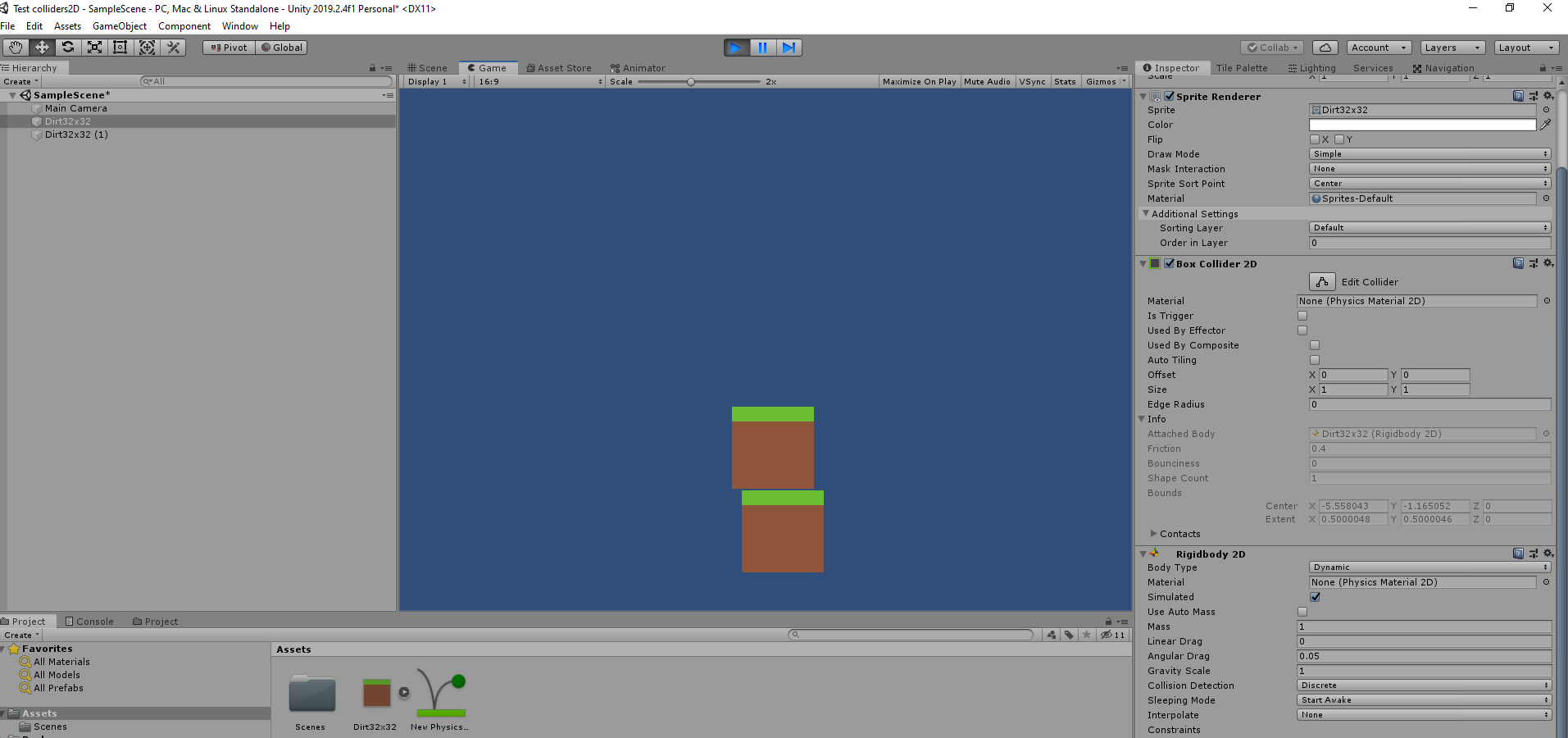
alt text

So here's a very basic example, I'v 2 sprites, with one box collider 2D each, and the upper one has a rigidbody 2D. So normally the upper one should fall one the lower one and that's all. But if you look at the image, there's always a gap between the 2 sprites. Is there something I do wrong, something that I didn't set correctly or is there a sort a bug with Unity that you have too?

I've also heard 2 solutions to partly fix it, the first one is to reduce the size of the colliders, so the colliders are smaller than the sprite and the "void" between the object is filled with the sprites, but it's only possible for basic colliders shape like box colliders or set the pixel per unit to 1, so that make is 100 times bigger and there's no more gap, but doesn't it make the game very laggy to make everything 100 times bigger or cause physics bugs with a gravity of 981 instead of 9,81?

bug.png (117.1 kB)
Comment
Add comment · Show 4
10 |3000 characters needed characters left characters exceeded
▼
  • Viewable by all users
  • Viewable by moderators
  • Viewable by moderators and the original poster
  • Advanced visibility
Viewable by all users
avatar image xxmariofer · Sep 12, 2019 at 12:00 PM 0
Share

remove the sprites and share with us a screenshot so we can see the "void" between the box colliders, the sprite is just a graphical representation and nothing has to do with the box sizes dont change the pixels per unit and almost 100% is not a unity bug

avatar image termway · Sep 13, 2019 at 01:30 PM 0
Share

An another thing to keep in $$anonymous$$d is the side effect of the contact offset of the physic engine.

Default Contact Offset Set a proximity distance value for colliders to be considered in contact, even they are not actually in contact. Colliders whose distance is less than the sum of their contactOffset values generate contacts. This allows the collision detection system to predictively enforce the contact constraint even when the objects are slightly separated. Caution: Reducing this value too far could cripple Unity’s ability to calculate continuous polygon collisions. Conversely, increasing the value too much could create artifacts for vertex collision.

If it's your problem you can reduce all your collider size by this value (or half this value). You can even do it programmatically.
avatar image xxmariofer termway · Sep 13, 2019 at 01:36 PM 0
Share

i have never seen the contact offset so big by default, it looks more like he imported sprites not fully cropped with free space in the borders, dont they?

avatar image termway xxmariofer · Sep 13, 2019 at 02:05 PM 0
Share

You are probably right but its hard to say with just that screenshot. I will rephrase my previous comment.

0 Replies

· Add your reply
  • Sort: 

Your answer

Hint: You can notify a user about this post by typing @username

Up to 2 attachments (including images) can be used with a maximum of 524.3 kB each and 1.0 MB total.

Follow this Question

Answers Answers and Comments

219 People are following this question.

avatar image avatar image avatar image avatar image avatar image avatar image avatar image avatar image avatar image avatar image avatar image avatar image avatar image avatar image avatar image avatar image avatar image avatar image avatar image avatar image avatar image avatar image avatar image avatar image avatar image avatar image avatar image avatar image avatar image avatar image avatar image avatar image avatar image avatar image avatar image avatar image avatar image avatar image avatar image avatar image avatar image avatar image avatar image avatar image avatar image avatar image avatar image avatar image avatar image avatar image avatar image avatar image avatar image avatar image avatar image avatar image avatar image avatar image avatar image avatar image avatar image avatar image avatar image avatar image avatar image avatar image avatar image avatar image avatar image avatar image avatar image avatar image avatar image avatar image avatar image avatar image avatar image avatar image avatar image avatar image avatar image avatar image avatar image avatar image avatar image avatar image avatar image avatar image avatar image avatar image avatar image avatar image avatar image avatar image avatar image avatar image avatar image avatar image avatar image avatar image avatar image avatar image avatar image avatar image avatar image avatar image avatar image avatar image avatar image avatar image avatar image avatar image avatar image avatar image avatar image avatar image avatar image avatar image avatar image avatar image avatar image avatar image avatar image avatar image avatar image avatar image avatar image avatar image avatar image avatar image avatar image avatar image avatar image avatar image avatar image avatar image avatar image avatar image avatar image avatar image avatar image avatar image avatar image avatar image avatar image avatar image avatar image avatar image avatar image avatar image avatar image avatar image avatar image avatar image avatar image avatar image avatar image avatar image avatar image avatar image avatar image avatar image avatar image avatar image avatar image avatar image avatar image avatar image avatar image avatar image avatar image avatar image avatar image avatar image avatar image avatar image avatar image avatar image avatar image avatar image avatar image avatar image avatar image avatar image avatar image avatar image avatar image avatar image avatar image avatar image avatar image avatar image avatar image avatar image avatar image avatar image avatar image avatar image avatar image avatar image avatar image avatar image avatar image avatar image avatar image avatar image avatar image avatar image avatar image avatar image avatar image avatar image avatar image avatar image avatar image avatar image avatar image avatar image avatar image

Related Questions

Scale object, collision not working 2 Answers

why is there's a gap between colliders2d? 1 Answer

Bullet hit the collider of a child object 1 Answer

Can I make 2d collider at specific angle? 0 Answers

Prevent objects from pushing eachother on collide 1 Answer


Enterprise
Social Q&A

Social
Subscribe on YouTube social-youtube Follow on LinkedIn social-linkedin Follow on Twitter social-twitter Follow on Facebook social-facebook Follow on Instagram social-instagram

Footer

  • Purchase
    • Products
    • Subscription
    • Asset Store
    • Unity Gear
    • Resellers
  • Education
    • Students
    • Educators
    • Certification
    • Learn
    • Center of Excellence
  • Download
    • Unity
    • Beta Program
  • Unity Labs
    • Labs
    • Publications
  • Resources
    • Learn platform
    • Community
    • Documentation
    • Unity QA
    • FAQ
    • Services Status
    • Connect
  • About Unity
    • About Us
    • Blog
    • Events
    • Careers
    • Contact
    • Press
    • Partners
    • Affiliates
    • Security
Copyright © 2020 Unity Technologies
  • Legal
  • Privacy Policy
  • Cookies
  • Do Not Sell My Personal Information
  • Cookies Settings
"Unity", Unity logos, and other Unity trademarks are trademarks or registered trademarks of Unity Technologies or its affiliates in the U.S. and elsewhere (more info here). Other names or brands are trademarks of their respective owners.
  • Anonymous
  • Sign in
  • Create
  • Ask a question
  • Spaces
  • Default
  • Help Room
  • META
  • Moderators
  • Explore
  • Topics
  • Questions
  • Users
  • Badges
