 koobas.hobune.stream


Layouts, min/max heights and force expand
Hello,
I'm trying to set my canvas' settings in my new project. I'm pretty new to Unity and after having developed UI with WPF for 5 years the struggle is real :)

What I want : - My application to expand in Height - My header in red with a min height of 65 and max height of 90 - Footer, min/max : 80-110 - Center (in green) : always take the available space in height
I've tried to add a Vertical Layout Group to my canvas (which contains the 3 panels) : 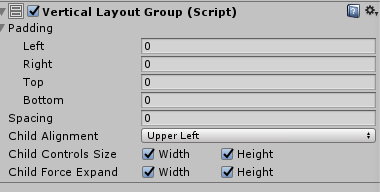
And on my header's panel i've added a LayoutElement and set my max height in prefered size.
But the max height is not working if I expand my window.
Bonus question : the width of my application will depend on the height to always keep a 4:3 ratio, for example if the height is 768, the width will always be 1024 even if the window's width is 2000.
In WPF I was just setting the width in the SizeChanged event which doesn't seem to exist in Unity, I'll look more once I will have done the height. (following this question for example : https://forum.unity.com/threads/window-resize-event.40253/ )
I hope I've been able to describe my issue.
Thank you,




