Wayback Machinekoobas.hobune.stream
May JUN Jul
Previous capture 12 Next capture
2021 2022 2023
1 capture
12 Jun 22 - 12 Jun 22
sparklines
Close Help
  • Products
  • Solutions
  • Made with Unity
  • Learning
  • Support & Services
  • Community
  • Asset Store
  • Get Unity

UNITY ACCOUNT

You need a Unity Account to shop in the Online and Asset Stores, participate in the Unity Community and manage your license portfolio. Login Create account
  • Blog
  • Forums
  • Answers
  • Evangelists
  • User Groups
  • Beta Program
  • Advisory Panel

Navigation

  • Home
  • Products
  • Solutions
  • Made with Unity
  • Learning
  • Support & Services
  • Community
    • Blog
    • Forums
    • Answers
    • Evangelists
    • User Groups
    • Beta Program
    • Advisory Panel

Unity account

You need a Unity Account to shop in the Online and Asset Stores, participate in the Unity Community and manage your license portfolio. Login Create account

Language

  • Chinese
  • Spanish
  • Japanese
  • Korean
  • Portuguese
  • Ask a question
  • Spaces
    • Default
    • Help Room
    • META
    • Moderators
    • Topics
    • Questions
    • Users
    • Badges
  • Home /
avatar image
0
Question by fleischverpackung · Mar 17, 2016 at 10:30 PM · physicsscripting beginnercloth

Collider looses cloth

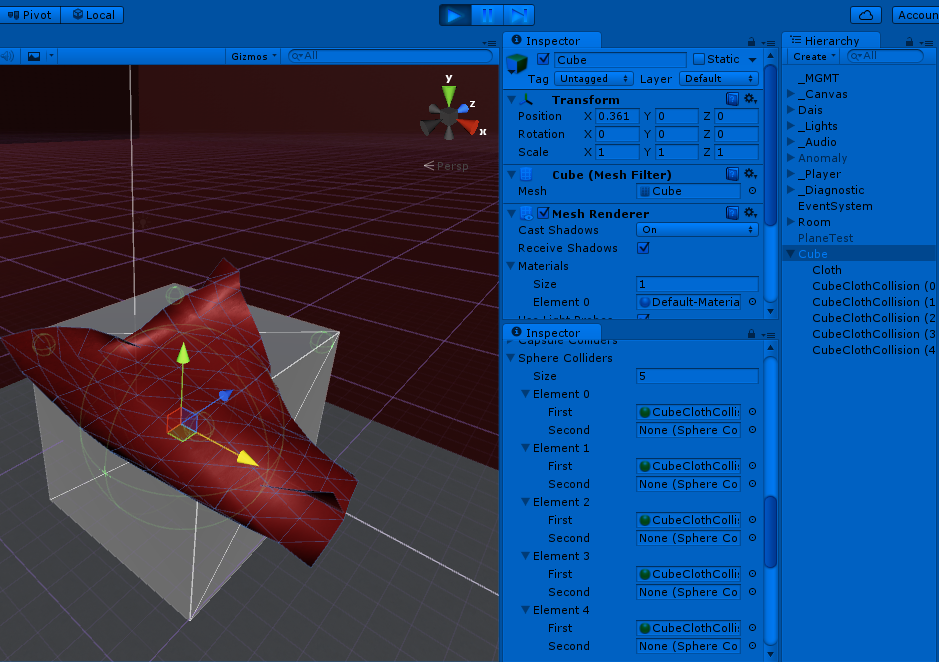
I use a box with 30x30x30 vertices for cloth. Four Capsule colliders hold it on the top.

Problem #1 If i scale the colliders to hit a single vertice it won't hold the cloth. ![alt text][1] I have to make them really large (which makes the attatched pieces look ugly) ![alt text][2]

Problem#2 When I move the colliders fast, the cloth detatches and falls down. I need a way to attatch the cloth on single points onto objects, which I can move with c# script

a.jpg (38.1 kB)
b2.jpg (54.3 kB)
Comment
Add comment
10 |3000 characters needed characters left characters exceeded
▼
  • Viewable by all users
  • Viewable by moderators
  • Viewable by moderators and the original poster
  • Advanced visibility
Viewable by all users

2 Replies

· Add your reply
  • Sort: 
avatar image
0

Answer by JBehreandt · Apr 29, 2016 at 06:25 AM

Hi @fleischverpackung

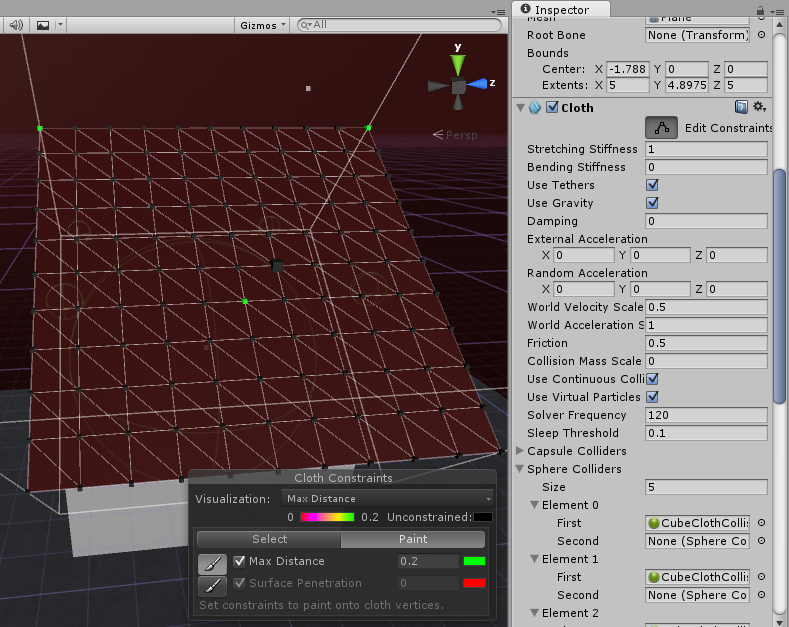
I tried to recreate what you're trying to do based on your screen caps.alt textalt text I wanted to ask, have you gone into the Cloth component, clicked on Edit Constraints and then painted green (0.2) the vertices you want to be pinned? I made a cube GameObject the parent of the GameObject with the Cloth component, set the pins and didn't have a problem with the cloth detaching from the box when I moved the box's transform. (Unless I'm not understanding correctly... is the mesh used by the Skinned Mesh Renderer component affiliated with the Cloth component a plane? It's a little hard for me to tell from the description.)

cloth2.png (270.5 kB)
cloth1.png (338.6 kB)
Comment
Add comment · Share
10 |3000 characters needed characters left characters exceeded
▼
  • Viewable by all users
  • Viewable by moderators
  • Viewable by moderators and the original poster
  • Advanced visibility
Viewable by all users
avatar image
0

Answer by fleischverpackung · Apr 29, 2016 at 08:39 AM

Hi there, thanks for trying!

I used a box with 6 sides of cloth, each of them 30x30 vertices. Then I wanted to lock some vertices to colliders. You can either edit the constraints to fix a cloth vertice, or you can start the simulation with a collider that surrounds the vertices you want to be fixed to that collider. I mean it does work, but it seems to have problems when the collider just contains one vertex. In Obi cloth this works flawlessly! One collider, one vertice - bombproof. Within the new Unity5 cloth engine this seems a little big buggy and the collider looses the cloth.

Comment
Add comment · Show 1 · Share
10 |3000 characters needed characters left characters exceeded
▼
  • Viewable by all users
  • Viewable by moderators
  • Viewable by moderators and the original poster
  • Advanced visibility
Viewable by all users
avatar image Darkgaze · Sep 25, 2018 at 04:33 PM 0
Share

Obi Cloth took a long while to be made, and yes, it is way more tested and improved than the "official" cloth. Thanks for your words about our asset. You can see more about all those assets here :-) http://obi.virtualmethodstudio.com/

Your answer

Hint: You can notify a user about this post by typing @username

Up to 2 attachments (including images) can be used with a maximum of 524.3 kB each and 1.0 MB total.

Follow this Question

Answers Answers and Comments

5 People are following this question.

avatar image avatar image avatar image avatar image avatar image

Related Questions

No APEX, what's the next best thing? 1 Answer

Cloth stretching problem 0 Answers

Can you tell when an Interactive Cloth is colliding with another object? 1 Answer

Zbrush with Unity? Hair/Cloth and fibermesh? 2 Answers

How to solve my glitchy/laggy ClothPhysics problem? 0 Answers


Enterprise
Social Q&A

Social
Subscribe on YouTube social-youtube Follow on LinkedIn social-linkedin Follow on Twitter social-twitter Follow on Facebook social-facebook Follow on Instagram social-instagram

Footer

  • Purchase
    • Products
    • Subscription
    • Asset Store
    • Unity Gear
    • Resellers
  • Education
    • Students
    • Educators
    • Certification
    • Learn
    • Center of Excellence
  • Download
    • Unity
    • Beta Program
  • Unity Labs
    • Labs
    • Publications
  • Resources
    • Learn platform
    • Community
    • Documentation
    • Unity QA
    • FAQ
    • Services Status
    • Connect
  • About Unity
    • About Us
    • Blog
    • Events
    • Careers
    • Contact
    • Press
    • Partners
    • Affiliates
    • Security
Copyright © 2020 Unity Technologies
  • Legal
  • Privacy Policy
  • Cookies
  • Do Not Sell My Personal Information
  • Cookies Settings
"Unity", Unity logos, and other Unity trademarks are trademarks or registered trademarks of Unity Technologies or its affiliates in the U.S. and elsewhere (more info here). Other names or brands are trademarks of their respective owners.
  • Anonymous
  • Sign in
  • Create
  • Ask a question
  • Spaces
  • Default
  • Help Room
  • META
  • Moderators
  • Explore
  • Topics
  • Questions
  • Users
  • Badges