
Wayback Machinekoobas.hobune.stream
May JUN Jul
Previous capture 12 Next capture
2021 2022 2023
1 capture
12 Jun 22 - 12 Jun 22
sparklines
Close Help
  • Products
  • Solutions
  • Made with Unity
  • Learning
  • Support & Services
  • Community
  • Asset Store
  • Get Unity

UNITY ACCOUNT

You need a Unity Account to shop in the Online and Asset Stores, participate in the Unity Community and manage your license portfolio. Login Create account
  • Blog
  • Forums
  • Answers
  • Evangelists
  • User Groups
  • Beta Program
  • Advisory Panel

Navigation

  • Home
  • Products
  • Solutions
  • Made with Unity
  • Learning
  • Support & Services
  • Community
    • Blog
    • Forums
    • Answers
    • Evangelists
    • User Groups
    • Beta Program
    • Advisory Panel

Unity account

You need a Unity Account to shop in the Online and Asset Stores, participate in the Unity Community and manage your license portfolio. Login Create account

Language

  • Chinese
  • Spanish
  • Japanese
  • Korean
  • Portuguese
  • Ask a question
  • Spaces
    • Default
    • Help Room
    • META
    • Moderators
    • Topics
    • Questions
    • Users
    • Badges
  • Home /
  • Help Room /
avatar image
0
Question by baroquedub · Apr 28, 2016 at 11:21 PM · rotationturretaimingtank

Get rotation of a randomly rotating turret on a moving tank (to Spawn missiles in that direction)

I've fried my brain with this one and would very much appreciate any help anyone can give! Looked at similar questions and answers but can't get my head around these rotations...

I have a tank with a random rotation on its turret (it sweeps left and right, changing direction randomly).

I have a missile spawner as a child of the turret with a script which aims and fires along the axis of the turret:
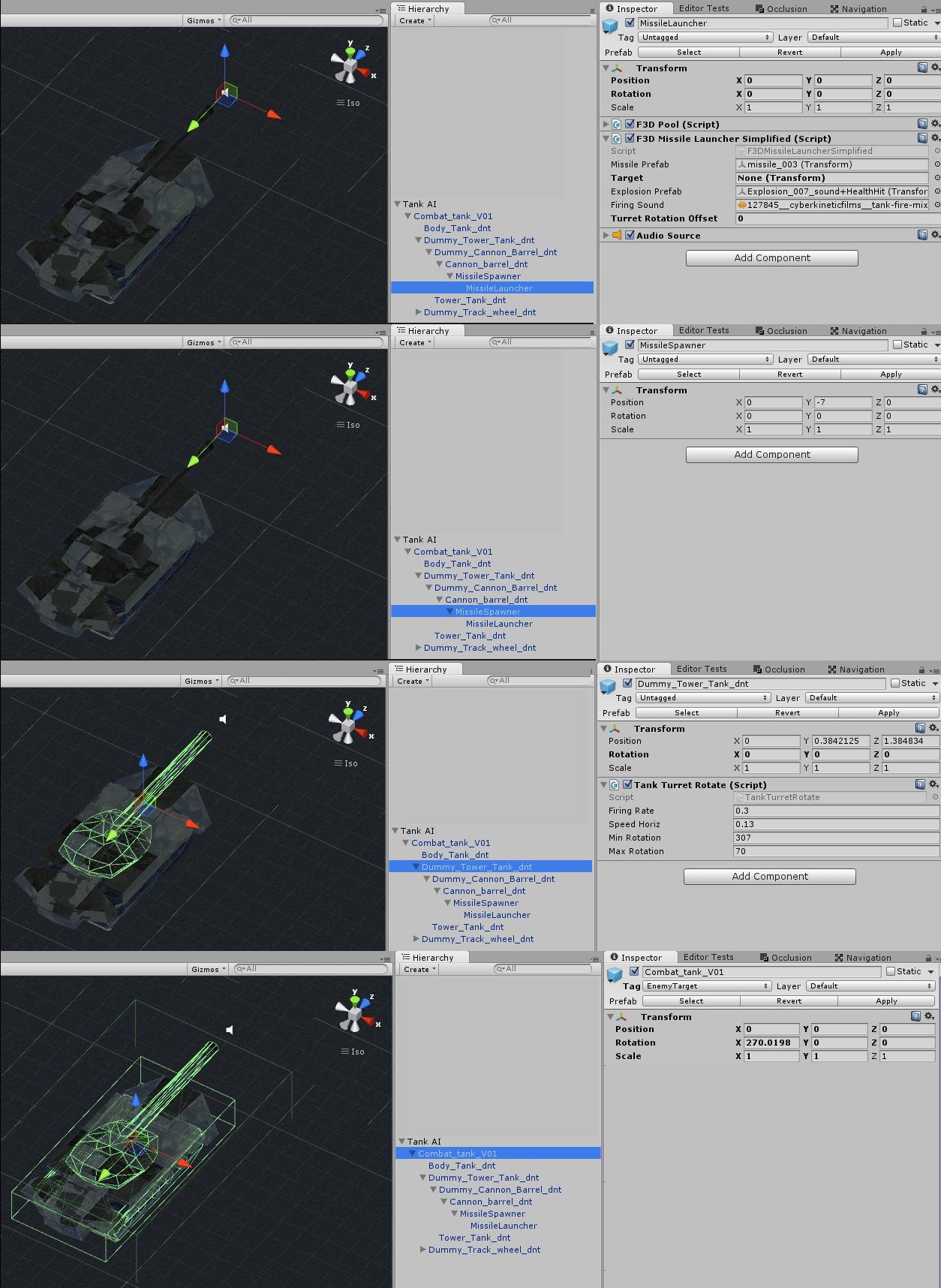
alt text

In F3DMissileLauncherSimplified.cs, attached to the MissileLauncher child, I'm using the following code in the Fire() method (this is randomly triggered so that the missiles launch at varying intervals):

 Transform barrel = transform.parent;
 float turretRotation = barrel.parent.parent.parent.localRotation.eulerAngles.z;
 Quaternion dirAngle = Quaternion.Euler(0, turretRotation, 0);
 Transform tMissile = F3DPool.instance.Spawn(missilePrefab, barrel.position, dirAngle, null);

The Spawn method seems pretty standard and is defined as follows:

  public Transform Spawn(Transform obj, Vector3 pos, Quaternion rot, Transform parent)

The situation is slightly complicated by the fact that this is a Blender mesh imported with a 270 rotation on the x axis but all other transforms are aligned as you'd expect. (See screenshots above)

This all works fine when the tank is stationary but once I added a NavMeshAgent and a random roaming script, making the tank move around (in addition to the turret rotation) the missiles no longer come out in line with the turret, but off at varying angles.
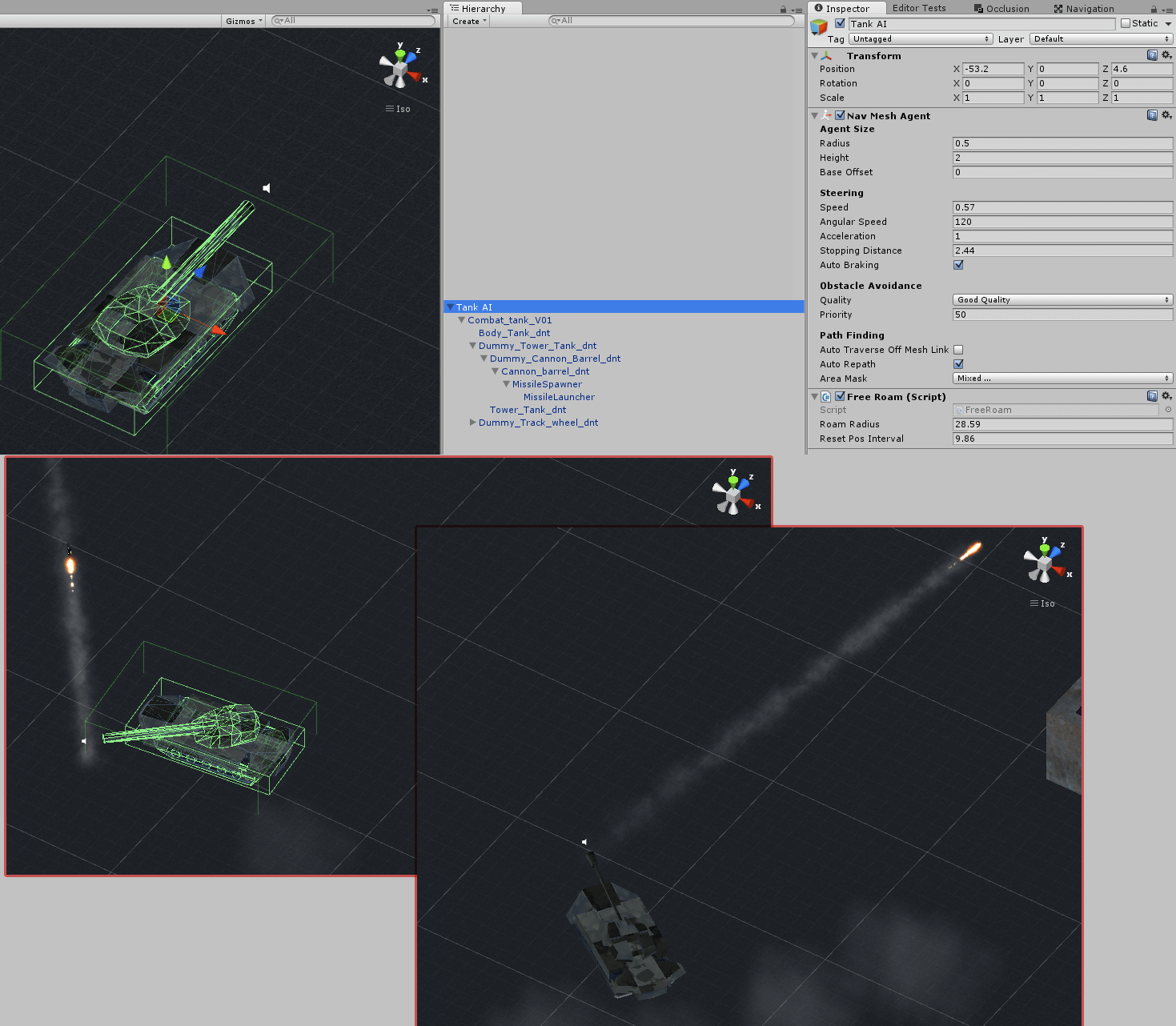
alt text

I feel stupid. Surely getting the rotation angle, looking down a turret, can't be this difficult!

tankai.png (502.1 kB)
tank-hierarchy.png (436.6 kB)
Comment
Add comment
10 |3000 characters needed characters left characters exceeded
▼
  • Viewable by all users
  • Viewable by moderators
  • Viewable by moderators and the original poster
  • Advanced visibility
Viewable by all users

2 Replies

· Add your reply
  • Sort: 
avatar image
1
Best Answer

Answer by baroquedub · Apr 29, 2016 at 08:59 PM

Can't seem to add a reply to @Scribe (too many replies on the same post?) but this is definitely his answer. Works great. Thank you! I'd obviously been over-thinking this, being still relatively new to Unity.

So based on his reply, the solution is:

 Transform barrel = transform.parent;
 Quaternion dirAngle = Quaternion.LookRotation(-transform.up, transform.forward);
 Transform tMissile = F3DPool.instance.Spawn(missilePrefab, barrel.position, dirAngle, null);

For anyone interested, checking LookRotation in the docs, explains the solution. This is how to get the angle in the direction I want:

      Quaternion LookRotation(Vector3 forward, Vector3 upwards);

and because the gameobject to which the script is attached (the MissileLauncher) has an odd rotation the LookRotation is adjusted accordingly:
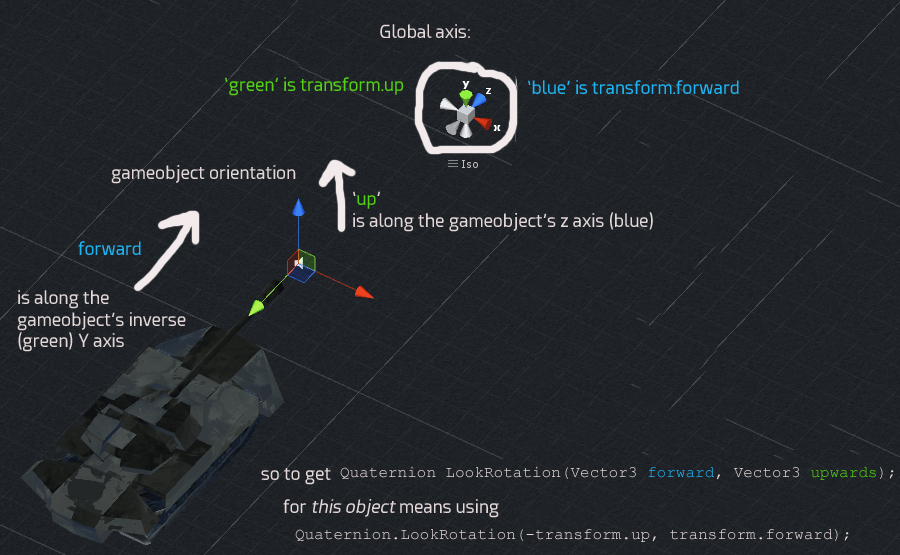
alt text

'Forward' is actually the reverse of the object's y axis (-transform.up) which is green 'Up' is my object's forward axis (positive z) the arrow in blue.

Comparing the object's axis with the world axis explains why things have to be adjusted. To get the 'forward' parameter of the LookRotation function you have to go along the object' Y axis (in reverse) To get the 'up' parameter you have to go along my object's z axis.

Thank you for pointing that out. I hope this helps other newbies flummoxed by all these rotations and axis!


missilelauncher-explanation.png (237.0 kB)
Comment
Add comment · Show 1 · Share
10 |3000 characters needed characters left characters exceeded
▼
  • Viewable by all users
  • Viewable by moderators
  • Viewable by moderators and the original poster
  • Advanced visibility
Viewable by all users
avatar image Scribe · Apr 30, 2016 at 11:19 AM 0
Share

Nice description, much better explanation than my own :) glad you got it working!

avatar image
0

Answer by AlbinoStoic · Apr 29, 2016 at 01:34 AM

This is easy if your firing script is under the barrel and not the tank!

   // C# - Called by Update() on the Barrel
   void Fire(){
     // Find out what the barrel thinks forward is.
     Vector3 direction = transform.TransformDirection(Vector3.forward * 1f);
     
     // Spawn the bullet at our position + direction + rotation
     GameObject bullet = Instantiate(bulletPrefab, transform.position + direction, transform.rotation);
     
     // Send the bullet speeding off "forward" (this only works because we rotated the object when we created it.)
     bullet.GetComponent<Rigidbody>().velocity = new Vector3(1f, 0, 0);
     
     // Do your Spawn or Network.Spawn now that it's ready.
   }
Comment
Add comment · Show 4 · Share
10 |3000 characters needed characters left characters exceeded
▼
  • Viewable by all users
  • Viewable by moderators
  • Viewable by moderators and the original poster
  • Advanced visibility
Viewable by all users
avatar image baroquedub · Apr 29, 2016 at 07:52 AM 0
Share

Sorry. I've seen similar things posted around but it's not what I'm asking.

$$anonymous$$y spawn pool script needs the direction angle.

Also, I've got my Firing script on the $$anonymous$$issile Launcher (the last child in the hierarchy) not the parent tank. (Have a look at the screenshots and you'll see what I mean).

Using your logic, I've tried:

Transform barrel = transform.parent.parent.parent.parent;

Vector3 direction = barrel.TransformDirection(Vector3.forward * 1f);

Quaternion dirAngle = Quaternion.Euler(direction);

Transform t$$anonymous$$issile = F3DPool.instance.Spawn(missilePrefab, transform.parent.position, dirAngle, null);

but that does the same thing, firing at odd angles

avatar image Scribe baroquedub · Apr 29, 2016 at 12:37 PM 0
Share

If you have the direction as a vector3, then you can use Quaternion.LookRotation to get the rotation to apply, try:

 Quaternion.LookRotation(direction, Vector3.up);
avatar image baroquedub Scribe · Apr 29, 2016 at 12:46 PM 0
Share

The problem is I don't know how to get the direction from this randomly rotating turret on a randomly moving tank. There isn't a target as such, it just fires randomly in all directions.

The thing I don't understand is why method I use to get the rotation of the turret (when the tank is stationary) stops working when the tank is made to move by the Nav$$anonymous$$eshAgent.

Thanks for your help though :) I've altered the title of my question to better explain what I'm trying to achieve. I can see now that I wasn't being very clear.

Show more comments

Your answer

Hint: You can notify a user about this post by typing @username

Up to 2 attachments (including images) can be used with a maximum of 524.3 kB each and 1.0 MB total.

Follow this Question

Answers Answers and Comments

67 People are following this question.

avatar image avatar image avatar image avatar image avatar image avatar image avatar image avatar image avatar image avatar image avatar image avatar image avatar image avatar image avatar image avatar image avatar image avatar image avatar image avatar image avatar image avatar image avatar image avatar image avatar image avatar image avatar image avatar image avatar image avatar image avatar image avatar image avatar image avatar image avatar image avatar image avatar image avatar image avatar image avatar image avatar image avatar image avatar image avatar image avatar image avatar image avatar image avatar image avatar image avatar image avatar image avatar image avatar image avatar image avatar image avatar image avatar image avatar image avatar image avatar image avatar image avatar image avatar image avatar image avatar image avatar image avatar image

Related Questions

Turret rotation based on its own local rotation. 3 Answers

Tank turret rotation while tank is moving help 1 Answer

Rotate tank turret using quaternions 0 Answers

[Solved - sort of] Can't find a way to lock cannon aiming between 2 angle values 1 Answer

Problem with projectile rotation - 2D 0 Answers


Enterprise
Social Q&A

Social
Subscribe on YouTube social-youtube Follow on LinkedIn social-linkedin Follow on Twitter social-twitter Follow on Facebook social-facebook Follow on Instagram social-instagram

Footer

  • Purchase
    • Products
    • Subscription
    • Asset Store
    • Unity Gear
    • Resellers
  • Education
    • Students
    • Educators
    • Certification
    • Learn
    • Center of Excellence
  • Download
    • Unity
    • Beta Program
  • Unity Labs
    • Labs
    • Publications
  • Resources
    • Learn platform
    • Community
    • Documentation
    • Unity QA
    • FAQ
    • Services Status
    • Connect
  • About Unity
    • About Us
    • Blog
    • Events
    • Careers
    • Contact
    • Press
    • Partners
    • Affiliates
    • Security
Copyright © 2020 Unity Technologies
  • Legal
  • Privacy Policy
  • Cookies
  • Do Not Sell My Personal Information
  • Cookies Settings
"Unity", Unity logos, and other Unity trademarks are trademarks or registered trademarks of Unity Technologies or its affiliates in the U.S. and elsewhere (more info here). Other names or brands are trademarks of their respective owners.
  • Anonymous
  • Sign in
  • Create
  • Ask a question
  • Spaces
  • Default
  • Help Room
  • META
  • Moderators
  • Explore
  • Topics
  • Questions
  • Users
  • Badges
