 koobas.hobune.stream


VR: Possible to render a multiple mesh/material model transparent without seeing innards?
I would like to render a model in VR. This model consists of multiple meshes, some with different materials. I would like this entire model to fade in and out without having depth sorting issues and being able to see the innards of the model.
If there was only one mesh in the model, I could use a technique like this, this, or this. But these multi-pass methods don't seem to work with multiple meshes in the model that should all fade together. (I get depth sorting issues between meshes, etc.)
If I was not in VR, I could render the model as opaque to a render texture and then apply that render texture, alpha blended, on top of the existing scene... But doing this in VR seems tricky, since I don't seem to have easy access to the two cameras. I expect this will get even more difficult with rendering changes in Unity 5.4. (Unity only seems to expose one camera object that renders both eyes.)
Any ideas on how to achieve this effect in VR?

Hi, some techniques to do this are close to the second link you provided: first, render all objects with a shader that will only write to the Z buffer = with a totally transparent color. Then, render the objects a second time, this time with their regular shaders. The first pass will write to the Z buffer, removing the "overdraw" effect that transparency has. The second will render the transparent colors only where there is a Z equal. I don't think it's possible to do this with a multiple pass shader in unity as the first Z pass must be done before the color pass (Z pass in geometry queue and color pass in transparent queue).

Hi dns. Actually, it is possible to do what you described in a multipass shader, as shown in the second link and also shown in the Unity documentation. But as I mentioned in my question, this only works for a single-mesh object. Also, if I wrote to the z-buffer without writing any colour in the opaque queue, this would simply result in the camera's clear colour showing behind where the object is, rather than blending with the world that should be behind the transparent object -- Ins$$anonymous$$d I tried your method, but writing to the z-buffer with a second renderer in the Transparent-1 queue. This resulted in transparency only being drawn where z-fighting was happening (ZTest Equal): http://imgur.com/a/prHxJ.
Good attempt, but ZTest Equal doesn't seem to cut it for this type of work.
I don't understand exactly what you mean by "only works for a single mesh object" ? About the shader in the Unity documentation: cool, didn't find this one :) and yes, the Z write pass is supposed to be in the transparent queue. I don't understand the z fight: is the z writing pass and color writing pass the same object ? What do you want to achieve with this image of a book/paper pile + some transparent object on it ?
(Adding a comment coz can't reply anymore) So, if I understand well, you want multiple objects that can each be transparent at the same time and with "sorted" transparency. $$anonymous$$aybe if you can cut the objects into parts small enough so that you can sort them yourself and draw them front to back using the 2 pass transparent shader you already have (so the closer to the cam would hide the transparent objects under them). But that wouldn't work with any shape and could Z fight. To sort them, it should be possible to use the SortingLayer, assigning dynamically objects to layers at each frame, but then with 2 VR cameras.... Have you tried describe the problem in the graphic/shader section of the forum ?

I'm struggling with this right now. We are in AR, so transparency sorting is our everyday hell.
I specifically have a bunch of brain chunks. I've already implemented the solution from number two, a multi pass transparency shader with depth writing, but as stated it obviously fails across multiple meshes.
I'm thinking one solution might be to render all objects with that material into a single buffer, but I'm uncertain how that might be done. Did anyone have any luck solving this problem?
Here's my example, for the record:
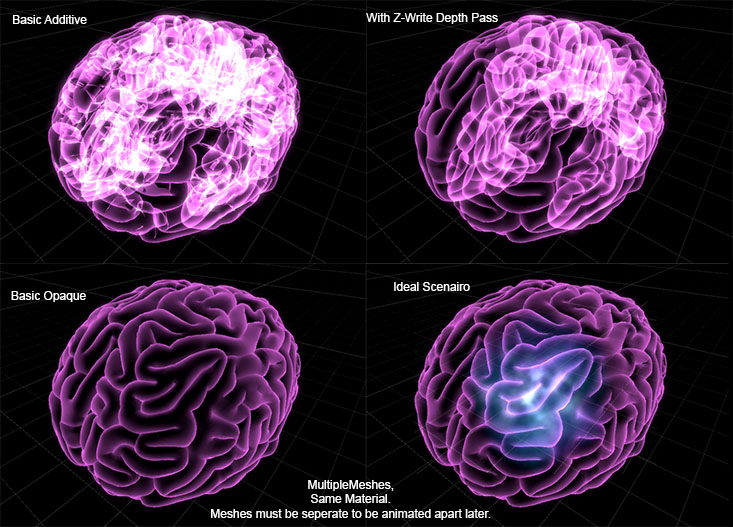
After looking into this for a while, I believe that the correct answer is change your artwork to be a single mesh and use skinned animations so that the z-write depth pass method actually works.
...So no, I still haven't found an answer. It's seems to be a fundamentally very difficult problem that is best "solved" by changing the way that you render (modifying art to combine the entire virtual object into one mesh.)
Please post back if you find a different solution!



