
Wayback Machinekoobas.hobune.stream
May JUN Jul
Previous capture 12 Next capture
2021 2022 2023
1 capture
12 Jun 22 - 12 Jun 22
sparklines
Close Help
  • Products
  • Solutions
  • Made with Unity
  • Learning
  • Support & Services
  • Community
  • Asset Store
  • Get Unity

UNITY ACCOUNT

You need a Unity Account to shop in the Online and Asset Stores, participate in the Unity Community and manage your license portfolio. Login Create account
  • Blog
  • Forums
  • Answers
  • Evangelists
  • User Groups
  • Beta Program
  • Advisory Panel

Navigation

  • Home
  • Products
  • Solutions
  • Made with Unity
  • Learning
  • Support & Services
  • Community
    • Blog
    • Forums
    • Answers
    • Evangelists
    • User Groups
    • Beta Program
    • Advisory Panel

Unity account

You need a Unity Account to shop in the Online and Asset Stores, participate in the Unity Community and manage your license portfolio. Login Create account

Language

  • Chinese
  • Spanish
  • Japanese
  • Korean
  • Portuguese
  • Ask a question
  • Spaces
    • Default
    • Help Room
    • META
    • Moderators
    • Topics
    • Questions
    • Users
    • Badges
  • Home /
avatar image
0
Question by Ray-Koopa · Jan 18, 2016 at 08:48 AM · texturematerialalpha-channel

Alpha Texture with white pixels turns out black

I'm having a few issues creating a grid visual for a level editor inside the game. One of it is that I have an alpha texture with white colored pixels, but in the game, it eventually turns out black.

(To visualize my problems, I had to use a few external image links, as I could only attach 2 images otherwise.)

  • The grid itself is just a plane which gets the following texture applied: Texture Inspector
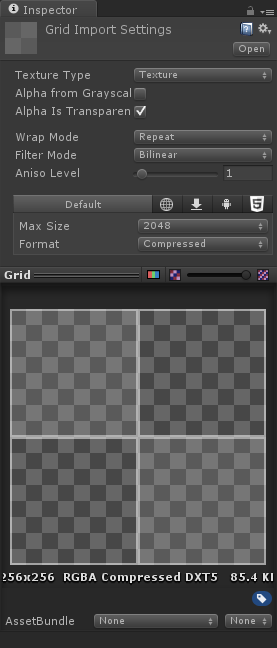
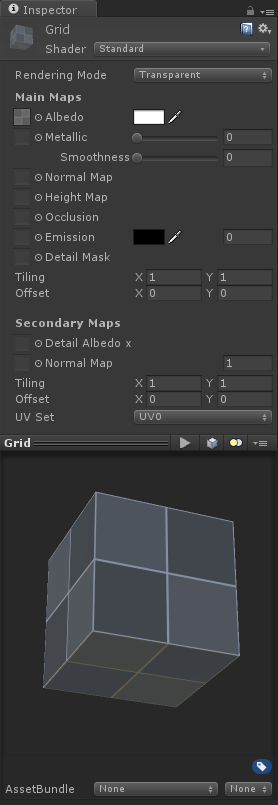
  • While it still looks good in the texture inspector, it already looks buggy in the material inspector. It doesn't look fully transparent anymore, as if a blueish tint was added to it through lighting, and the bottom of the cube is somehow yellowish: Material Inspector
  • Even worse, when seeing the plane in the editor, it turned into a darkening texture looking like it contains black color: http://ray.syroot.com/unity/alphatexture/p3.png

  • That's absolutely not what I want. In the end, it should look like this (screenshot from the old version of my game on my engine); note that the background clear color is black (if it would be blue, the grid would still be white): http://ray.syroot.com/unity/alphatexture/p4.png

My first guesses were that Unity applied some kind of lighting to the grid. But I already excluded the object from the only ambient light with a cull mask, putting it into its own layer.

I'm a bit lost here. Did I already make an error in the material inspector, since it already looks bad there?

p1.png (19.5 kB)
p2.png (29.7 kB)
Comment
Add comment
10 |3000 characters needed characters left characters exceeded
▼
  • Viewable by all users
  • Viewable by moderators
  • Viewable by moderators and the original poster
  • Advanced visibility
Viewable by all users

1 Reply

· Add your reply
  • Sort: 
avatar image
0
Best Answer

Answer by saschandroid · Jan 18, 2016 at 09:26 AM

Do you get the desired effect with the "Unlit/Transparent" shader?

Comment
Add comment · Show 1 · Share
10 |3000 characters needed characters left characters exceeded
▼
  • Viewable by all users
  • Viewable by moderators
  • Viewable by moderators and the original poster
  • Advanced visibility
Viewable by all users
avatar image Ray-Koopa · Jan 18, 2016 at 09:30 AM 0
Share

Thanks, that's it! I quickly had some look into the shader manuals, and guess I tweak this shader to also disable culling and mix in a texture deter$$anonymous$$ing the alpha to get a nice circular fade out of the grid.

Your answer

Hint: You can notify a user about this post by typing @username

Up to 2 attachments (including images) can be used with a maximum of 524.3 kB each and 1.0 MB total.

Follow this Question

Answers Answers and Comments

4 People are following this question.

avatar image avatar image avatar image avatar image

Related Questions

How to make a default particle's texture? 1 Answer

How can I transparent mesh with texture UV map 1 Answer

Making leaves for unity trees 1 Answer

Image loaded with LoadImageIntoTexture gets inverted 0 Answers

Material/Texture on the Inside of a Sphere 5 Answers


Enterprise
Social Q&A

Social
Subscribe on YouTube social-youtube Follow on LinkedIn social-linkedin Follow on Twitter social-twitter Follow on Facebook social-facebook Follow on Instagram social-instagram

Footer

  • Purchase
    • Products
    • Subscription
    • Asset Store
    • Unity Gear
    • Resellers
  • Education
    • Students
    • Educators
    • Certification
    • Learn
    • Center of Excellence
  • Download
    • Unity
    • Beta Program
  • Unity Labs
    • Labs
    • Publications
  • Resources
    • Learn platform
    • Community
    • Documentation
    • Unity QA
    • FAQ
    • Services Status
    • Connect
  • About Unity
    • About Us
    • Blog
    • Events
    • Careers
    • Contact
    • Press
    • Partners
    • Affiliates
    • Security
Copyright © 2020 Unity Technologies
  • Legal
  • Privacy Policy
  • Cookies
  • Do Not Sell My Personal Information
  • Cookies Settings
"Unity", Unity logos, and other Unity trademarks are trademarks or registered trademarks of Unity Technologies or its affiliates in the U.S. and elsewhere (more info here). Other names or brands are trademarks of their respective owners.
  • Anonymous
  • Sign in
  • Create
  • Ask a question
  • Spaces
  • Default
  • Help Room
  • META
  • Moderators
  • Explore
  • Topics
  • Questions
  • Users
  • Badges
