Wayback Machinekoobas.hobune.stream
May JUN Jul
Previous capture 13 Next capture
2021 2022 2023
1 capture
13 Jun 22 - 13 Jun 22
sparklines
Close Help
  • Products
  • Solutions
  • Made with Unity
  • Learning
  • Support & Services
  • Community
  • Asset Store
  • Get Unity

UNITY ACCOUNT

You need a Unity Account to shop in the Online and Asset Stores, participate in the Unity Community and manage your license portfolio. Login Create account
  • Blog
  • Forums
  • Answers
  • Evangelists
  • User Groups
  • Beta Program
  • Advisory Panel

Navigation

  • Home
  • Products
  • Solutions
  • Made with Unity
  • Learning
  • Support & Services
  • Community
    • Blog
    • Forums
    • Answers
    • Evangelists
    • User Groups
    • Beta Program
    • Advisory Panel

Unity account

You need a Unity Account to shop in the Online and Asset Stores, participate in the Unity Community and manage your license portfolio. Login Create account

Language

  • Chinese
  • Spanish
  • Japanese
  • Korean
  • Portuguese
  • Ask a question
  • Spaces
    • Default
    • Help Room
    • META
    • Moderators
    • Topics
    • Questions
    • Users
    • Badges
  • Home /
avatar image
0
Question by hanso23 · Jul 29, 2014 at 07:58 PM · transparentwater pro

help needed: transparent texture vs water4

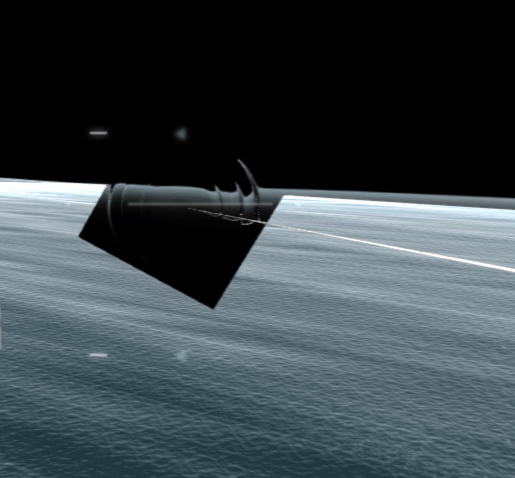
hey everyone! I kinda stuck with an odd problem: I've got my player ship shooting a missile with a "transparent-kind-of" explosing ( it's the heatwave from ben throop's detonator framework). everything is running fine, but when i add the water4 present into my scene, i get this annoying graphic issue:
alt text

you can clearly see the texture-box around the explosion. how can i solve this? :s

water4prob.jpg (88.9 kB)
Comment
Add comment · Show 2
10 |3000 characters needed characters left characters exceeded
▼
  • Viewable by all users
  • Viewable by moderators
  • Viewable by moderators and the original poster
  • Advanced visibility
Viewable by all users
avatar image hanso23 · Jul 30, 2014 at 07:48 PM 0
Share

anyone?

alt text

( the image link was broken yesterday, sorry)

water4prob.jpg (88.9 kB)
avatar image sethuraj · Jul 31, 2014 at 09:51 AM 1
Share

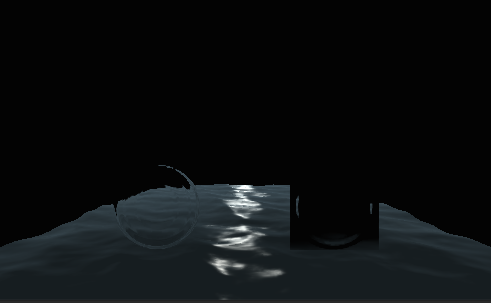
After experimenting for a while this is the result i obtained..
alt text

In the left you can see its working properly and in the right side the problem you mentioned.**Its two planes with the same material.One planes's normal towards camera and other plane's normal away from camera.**That is one plane Y rotation is zero and other plane Y rotation 180.

But i made a few changes to the distortion shader.I disabled back face culling,turned on depth writing and depth Testting Less than or equal.Just add this code to the beginning of the subshader block in your "HeatDistort" shader file.

 Category 
 {
     // We must be transparent, so other objects are drawn before this one
     Tags { "Queue"="Transparent+100" "RenderType"="Opaque" }
         
     //Tags {"Queue"="Transparent" "IgnoreProjector"="False" "RenderType"="Opaque"}
 
     SubShader 
     {
        //ADD these three lines       
        Cull off  //Disable Backface culling       
        ZWrite on //Enable Depth writing          
        ZTest LEqual //$$anonymous$$ake Depth test Less than or equal
 
        // This pass grabs the screen behind the object into a texture.
        // We can access the result in the next pass as _GrabTexture
        GrabPass 
        {                            
            Name "BASE"
        Tags { "Light$$anonymous$$ode" = "Always" }
        }


screen shot 2014-07-31 at 3.09.54 pm.png (45.7 kB)

0 Replies

· Add your reply
  • Sort: 

Your answer

Hint: You can notify a user about this post by typing @username

Up to 2 attachments (including images) can be used with a maximum of 524.3 kB each and 1.0 MB total.

Follow this Question

Answers Answers and Comments

3 People are following this question.

avatar image avatar image avatar image

Related Questions

Gui.Enable transperancy 4 Answers

Google Sketchup FBX problem 2 Answers

How to make Transparent/VertexLit shader work fine 3 Answers

transparent objects 0 Answers

Moving an object 1 Answer


Enterprise
Social Q&A

Social
Subscribe on YouTube social-youtube Follow on LinkedIn social-linkedin Follow on Twitter social-twitter Follow on Facebook social-facebook Follow on Instagram social-instagram

Footer

  • Purchase
    • Products
    • Subscription
    • Asset Store
    • Unity Gear
    • Resellers
  • Education
    • Students
    • Educators
    • Certification
    • Learn
    • Center of Excellence
  • Download
    • Unity
    • Beta Program
  • Unity Labs
    • Labs
    • Publications
  • Resources
    • Learn platform
    • Community
    • Documentation
    • Unity QA
    • FAQ
    • Services Status
    • Connect
  • About Unity
    • About Us
    • Blog
    • Events
    • Careers
    • Contact
    • Press
    • Partners
    • Affiliates
    • Security
Copyright © 2020 Unity Technologies
  • Legal
  • Privacy Policy
  • Cookies
  • Do Not Sell My Personal Information
  • Cookies Settings
"Unity", Unity logos, and other Unity trademarks are trademarks or registered trademarks of Unity Technologies or its affiliates in the U.S. and elsewhere (more info here). Other names or brands are trademarks of their respective owners.
  • Anonymous
  • Sign in
  • Create
  • Ask a question
  • Spaces
  • Default
  • Help Room
  • META
  • Moderators
  • Explore
  • Topics
  • Questions
  • Users
  • Badges