Wayback Machinekoobas.hobune.stream
May JUN Jul
Previous capture 12 Next capture
2021 2022 2023
1 capture
12 Jun 22 - 12 Jun 22
sparklines
Close Help
  • Products
  • Solutions
  • Made with Unity
  • Learning
  • Support & Services
  • Community
  • Asset Store
  • Get Unity

UNITY ACCOUNT

You need a Unity Account to shop in the Online and Asset Stores, participate in the Unity Community and manage your license portfolio. Login Create account
  • Blog
  • Forums
  • Answers
  • Evangelists
  • User Groups
  • Beta Program
  • Advisory Panel

Navigation

  • Home
  • Products
  • Solutions
  • Made with Unity
  • Learning
  • Support & Services
  • Community
    • Blog
    • Forums
    • Answers
    • Evangelists
    • User Groups
    • Beta Program
    • Advisory Panel

Unity account

You need a Unity Account to shop in the Online and Asset Stores, participate in the Unity Community and manage your license portfolio. Login Create account

Language

  • Chinese
  • Spanish
  • Japanese
  • Korean
  • Portuguese
  • Ask a question
  • Spaces
    • Default
    • Help Room
    • META
    • Moderators
    • Topics
    • Questions
    • Users
    • Badges
  • Home /
avatar image
0
Question by sahilanand · Dec 04, 2016 at 08:24 AM · unity 5collider3d modelsvehicleracing game

vehicle falls through the ground

Greetings! I'm making a car racing game and I'm a beginner ..so the problem is that as i click on play my car falls through the ground..I have imported the car using Unity Standard Assets & hence the colliders are already applied to all the four wheels..I also have attached a screenshot for reference.I created a long bridge using Autodesk Maya & I've imported the bridge in Unity ..My car is moving perfectly on a plain surface or terrain without falling through the ground however when i placed my car on that bridge the car doesnt seem to move and it falls through the bridge..I tried adding "box collider" & "rigid body" (I checked the option- use gravity) as well to the bridge but still the car is falling through the bridge ..Please help me since 2 weeks I'm trying to figure it out but I haven't achieved any success ..Any help would be appreciated ! :) alt text
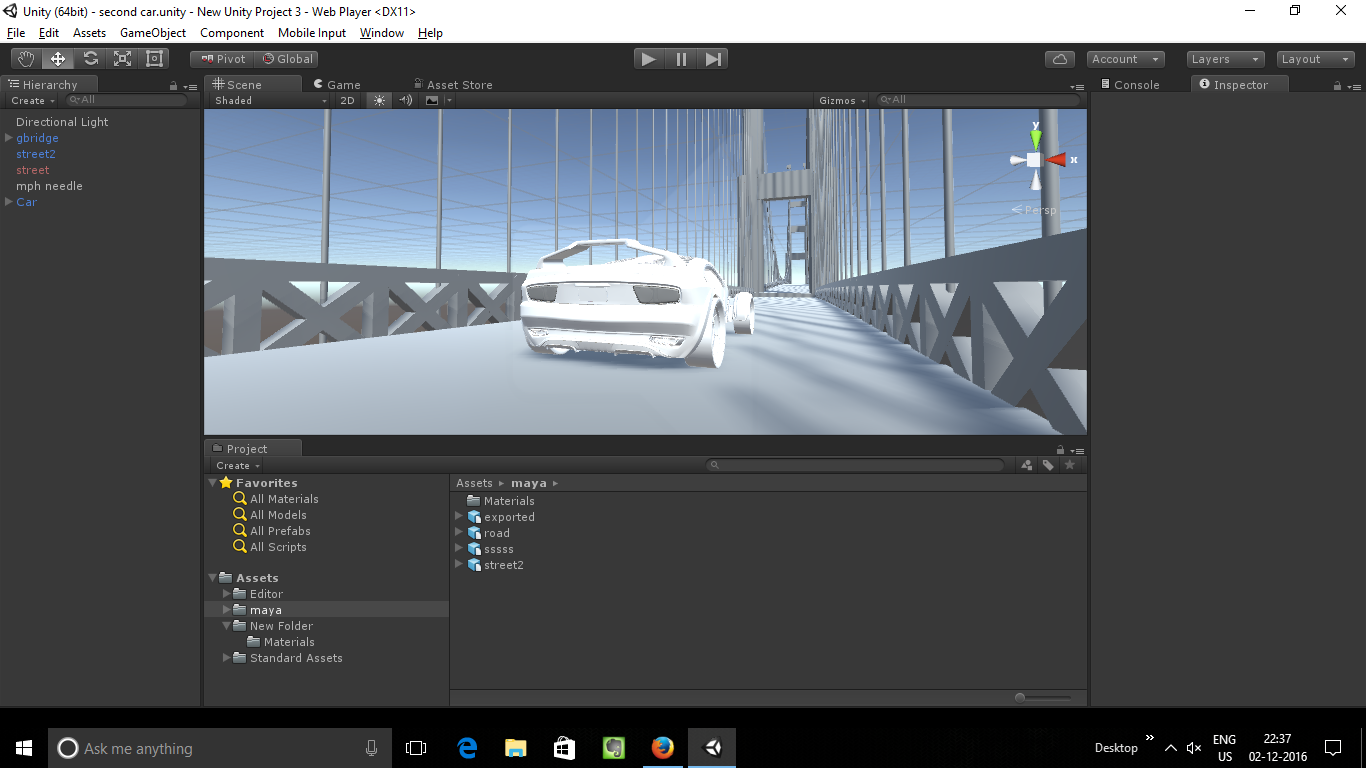
screenshot-4.png (372.0 kB)
Comment
Add comment · Show 1
10 |3000 characters needed characters left characters exceeded
▼
  • Viewable by all users
  • Viewable by moderators
  • Viewable by moderators and the original poster
  • Advanced visibility
Viewable by all users
avatar image Paricus · Dec 04, 2016 at 05:56 PM 0
Share

have you applied a mesh collider to the bridge

1 Reply

· Add your reply
  • Sort: 
avatar image
0
Best Answer

Answer by FlightOfOne · Dec 04, 2016 at 06:01 PM

I think it's something very, very simple. You do not need rigidbody and gravity on the bridge. I have a feeling that your box collider is too large(or too small) that when you place the car, it is actually inside the collider. That will cause it to fall through since it's already inside the collider. You can adjust the size and the position of the collider, independent of the bridge.

Can you take a screenshot while the bridge is selected, so we can see the inspector on it?

Comment
Add comment · Show 2 · Share
10 |3000 characters needed characters left characters exceeded
▼
  • Viewable by all users
  • Viewable by moderators
  • Viewable by moderators and the original poster
  • Advanced visibility
Viewable by all users
avatar image sahilanand · Dec 07, 2016 at 09:30 AM 0
Share

Hey thanks for the answer,aalt texts I'm a beginner I'm not able to figure it out that my box collider is big or small than my car.I have attached a screenshot while my bridge is selected & you can see the inspector tab

screenshot-5.png (383.2 kB)
avatar image roman_sedition sahilanand · Dec 07, 2016 at 10:54 AM 0
Share

It looks like your mesh collider doesn't have a mesh applied to it. Have you applied 'Generate Colliders' when you imported the model?alt text
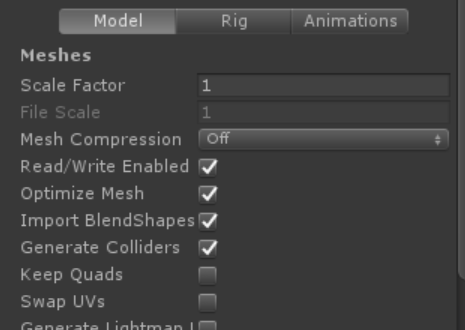
capture.png (31.0 kB)

Your answer

Hint: You can notify a user about this post by typing @username

Up to 2 attachments (including images) can be used with a maximum of 524.3 kB each and 1.0 MB total.

Follow this Question

Answers Answers and Comments

6 People are following this question.

avatar image avatar image avatar image avatar image avatar image avatar image

Related Questions

Respawn with damage nwh 1 Answer

Utilizing Multiple Scripts for Car Movement in a Racing Game 1 Answer

Infinite Road Generation using Colliders, is this wrong? 0 Answers

WheelCollider - I don't have a circle of Collider 1 Answer

How can I create alerts with symbols and sounds for a car HUD? 0 Answers


Enterprise
Social Q&A

Social
Subscribe on YouTube social-youtube Follow on LinkedIn social-linkedin Follow on Twitter social-twitter Follow on Facebook social-facebook Follow on Instagram social-instagram

Footer

  • Purchase
    • Products
    • Subscription
    • Asset Store
    • Unity Gear
    • Resellers
  • Education
    • Students
    • Educators
    • Certification
    • Learn
    • Center of Excellence
  • Download
    • Unity
    • Beta Program
  • Unity Labs
    • Labs
    • Publications
  • Resources
    • Learn platform
    • Community
    • Documentation
    • Unity QA
    • FAQ
    • Services Status
    • Connect
  • About Unity
    • About Us
    • Blog
    • Events
    • Careers
    • Contact
    • Press
    • Partners
    • Affiliates
    • Security
Copyright © 2020 Unity Technologies
  • Legal
  • Privacy Policy
  • Cookies
  • Do Not Sell My Personal Information
  • Cookies Settings
"Unity", Unity logos, and other Unity trademarks are trademarks or registered trademarks of Unity Technologies or its affiliates in the U.S. and elsewhere (more info here). Other names or brands are trademarks of their respective owners.
  • Anonymous
  • Sign in
  • Create
  • Ask a question
  • Spaces
  • Default
  • Help Room
  • META
  • Moderators
  • Explore
  • Topics
  • Questions
  • Users
  • Badges