
Wayback Machinekoobas.hobune.stream
May JUN Jul
Previous capture 12 Next capture
2021 2022 2023
1 capture
12 Jun 22 - 12 Jun 22
sparklines
Close Help
  • Products
  • Solutions
  • Made with Unity
  • Learning
  • Support & Services
  • Community
  • Asset Store
  • Get Unity

UNITY ACCOUNT

You need a Unity Account to shop in the Online and Asset Stores, participate in the Unity Community and manage your license portfolio. Login Create account
  • Blog
  • Forums
  • Answers
  • Evangelists
  • User Groups
  • Beta Program
  • Advisory Panel

Navigation

  • Home
  • Products
  • Solutions
  • Made with Unity
  • Learning
  • Support & Services
  • Community
    • Blog
    • Forums
    • Answers
    • Evangelists
    • User Groups
    • Beta Program
    • Advisory Panel

Unity account

You need a Unity Account to shop in the Online and Asset Stores, participate in the Unity Community and manage your license portfolio. Login Create account

Language

  • Chinese
  • Spanish
  • Japanese
  • Korean
  • Portuguese
  • Ask a question
  • Spaces
    • Default
    • Help Room
    • META
    • Moderators
    • Topics
    • Questions
    • Users
    • Badges
  • Home /
  • Help Room /
avatar image
0
Question by Backside2357 · Jan 20, 2018 at 06:27 PM · c#animatoreditor-scriptingbug report

Assignment to ChildAnimatorState.position has no effect

Hi there!

I have a very simple script that is supposed to change the positions of the state nodes in my Animator graph, for example the "New Animation" state in this graph: alt text
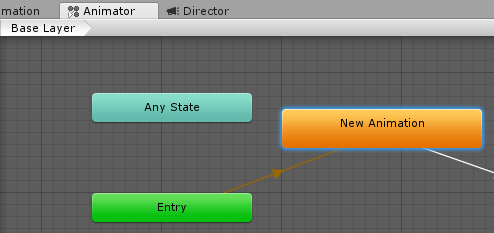
I can access the state position as shown in the "GenerateAnimatorGraph" function in the code below. But although the position property is a get/set, I cannot alter the position value -> the Debug.Log gives me an unaltered position:

alt text

Is this a bug or how is this supposed to work?

 using System.Collections;
 using System.Collections.Generic;
 using UnityEngine;
 
 using UnityEditor;
 using UnityEditor.Animations;
 
 { 
 
     [ExecuteInEditMode]
     public class AnimationManager : MonoBehaviour {
 
         public AnimatorController animatorController;
     
         // Update is called once per frame
         void Update () {
         
             if(animatorController == null)
             {
                 return;
             }
            
             GenerateAnimatorGraph();
 
         }
 
 
         void GenerateAnimatorGraph()
         {
             // Attempt to change the states position
             animatorController.layers[0].stateMachine.states[0].position = new Vector3(120, 240, 0);

             // Get state position -> is unaltered!!!
             Debug.Log(animatorController.layers[0].stateMachine.states[0].position.ToString());
         }
 
 
     }
 }


unityanimatorproblem2.png (2.7 kB)
unityanimatorproblem.png (12.9 kB)
Comment
Add comment
10 |3000 characters needed characters left characters exceeded
▼
  • Viewable by all users
  • Viewable by moderators
  • Viewable by moderators and the original poster
  • Advanced visibility
Viewable by all users

3 Replies

· Add your reply
  • Sort: 
avatar image
1

Answer by Linka · Aug 24, 2018 at 06:34 AM

 //ChildAnimatorState is ValueType, set position like this
 
 var animator = Selection.activeObject as AnimatorController;
 if (animator != null)
 {
     var baseLayer = animator.layers[0];
     baseLayer.stateMachine.entryPosition = new Vector3(132, 324);
     baseLayer.stateMachine.anyStatePosition = new Vector3(-60, 24);
     var childStates = baseLayer.stateMachine.states;
     for (var i = 0; i < childStates.Length; i++)
     {
         var childState = childStates[i];
         Debug.Log(childState.state.name);
         childState.position = new Vector3(123,321,0);
         childStates[i] = childState;
     }
     baseLayer.stateMachine.states = childStates;
     EditorUtility.SetDirty(animator);
 }
 AssetDatabase.Refresh();
Comment
Add comment · Share
10 |3000 characters needed characters left characters exceeded
▼
  • Viewable by all users
  • Viewable by moderators
  • Viewable by moderators and the original poster
  • Advanced visibility
Viewable by all users
avatar image
0

Answer by BuoyantOtter · Feb 27, 2018 at 10:51 AM

Seems like a bug to me. You can set the position of a ChildAnimatorState if you do it during initialization like so: var state = StateMachine.AddState("state1", new Vector3(400, 100, 0));

Comment
Add comment · Share
10 |3000 characters needed characters left characters exceeded
▼
  • Viewable by all users
  • Viewable by moderators
  • Viewable by moderators and the original poster
  • Advanced visibility
Viewable by all users
avatar image
0

Answer by JasonTodd · Jun 25, 2019 at 05:26 AM

Try this...

 UnityEngine.Object[] selectedAsset = Selection.GetFiltered(typeof(UnityEngine.Object), SelectionMode.DeepAssets);
         foreach (UnityEngine.Object obj in selectedAsset)
         {
             if (obj.GetType() != typeof(AnimatorController))
             {
                 continue;
             }
 
             AnimatorController controller = obj as AnimatorController;
             AnimatorControllerLayer controllerLayer = controller.layers[0];
             AnimatorStateMachine stateMachine = controllerLayer.stateMachine;
 
             // 1. Create an array in order to hold all childStates.
             ChildAnimatorState[] childStates = new ChildAnimatorState[stateMachine.states.Length];
             for (int i = 0; i < stateMachine.states.Length; i++)
             {
                 // 2. Assign origin state. ChildAnimatorState is a Struct so each 'childState' is a new one.
                 childStates[i] = stateMachine.states[i];
                 // 3. Change new childState's position.
                 childStates[i].position = new Vector3(100, 0, 0);    // Set your positions.
             }

             // 4. ChildAnimatorState is Struct so we need to assign 'childStates' back to stateMachine.states.
             stateMachine.states = childStates;
             EditorUtility.SetDirty(controller);
         }
 
         AssetDatabase.Refresh();
         AssetDatabase.SaveAssets();
Comment
Add comment · Share
10 |3000 characters needed characters left characters exceeded
▼
  • Viewable by all users
  • Viewable by moderators
  • Viewable by moderators and the original poster
  • Advanced visibility
Viewable by all users

Your answer

Hint: You can notify a user about this post by typing @username

Up to 2 attachments (including images) can be used with a maximum of 524.3 kB each and 1.0 MB total.

Follow this Question

Answers Answers and Comments

136 People are following this question.

avatar image avatar image avatar image avatar image avatar image avatar image avatar image avatar image avatar image avatar image avatar image avatar image avatar image avatar image avatar image avatar image avatar image avatar image avatar image avatar image avatar image avatar image avatar image avatar image avatar image avatar image avatar image avatar image avatar image avatar image avatar image avatar image avatar image avatar image avatar image avatar image avatar image avatar image avatar image avatar image avatar image avatar image avatar image avatar image avatar image avatar image avatar image avatar image avatar image avatar image avatar image avatar image avatar image avatar image avatar image avatar image avatar image avatar image avatar image avatar image avatar image avatar image avatar image avatar image avatar image avatar image avatar image avatar image avatar image avatar image avatar image avatar image avatar image avatar image avatar image avatar image avatar image avatar image avatar image avatar image avatar image avatar image avatar image avatar image avatar image avatar image avatar image avatar image avatar image avatar image avatar image avatar image avatar image avatar image avatar image avatar image avatar image avatar image avatar image avatar image avatar image avatar image avatar image avatar image avatar image avatar image avatar image avatar image avatar image avatar image avatar image avatar image avatar image avatar image avatar image avatar image avatar image avatar image avatar image avatar image avatar image avatar image avatar image avatar image avatar image avatar image avatar image avatar image avatar image avatar image avatar image avatar image avatar image avatar image avatar image avatar image

Related Questions

Why am I getting this strange behaviour? 1 Answer

How to properly import mesh C# Editor 1 Answer

Pre-populated UnityEvent style list from GetComponents on GameObject 0 Answers

UnityEvent.Invoke() causing ArgumentOutOfRangeException 0 Answers

Can't find Animator State/Invalid Layer Index in child object inside prefab 0 Answers


Enterprise
Social Q&A

Social
Subscribe on YouTube social-youtube Follow on LinkedIn social-linkedin Follow on Twitter social-twitter Follow on Facebook social-facebook Follow on Instagram social-instagram

Footer

  • Purchase
    • Products
    • Subscription
    • Asset Store
    • Unity Gear
    • Resellers
  • Education
    • Students
    • Educators
    • Certification
    • Learn
    • Center of Excellence
  • Download
    • Unity
    • Beta Program
  • Unity Labs
    • Labs
    • Publications
  • Resources
    • Learn platform
    • Community
    • Documentation
    • Unity QA
    • FAQ
    • Services Status
    • Connect
  • About Unity
    • About Us
    • Blog
    • Events
    • Careers
    • Contact
    • Press
    • Partners
    • Affiliates
    • Security
Copyright © 2020 Unity Technologies
  • Legal
  • Privacy Policy
  • Cookies
  • Do Not Sell My Personal Information
  • Cookies Settings
"Unity", Unity logos, and other Unity trademarks are trademarks or registered trademarks of Unity Technologies or its affiliates in the U.S. and elsewhere (more info here). Other names or brands are trademarks of their respective owners.
  • Anonymous
  • Sign in
  • Create
  • Ask a question
  • Spaces
  • Default
  • Help Room
  • META
  • Moderators
  • Explore
  • Topics
  • Questions
  • Users
  • Badges
