 koobas.hobune.stream


2D dash/knockback?
So basicly what Im trying to do is a knockback effect for my 2D fighting game, however I only seem to be able to make the knockedback player teleport back instead of being smoothly pushed back. Any help?
 using UnityEngine;
 using System.Collections;

 public class playerFighting : MonoBehaviour {
     public int health = 1000;

     public float initialDelay;
     public float afterDelay;
     public float attackDelay;
     public float shurikenSpeed;

     public bool isAttacking = false;
     public bool inRange = false;
     public bool isHit = false;

     public int attackStacks = 0;

     playerMovement pm;
     gameManager gm;

     GameObject target;

     new string name;

     bool shurikenDelay = false;

     Animator anim;

     // Use this for initialization
     void Start () {
         name = this.gameObject.name;
         anim = GetComponent<Animator> ();
         pm = GetComponent<playerMovement> ();

     }

     // Update is called once per frame
     void Update () {
         //Attack
         if (Input.GetAxis (name + " Attack") == 1 && !isAttacking && pm.jumpEnable > 0) {
             StartCoroutine(Attack());
         }

         //Shuriken
         if((Input.GetAxis(name + " ShurikenX") >= 0.5 || Input.GetAxis(name + " ShurikenY") >= 0.5 || Input.GetAxis(name + " ShurikenX") <= -0.5 || Input.GetAxis(name + " ShurikenY") <= -0.5) && !shurikenDelay){
             StartCoroutine(Shuriken());
         }

         //Health
         if (health <= 0) {
             Debug.Log (name + " lost. Game Over!");
             gm.GameOver();
         }

         anim.SetFloat("Attack", Input.GetAxis(name + " Attack"));
         anim.SetInteger ("AttackStacks", attackStacks);
         anim.SetBool ("isHit", isHit);
     }


     IEnumerator Attack(){
         attackStacks = 0;

         isAttacking = true;
         yield return new WaitForSeconds (initialDelay);
         //Debug.Log (name + " is attacking.");
         if (inRange) {
             while(Input.GetAxis(name + " Attack") == 1){
                 float timer = Time.time;
                 float reset = timer + 1;

                 if(attackStacks < 2){
                     target.GetComponent<playerFighting>().isHit = true;
                     target.GetComponent<playerFighting> ().health -= 10;
                     yield return new WaitForSeconds (attackDelay);
                     attackStacks++;
                     target.GetComponent<playerFighting>().isHit = false;
                     yield return new WaitForSeconds (initialDelay);
                     continue;
                 }

                 else if(attackStacks == 2){
                     if(target !=null){
                         Debug.Log("Power attack!");
                         target.GetComponent<playerFighting> ().health -= 20;
                         target.rigidbody2D.AddForce(new Vector2(-this.transform.localScale.x * 10000, 1) * 100 * Time.deltaTime * 0.5f);
                     }
                     //powerAttack
                     break;
                 }

                 timer += 1 * Time.deltaTime;

                 if(timer == reset){
                     attackStacks = 0;
                     break;
                 }
             }
             if(target != null)
                 target.GetComponent<playerFighting>().isHit = false;
         }
         if(target != null)
             target.GetComponent<playerFighting>().isHit = false;
         yield return new WaitForSeconds (afterDelay);
         attackStacks = 0;
         isAttacking = false;
     }

     IEnumerator Shuriken(){
         shurikenDelay = true;
         GameObject Shuriken = (GameObject)Instantiate(Resources.Load ("Shuriken"));
         Shuriken.GetComponent<shuriken>().Player = this.gameObject;
         Shuriken.GetComponent<shuriken>().player = this.rigidbody2D;
         Shuriken.transform.position = new Vector2(this.transform.position.x, this.transform.position.y + 0.1f);
         //shuriken = Shuriken;
         Shuriken.rigidbody2D.AddForce(new Vector2(Input.GetAxis(name + " ShurikenX"), Input.GetAxis(name + " ShurikenY")) * shurikenSpeed);
         yield return new WaitForSeconds (1.5f);
         shurikenDelay = false;
     }

     void OnTriggerEnter2D(Collider2D other){
         if (other.tag == "Player") {
             Debug.Log("In range");
             target = other.gameObject;
             inRange = true;
         }
     }

     void OnTriggerExit2D(Collider2D other){
         if (other.tag == "Player") {
             Debug.Log("out of range");
             target = null;
             inRange = false;
         }
     }
 }

If there is a rigidbody on your pushback player then you can use Rigidbody.AddForce and let physics engine do its task.
If not, then you need to use Vector3.Lerp or Vector3.MoveTowards to move your player rather than instantly teleporting him.

It has a rigidbody (2D) however addforce seems to teleport the player anyways or not push at all.

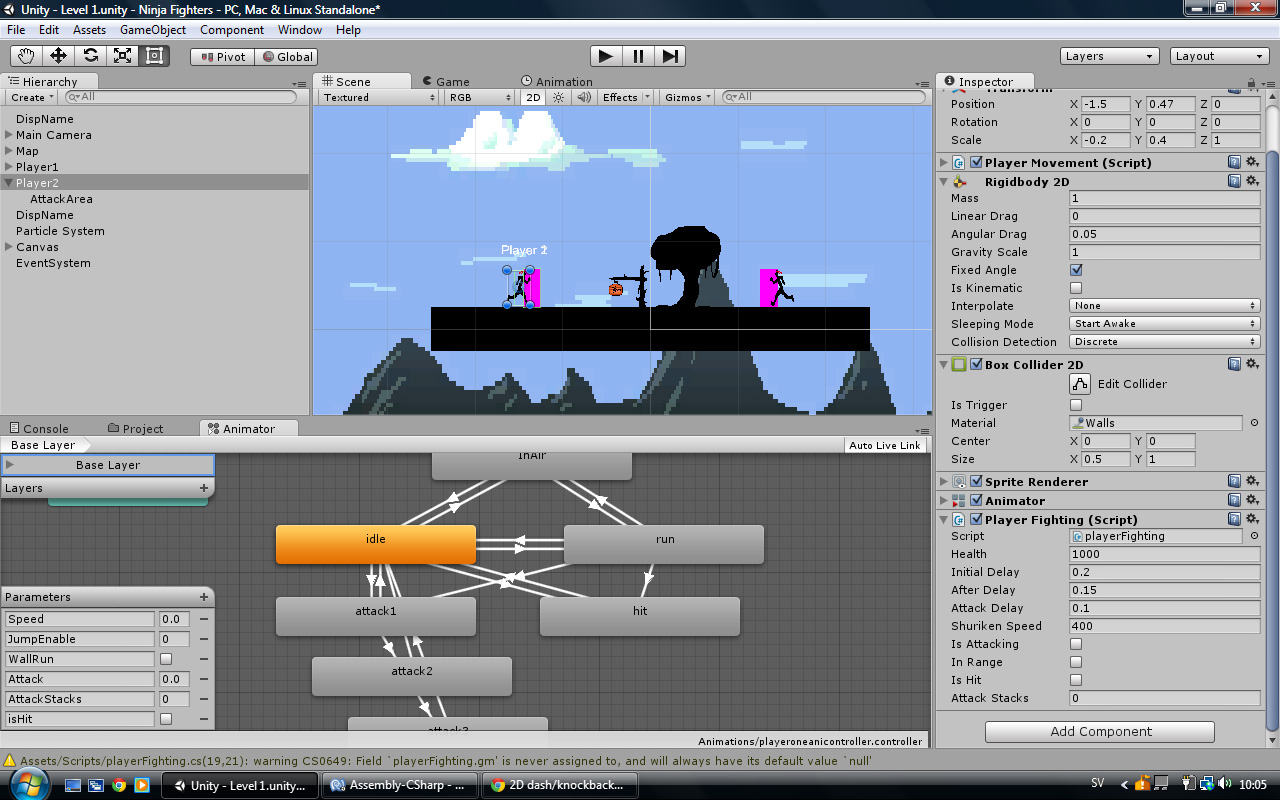
Can you share your code along with how your player object is set up (inspector screenshot for player object)?
You are applying regular force in your coroutine which seems to be the issue. Try applying a Force$$anonymous$$ode.Impulse and set the value of the force applied to be as required.
target.rigidbody2D.AddForce(new Vector2(-this.transform.localScale.x * 10000, 1) * 100 * Time.deltaTime * 0.5f, Force$$anonymous$$ode.Impulse);
Also start with small values rather than using 1000 and 100.



