
Wayback Machinekoobas.hobune.stream
May JUN Jul
Previous capture 12 Next capture
2021 2022 2023
1 capture
12 Jun 22 - 12 Jun 22
sparklines
Close Help
  • Products
  • Solutions
  • Made with Unity
  • Learning
  • Support & Services
  • Community
  • Asset Store
  • Get Unity

UNITY ACCOUNT

You need a Unity Account to shop in the Online and Asset Stores, participate in the Unity Community and manage your license portfolio. Login Create account
  • Blog
  • Forums
  • Answers
  • Evangelists
  • User Groups
  • Beta Program
  • Advisory Panel

Navigation

  • Home
  • Products
  • Solutions
  • Made with Unity
  • Learning
  • Support & Services
  • Community
    • Blog
    • Forums
    • Answers
    • Evangelists
    • User Groups
    • Beta Program
    • Advisory Panel

Unity account

You need a Unity Account to shop in the Online and Asset Stores, participate in the Unity Community and manage your license portfolio. Login Create account

Language

  • Chinese
  • Spanish
  • Japanese
  • Korean
  • Portuguese
  • Ask a question
  • Spaces
    • Default
    • Help Room
    • META
    • Moderators
    • Topics
    • Questions
    • Users
    • Badges
  • Home /
avatar image
0
Question by Chocolade · May 16, 2017 at 05:27 PM · c#scripting problemscript.

When i Instantiate new objects what should i do with the original object ?

 using System.Collections;
 using System.Collections.Generic;
 using UnityEngine;
 
 public class InstantiateObjects : MonoBehaviour
 {
     public GameObject prefab;
     public Terrain terrain;
     public float yOffset = 0.5f;
     public int objectsToInstantiate;
     public bool parent = true;
 
     private float terrainWidth;
     private float terrainLength;
     private float xTerrainPos;
     private float zTerrainPos;
     private List<GameObject> prefabs = new List<GameObject>();
 
 
     void Start()
     {
         //Get terrain size
         terrainWidth = terrain.terrainData.size.x;
         terrainLength = terrain.terrainData.size.z;
 
         //Get terrain position
         xTerrainPos = terrain.transform.position.x;
         zTerrainPos = terrain.transform.position.z;
 
         generateObjectOnTerrain();
     }
 
     public void generateObjectOnTerrain()
     {
         for (int i = 0; i < objectsToInstantiate; i++)
         {
             //Generate random x,z,y position on the terrain
             float randX = UnityEngine.Random.Range(xTerrainPos, xTerrainPos + terrainWidth);
             float randZ = UnityEngine.Random.Range(zTerrainPos, zTerrainPos + terrainLength);
             float yVal = Terrain.activeTerrain.SampleHeight(new Vector3(randX, 0, randZ));
 
             //Apply Offset if needed
             yVal = yVal + yOffset;
 
             //Generate the Prefab on the generated position        
             GameObject objInstance = Instantiate(prefab, new Vector3(randX, yVal, randZ), Quaternion.identity);
             if (parent)
                 objInstance.transform.parent = this.transform;
             prefabs.Add(objInstance);
         }
     }
 
     public List<GameObject> PrefabsList()
     {
         return prefabs;
     }
 }
 

I have one empty GameObject i renamed it to Teleportation Booths. And also tagged it as: Teleportations. On this gameobject i attached the script.

Then under it as child i have another gameobject renamed it to: Teleportation Booth and tagged it as: Teleportation.

Now when i make a clone of the child it's creating duplicated 20 childs. But the original object i'm using to duplicate is not counting as child.
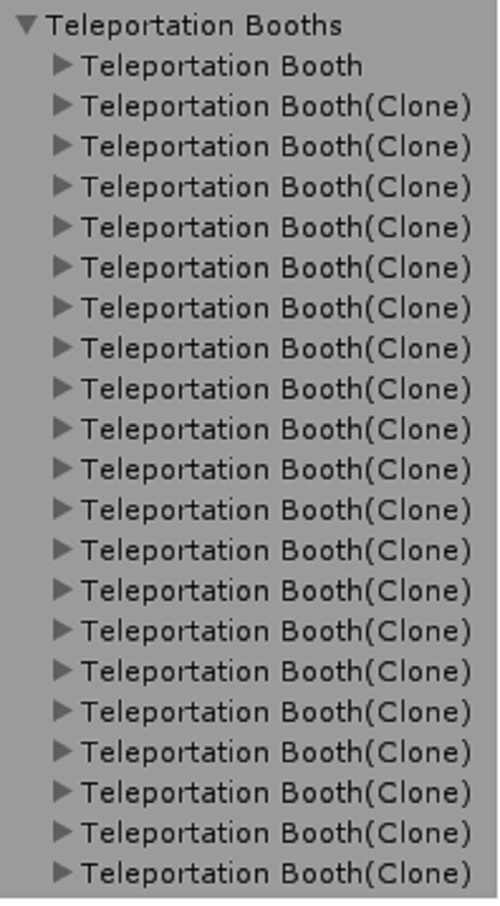
Teleports

I mean that in another script when getting all clones the original is not counter. It should be 21 but it's 20: Now the List TeleportBooths contain 20 items. But i want to use also the original one not only the 20.

 using System.Collections;
 using System.Collections.Generic;
 using UnityEngine;
 
 public class Teleport : MonoBehaviour {
 
     
     private List<GameObject> TeleportBooths;
 
     private void Start()
     {
         InstantiateObjects gos = GetComponent<InstantiateObjects>();
 
         TeleportBooths = new List<GameObject>();
         TeleportBooths = gos.PrefabsList();
         for(int i = 0; i < TeleportBooths.Count; i++)
         {
             TeleportBooths[i].AddComponent<TeleportationsCore>();
         }
     }
 }
teleport.jpg (115.8 kB)
Comment
Add comment
10 |3000 characters needed characters left characters exceeded
▼
  • Viewable by all users
  • Viewable by moderators
  • Viewable by moderators and the original poster
  • Advanced visibility
Viewable by all users

1 Reply

· Add your reply
  • Sort: 
avatar image
2
Best Answer

Answer by Joe-Censored · May 16, 2017 at 05:38 PM

I think you have a misunderstanding of what a prefab is supposed to be. Prefabs are gameobjects that you have in your assets folders, such as under resources, that you instantiate. You don't need one already in the scene first. So what to do with the one already in your scene is to just not have one already in your scene in the first place.

Also, naming your list of instantiated gameobjects as "prefabs" is very confusing, since they aren't prefabs.

Comment
Add comment · Show 7 · Share
10 |3000 characters needed characters left characters exceeded
▼
  • Viewable by all users
  • Viewable by moderators
  • Viewable by moderators and the original poster
  • Advanced visibility
Viewable by all users
avatar image Chocolade · May 16, 2017 at 06:53 PM 1
Share

So the original gameobject the one i'm cloning should be as prefab in the assets folder(Should i create a folder in the editor in the Assets and call it Prefabs ?) not in the scene and not in hierarchy and then i just drag it from the assets as prefab to the script in the inspector ?

And then i'm just using in the scene the 20 cloned objects.

Did i understand it right ?

avatar image toddisarockstar Chocolade · May 16, 2017 at 07:18 PM 1
Share

you got it!

avatar image Joe-Censored Chocolade · May 16, 2017 at 11:03 PM 0
Share

As Todd already pointed out, you nailed it exactly. What you name the folder is up to you, but placing them somewhere under a folder named Resources is sometimes desirable as that folder has special significance for built in methods like Resources.Load.

https://docs.unity3d.com/ScriptReference/Resources.Load.html

avatar image Chocolade · May 16, 2017 at 06:57 PM 0
Share

I think i'm getting it. I did Assets > Create > Prefab Then i dragged the GameObject in the Hierarchy to the new created Prefab in the Assets.

Now i'm using this new Prefab in the inspector in the script for cloning right ?

avatar image ThePunisher Chocolade · May 16, 2017 at 09:32 PM 0
Share

Yeah correct. The purpose of prefabs are to be used as templates to create instances from. You can essentially take any object in your scene and turn it into a prefab (by dragging it into your assets/project view) for you to quickly create instances of it either dynamically during runtime ( like you would with, say, bullets), or during development while working on your scene.

However, you can still clone objects that are in your scene that are not prefabs at all, which is kind of what you were originally doing.

avatar image Joe-Censored Chocolade · May 16, 2017 at 10:57 PM 0
Share

Yep and you can skip the Assets > Create > Prefab step. $$anonymous$$y typical workflow when I am creating a new prefab is I build it all in the scene, and when I'm satisfied I just drag the gameobject into my assets/resources folder. Then I delete the original in the scene and link up whatever code is going to instantiate the new prefab.

avatar image ThePunisher Joe-Censored · May 16, 2017 at 11:15 PM 0
Share

Nice, same here.

Your answer

Hint: You can notify a user about this post by typing @username

Up to 2 attachments (including images) can be used with a maximum of 524.3 kB each and 1.0 MB total.

Follow this Question

Answers Answers and Comments

331 People are following this question.

avatar image avatar image avatar image avatar image avatar image avatar image avatar image avatar image avatar image avatar image avatar image avatar image avatar image avatar image avatar image avatar image avatar image avatar image avatar image avatar image avatar image avatar image avatar image avatar image avatar image avatar image avatar image avatar image avatar image avatar image avatar image avatar image avatar image avatar image avatar image avatar image avatar image avatar image avatar image avatar image avatar image avatar image avatar image avatar image avatar image avatar image avatar image avatar image avatar image avatar image avatar image avatar image avatar image avatar image avatar image avatar image avatar image avatar image avatar image avatar image avatar image avatar image avatar image avatar image avatar image avatar image avatar image avatar image avatar image avatar image avatar image avatar image avatar image avatar image avatar image avatar image avatar image avatar image avatar image avatar image avatar image avatar image avatar image avatar image avatar image avatar image avatar image avatar image avatar image avatar image avatar image avatar image avatar image avatar image avatar image avatar image avatar image avatar image avatar image avatar image avatar image avatar image avatar image avatar image avatar image avatar image avatar image avatar image avatar image avatar image avatar image avatar image avatar image avatar image avatar image avatar image avatar image avatar image avatar image avatar image avatar image avatar image avatar image avatar image avatar image avatar image avatar image avatar image avatar image avatar image avatar image avatar image avatar image avatar image avatar image avatar image avatar image avatar image avatar image avatar image avatar image avatar image avatar image avatar image avatar image avatar image avatar image avatar image avatar image avatar image avatar image avatar image avatar image avatar image avatar image avatar image avatar image avatar image avatar image avatar image avatar image avatar image avatar image avatar image avatar image avatar image avatar image avatar image avatar image avatar image avatar image avatar image avatar image avatar image avatar image avatar image avatar image avatar image avatar image avatar image avatar image avatar image avatar image avatar image avatar image avatar image avatar image avatar image avatar image avatar image avatar image avatar image avatar image avatar image avatar image avatar image avatar image avatar image avatar image avatar image avatar image avatar image avatar image avatar image avatar image avatar image avatar image avatar image avatar image avatar image avatar image avatar image avatar image avatar image avatar image avatar image avatar image avatar image avatar image avatar image avatar image avatar image avatar image avatar image avatar image avatar image avatar image avatar image avatar image avatar image avatar image avatar image avatar image avatar image avatar image avatar image avatar image avatar image avatar image avatar image avatar image avatar image avatar image avatar image avatar image avatar image avatar image avatar image avatar image avatar image avatar image avatar image avatar image avatar image avatar image avatar image avatar image avatar image avatar image avatar image avatar image avatar image avatar image avatar image avatar image avatar image avatar image avatar image avatar image avatar image avatar image avatar image avatar image avatar image avatar image avatar image avatar image avatar image avatar image avatar image avatar image avatar image avatar image avatar image avatar image avatar image avatar image avatar image avatar image avatar image avatar image avatar image avatar image avatar image avatar image avatar image avatar image avatar image avatar image avatar image avatar image avatar image avatar image avatar image avatar image avatar image avatar image avatar image avatar image avatar image avatar image avatar image avatar image avatar image avatar image avatar image avatar image avatar image avatar image avatar image avatar image avatar image avatar image avatar image avatar image avatar image avatar image avatar image avatar image avatar image avatar image

Related Questions

How can i List objects by name but also in small text or big text or any kind ? 1 Answer

Why the speed parameter in Animator change the animation speed only for door open but when the door is closing the speed still very fast ? 1 Answer

How can i make an entrance and exit in this maze ? 1 Answer

How can I animate linerenderer lines over time ? 1 Answer

How can i find a thirdpersoncontroller hand and attach object to the hand ? 1 Answer


Enterprise
Social Q&A

Social
Subscribe on YouTube social-youtube Follow on LinkedIn social-linkedin Follow on Twitter social-twitter Follow on Facebook social-facebook Follow on Instagram social-instagram

Footer

  • Purchase
    • Products
    • Subscription
    • Asset Store
    • Unity Gear
    • Resellers
  • Education
    • Students
    • Educators
    • Certification
    • Learn
    • Center of Excellence
  • Download
    • Unity
    • Beta Program
  • Unity Labs
    • Labs
    • Publications
  • Resources
    • Learn platform
    • Community
    • Documentation
    • Unity QA
    • FAQ
    • Services Status
    • Connect
  • About Unity
    • About Us
    • Blog
    • Events
    • Careers
    • Contact
    • Press
    • Partners
    • Affiliates
    • Security
Copyright © 2020 Unity Technologies
  • Legal
  • Privacy Policy
  • Cookies
  • Do Not Sell My Personal Information
  • Cookies Settings
"Unity", Unity logos, and other Unity trademarks are trademarks or registered trademarks of Unity Technologies or its affiliates in the U.S. and elsewhere (more info here). Other names or brands are trademarks of their respective owners.
  • Anonymous
  • Sign in
  • Create
  • Ask a question
  • Spaces
  • Default
  • Help Room
  • META
  • Moderators
  • Explore
  • Topics
  • Questions
  • Users
  • Badges
