
Wayback Machinekoobas.hobune.stream
May JUN Jul
Previous capture 12 Next capture
2021 2022 2023
1 capture
12 Jun 22 - 12 Jun 22
sparklines
Close Help
  • Products
  • Solutions
  • Made with Unity
  • Learning
  • Support & Services
  • Community
  • Asset Store
  • Get Unity

UNITY ACCOUNT

You need a Unity Account to shop in the Online and Asset Stores, participate in the Unity Community and manage your license portfolio. Login Create account
  • Blog
  • Forums
  • Answers
  • Evangelists
  • User Groups
  • Beta Program
  • Advisory Panel

Navigation

  • Home
  • Products
  • Solutions
  • Made with Unity
  • Learning
  • Support & Services
  • Community
    • Blog
    • Forums
    • Answers
    • Evangelists
    • User Groups
    • Beta Program
    • Advisory Panel

Unity account

You need a Unity Account to shop in the Online and Asset Stores, participate in the Unity Community and manage your license portfolio. Login Create account

Language

  • Chinese
  • Spanish
  • Japanese
  • Korean
  • Portuguese
  • Ask a question
  • Spaces
    • Default
    • Help Room
    • META
    • Moderators
    • Topics
    • Questions
    • Users
    • Badges
  • Home /
  • Help Room /
avatar image
0
Question by rob444 · May 07, 2016 at 07:56 AM · animationscharacter movement

Character stuck moving on spot.

Making a 3rd person game and working on the movement and animations. But for some reason my character will only move on the spot.

It will run, strafe and jump as per the animations and controls but will only do so on the spot. I've tried using rigidbody and various little things but to no avail. Any suggestions?

I'm also using a flat terrain and no obstacles for testing area.
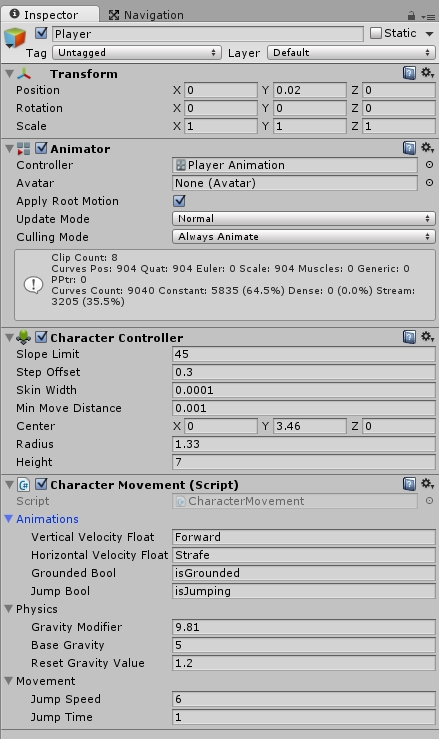
alt text

 using UnityEngine;
 using System.Collections;

 [RequireComponent(typeof(Animator))]
 [RequireComponent(typeof(CharacterController))]

 public class CharacterMovement : MonoBehaviour
 {

 //public Texture2D cursorTexture;
 //private Vector2 hotSpot = Vector2.zero;
 //Rigidbody rigidbody;

 Animator animator;
 CharacterController characterController;

 [System.Serializable]
 public class AnimationSettings
 {
     public string verticalVelocityFloat = "Forward";
     public string horizontalVelocityFloat = "Strafe";
     public string groundedBool = "isGrounded";
     public string jumpBool = "isJumping";
 }
 [SerializeField]
 public AnimationSettings animations;

 [System.Serializable]
 public class PhysicsSettings
 {
     public float gravityModifier = 9.81f;
     public float baseGravity = 50.0f;
     public float resetGravityValue = 1.2f;
 }
 [SerializeField]
 public PhysicsSettings physics;

 [System.Serializable]
 public class MovementSettings
 {
     public float jumpSpeed = 6;
     public float jumpTime = 0.25f;
 }
 [SerializeField]
 public MovementSettings movement;

 bool jumping;
 bool resetGravity;
 float gravity;

 // Use this for initialization
 void Start()
 {

     animator = GetComponent<Animator>();
     characterController = GetComponent<CharacterController>();
     SetupAnimator();

 }

 void Update()
 {

     ApplyGravity();
     Animate(Input.GetAxis("Vertical"), Input.GetAxis("Horizontal"));

     if (Input.GetButtonDown("Jump"))
     {
         Jump();
     }
     
 }

 //Animates the character and applies movement
 public void Animate(float forward, float strafe)
 {
     animator.SetFloat(animations.verticalVelocityFloat, forward);
     animator.SetFloat(animations.horizontalVelocityFloat, strafe);
     animator.SetBool(animations.groundedBool, characterController.isGrounded);
     animator.SetBool(animations.jumpBool, jumping);
 }

 public void Jump()
 {
     if (jumping)
     {
         return;
     }

     if (characterController.isGrounded)
     {
         jumping = true;
         StartCoroutine(StopJump());
     }
 }

 IEnumerator StopJump()
 {
     yield return new WaitForSeconds(movement.jumpTime);
     jumping = false;
 }

 //apply gravity
 void ApplyGravity()
 {
     if (!characterController.isGrounded)
     {
         if (!resetGravity)
         {
             gravity = physics.resetGravityValue;
             resetGravity = true;
         }
         gravity += Time.deltaTime * physics.gravityModifier;
     }
     else
     {
         gravity = physics.baseGravity;
         resetGravity = false;
     }

     Vector3 gravityVector = new Vector3();

     if (!jumping)
     {
         gravityVector.y -= gravity;
     }
     else
     {
         gravityVector.y = movement.jumpSpeed;
     }

     characterController.Move(gravityVector * Time.deltaTime);
 }

 //Sets up avater
 void SetupAnimator()
 {
     Animator[] animators = GetComponentsInChildren<Animator>();

     if (animators.Length > 0)
     {
         for (int i = 0; i < animators.Length; i++)
         {
             Animator anim = animators[i];
             Avatar av = anim.avatar;

             if (anim != animator)
             {
                 animator.avatar = av;
                 Destroy(anim);
             }
         }
     }
 }


}

screen-shot-152.jpg (151.0 kB)
Comment
Add comment
10 |3000 characters needed characters left characters exceeded
▼
  • Viewable by all users
  • Viewable by moderators
  • Viewable by moderators and the original poster
  • Advanced visibility
Viewable by all users

1 Reply

· Add your reply
  • Sort: 
avatar image
0

Answer by AdvaitKelkar · Dec 29, 2019 at 03:01 PM

I know this is an old thread, but I was going through exactly the same problem so here's the solution.

If you downloaded the animations through Mixamo, you might've checked the "In Place" box while viewing the animation. If you forgot to uncheck the box and downloaded the animation, it retains the setting even when downloaded, causing the player to not move while the animation is playing. To solve the problem, just download the animations again while making sure the "In Place" box is left unchecked.

Hope this helps someone!

Comment
Add comment · Share
10 |3000 characters needed characters left characters exceeded
▼
  • Viewable by all users
  • Viewable by moderators
  • Viewable by moderators and the original poster
  • Advanced visibility
Viewable by all users

Your answer

Hint: You can notify a user about this post by typing @username

Up to 2 attachments (including images) can be used with a maximum of 524.3 kB each and 1.0 MB total.

Follow this Question

Answers Answers and Comments

55 People are following this question.

avatar image avatar image avatar image avatar image avatar image avatar image avatar image avatar image avatar image avatar image avatar image avatar image avatar image avatar image avatar image avatar image avatar image avatar image avatar image avatar image avatar image avatar image avatar image avatar image avatar image avatar image avatar image avatar image avatar image avatar image avatar image avatar image avatar image avatar image avatar image avatar image avatar image avatar image avatar image avatar image avatar image avatar image avatar image avatar image avatar image avatar image avatar image avatar image avatar image avatar image avatar image avatar image avatar image avatar image avatar image

Related Questions

w= run forward a=strafe left d=strafe right s=run backwards anims ( i need help trying to set up conditions and a script for this) Cant do Caracter Movement to Save my life? :c 0 Answers

Parent and unparent animated character 0 Answers

How do i calculate in which direction my character is moving relative to it's rotation? 0 Answers

How do i calculate in which direction my character is moving relative to it's rotation? 0 Answers

Edit animation 0 Answers


Enterprise
Social Q&A

Social
Subscribe on YouTube social-youtube Follow on LinkedIn social-linkedin Follow on Twitter social-twitter Follow on Facebook social-facebook Follow on Instagram social-instagram

Footer

  • Purchase
    • Products
    • Subscription
    • Asset Store
    • Unity Gear
    • Resellers
  • Education
    • Students
    • Educators
    • Certification
    • Learn
    • Center of Excellence
  • Download
    • Unity
    • Beta Program
  • Unity Labs
    • Labs
    • Publications
  • Resources
    • Learn platform
    • Community
    • Documentation
    • Unity QA
    • FAQ
    • Services Status
    • Connect
  • About Unity
    • About Us
    • Blog
    • Events
    • Careers
    • Contact
    • Press
    • Partners
    • Affiliates
    • Security
Copyright © 2020 Unity Technologies
  • Legal
  • Privacy Policy
  • Cookies
  • Do Not Sell My Personal Information
  • Cookies Settings
"Unity", Unity logos, and other Unity trademarks are trademarks or registered trademarks of Unity Technologies or its affiliates in the U.S. and elsewhere (more info here). Other names or brands are trademarks of their respective owners.
  • Anonymous
  • Sign in
  • Create
  • Ask a question
  • Spaces
  • Default
  • Help Room
  • META
  • Moderators
  • Explore
  • Topics
  • Questions
  • Users
  • Badges
