 koobas.hobune.stream


Vertical Perspective / Horizontal Orthographic
Hi there,
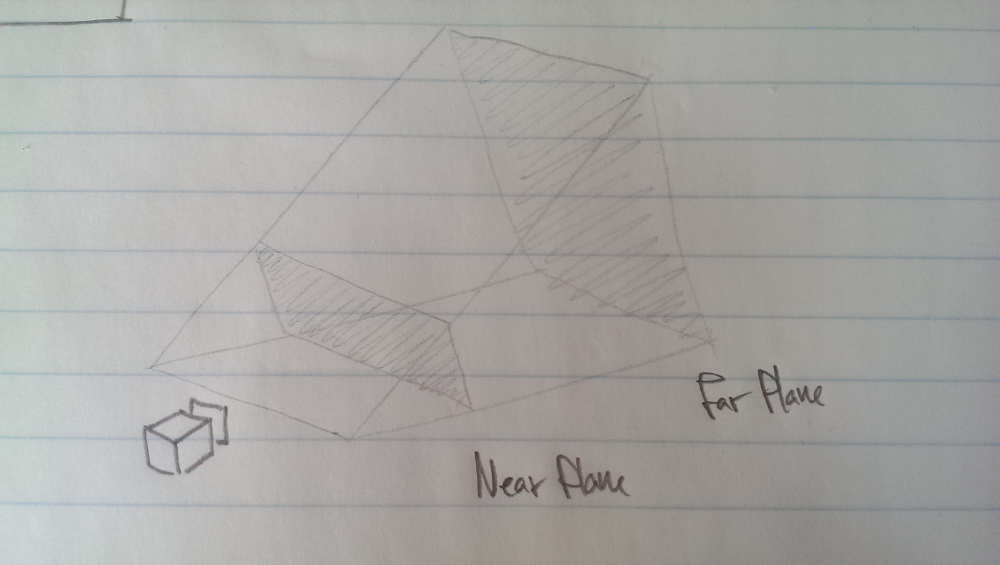
I've been trying to come up with a solution to this for quite a while now.. I want my camera to be horizontally orthographic but still have vertical perspective.
I'm able to draw the frustom, but creating a projection matrix for this, made my head spin a little.. Is there such a matrix available somewhere, or would you recommend something different?
Any help is much appreciated!

Unfortunately I don't think this is physically possible using a projection matrix as you can never separate all the variables out to be able to solve for a matrix. This is because in orthographic projection, x, y and z are all just multiples of themselves, so w can be equal to 1. In perspective projection, x and y are some multiple of -z and so w is set to -z so that on division by it you get all x, y, and z as either functions of themselves or constants.
Fortunately this does seem do-able via shader scripts, this would mean everything you need affected has to have some variation of these shaders attached, which may be a quite large disadvantage. I am not very experienced with shader scripts (in fact this is the first thing I've properly attempt to do with them) but I've managed to get some ~working~ shaders-
A surface shader, set your camera to orthographic and attach a material that uses this shader to the object:
 Shader "Custom/OrthoPerspective2" {
     Properties {
         _MainTex ("Base (RGB)", 2D) = "white" {}
         _NearClipPlane ("Near Clip", Float) = 0.3
     }
     SubShader {
         Tags { "RenderType"="Opaque" }

         CGPROGRAM
         #pragma surface surf Lambert vertex:vert addshadow

         sampler2D _MainTex;
         uniform float _NearClipPlane;

         struct Input {
             float2 uv_MainTex;
         };

         void vert (inout appdata_full v) {
             //v.vertex.y += _NearClipPlane*0.1*v.vertex.y/v.vertex.z;

             float4 hpos = mul (UNITY_MATRIX_MVP, v.vertex);
             hpos.y *= 0.03/hpos.z;
             hpos = mul(UNITY_MATRIX_IT_MV, hpos);
             v.vertex.y = hpos.y;

         }
         void surf (Input IN, inout SurfaceOutput o) {
             half4 c = tex2D (_MainTex, IN.uv_MainTex);
             o.Albedo = c.rgb;
             o.Alpha = c.a;
         }
         ENDCG
     }
     FallBack "Diffuse"
 }
And a vertex/fragment shader for which you would set your camera as Perspective:
 Shader "Custom/OrthoPerspective" {
     Properties {
         _MainTex ("Base (RGB)", 2D) = "white" {}
         _NearClipPlane ("Near Clip", Float) = 0.3
     }
     SubShader {
         Pass {
             CGPROGRAM
             #pragma vertex vert
             #pragma fragment frag

             #include "UnityCG.cginc"

             uniform float _NearClipPlane;

             struct vertexInput {
                 float4 vertex : POSITION;
                 float4 texcoord0 : TEXCOORD0;
             };

             struct fragmentInput{
                 float4 position : SV_POSITION;
                 float4 texcoord0 : TEXCOORD0;
             };

             fragmentInput vert(vertexInput i){
                 fragmentInput o;
                 float4 v = mul (UNITY_MATRIX_MVP, i.vertex);
                 o.position = v;
                 o.position.x *= o.position.z/(_NearClipPlane*30);
                 o.texcoord0 = i.texcoord0;
                 return o;
             }

             float4 frag(fragmentInput i) : COLOR {
                 float4 color;
                 if ( fmod(i.texcoord0.x*8.0,2.0) < 1.0 ){
                     if ( fmod(i.texcoord0.y*8.0,2.0) < 1.0 )
                     {
                         color = float4(1.0,1.0,1.0,1.0);
                     } else {
                         color = float4(0.0,0.0,0.0,1.0);
                     }
                 } else {
                     if ( fmod(i.texcoord0.y*8.0,2.0) > 1.0 )
                     {
                         color = float4(1.0,1.0,1.0,1.0);
                     } else {
                         color = float4(0.0,0.0,0.0,1.0);}
                     }
                 return color;
             }
             ENDCG
         }
     }
 }
I hope this helps somewhat!
Scribe



