
Wayback Machinekoobas.hobune.stream
May JUN Jul
Previous capture 12 Next capture
2021 2022 2023
1 capture
12 Jun 22 - 12 Jun 22
sparklines
Close Help
  • Products
  • Solutions
  • Made with Unity
  • Learning
  • Support & Services
  • Community
  • Asset Store
  • Get Unity

UNITY ACCOUNT

You need a Unity Account to shop in the Online and Asset Stores, participate in the Unity Community and manage your license portfolio. Login Create account
  • Blog
  • Forums
  • Answers
  • Evangelists
  • User Groups
  • Beta Program
  • Advisory Panel

Navigation

  • Home
  • Products
  • Solutions
  • Made with Unity
  • Learning
  • Support & Services
  • Community
    • Blog
    • Forums
    • Answers
    • Evangelists
    • User Groups
    • Beta Program
    • Advisory Panel

Unity account

You need a Unity Account to shop in the Online and Asset Stores, participate in the Unity Community and manage your license portfolio. Login Create account

Language

  • Chinese
  • Spanish
  • Japanese
  • Korean
  • Portuguese
  • Ask a question
  • Spaces
    • Default
    • Help Room
    • META
    • Moderators
    • Topics
    • Questions
    • Users
    • Badges
  • Home /
avatar image
0
Question by Dahku · May 21, 2017 at 02:53 AM · animationmeshlighting

What Might Cause Lighting Problems on Animated Mesh?

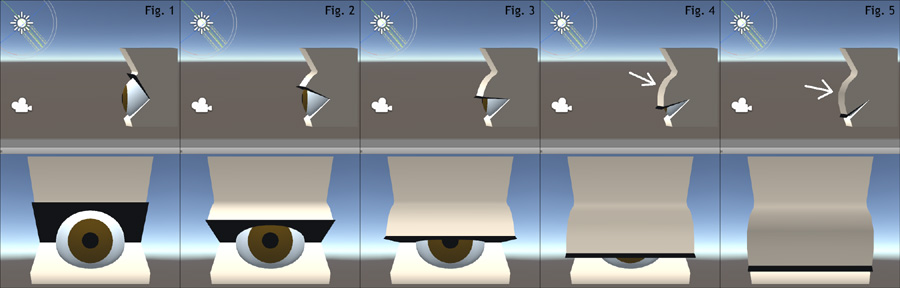
Hello, I have a lighting issue I can't seem to figure out. After going to the trouble of making 3D eyelids that open and close, I brought my character into Unity and found strange shading patches on the closed eyelids, despite having a directional light clearly aimed at them. For the sake of asking for help here, I have created a highly simplified version of what's happening, set alone in a default scene. Figures 1 through 5 show the animation progression, and in the scene view the light angle is unmistakable. Things look generally fine until Fig.4, when darkness appears where there should be light. Fig.5 shows the problem in full.
alt text

I have tinkered with every setting on the light, scene and lightmap settings, and model import settings. All normals are facing the right way, and I even tried removing the eyeball from the model on the chance that the nearness of the ball to the lid might be causing strange behavior. I've tried other things suggested in various UA topics, but nothing has helped.

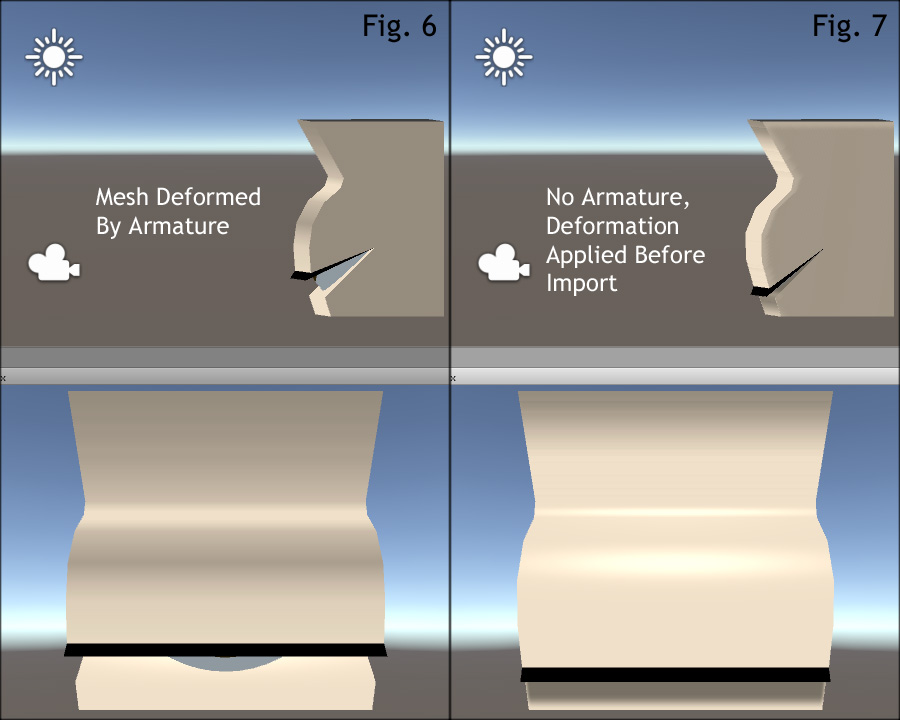
Figures 1 through 5 were using the standard shader, but the problem becomes all the more pronounced with my intended toon shader, as Fig.6 shows. However, if I apply the armature modifier in Blender before import, so that the model's pose is closed by default and doesn't animate, then everything looks fine. Fig.7 shows exactly how the lighting should be hitting the model.
alt text

I am at a complete loss as to what to do about this. Any help would be greatly appreciated!

fig15.jpg (60.1 kB)
fig67.jpg (85.9 kB)
Comment
Add comment
10 |3000 characters needed characters left characters exceeded
▼
  • Viewable by all users
  • Viewable by moderators
  • Viewable by moderators and the original poster
  • Advanced visibility
Viewable by all users

0 Replies

· Add your reply
  • Sort: 

Your answer

Hint: You can notify a user about this post by typing @username

Up to 2 attachments (including images) can be used with a maximum of 524.3 kB each and 1.0 MB total.

Follow this Question

Answers Answers and Comments

3 People are following this question.

avatar image avatar image avatar image

Related Questions

How to light back side of quad mesh same way as front side? 1 Answer

Unity Multiplayer - Animations - mesh subobject movements conveyed 1 Answer

How can I emit animated prefabs from a particle system? 0 Answers

Bend 2D sprites in a 3D space 0 Answers

Character Controller mesh scaling with animations 0 Answers


Enterprise
Social Q&A

Social
Subscribe on YouTube social-youtube Follow on LinkedIn social-linkedin Follow on Twitter social-twitter Follow on Facebook social-facebook Follow on Instagram social-instagram

Footer

  • Purchase
    • Products
    • Subscription
    • Asset Store
    • Unity Gear
    • Resellers
  • Education
    • Students
    • Educators
    • Certification
    • Learn
    • Center of Excellence
  • Download
    • Unity
    • Beta Program
  • Unity Labs
    • Labs
    • Publications
  • Resources
    • Learn platform
    • Community
    • Documentation
    • Unity QA
    • FAQ
    • Services Status
    • Connect
  • About Unity
    • About Us
    • Blog
    • Events
    • Careers
    • Contact
    • Press
    • Partners
    • Affiliates
    • Security
Copyright © 2020 Unity Technologies
  • Legal
  • Privacy Policy
  • Cookies
  • Do Not Sell My Personal Information
  • Cookies Settings
"Unity", Unity logos, and other Unity trademarks are trademarks or registered trademarks of Unity Technologies or its affiliates in the U.S. and elsewhere (more info here). Other names or brands are trademarks of their respective owners.
  • Anonymous
  • Sign in
  • Create
  • Ask a question
  • Spaces
  • Default
  • Help Room
  • META
  • Moderators
  • Explore
  • Topics
  • Questions
  • Users
  • Badges
