
Wayback Machinekoobas.hobune.stream
May JUN Jul
Previous capture 12 Next capture
2021 2022 2023
1 capture
12 Jun 22 - 12 Jun 22
sparklines
Close Help
  • Products
  • Solutions
  • Made with Unity
  • Learning
  • Support & Services
  • Community
  • Asset Store
  • Get Unity

UNITY ACCOUNT

You need a Unity Account to shop in the Online and Asset Stores, participate in the Unity Community and manage your license portfolio. Login Create account
  • Blog
  • Forums
  • Answers
  • Evangelists
  • User Groups
  • Beta Program
  • Advisory Panel

Navigation

  • Home
  • Products
  • Solutions
  • Made with Unity
  • Learning
  • Support & Services
  • Community
    • Blog
    • Forums
    • Answers
    • Evangelists
    • User Groups
    • Beta Program
    • Advisory Panel

Unity account

You need a Unity Account to shop in the Online and Asset Stores, participate in the Unity Community and manage your license portfolio. Login Create account

Language

  • Chinese
  • Spanish
  • Japanese
  • Korean
  • Portuguese
  • Ask a question
  • Spaces
    • Default
    • Help Room
    • META
    • Moderators
    • Topics
    • Questions
    • Users
    • Badges
  • Home /
  • Help Room /
avatar image
0
Question by davaguco · Mar 21, 2017 at 10:34 AM · terrainraycasthitheight

Script attached to different objects always return same terrain height on different locations

I have attached a script that creates a building object with a model and a collider on different spots of the terrain in runtime.

The buldings are created, but I stilll can't get them to be at the same height as the terrain they have underneath. The terrain is not flat, so they should each have different height. However, all buildings end up with the same height, so some are floating and some are halfway undergound.

The script that I have attached to each building is the following:

     private float houseHeight;
     GameObject house;
     RaycastHit hit;
 
     void HouseHeight()
     {
 
         house = gameObject;
         Debug.Log("building: " + house.name);
         Vector3 groundzero = new Vector3(house.transform.position.x, 2000f, house.transform.position.z);
         Ray downRay = new Ray(groundzero, Vector3.down);
         if (Physics.Raycast(downRay, out hit))
         {
             houseHeight = 2000f - hit.distance;
             house.transform.position = new Vector3(house.transform.position.x, houseHeight, house.transform.position.z);
             Debug.Log("houseHeight: " + houseHeight);
             Debug.Log("hit.distance: " + hit.distance);
         }

I added the Logs so I would know what was happening. It seems the building name is changing, so each script knows it's attacked to a different object. But hit.distance is always the same, and houseHeight too. What am I missing?

Thanks for your help.

Comment
Add comment · Show 2
10 |3000 characters needed characters left characters exceeded
▼
  • Viewable by all users
  • Viewable by moderators
  • Viewable by moderators and the original poster
  • Advanced visibility
Viewable by all users
avatar image davaguco · Mar 21, 2017 at 12:58 PM 0
Share

It seems groundzero is always looking at (0, 2000, 0), because the position of the object is always (0,0,0), I guess it's a local position ins$$anonymous$$d of a world position. And suddenly, Unity switches to world position when doing the raycast so it always returns the same distance. I still don't know how to solve it, I will keep looking.

avatar image davaguco · Mar 22, 2017 at 01:23 PM 0
Share

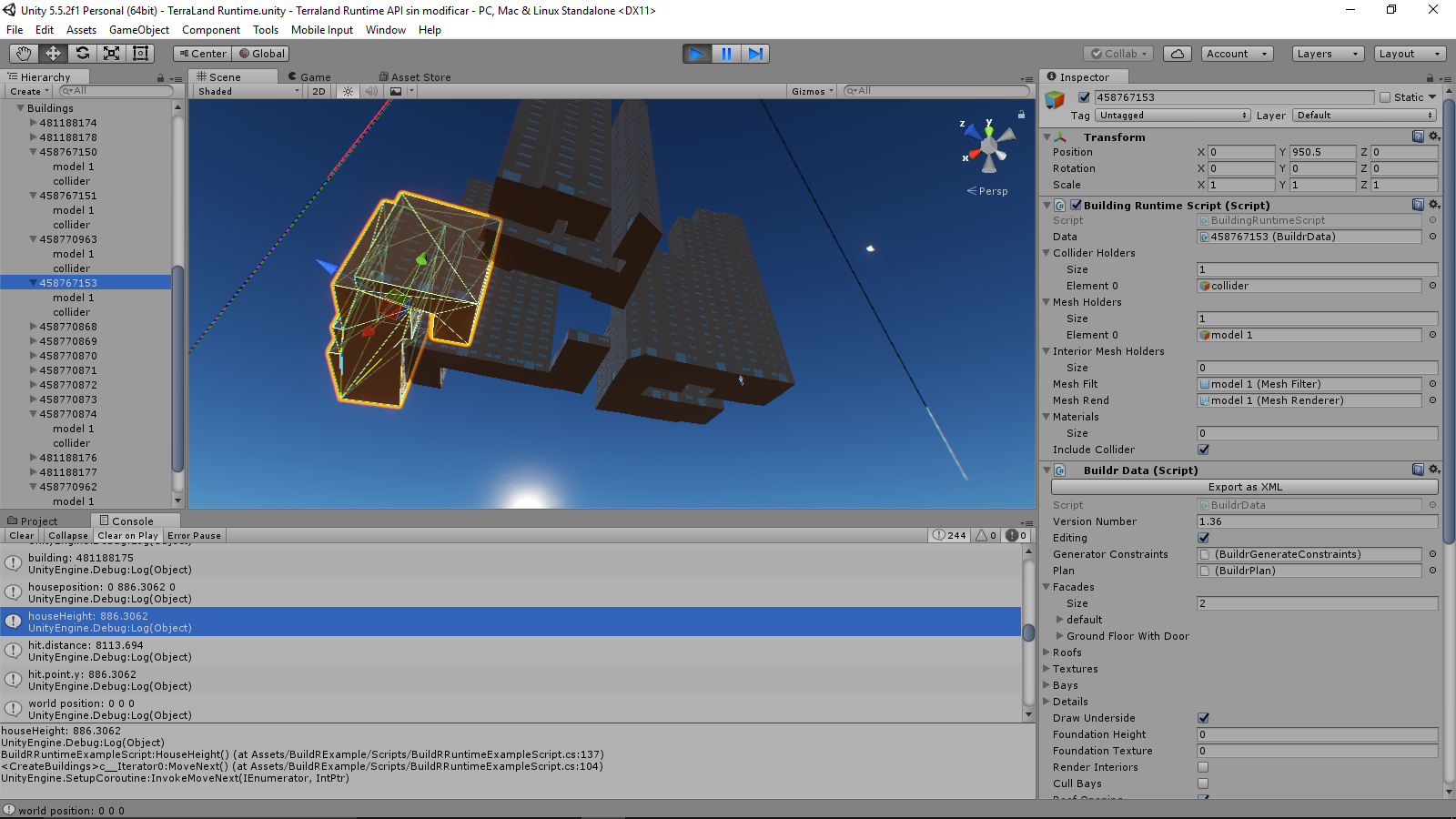
I placed a simple cube at (0,950,0). All buildings now have 950 height because the raycast hits the cube at this height. On the scene the buildings appear to be located at their correct location (not all at the same place), but their transform on runtime is always 0,950,0.

How is it posible to see all buildings placed at different locations but their transform.position.x and transform.position.z is 0?
alt text

sin-titulo.png (353.3 kB)

2 Replies

· Add your reply
  • Sort: 
avatar image
0
Best Answer

Answer by davaguco · Mar 22, 2017 at 01:44 PM

I think I found the answer, it has something to do with the pivot of the meshrender, that is not located at the center of the object (which is 0,0 on my Project).

This is the code:

 private float houseHeight;
     GameObject house;
     RaycastHit hit;
     GameObject model;


     void HouseHeight()
     {
         model = transform.Find("model 1").gameObject;
         MeshRenderer renderer = model.GetComponent<MeshRenderer>();
         Vector3 centro = renderer.bounds.center;
         house = gameObject;            
         Vector3 fromtop2 = new Vector3(centro.x, 9000f, centro.z);
         Ray downRay = new Ray(fromtop2, Vector3.down);
         if (Physics.Raycast(downRay, out hit))
         {            
             houseHeight = hit.point.y;
             house.transform.position = new Vector3(house.transform.position.x, houseHeight, house.transform.position.z);
 
             Debug.Log("building: " + house.name);
             Debug.Log("houseposition: " + house.transform.position.x + " " + house.transform.position.y + " " + house.transform.position.z);
             Debug.Log("houseHeight: " + houseHeight);
             Debug.Log("hit.distance: " + hit.distance);
             Debug.Log("hit.point.y: " + hit.point.y);
             Debug.Log("render center: " + centro.x + " " + centro.y + " " + centro.z);
         }
Comment
Add comment · Show 1 · Share
10 |3000 characters needed characters left characters exceeded
▼
  • Viewable by all users
  • Viewable by moderators
  • Viewable by moderators and the original poster
  • Advanced visibility
Viewable by all users
avatar image gameplay4all · Mar 22, 2017 at 01:48 PM 0
Share

Oh well we found out at the same time ;)

avatar image
0

Answer by gameplay4all · Mar 21, 2017 at 01:26 PM

Try using hit.point.y for the height! RaycastHit.point is the Vector3 location in world position of the RaycastHit.

Something you might want to check if this doesn't work: Is the terrain collider set up properly?

Hope this helps!

-Gameplay4all

Comment
Add comment · Show 2 · Share
10 |3000 characters needed characters left characters exceeded
▼
  • Viewable by all users
  • Viewable by moderators
  • Viewable by moderators and the original poster
  • Advanced visibility
Viewable by all users
avatar image davaguco · Mar 22, 2017 at 11:47 AM 0
Share

I used hit.point.y but still gives the same result. The terrains do have terrain colliders.

avatar image gameplay4all · Mar 22, 2017 at 01:46 PM 0
Share

Okay, I guess this is happening. I can't be sure because I don't know how your project is setup.

All your building objects have pivot points way off center. Try changing the scene view to show the pivot point ins$$anonymous$$d of the center (press Z) or use the button under the "component" menu in the bar above. That's why the LOCAL position, which is shown in the editor, is 0 and the buildings still seem to have different positions. The position shown in the editor is relative to the "buildings" object you have them parented to. So since transform.position returns the pivot, which is the same for all the buildings and seems to be at (0,0,0), and your raycast is cast from this position it all returns the same height because they are cast from the same position.

Hope this helps!

-Gameplay4all

P.S. Try debugging all the transform.position s :)

Your answer

Hint: You can notify a user about this post by typing @username

Up to 2 attachments (including images) can be used with a maximum of 524.3 kB each and 1.0 MB total.

Follow this Question

Answers Answers and Comments

108 People are following this question.

avatar image avatar image avatar image avatar image avatar image avatar image avatar image avatar image avatar image avatar image avatar image avatar image avatar image avatar image avatar image avatar image avatar image avatar image avatar image avatar image avatar image avatar image avatar image avatar image avatar image avatar image avatar image avatar image avatar image avatar image avatar image avatar image avatar image avatar image avatar image avatar image avatar image avatar image avatar image avatar image avatar image avatar image avatar image avatar image avatar image avatar image avatar image avatar image avatar image avatar image avatar image avatar image avatar image avatar image avatar image avatar image avatar image avatar image avatar image avatar image avatar image avatar image avatar image avatar image avatar image avatar image avatar image avatar image avatar image avatar image avatar image avatar image avatar image avatar image avatar image avatar image avatar image avatar image avatar image avatar image avatar image avatar image avatar image avatar image avatar image avatar image avatar image avatar image avatar image avatar image avatar image avatar image avatar image avatar image avatar image avatar image avatar image avatar image avatar image avatar image avatar image avatar image avatar image avatar image avatar image avatar image avatar image avatar image

Related Questions

Terrain smoothing brush opacity settings 0 Answers

I'm Trying to get a 3D Model to follow a Raycast 0 Answers

Find the Terrain Width and Height 1 Answer

NPC gets up inside terrain (disconsidering the terrain collider) 1 Answer

unity terrain apply texture by altitude 0 Answers


Enterprise
Social Q&A

Social
Subscribe on YouTube social-youtube Follow on LinkedIn social-linkedin Follow on Twitter social-twitter Follow on Facebook social-facebook Follow on Instagram social-instagram

Footer

  • Purchase
    • Products
    • Subscription
    • Asset Store
    • Unity Gear
    • Resellers
  • Education
    • Students
    • Educators
    • Certification
    • Learn
    • Center of Excellence
  • Download
    • Unity
    • Beta Program
  • Unity Labs
    • Labs
    • Publications
  • Resources
    • Learn platform
    • Community
    • Documentation
    • Unity QA
    • FAQ
    • Services Status
    • Connect
  • About Unity
    • About Us
    • Blog
    • Events
    • Careers
    • Contact
    • Press
    • Partners
    • Affiliates
    • Security
Copyright © 2020 Unity Technologies
  • Legal
  • Privacy Policy
  • Cookies
  • Do Not Sell My Personal Information
  • Cookies Settings
"Unity", Unity logos, and other Unity trademarks are trademarks or registered trademarks of Unity Technologies or its affiliates in the U.S. and elsewhere (more info here). Other names or brands are trademarks of their respective owners.
  • Anonymous
  • Sign in
  • Create
  • Ask a question
  • Spaces
  • Default
  • Help Room
  • META
  • Moderators
  • Explore
  • Topics
  • Questions
  • Users
  • Badges
