
Wayback Machinekoobas.hobune.stream
May JUN Jul
Previous capture 11 Next capture
2021 2022 2023
1 capture
11 Jun 22 - 11 Jun 22
sparklines
Close Help
  • Products
  • Solutions
  • Made with Unity
  • Learning
  • Support & Services
  • Community
  • Asset Store
  • Get Unity

UNITY ACCOUNT

You need a Unity Account to shop in the Online and Asset Stores, participate in the Unity Community and manage your license portfolio. Login Create account
  • Blog
  • Forums
  • Answers
  • Evangelists
  • User Groups
  • Beta Program
  • Advisory Panel

Navigation

  • Home
  • Products
  • Solutions
  • Made with Unity
  • Learning
  • Support & Services
  • Community
    • Blog
    • Forums
    • Answers
    • Evangelists
    • User Groups
    • Beta Program
    • Advisory Panel

Unity account

You need a Unity Account to shop in the Online and Asset Stores, participate in the Unity Community and manage your license portfolio. Login Create account

Language

  • Chinese
  • Spanish
  • Japanese
  • Korean
  • Portuguese
  • Ask a question
  • Spaces
    • Default
    • Help Room
    • META
    • Moderators
    • Topics
    • Questions
    • Users
    • Badges
  • Home /
avatar image
1
Question by Dudledok · Jul 27, 2015 at 10:22 AM · unity 5renderingtexttransparency

Transparent object is behind Text but still affects it

I have an object in the scene which uses transparency and my intention is to have text positioned in the scene and displayed on top of the translucent object. Below you can see this working correctly:

Correct

If I move the camera in the scene then sometimes the text appears as if it is behind the transparent object, even though the only thing moving is the camera. Below you can see the exact same scene but from a position ever so slightly to one side:
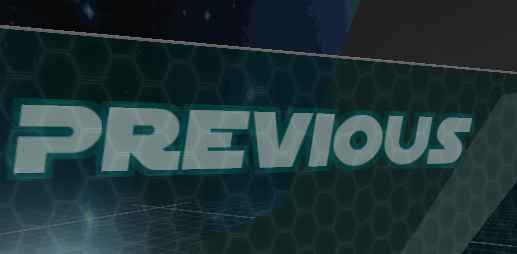
Wrong

Why does this happen? And how can I fix this?

Notes:

  • For the translucent object I am using the standard shader and set the rendering mode to transparent

  • I have tried using the fade rendering mode but the issues persists

  • With the opaque rendering mode there is no issue and text is always in front

wrong.png (147.6 kB)
correct.png (137.4 kB)
Comment
Add comment · Show 8
10 |3000 characters needed characters left characters exceeded
▼
  • Viewable by all users
  • Viewable by moderators
  • Viewable by moderators and the original poster
  • Advanced visibility
Viewable by all users
avatar image Rhylvin2015 · Jul 27, 2015 at 10:36 AM 0
Share

did you put that text("Previous") on the camera as a child? if you did, then if the camera moves so will the text. and the text moves towards the background and now making the text be behind the transparent background..

avatar image Dudledok · Jul 27, 2015 at 10:50 AM 0
Share

@Rhylvin2015 No, it is the child of a canvas object which has no parents and never moves.

avatar image jre03f · Jun 24, 2016 at 06:49 PM 0
Share

I'm having the same problem in my project.

@Dudledok, were you able to find a solution to this issue? Thanks!

avatar image Dudledok jre03f · Jun 24, 2016 at 09:21 PM 0
Share

No, unfortunately not, and I haven't worked on that project in a while so I can't help much any more, sorry.

avatar image JedBeryll Dudledok · Jun 25, 2016 at 05:45 AM 0
Share

Do they have the same parent? If the background object is lower in the hierarchy, it will be rendered later. That can be solved if you move the text under the background or make the text child of the background.

Show more comments
avatar image Asgardr · Jun 30, 2016 at 09:05 PM 0
Share

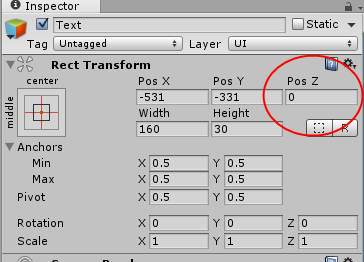
Have you tried modifying the "Pos Z" property of the text to be above the background?
alt text

hqsbi3a.png (18.4 kB)

0 Replies

· Add your reply
  • Sort: 

Your answer

Hint: You can notify a user about this post by typing @username

Up to 2 attachments (including images) can be used with a maximum of 524.3 kB each and 1.0 MB total.

Follow this Question

Answers Answers and Comments

25 People are following this question.

avatar image avatar image avatar image avatar image avatar image avatar image avatar image avatar image avatar image avatar image avatar image avatar image avatar image avatar image avatar image avatar image avatar image avatar image avatar image avatar image avatar image avatar image avatar image avatar image avatar image

Related Questions

Unity 5.2 Text Rendering issue 0 Answers

Text Meshes not rendering correctly on iOS device 1 Answer

Want my UI to not move when I move my camera? 2 Answers

Half the letters in my text don't show up at higher resolutions. 0 Answers

Create interactable "hotspots" with dialog boxes in steamVR 1 Answer


Enterprise
Social Q&A

Social
Subscribe on YouTube social-youtube Follow on LinkedIn social-linkedin Follow on Twitter social-twitter Follow on Facebook social-facebook Follow on Instagram social-instagram

Footer

  • Purchase
    • Products
    • Subscription
    • Asset Store
    • Unity Gear
    • Resellers
  • Education
    • Students
    • Educators
    • Certification
    • Learn
    • Center of Excellence
  • Download
    • Unity
    • Beta Program
  • Unity Labs
    • Labs
    • Publications
  • Resources
    • Learn platform
    • Community
    • Documentation
    • Unity QA
    • FAQ
    • Services Status
    • Connect
  • About Unity
    • About Us
    • Blog
    • Events
    • Careers
    • Contact
    • Press
    • Partners
    • Affiliates
    • Security
Copyright © 2020 Unity Technologies
  • Legal
  • Privacy Policy
  • Cookies
  • Do Not Sell My Personal Information
  • Cookies Settings
"Unity", Unity logos, and other Unity trademarks are trademarks or registered trademarks of Unity Technologies or its affiliates in the U.S. and elsewhere (more info here). Other names or brands are trademarks of their respective owners.
  • Anonymous
  • Sign in
  • Create
  • Ask a question
  • Spaces
  • Default
  • Help Room
  • META
  • Moderators
  • Explore
  • Topics
  • Questions
  • Users
  • Badges