
Wayback Machinekoobas.hobune.stream
May JUN Jul
Previous capture 12 Next capture
2021 2022 2023
1 capture
12 Jun 22 - 12 Jun 22
sparklines
Close Help
  • Products
  • Solutions
  • Made with Unity
  • Learning
  • Support & Services
  • Community
  • Asset Store
  • Get Unity

UNITY ACCOUNT

You need a Unity Account to shop in the Online and Asset Stores, participate in the Unity Community and manage your license portfolio. Login Create account
  • Blog
  • Forums
  • Answers
  • Evangelists
  • User Groups
  • Beta Program
  • Advisory Panel

Navigation

  • Home
  • Products
  • Solutions
  • Made with Unity
  • Learning
  • Support & Services
  • Community
    • Blog
    • Forums
    • Answers
    • Evangelists
    • User Groups
    • Beta Program
    • Advisory Panel

Unity account

You need a Unity Account to shop in the Online and Asset Stores, participate in the Unity Community and manage your license portfolio. Login Create account

Language

  • Chinese
  • Spanish
  • Japanese
  • Korean
  • Portuguese
  • Ask a question
  • Spaces
    • Default
    • Help Room
    • META
    • Moderators
    • Topics
    • Questions
    • Users
    • Badges
  • Home /
avatar image
0
Question by Arogunz · Nov 11, 2017 at 07:49 PM · unity 5raycastlinerenderer

Raycast.distance giving me the wrong number

Aloha, i am trying to build a simple billiard and right now i am stuck on a problem with a Raycast.. the output of a Raycast.distance is wrong...

That's the part of my code

 void Update () {
         RaycastHit hit;
         if (Physics.Raycast(transform.position, transform.forward, out hit))
         {
             if(hit.collider)
             {
                 lr.SetPosition(1,new Vector3(0,0,hit.distance));
             }
         } else{
             lr.SetPosition(1, new Vector3(0,0,5000));
         }
     }
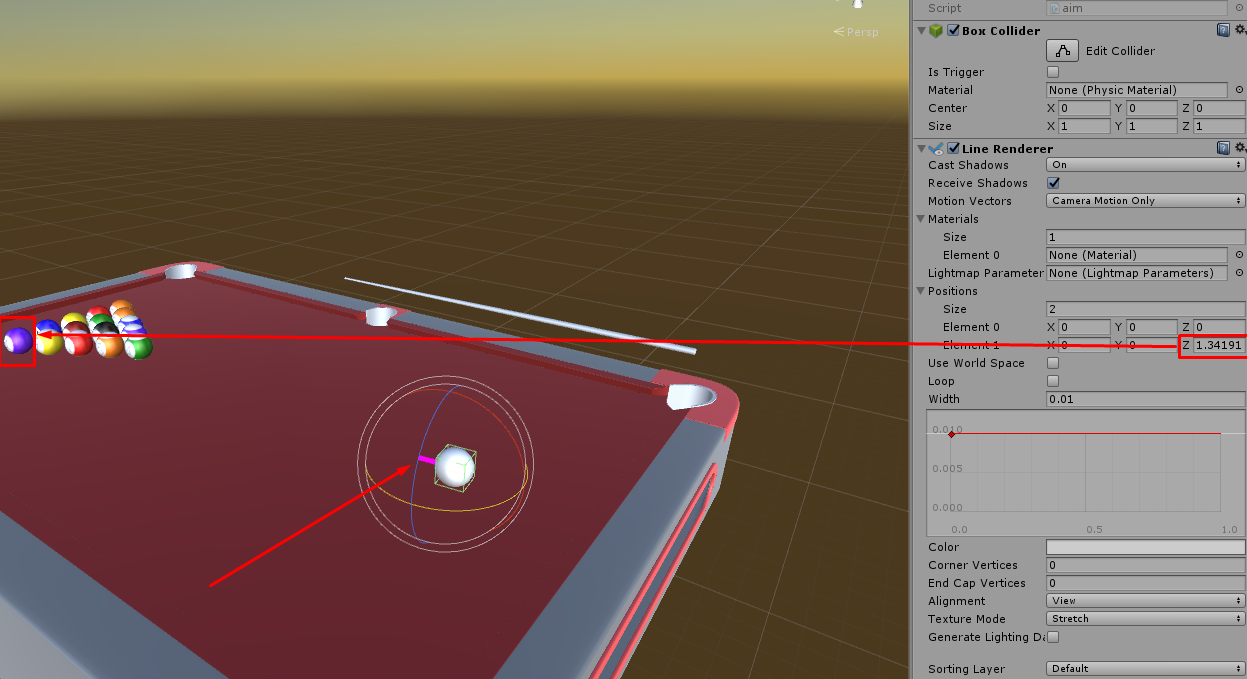
alt text

So what am i doing wrong?

I wann that the Line will stop at the target (that why i am using hit.distance )

screenshot-22.png (228.5 kB)
Comment
Add comment · Show 2
10 |3000 characters needed characters left characters exceeded
▼
  • Viewable by all users
  • Viewable by moderators
  • Viewable by moderators and the original poster
  • Advanced visibility
Viewable by all users
avatar image Arogunz · Nov 11, 2017 at 07:50 PM 0
Share

Upd: If the line isn't hitting the colliders, it works fine ( lr.SetPosition(1, new Vector3(0,0,5000)); )

avatar image FlaSh-G · Nov 12, 2017 at 08:21 PM 0
Share

Your code looks fine. $$anonymous$$aybe try to use the Script in a $$anonymous$$imal example and see if it works.

If it does, copy your scene and remove parts of it step by step until it works properly to find out what makes it break.

2 Replies

· Add your reply
  • Sort: 
avatar image
0

Answer by IvovdMarel · Nov 13, 2017 at 03:39 AM

You should use hit.point ( the point where it hit), not hit.distance (the distance from your object to the object that was hit).

In addition, you should check the 'Use World Space' checkbox.

Comment
Add comment · Show 2 · Share
10 |3000 characters needed characters left characters exceeded
▼
  • Viewable by all users
  • Viewable by moderators
  • Viewable by moderators and the original poster
  • Advanced visibility
Viewable by all users
avatar image Bunny83 · Nov 13, 2017 at 03:58 AM 0
Share

I usually would agree, however if the raycast is done from the same object where the line renderer is attached to using local space should work this way. "distance" would be the localspace distance. When using localspace you don't need to update the start point of the line renderer all the time as in localspace it's always 0,0,0.


.

Though if the raycast is actually done from the same object we don't know for sure as this information is missing from the question. If it's actually using the correct space and it gives the wrong distance, the ray most likely didn't hit the object he thinks that he's hitting. Printing the object name that was hit would probably help.

avatar image FlaSh-G · Nov 13, 2017 at 10:01 AM 0
Share

Local space is absolutely fine for the line renderer in this case, and there is no reason to not use hit.distance.

hit.distance is the distance from the ray origin to the hit point, not the distance between two objects.

avatar image
-1

Answer by Max_Bol · Nov 13, 2017 at 11:43 AM

The mistake you made is that you don't use LineRenderer().SetPosition() correctly. https://docs.unity3d.com/ScriptReference/LineRenderer.SetPosition.html

LineRenderer().SetPosition() requires you to fill it with the the integer as Index (this you did) and a Vector3 as position (which you didn't as you feed it the distance... not the position you want the line to end up at).

You should feed it hit.point instead of hit.distance as this give the position (vector3) where the raycast hit.

The mistake here was that you handle the LineRenderer as if it was a Raycast (which is done toward a direction and a distance)

Comment
Add comment · Show 1 · Share
10 |3000 characters needed characters left characters exceeded
▼
  • Viewable by all users
  • Viewable by moderators
  • Viewable by moderators and the original poster
  • Advanced visibility
Viewable by all users
avatar image FlaSh-G · Nov 13, 2017 at 12:23 PM 0
Share

This is incorrect. The LineRenderer is set to local space, which means that the LineRenderer with position 0 being 0,0,0 starts at transform.position, and the second position is, in world space, "transform.position + transform.forward * hit.distance", which is correct.

Your answer

Hint: You can notify a user about this post by typing @username

Up to 2 attachments (including images) can be used with a maximum of 524.3 kB each and 1.0 MB total.

Follow this Question

Answers Answers and Comments

172 People are following this question.

avatar image avatar image avatar image avatar image avatar image avatar image avatar image avatar image avatar image avatar image avatar image avatar image avatar image avatar image avatar image avatar image avatar image avatar image avatar image avatar image avatar image avatar image avatar image avatar image avatar image avatar image avatar image avatar image avatar image avatar image avatar image avatar image avatar image avatar image avatar image avatar image avatar image avatar image avatar image avatar image avatar image avatar image avatar image avatar image avatar image avatar image avatar image avatar image avatar image avatar image avatar image avatar image avatar image avatar image avatar image avatar image avatar image avatar image avatar image avatar image avatar image avatar image avatar image avatar image avatar image avatar image avatar image avatar image avatar image avatar image avatar image avatar image avatar image avatar image avatar image avatar image avatar image avatar image avatar image avatar image avatar image avatar image avatar image avatar image avatar image avatar image avatar image avatar image avatar image avatar image avatar image avatar image avatar image avatar image avatar image avatar image avatar image avatar image avatar image avatar image avatar image avatar image avatar image avatar image avatar image avatar image avatar image avatar image avatar image avatar image avatar image avatar image avatar image avatar image avatar image avatar image avatar image avatar image avatar image avatar image avatar image avatar image avatar image avatar image avatar image avatar image avatar image avatar image avatar image avatar image avatar image avatar image avatar image avatar image avatar image avatar image avatar image avatar image avatar image avatar image avatar image avatar image avatar image avatar image avatar image avatar image avatar image avatar image avatar image avatar image avatar image avatar image avatar image avatar image avatar image avatar image avatar image avatar image avatar image avatar image avatar image avatar image avatar image avatar image avatar image avatar image avatar image avatar image avatar image avatar image avatar image avatar image

Related Questions

Raycasts in Multiplayer Network 0 Answers

[C#] Line Renderer beam not going straight 1 Answer

c# Raycast going off at odd angles. Unity 5 2 Answers

Simple wire/cable 1 Answer

RayCast Line Not Rotating with Gun? 0 Answers


Enterprise
Social Q&A

Social
Subscribe on YouTube social-youtube Follow on LinkedIn social-linkedin Follow on Twitter social-twitter Follow on Facebook social-facebook Follow on Instagram social-instagram

Footer

  • Purchase
    • Products
    • Subscription
    • Asset Store
    • Unity Gear
    • Resellers
  • Education
    • Students
    • Educators
    • Certification
    • Learn
    • Center of Excellence
  • Download
    • Unity
    • Beta Program
  • Unity Labs
    • Labs
    • Publications
  • Resources
    • Learn platform
    • Community
    • Documentation
    • Unity QA
    • FAQ
    • Services Status
    • Connect
  • About Unity
    • About Us
    • Blog
    • Events
    • Careers
    • Contact
    • Press
    • Partners
    • Affiliates
    • Security
Copyright © 2020 Unity Technologies
  • Legal
  • Privacy Policy
  • Cookies
  • Do Not Sell My Personal Information
  • Cookies Settings
"Unity", Unity logos, and other Unity trademarks are trademarks or registered trademarks of Unity Technologies or its affiliates in the U.S. and elsewhere (more info here). Other names or brands are trademarks of their respective owners.
  • Anonymous
  • Sign in
  • Create
  • Ask a question
  • Spaces
  • Default
  • Help Room
  • META
  • Moderators
  • Explore
  • Topics
  • Questions
  • Users
  • Badges
