
Wayback Machinekoobas.hobune.stream
May JUN Jul
Previous capture 12 Next capture
2021 2022 2023
1 capture
12 Jun 22 - 12 Jun 22
sparklines
Close Help
  • Products
  • Solutions
  • Made with Unity
  • Learning
  • Support & Services
  • Community
  • Asset Store
  • Get Unity

UNITY ACCOUNT

You need a Unity Account to shop in the Online and Asset Stores, participate in the Unity Community and manage your license portfolio. Login Create account
  • Blog
  • Forums
  • Answers
  • Evangelists
  • User Groups
  • Beta Program
  • Advisory Panel

Navigation

  • Home
  • Products
  • Solutions
  • Made with Unity
  • Learning
  • Support & Services
  • Community
    • Blog
    • Forums
    • Answers
    • Evangelists
    • User Groups
    • Beta Program
    • Advisory Panel

Unity account

You need a Unity Account to shop in the Online and Asset Stores, participate in the Unity Community and manage your license portfolio. Login Create account

Language

  • Chinese
  • Spanish
  • Japanese
  • Korean
  • Portuguese
  • Ask a question
  • Spaces
    • Default
    • Help Room
    • META
    • Moderators
    • Topics
    • Questions
    • Users
    • Badges
  • Home /
avatar image
0
Question by Mgmissi · Apr 25, 2017 at 12:09 AM · physics2dcollision detectioncollider2devent triggering

OnTriggerEnter2D firing without an actual collision occuring

Hello,
I am working on a endless runner/fighting game hybrid where the player character must collect objects to score points. In its current state the collectibles are depicted using Dragon Balls from Dragon Ball Z.

Anyway, The player character has a child called HurtBox, which has a script that contains OnCollisionEnter2D to collect coins when the HurtBox touches them.

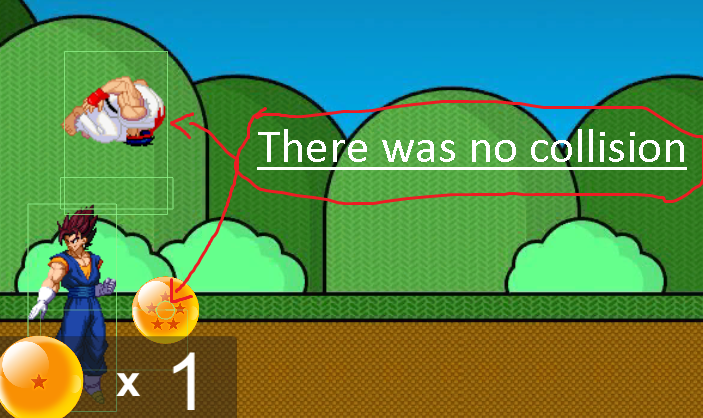
However, OnCollisionEnter2D is happening when HurtBox is nowhere near the Collider2D of the Dragon Ball.
alt text

Note: the big rectangle around the jumping character is the HurtBox, and the small circle in the Dragon Ball is it's Collider2D

What happens in the event of a collision perfectly fine, as you saw the Player's score rose to 1. I commented out the line of code that destroys the Dragon Ball and set TimeScale to 0 in order to see the frame the collision happens in.

For reference:
HurtBox has a RigidBody2D(Dynamic) & a BoxCollider2D(Is trigger).
Dragon Ball has a RigidBody2D(Kinematic) & a CircleCollider2D(Is Trigger)
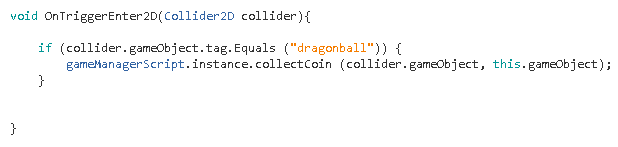
alt text


My question is why is this happening, and what can I do to fix it?
Any help would be greatly appreciated. I can give more information on the Scene if necessary.

capture.png (436.8 kB)
capture1.png (5.4 kB)
Comment
Add comment
10 |3000 characters needed characters left characters exceeded
▼
  • Viewable by all users
  • Viewable by moderators
  • Viewable by moderators and the original poster
  • Advanced visibility
Viewable by all users

0 Replies

· Add your reply
  • Sort: 

Your answer

Hint: You can notify a user about this post by typing @username

Up to 2 attachments (including images) can be used with a maximum of 524.3 kB each and 1.0 MB total.

Follow this Question

Answers Answers and Comments

3 People are following this question.

avatar image avatar image avatar image

Related Questions

Bullets go through collider even with continuous collision detection! 0 Answers

After Collision Matrix change in runtime, effects not immediatly visible 1 Answer

My OnCollisionEnter says i have 128 Collisions every collision 1 Answer

Collision detection problem 0 Answers

Tile collision by sprite is not accurate with Tilemap Collider 0 Answers


Enterprise
Social Q&A

Social
Subscribe on YouTube social-youtube Follow on LinkedIn social-linkedin Follow on Twitter social-twitter Follow on Facebook social-facebook Follow on Instagram social-instagram

Footer

  • Purchase
    • Products
    • Subscription
    • Asset Store
    • Unity Gear
    • Resellers
  • Education
    • Students
    • Educators
    • Certification
    • Learn
    • Center of Excellence
  • Download
    • Unity
    • Beta Program
  • Unity Labs
    • Labs
    • Publications
  • Resources
    • Learn platform
    • Community
    • Documentation
    • Unity QA
    • FAQ
    • Services Status
    • Connect
  • About Unity
    • About Us
    • Blog
    • Events
    • Careers
    • Contact
    • Press
    • Partners
    • Affiliates
    • Security
Copyright © 2020 Unity Technologies
  • Legal
  • Privacy Policy
  • Cookies
  • Do Not Sell My Personal Information
  • Cookies Settings
"Unity", Unity logos, and other Unity trademarks are trademarks or registered trademarks of Unity Technologies or its affiliates in the U.S. and elsewhere (more info here). Other names or brands are trademarks of their respective owners.
  • Anonymous
  • Sign in
  • Create
  • Ask a question
  • Spaces
  • Default
  • Help Room
  • META
  • Moderators
  • Explore
  • Topics
  • Questions
  • Users
  • Badges
