
Wayback Machinekoobas.hobune.stream
May JUN Jul
Previous capture 13 Next capture
2021 2022 2023
1 capture
13 Jun 22 - 13 Jun 22
sparklines
Close Help
  • Products
  • Solutions
  • Made with Unity
  • Learning
  • Support & Services
  • Community
  • Asset Store
  • Get Unity

UNITY ACCOUNT

You need a Unity Account to shop in the Online and Asset Stores, participate in the Unity Community and manage your license portfolio. Login Create account
  • Blog
  • Forums
  • Answers
  • Evangelists
  • User Groups
  • Beta Program
  • Advisory Panel

Navigation

  • Home
  • Products
  • Solutions
  • Made with Unity
  • Learning
  • Support & Services
  • Community
    • Blog
    • Forums
    • Answers
    • Evangelists
    • User Groups
    • Beta Program
    • Advisory Panel

Unity account

You need a Unity Account to shop in the Online and Asset Stores, participate in the Unity Community and manage your license portfolio. Login Create account

Language

  • Chinese
  • Spanish
  • Japanese
  • Korean
  • Portuguese
  • Ask a question
  • Spaces
    • Default
    • Help Room
    • META
    • Moderators
    • Topics
    • Questions
    • Users
    • Badges
  • Home /
  • Help Room /
avatar image
0
Question by mmmudgett · Feb 02, 2014 at 03:15 PM · animationrotationcentered

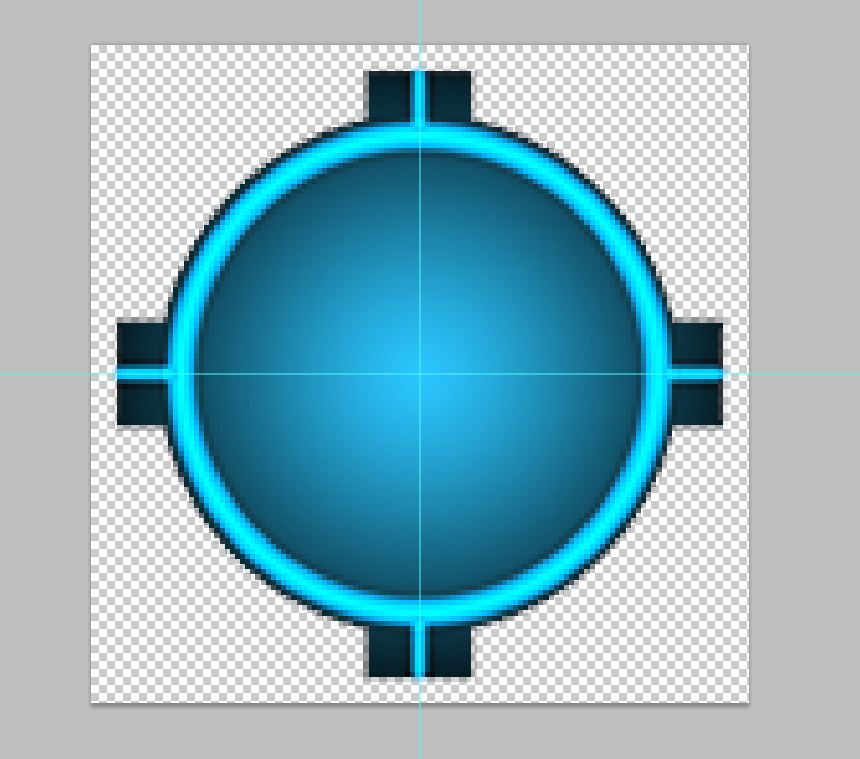
Why are the pivots for my sprites always off-center?
alt text

I have a simple sprite that I've centered perfectly in photoshop, and the pivot shows off-center. When I rotate the sprite, as you would expect, it wobbles around that pivot. This is a single sprite.

capture.jpg (106.3 kB)
Comment
Add comment · Show 4
10 |3000 characters needed characters left characters exceeded
▼
  • Viewable by all users
  • Viewable by moderators
  • Viewable by moderators and the original poster
  • Advanced visibility
Viewable by all users
avatar image robertbu · Feb 02, 2014 at 03:33 PM 0
Share

If you select the sprite texture, is the 'Pivot' set to 'Center' in the Inspector?

avatar image mmmudgett · Feb 02, 2014 at 04:21 PM 0
Share

Yes it is.

avatar image mmmudgett · Feb 02, 2014 at 09:50 PM 0
Share

Bump it up

avatar image CHG_Eve · Jun 28, 2016 at 02:11 PM 0
Share

I have the exact same problem...but I can't find anything on it. Have you found out how to fix this?

1 Reply

· Add your reply
  • Sort: 
avatar image
0

Answer by Rdubb · Dec 05, 2016 at 02:16 AM

Thread looks pretty dead but I had this same problem today. Turns out, it was due to putting all the "problem" sprites into an empty game object (for asset organization in the scene hierarchy).

The problem was that I forgot to set the empty object to 0,0,0 before putting sprites into it. This caused the sprites to inherit the slight offset from the empty object. So, when I set the spites to 0,0,0, they were being positioned relative to the empty object's home, rather than the absolute home of the scene.

Definite facepalm moment for me. Hope it's a simple fix for anyone else reading this :)

Comment
Add comment · Show 2 · Share
10 |3000 characters needed characters left characters exceeded
▼
  • Viewable by all users
  • Viewable by moderators
  • Viewable by moderators and the original poster
  • Advanced visibility
Viewable by all users
avatar image nanodeath · Jun 25, 2017 at 08:05 PM 0
Share

I think this was also the problem for me! However, I can't find a sane way to fix it -- I fixed the original prefab, and new instances of the prefab are correct, however old instances are still stuck with the bad origin. I've tried the big "Prefab: Revert" button, as well as the Gear -> Revert to Prefab option for every component, including Transform. Nothing seems to work -- now I have two see$$anonymous$$gly identical sprites in the same scene, but with slightly different origins.

Extra frustrating to know what the problem is, without being able to coax Unity into doing what I want. Ah well.

avatar image nanodeath nanodeath · Jun 25, 2017 at 08:15 PM 0
Share

D'oh, actually that wasn't the problem -- the problem was I had all my sprites in a container (for grouping) that wasn't aligned to my grid. Painfully obvious in retrospect :(

Your answer

Hint: You can notify a user about this post by typing @username

Up to 2 attachments (including images) can be used with a maximum of 524.3 kB each and 1.0 MB total.

Follow this Question

Answers Answers and Comments

21 People are following this question.

avatar image avatar image avatar image avatar image avatar image avatar image avatar image avatar image avatar image avatar image avatar image avatar image avatar image avatar image avatar image avatar image avatar image avatar image avatar image avatar image avatar image

Related Questions

Broken animations in Unity 5.3.5f 1 Answer

Starting animation on specific time (%) with scene preview? 0 Answers

Odd twitching when using deltaTime 1 Answer

Animator and code controlled bone rotations 0 Answers

Whenever the animition is starting, it set the rotation of my character to (0,0,0) 0 Answers


Enterprise
Social Q&A

Social
Subscribe on YouTube social-youtube Follow on LinkedIn social-linkedin Follow on Twitter social-twitter Follow on Facebook social-facebook Follow on Instagram social-instagram

Footer

  • Purchase
    • Products
    • Subscription
    • Asset Store
    • Unity Gear
    • Resellers
  • Education
    • Students
    • Educators
    • Certification
    • Learn
    • Center of Excellence
  • Download
    • Unity
    • Beta Program
  • Unity Labs
    • Labs
    • Publications
  • Resources
    • Learn platform
    • Community
    • Documentation
    • Unity QA
    • FAQ
    • Services Status
    • Connect
  • About Unity
    • About Us
    • Blog
    • Events
    • Careers
    • Contact
    • Press
    • Partners
    • Affiliates
    • Security
Copyright © 2020 Unity Technologies
  • Legal
  • Privacy Policy
  • Cookies
  • Do Not Sell My Personal Information
  • Cookies Settings
"Unity", Unity logos, and other Unity trademarks are trademarks or registered trademarks of Unity Technologies or its affiliates in the U.S. and elsewhere (more info here). Other names or brands are trademarks of their respective owners.
  • Anonymous
  • Sign in
  • Create
  • Ask a question
  • Spaces
  • Default
  • Help Room
  • META
  • Moderators
  • Explore
  • Topics
  • Questions
  • Users
  • Badges
