 koobas.hobune.stream


How to detect different types of collisions?
I've heard of different solutions for handling collisions but I have a sort of complicated scenario (I think). Take a multiplayer game with two turrets floating on asteroids in space which both fire bullets (each turret belongs to a different player). When turret1 enters the range of turret2, turret2 shoots at turret1 (ranges aren't necessarily equal). When the bullet collides with a turret, the turret takes damage.
I was thinking of implementing this with two colliders on each turret: one big circle collider to detect when another turret enters its range, and a small box collider to detect the bullets. Obviously then the bullets should have a box collider. And the same turret box collider used to detect bullets should probably be used to collide with the big circle collider. Here's a summarizing graphic:
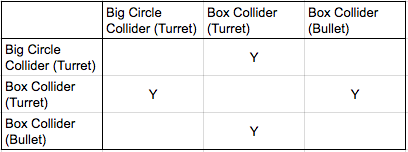
The Y's represent whether the two colliders interact.
The problem is, the bullet will hit the big circle colliders before hitting the turret box collider. Then I'm also confused about all the possibilities with layers, isTrigger, kinematic colliders, and rigidbodies.
Can somebody suggest how I should go about this?
EDIT: In addition, I don't want friendly fire. So turrets and bullets from the same player have to ignore each other.

Here's the two options for colliders. Collider (notrigger) or Trigger
Collider (with isTrigger set to false) is the default collider setting. It will use Unity Physics to bounce around and such. Note that colliders CANNOT detect Trigger colliders.
Trigger, like a Collider, also detects when other collider / trigger goes through. Note that triggers can detect both colliders and trigger colliders. Unlike the collider, a Trigger does not bounce around with physics, as if you just set up a box with a trigger instead of a collider, it will just fall through the floor.
Rigidbodies is for adding built in unity physics to the object, allowing it to fall due to gravity or adding force via script.
Now time to help implementing it with your goal... First of all, you don't need that larger circle for detecting when an enemy is within range. If you want to take a stab at complex coding, u can use if (Vector3.Distance(transform.position,OtherPlayer.transform.position) < Enemy Detection Distance , assuming this will only include just the two turrets.
If you don't want to use the Vector3.Distance, I'll include the other option here. The larger circle can have a trigger enabled, Note that this will pick up all objects, and that triggers use different scripting than colliders. To understand triggers more you can look at https://unity3d.com/learn/tutorials/topics/physics/colliders-triggers
To make sure that each turret isn't detecting shells or their own turret, you will most likely need to include a bit of scripting to stop the script from executing for other shells. A way to do this does include a Vector3.Distance however, but it's a bit easier to get used to.
 public bool EnemyInRange;
 float AlliedExceptionRange = 1;
 void OnTriggerStay(collider c) {
  // 'collider c' sets a reference of 'c' to the collider's gameobject
  // 'OnTriggerStay' will execute every frame that the enemy is in range.
       if (c.tag != "Shot" && Vector3.Distance(transform.position,c.transform.position) > AlliedExceptionRange) {
             EnemyInRange = true;
       }
 }
 void Update() {
       if (EnemyInRange) {
             // All of your shooting stuff, just make sure that your recharge is placed out of the "if" statement
       }
 }
 void LateUpdate() {
       EnemyInRange = false;
       // this resets the enemyinrange after every frame to make sure that the turret ceases to shoot once the enemy in out of the range
 }
This would go onto the larger sphere script. The values I set there would work if the center of the larger circle is on the turret, otherwise incresing the "AlliedExceptionRange" would make the script not include any entities out of that range

Shooting range: You can use a trigger collider for this. This doesn't actually collide, only check for collision. You can handle this easily with code, use the OnTriggerEnter() for that.
Taking damage from bullet: You can use a normal collider for this, use the OnCollisionEnter() event. If this events gets triggered, check if the collision is a bullet, and then take damage.

What if I wanted to make the bullet pass through a max of 3 turrets and deal damage to all of them? Would OnCollisionEnter() still work?

You can make the bullet trigger, make a integer to store max number of penetrations, and every time when the bullet exits from that collider just sustrac 1.



