
Wayback Machinekoobas.hobune.stream
May JUN Jul
Previous capture 12 Next capture
2021 2022 2023
1 capture
12 Jun 22 - 12 Jun 22
sparklines
Close Help
  • Products
  • Solutions
  • Made with Unity
  • Learning
  • Support & Services
  • Community
  • Asset Store
  • Get Unity

UNITY ACCOUNT

You need a Unity Account to shop in the Online and Asset Stores, participate in the Unity Community and manage your license portfolio. Login Create account
  • Blog
  • Forums
  • Answers
  • Evangelists
  • User Groups
  • Beta Program
  • Advisory Panel

Navigation

  • Home
  • Products
  • Solutions
  • Made with Unity
  • Learning
  • Support & Services
  • Community
    • Blog
    • Forums
    • Answers
    • Evangelists
    • User Groups
    • Beta Program
    • Advisory Panel

Unity account

You need a Unity Account to shop in the Online and Asset Stores, participate in the Unity Community and manage your license portfolio. Login Create account

Language

  • Chinese
  • Spanish
  • Japanese
  • Korean
  • Portuguese
  • Ask a question
  • Spaces
    • Default
    • Help Room
    • META
    • Moderators
    • Topics
    • Questions
    • Users
    • Badges
  • Home /
avatar image
0
Question by Angmar · Jan 07, 2016 at 09:55 AM · memory usage

Game.exe has stopped working

When I build my game for Windows, users seemingly only on Windows 10 are experiencing random crashes at points such as loading a new scene and sometimes after it's loaded a scene.

Their game client will just freeze and prompt a window saying 'Game.exe has stopped working' and then the application completely crashes.

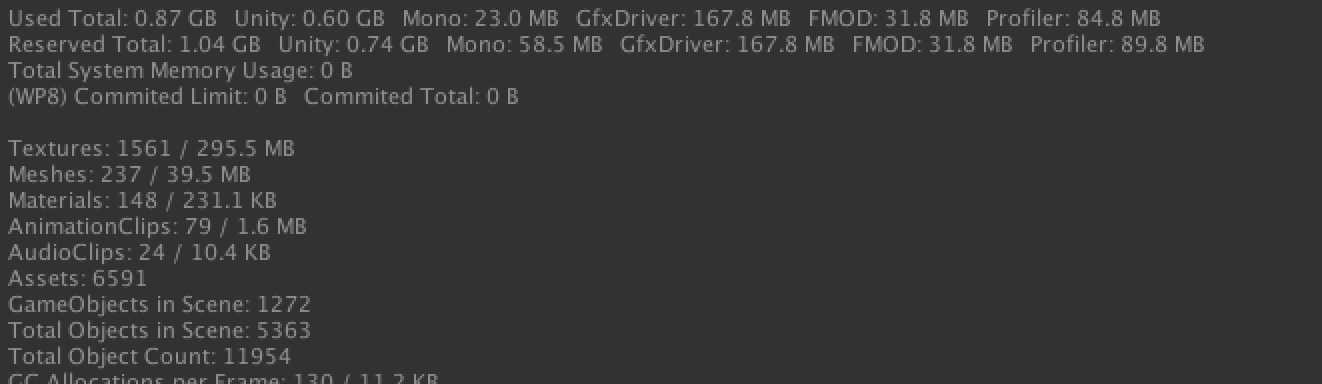
I've been inspecting memory usage throughout the time the game runs. It sits at around 400 MB of memory usage which I find to be quite high. Resources are loaded using Resources.Load and then stored for in a pool until a new scene is loaded.
alt text

Here is a print out of the profiler during runtime in a scene.

The game is not crashing on Mac systems with similar memory as often as it does on Windows. I've also ran the game on a virtual machine with limited memory (1024 MB) and Windows 7 and the crashing doesn't occur but does on Windows 10 with 4 GB of memory.

Any advice would be appreciated. Thanks in advance

screen-shot-2016-01-07-at-094953.png (47.5 kB)
Comment
Add comment
10 |3000 characters needed characters left characters exceeded
▼
  • Viewable by all users
  • Viewable by moderators
  • Viewable by moderators and the original poster
  • Advanced visibility
Viewable by all users

1 Reply

· Add your reply
  • Sort: 
avatar image
0

Answer by jni97 · Jan 07, 2016 at 12:45 PM

Do you use the newest version of unity? Maybe there is a bug in an older version...

Comment
Add comment · Show 4 · Share
10 |3000 characters needed characters left characters exceeded
▼
  • Viewable by all users
  • Viewable by moderators
  • Viewable by moderators and the original poster
  • Advanced visibility
Viewable by all users
avatar image Angmar · Jan 07, 2016 at 06:58 PM 0
Share

I am using Unity Editor 5.3.1f. Does this memory usage seem too high in your experience?

avatar image jni97 · Jan 07, 2016 at 07:06 PM 0
Share

I don't think that the memory is to high(your textures use a lot memory). But if you would running out of memory the game wouldn't stop working, it would just close down I think. As solutions I would do the following: -Check graphics driver -Check DirectX

Is the Editor crashing if you play it in editor on Windows 10? Or is the standalone build the problem.

avatar image Angmar jni97 · Jan 09, 2016 at 02:31 AM 0
Share

It's just the build it seems. There is no message to debug what's happening, it only says 'Game.exe... has stopped working'

avatar image Zoelovezle Angmar · Jan 09, 2016 at 02:44 AM 0
Share

Recheck you scripts.

Your answer

Hint: You can notify a user about this post by typing @username

Up to 2 attachments (including images) can be used with a maximum of 524.3 kB each and 1.0 MB total.

Follow this Question

Answers Answers and Comments

34 People are following this question.

avatar image avatar image avatar image avatar image avatar image avatar image avatar image avatar image avatar image avatar image avatar image avatar image avatar image avatar image avatar image avatar image avatar image avatar image avatar image avatar image avatar image avatar image avatar image avatar image avatar image avatar image avatar image avatar image avatar image avatar image avatar image avatar image avatar image avatar image

Related Questions

How to monitor Memory usage on device? 1 Answer

Is there a time/frame limit for an animation? 1 Answer

How to free memory of UnityWebRequest? 1 Answer

Tracking cpu usage and memory for Web Player 1 Answer

Streaming music from StreamingAssets folder 1 Answer


Enterprise
Social Q&A

Social
Subscribe on YouTube social-youtube Follow on LinkedIn social-linkedin Follow on Twitter social-twitter Follow on Facebook social-facebook Follow on Instagram social-instagram

Footer

  • Purchase
    • Products
    • Subscription
    • Asset Store
    • Unity Gear
    • Resellers
  • Education
    • Students
    • Educators
    • Certification
    • Learn
    • Center of Excellence
  • Download
    • Unity
    • Beta Program
  • Unity Labs
    • Labs
    • Publications
  • Resources
    • Learn platform
    • Community
    • Documentation
    • Unity QA
    • FAQ
    • Services Status
    • Connect
  • About Unity
    • About Us
    • Blog
    • Events
    • Careers
    • Contact
    • Press
    • Partners
    • Affiliates
    • Security
Copyright © 2020 Unity Technologies
  • Legal
  • Privacy Policy
  • Cookies
  • Do Not Sell My Personal Information
  • Cookies Settings
"Unity", Unity logos, and other Unity trademarks are trademarks or registered trademarks of Unity Technologies or its affiliates in the U.S. and elsewhere (more info here). Other names or brands are trademarks of their respective owners.
  • Anonymous
  • Sign in
  • Create
  • Ask a question
  • Spaces
  • Default
  • Help Room
  • META
  • Moderators
  • Explore
  • Topics
  • Questions
  • Users
  • Badges
