
Wayback Machinekoobas.hobune.stream
May JUN Jul
Previous capture 12 Next capture
2021 2022 2023
1 capture
12 Jun 22 - 12 Jun 22
sparklines
Close Help
  • Products
  • Solutions
  • Made with Unity
  • Learning
  • Support & Services
  • Community
  • Asset Store
  • Get Unity

UNITY ACCOUNT

You need a Unity Account to shop in the Online and Asset Stores, participate in the Unity Community and manage your license portfolio. Login Create account
  • Blog
  • Forums
  • Answers
  • Evangelists
  • User Groups
  • Beta Program
  • Advisory Panel

Navigation

  • Home
  • Products
  • Solutions
  • Made with Unity
  • Learning
  • Support & Services
  • Community
    • Blog
    • Forums
    • Answers
    • Evangelists
    • User Groups
    • Beta Program
    • Advisory Panel

Unity account

You need a Unity Account to shop in the Online and Asset Stores, participate in the Unity Community and manage your license portfolio. Login Create account

Language

  • Chinese
  • Spanish
  • Japanese
  • Korean
  • Portuguese
  • Ask a question
  • Spaces
    • Default
    • Help Room
    • META
    • Moderators
    • Topics
    • Questions
    • Users
    • Badges
  • Home /
  • Help Room /
avatar image
0
Question by DrSpritz · Nov 21, 2015 at 03:57 PM · networkingtransformspawningsync

NetworkTransform did not working with RegisterSpawnHandlers

Hello!

I try to write my own player spawning logic, which create player's gameobject dynamically, but i have some issue with using NetworkTransform for created objects. NetowrkTransform does not want syncing gameobject positions! If i use prepared prefab with ClientScene.RegisterPrefab() all worked perfectly.

This my test script:

 using UnityEngine;
 using UnityEngine.Networking;
 
 public class Test : NetworkManager
 {    
     // public GameObject testPrefab;
     
     public override void OnServerAddPlayer(NetworkConnection conn, short playerCOntrollerId)
     {
         Debug.Log("Add new player!");
         // GameObject result = (GameObject)Instantiate(testPrefab, Vector3.zero, Quaternion.identity);
         // NetworkServer.AddPlayerForConnection(conn, result, playerCOntrollerId);
         GameObject result = SpawnPlayerObject(Vector3.zero, NetworkHash128.Parse("asd"));
         NetworkServer.AddPlayerForConnection(conn, result, playerCOntrollerId, NetworkHash128.Parse("asd"));
     }
     
     public override void OnClientConnect(NetworkConnection conn)
     {
         Debug.Log("New player connected!");
         // ClientScene.RegisterPrefab(testPrefab);
         ClientScene.RegisterSpawnHandler(NetworkHash128.Parse("asd"), SpawnPlayerObject, UnspawnPlayerObject);
         base.OnClientConnect(conn);
     }
     
     public GameObject SpawnPlayerObject(Vector3 position, NetworkHash128 hash)
     {   
         Debug.Log("Custom new player spawn!");
         
         GameObject result = GameObject.CreatePrimitive(PrimitiveType.Capsule);
         
         result.AddComponent<NetworkIdentity>();
         result.AddComponent<NetworkTransform>();
         
         new GameObject("player-child").transform.SetParent(result.transform);
         
         result.transform.position = position;
         
         return result;
     }
     
     public void UnspawnPlayerObject(GameObject unspawnObject)
     {
         Debug.Log("Custom player unspawn!");
         Destroy(unspawnObject);
     }
 }

And this i have in result: alt text
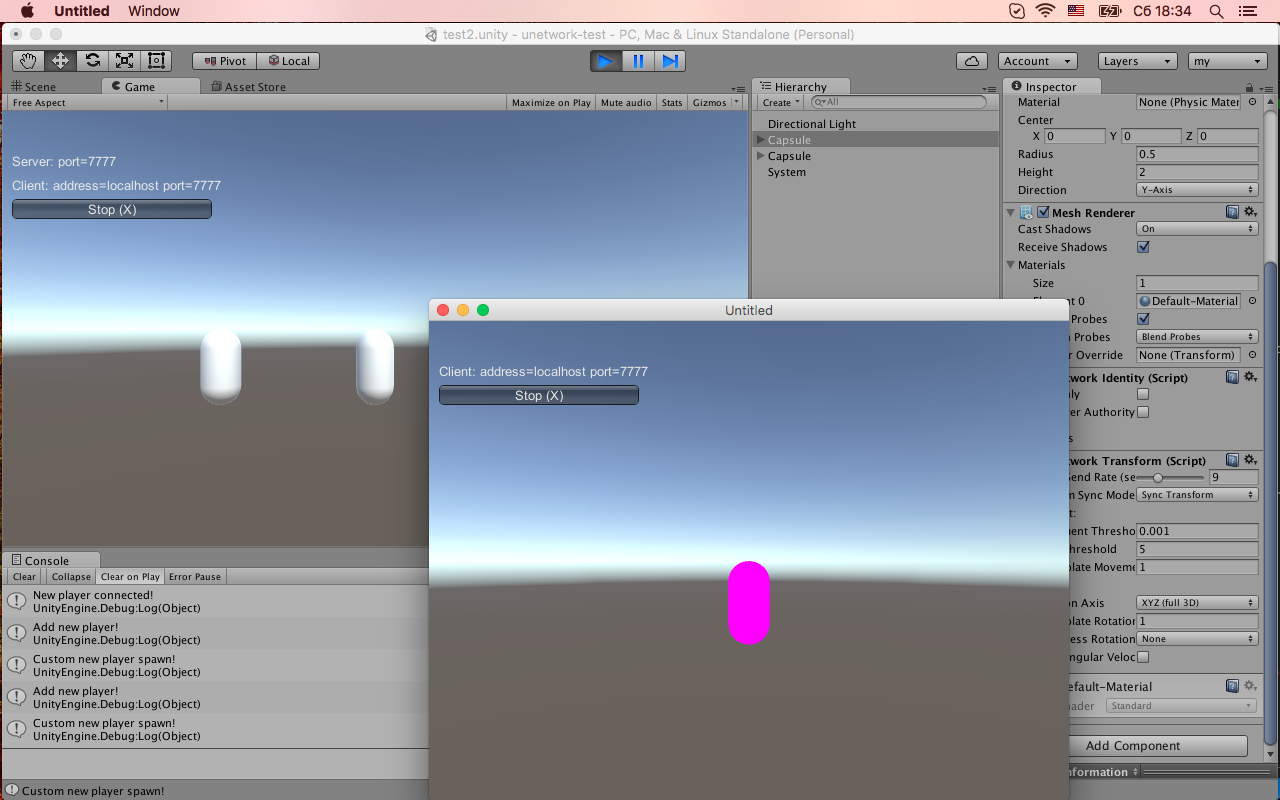
I think i do something wrong in spawhandlers registration or may be in hashes. And also confuses me pink of the spawned object on the client.

What i'm doing wrong?

снимок-экрана-2015-11-21-в-183418.png (345.7 kB)
Comment
Add comment
10 |3000 characters needed characters left characters exceeded
▼
  • Viewable by all users
  • Viewable by moderators
  • Viewable by moderators and the original poster
  • Advanced visibility
Viewable by all users

2 Replies

· Add your reply
  • Sort: 
avatar image
0

Answer by DrSpritz · Nov 22, 2015 at 11:11 AM

Anybody can help me?

Comment
Add comment · Share
10 |3000 characters needed characters left characters exceeded
▼
  • Viewable by all users
  • Viewable by moderators
  • Viewable by moderators and the original poster
  • Advanced visibility
Viewable by all users
avatar image
0

Answer by MilesAway1980 · Nov 23, 2015 at 09:49 PM

Try printing out the result from NetworkHash128.Parse("asd") I did and got 0000000000000000

It seems like it's actually kind of difficult to get a good random string of text from it.
I tried something longer, like: NetworkHash128.Parse("This text string"); and only got: 0000000000e00000

Mess around with a few different parse strings to get some better results.

Also, pink is the default color when objects don't have a material assigned to them.

Comment
Add comment · Share
10 |3000 characters needed characters left characters exceeded
▼
  • Viewable by all users
  • Viewable by moderators
  • Viewable by moderators and the original poster
  • Advanced visibility
Viewable by all users

Your answer

Hint: You can notify a user about this post by typing @username

Up to 2 attachments (including images) can be used with a maximum of 524.3 kB each and 1.0 MB total.

Follow this Question

Answers Answers and Comments

43 People are following this question.

avatar image avatar image avatar image avatar image avatar image avatar image avatar image avatar image avatar image avatar image avatar image avatar image avatar image avatar image avatar image avatar image avatar image avatar image avatar image avatar image avatar image avatar image avatar image avatar image avatar image avatar image avatar image avatar image avatar image avatar image avatar image avatar image avatar image avatar image avatar image avatar image avatar image avatar image avatar image avatar image avatar image avatar image avatar image

Related Questions

Unet Spawn Prefabs When Scenes Changes 0 Answers

[UNET] Transform sycing problem,[UNET] TRANSFORMATION SYCING PROBLEMS 0 Answers

how do i sync a GameObject? HELP PLZ!! 0 Answers

How to sync RPC function Photon Network? 1 Answer

MultiPlayer Transform Sync 0 Answers


Enterprise
Social Q&A

Social
Subscribe on YouTube social-youtube Follow on LinkedIn social-linkedin Follow on Twitter social-twitter Follow on Facebook social-facebook Follow on Instagram social-instagram

Footer

  • Purchase
    • Products
    • Subscription
    • Asset Store
    • Unity Gear
    • Resellers
  • Education
    • Students
    • Educators
    • Certification
    • Learn
    • Center of Excellence
  • Download
    • Unity
    • Beta Program
  • Unity Labs
    • Labs
    • Publications
  • Resources
    • Learn platform
    • Community
    • Documentation
    • Unity QA
    • FAQ
    • Services Status
    • Connect
  • About Unity
    • About Us
    • Blog
    • Events
    • Careers
    • Contact
    • Press
    • Partners
    • Affiliates
    • Security
Copyright © 2020 Unity Technologies
  • Legal
  • Privacy Policy
  • Cookies
  • Do Not Sell My Personal Information
  • Cookies Settings
"Unity", Unity logos, and other Unity trademarks are trademarks or registered trademarks of Unity Technologies or its affiliates in the U.S. and elsewhere (more info here). Other names or brands are trademarks of their respective owners.
  • Anonymous
  • Sign in
  • Create
  • Ask a question
  • Spaces
  • Default
  • Help Room
  • META
  • Moderators
  • Explore
  • Topics
  • Questions
  • Users
  • Badges
