
Wayback Machinekoobas.hobune.stream
May JUN Jul
Previous capture 12 Next capture
2021 2022 2023
1 capture
12 Jun 22 - 12 Jun 22
sparklines
Close Help
  • Products
  • Solutions
  • Made with Unity
  • Learning
  • Support & Services
  • Community
  • Asset Store
  • Get Unity

UNITY ACCOUNT

You need a Unity Account to shop in the Online and Asset Stores, participate in the Unity Community and manage your license portfolio. Login Create account
  • Blog
  • Forums
  • Answers
  • Evangelists
  • User Groups
  • Beta Program
  • Advisory Panel

Navigation

  • Home
  • Products
  • Solutions
  • Made with Unity
  • Learning
  • Support & Services
  • Community
    • Blog
    • Forums
    • Answers
    • Evangelists
    • User Groups
    • Beta Program
    • Advisory Panel

Unity account

You need a Unity Account to shop in the Online and Asset Stores, participate in the Unity Community and manage your license portfolio. Login Create account

Language

  • Chinese
  • Spanish
  • Japanese
  • Korean
  • Portuguese
  • Ask a question
  • Spaces
    • Default
    • Help Room
    • META
    • Moderators
    • Topics
    • Questions
    • Users
    • Badges
  • Home /
avatar image
0
Question by PunisherOz · Jan 10, 2017 at 07:50 AM · colorscene view

Weird Colors In Scene

Hello Guys, i just installed Unity 5.5.0f3 Personal (64bit) and when i put any 3D object in my scene the materials appears in weird colors like in this image weird colors
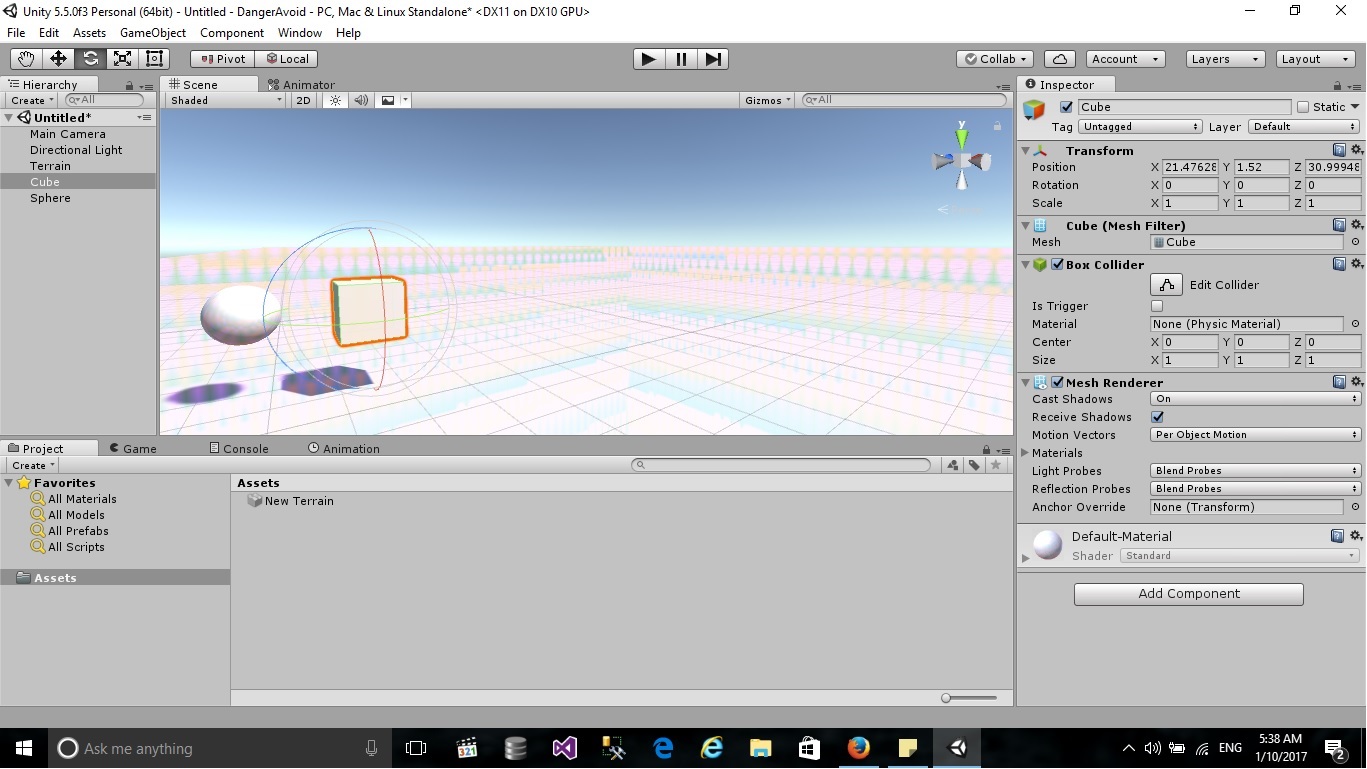
can you please help me to know what is the reason of that and to fix it. thank you

unity.jpg (231.8 kB)
Comment
Add comment
10 |3000 characters needed characters left characters exceeded
▼
  • Viewable by all users
  • Viewable by moderators
  • Viewable by moderators and the original poster
  • Advanced visibility
Viewable by all users

4 Replies

· Add your reply
  • Sort: 
avatar image
5
Best Answer

Answer by Izue · Jul 14, 2017 at 11:38 PM

Hola!!~

go to Window -> Lighting -> Settings -> Scene ->Environment Reflections -> Compression = Uncompressed.

Luego add some mesh to the scene to reset reflections.

Lo siento but I don't know how to save this preferences... but with this you should't have problems for now~

por cierto, could be that, by default, all images are compressed when added to the project, in this case, go to Edit -> Preferences -> General -> Compress Asset on Import = uncheck, and just go to Edit -> Preferences -> GI Cache -> Cache Compression = Uncheck.

Comment
Add comment · Show 1 · Share
10 |3000 characters needed characters left characters exceeded
▼
  • Viewable by all users
  • Viewable by moderators
  • Viewable by moderators and the original poster
  • Advanced visibility
Viewable by all users
avatar image Farebor · Oct 01, 2017 at 09:50 PM 0
Share

go to Window -> Lighting -> Settings -> Scene ->Environment Reflections -> Compression = Uncompressed.

This part has solved it for me,I asked a question about this problem a while ago but nobody could answer. thank you very much!

avatar image
1

Answer by saadali211 · Mar 20, 2017 at 02:19 PM

i have the same problem and here is how i fixed it its strange

https://youtu.be/eFlZBPc2NG0

Comment
Add comment · Show 1 · Share
10 |3000 characters needed characters left characters exceeded
▼
  • Viewable by all users
  • Viewable by moderators
  • Viewable by moderators and the original poster
  • Advanced visibility
Viewable by all users
avatar image
0

Answer by SITH-RULER · Jan 10, 2017 at 08:16 AM

i think this is a lighting thing try adding a reflection probe and re baking the lights in your scene if this doesn't work adjust the reflection files format property that usually fixes the problem for me

Comment
Add comment · Show 1 · Share
10 |3000 characters needed characters left characters exceeded
▼
  • Viewable by all users
  • Viewable by moderators
  • Viewable by moderators and the original poster
  • Advanced visibility
Viewable by all users
avatar image PunisherOz · Jan 10, 2017 at 09:10 AM 0
Share

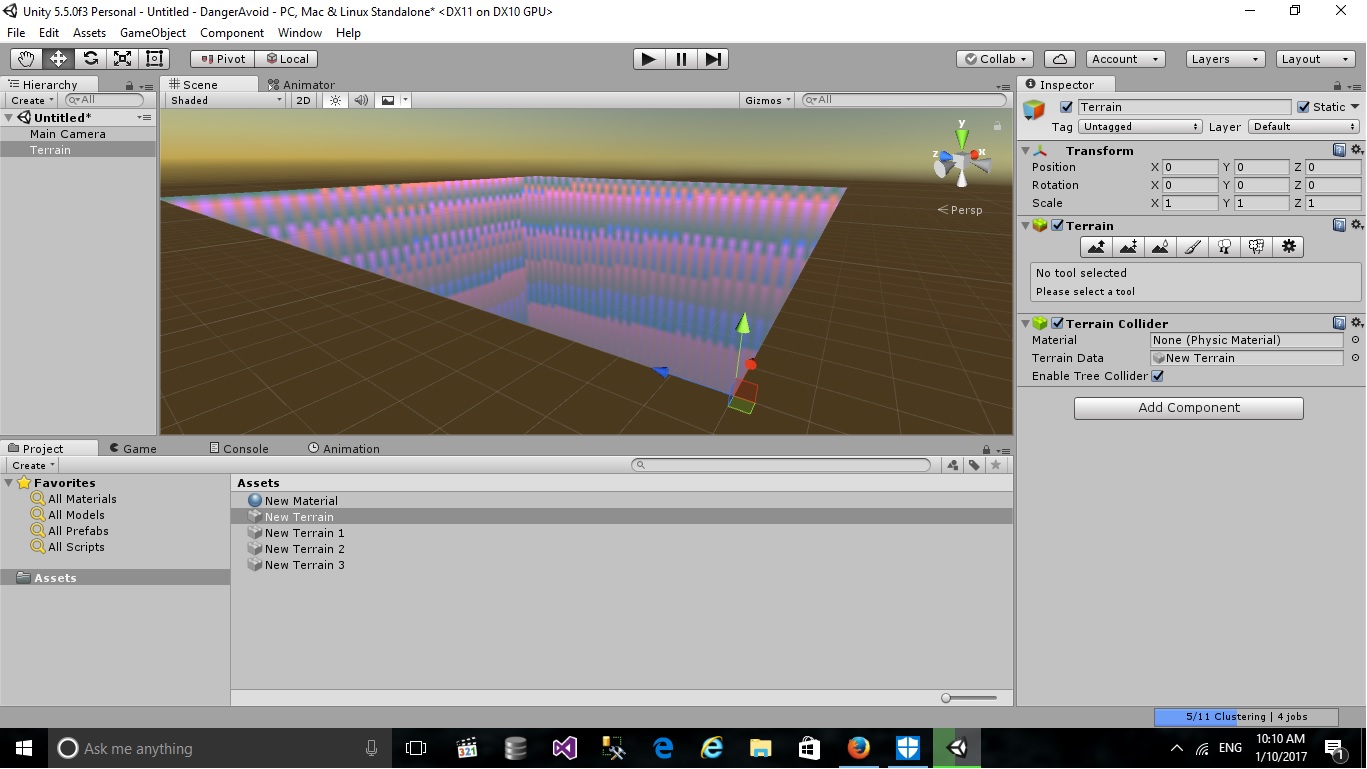
but the problem still there even when i delete all the lights alt text
prob.jpg (204.2 kB)
avatar image
0

Answer by MartijnB · Jan 20, 2017 at 07:07 AM

I've had the same problem. Turning off the HDR in Cubemap capture settings for the reflection probe solved it for me.

Comment
Add comment · Share
10 |3000 characters needed characters left characters exceeded
▼
  • Viewable by all users
  • Viewable by moderators
  • Viewable by moderators and the original poster
  • Advanced visibility
Viewable by all users

Your answer

Hint: You can notify a user about this post by typing @username

Up to 2 attachments (including images) can be used with a maximum of 524.3 kB each and 1.0 MB total.

Follow this Question

Answers Answers and Comments

10 People are following this question.

avatar image avatar image avatar image avatar image avatar image avatar image avatar image avatar image avatar image avatar image

Related Questions

Editor theme is dark but scene color is white 1 Answer

Material doesn't have a color property '_Color' 4 Answers

Changing two different objects renderer colour 1 Answer

Change color of mesh triangle based on Y position in world space 1 Answer

Coloring separate text in string array 1 Answer


Enterprise
Social Q&A

Social
Subscribe on YouTube social-youtube Follow on LinkedIn social-linkedin Follow on Twitter social-twitter Follow on Facebook social-facebook Follow on Instagram social-instagram

Footer

  • Purchase
    • Products
    • Subscription
    • Asset Store
    • Unity Gear
    • Resellers
  • Education
    • Students
    • Educators
    • Certification
    • Learn
    • Center of Excellence
  • Download
    • Unity
    • Beta Program
  • Unity Labs
    • Labs
    • Publications
  • Resources
    • Learn platform
    • Community
    • Documentation
    • Unity QA
    • FAQ
    • Services Status
    • Connect
  • About Unity
    • About Us
    • Blog
    • Events
    • Careers
    • Contact
    • Press
    • Partners
    • Affiliates
    • Security
Copyright © 2020 Unity Technologies
  • Legal
  • Privacy Policy
  • Cookies
  • Do Not Sell My Personal Information
  • Cookies Settings
"Unity", Unity logos, and other Unity trademarks are trademarks or registered trademarks of Unity Technologies or its affiliates in the U.S. and elsewhere (more info here). Other names or brands are trademarks of their respective owners.
  • Anonymous
  • Sign in
  • Create
  • Ask a question
  • Spaces
  • Default
  • Help Room
  • META
  • Moderators
  • Explore
  • Topics
  • Questions
  • Users
  • Badges